How to Find an Acura Radio Code With These Simple Tips
Finding your Acura radio code is easier than you think and can save you a trip to the dealership. Whether your radio displays a CODE or LOC after a battery disconnect, you can retrieve the code using your VIN, radio serial number, or owner’s manual. This guide walks you through every method step by step so you can get back to your favorite tunes fast.
You turn the key in your Acura and the dashboard lights up. But the radio stays dark. A flashing CODE or LOC message stares back at you. It is frustrating. You just want to hear your music on the way to work.
The good news is that finding your Acura radio code does not require a dealership visit or a costly repair. In most cases, you can retrieve the code yourself in just a few minutes. This guide covers every method you need to know. We will walk you through each step clearly and simply.
Whether you own an Acura MDX, an Acura TLX, or any other Acura model, the process is similar. You just need the right information. Let us dive in and get your radio working again.
Key Takeaways
- Know Your Options: You can find your Acura radio code through the owner’s manual, VIN lookup, radio serial number, or online tools.
- Check the Radio Display: The serial number is often printed on or near the radio unit itself under the dashboard.
- Contact Acura Support: If all else fails, Acura dealerships can retrieve your code using your VIN.
- Prevent Future Lockouts: Keeping a backup of your radio code saves time and frustration after a battery change.
- Avoid Common Mistakes: Entering wrong codes too many times can lock the radio permanently until a reset.
📑 Table of Contents
Why Does Your Acura Radio Ask for a Code?
Every Acura vehicle comes with a built-in anti-theft feature for the radio. This is a standard security measure across Honda and Acura models. The radio locks itself whenever it loses power. A dead battery, a disconnected cable, or a blown fuse can all trigger this lockout.
The radio displays a CODE or LOC message to let you know it needs the unlock code before it will play again. This is not a malfunction. It is a security feature designed to deter theft. Without the correct code, the radio stays silent even if the rest of the car works fine.
Common Situations That Trigger the Radio Lock
- Battery Disconnect: You changed the battery or the battery died and you disconnected the terminals.
- Blown Fuse: A fuse blew and you replaced it, cutting power to the radio temporarily.
- Jump Start: You jump-started your car and the power surge reset the radio memory.
- Radio Removal: You or a mechanic removed the radio unit for any reason.
- Battery Drain: Your car sat unused for a long time and the battery drained completely.
Understanding why the lockout happens helps you prevent it in the future. More on that later in this article.
How to Find Your Acura Radio Code
There are several ways to find your Acura radio code. Each method works well depending on what information you have available. Here are the most reliable approaches.
Method 1: Check the Owner’s Manual
The fastest way to find your radio code is in the owner’s manual. Most Acura manuals include a section on the audio system. Look for a card or a printed page with a list of codes. Some newer models include a radio code card tucked inside the manual cover.
If you still have your original owner’s manual, check these spots:
- Inside the front or back cover
- In a plastic sleeve or envelope attached to the manual
- On a small card stored in the glove box
If you lost the manual, do not worry. The next methods work just as well.
Method 2: Find the Radio Serial Number
Every Acura radio unit has a unique serial number. This number is what you need to retrieve the radio code. The serial number is usually printed on a sticker or engraved on the radio face.
To find it, follow these steps:
- Turn the ignition to the ACC or ON position.
- The radio display should show CODE or LOC.
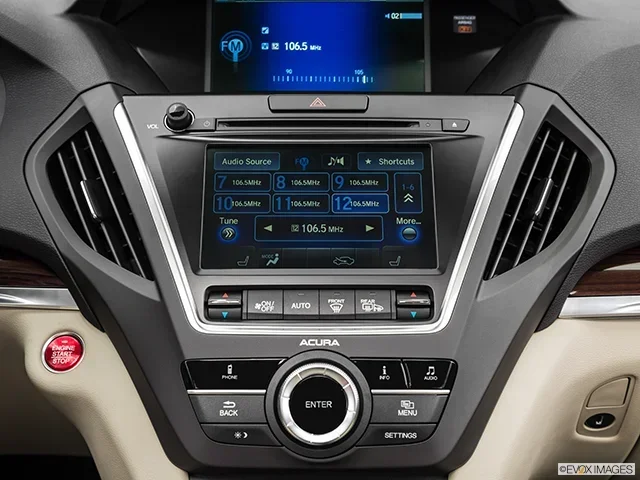
- Press and hold the preset buttons 1 and 6 simultaneously (on most models).
- A serial number will appear on the display. It usually starts with an “M” followed by numbers.
- Write this number down or take a photo with your phone.
The serial number is the key to unlocking your radio. Keep it somewhere safe. You can also use this number when contacting Acura support or using an online lookup tool.
Method 3: Use Your VIN to Retrieve the Code
Your Vehicle Identification Number, or VIN, is another way to find your radio code. The VIN is a 17-character code unique to every vehicle. You can find it on the dashboard near the windshield or on the driver’s side door jamb.
Here is how to use the VIN:
- Contact your local Acura dealership with your VIN.
- They can look up your radio code in their system.
- Some online Acura parts websites also offer VIN-based code lookups.
This method is very reliable. The dealership has access to Acura’s internal database. They can provide the code quickly. Just make sure you have your VIN handy before you call.
You might also want to determine the actual cash value of your car while you have the VIN handy. It is always useful to know your vehicle’s worth.
Method 4: Use Online Radio Code Generators
Several websites offer free or paid radio code lookups. You enter your radio serial number and the site generates the code. These tools work for most Acura models and Honda vehicles.
Here are some tips for using online generators:
- Make sure the website is reputable and has good reviews.
- Enter the serial number exactly as it appears.
- Some sites require you to select your specific Acura model and year.
- Avoid sites that ask for payment before showing the code. Free options exist.
Online generators are a great option if you do not want to visit a dealership. They work fast and you get your code in minutes.
Method 5: Contact Acura Customer Support
If none of the above methods work, you can always contact Acura customer support. They can verify your ownership and provide the radio code. You will need your VIN and proof of ownership.
Call Acura customer service or visit your nearest Acura dealership. The process usually takes just a few minutes. Dealerships are familiar with this issue and handle it regularly.
While you are at it, you might want to check your car battery health too. A weak battery can cause radio lockouts and other electrical issues.
Tips for Entering the Radio Code Correctly
Once you have your Acura radio code, entering it correctly is important. A wrong entry can lock the radio further. Here are some tips to make the process smooth.
Step-by-Step Code Entry
- Turn the radio on. The CODE or LOC message will appear.
- Use the preset buttons or the tuner knob to enter each digit of the code.
- Press the Seek/Track button or the AM/FM button to confirm.
- The radio should unlock and return to normal operation.
Quick Tips for Success
- Double-check each digit before confirming. It is easy to press the wrong button.
- Enter the code slowly. Rushing increases the chance of mistakes.
- Do not attempt more than 3 wrong entries. Too many incorrect attempts can trigger a permanent lockout.
- If the radio locks you out, you may need to wait 30 minutes or disconnect the battery briefly to reset.
- Write the code down and store it in a safe place for future reference.
Preventing Future Radio Lockouts
The best way to deal with an Acura radio code issue is to prevent it from happening again. A few simple habits can save you the hassle every time.
Simple Prevention Strategies
- Save the code in your phone or write it on a piece of tape inside the glove box.
- Take a photo of the radio serial number and store it in your cloud account.
- Keep the owner’s manual in the glove box so the code card is always accessible.
- Use a memory saver device when disconnecting the battery. This keeps the radio memory intact.
- Inform your mechanic before they disconnect the battery so they can be careful.
These small steps take just a few minutes. They can save you hours of frustration down the road. Prevention is always better than cure.
Common Mistakes to Avoid
When dealing with radio codes, people often make avoidable mistakes. Here is what to watch out for.
Mistake 1: Guessing the Code
Never try to guess the code. Each incorrect attempt brings you closer to a permanent lockout. The radio will not accept unlimited attempts. After a few wrong tries, you may need a professional reset.
Mistake 2: Using the Wrong Serial Number
Make sure you are using the correct serial number for the radio unit. Some Acura models have multiple radio units with different serial numbers. Entering the wrong serial number will give you the wrong code.
Mistake 3: Ignoring the Display Message
The radio display gives you clues about what is happening. A CODE message means you need to enter the code. A LOC message means the radio is locked and waiting. Understanding these messages helps you respond correctly.
Mistake 4: Skipping the Battery Disconnect
Some people skip disconnecting the battery after too many failed attempts. This is a mistake. If the radio is locked out, disconnecting the battery for 15 to 30 minutes can reset the system. Then you can try entering the code again.
For more help with car error codes in general, you can read how to clear a check engine code if you encounter other dashboard warnings alongside the radio lockout.
Which Acura Models Are Most Affected?
Radio code lockouts can happen on any Acura model. However, some models are more commonly reported with this issue. Here is a quick look at the most affected models.
| Acura Model | Years Most Affected | Common Trigger |
|---|---|---|
| Acura MDX | 2001-2013 | Battery disconnect or death |
| Acura TLX | 2009-2020 | Jump start or fuse replacement |
| Acura RDX | 2007-2018 | Battery terminal removal |
| Acura TSX | 2004-2014 | Radio unit removal for service |
| Acura ILX | 2013-2022 | Dead battery or prolonged storage |
Regardless of your model, the process for finding and entering the code is the same. The methods in this article apply to all Acura vehicles.
When to Seek Professional Help
Most radio code issues are simple to fix at home. But sometimes you need professional help. Here are signs that it is time to see a mechanic or visit the dealership.
- The radio still displays CODE after you enter the correct code three times.
- The radio serial number does not match any code generator online.
- The radio unit is physically damaged or the display is not working.
- You cannot find the serial number anywhere on the unit.
- The code you entered works but the radio still does not play.
In these cases, a dealership or qualified mechanic can run diagnostics and fix the problem. They have specialized tools that can reset the radio or replace the unit if needed.
Understanding your car’s systems goes a long way. If you are curious about what other codes and signals your vehicle might show, learning about check engine codes can give you a broader understanding of your car’s warning systems.
Final Thoughts
Finding your Acura radio code does not have to be stressful. You have multiple options available. You can check the owner’s manual, find the serial number, use your VIN, try an online generator, or contact Acura support. Each method is straightforward and takes only a few minutes.
The key is to stay calm and follow the steps carefully. Avoid guessing the code. Save your serial number in a safe place. And take preventive steps to avoid future lockouts.
With the right approach, you will have your Acura radio playing your favorite music again in no time. Keep this guide handy for the next time the CODE message flashes on your dashboard.
Frequently Asked Questions
How do I find the serial number on my Acura radio?
Turn the ignition to the ON position and press and hold preset buttons 1 and 6 together. The serial number will appear on the radio display. It usually starts with the letter “M” followed by a series of numbers. Write it down or take a clear photo for reference.
Can I find my Acura radio code for free online?
Yes, several reputable websites offer free radio code lookups. You simply enter the serial number displayed on your radio and the site generates the code. Always use trusted websites and avoid any that ask for payment upfront.
What happens if I enter the wrong Acura radio code too many times?
Entering too many wrong codes can lock the radio permanently until it is reset. You may need to disconnect the car battery for 30 minutes or visit a dealership for a professional reset. This is why you should only enter the code when you are confident it is correct.
Do I need to go to the dealership to get my Acura radio code?
No, you do not need to go to the dealership in most cases. You can find the code yourself using the owner’s manual, the serial number, your VIN, or an online code generator. Dealerships are a backup option if all other methods fail.
Will disconnecting the battery reset my Acura radio code?
Disconnecting the battery can reset the radio system if it is locked out from too many wrong code entries. However, it will not give you the actual code. You still need the correct code to unlock the radio after the reset.
Can I use the same radio code for a different Acura model?
No, each Acura radio code is unique to the specific radio unit serial number. Even if two Acura models are the same year, they may have different radio codes because each unit has its own serial number. Always use the serial number from your own radio.