Simple Steps to Change the Clock on Your Lexus RX 350
Changing the clock on your Lexus RX 350 is easy and quick. Whether you need to adjust the time after a battery replacement or simply want the correct time, this guide walks you through every method. You will learn how to use the touchscreen, the steering wheel controls, and the settings menu to update your Lexus RX 350 clock in just a few simple steps.
Have you ever glanced at your dashboard and realized your car clock is showing the wrong time? You are definitely not alone. Many Lexus RX 350 owners find themselves needing to change the clock on their Lexus RX 350 after a battery swap, a long vacation, or even a simple season change. The good news is that this is one of the easiest things you can do on your own. You do not need a mechanic, and you do not need any special tools. In fact, most people finish this task in under two minutes.
Your Lexus RX 350 comes with a built-in infotainment system that makes managing the clock straightforward. Whether you prefer using the touchscreen or the steering wheel controls, there is a method that fits your style. This guide covers every possible way to adjust the car clock on your RX 350. We also share common troubleshooting tips and answer the most frequently asked questions. By the end, you will feel confident handling this simple maintenance task like a pro.
Key Takeaways
- Multiple Methods Available: You can change the clock using the touchscreen display, steering wheel buttons, or the vehicle settings menu.
- Quick Process: Most clock adjustments take less than two minutes to complete.
- 24-Hour Format Option: The Lexus RX 350 lets you switch between 12-hour and 24-hour time formats easily.
- Battery Replacement Tip: After replacing your car battery, always check and reset the clock since it may lose the correct time.
- Time Zone Awareness: If you travel across time zones, you can update the clock and time zone settings from the same menu.
- No Tools Needed: This is a simple DIY task that requires no special equipment or mechanic visits.
📑 Table of Contents
- Why Your Lexus RX 350 Clock Might Need Changing
- How to Change the Clock Using the Touchscreen
- How to Change the Clock Using Steering Wheel Controls
- Setting the Correct Time Zone on Your Lexus RX 350
- Common Clock Problems and How to Fix Them
- Maintaining Your Lexus RX 350 Clock and Electronics
- When to Seek Professional Help
- Final Thoughts
Why Your Lexus RX 350 Clock Might Need Changing
There are several reasons why your clock might show the wrong time. Understanding these reasons helps you know when to change the clock on a Lexus RX 350 and prevents future confusion.
Battery Replacement
The most common reason is a dead or replaced car battery. When you disconnect the battery, the clock resets to a default time, usually midnight or 12:00. This happens because the clock relies on a small backup power source. If that backup dies or gets disconnected, the clock loses its memory. After any battery work, always check your Lexus RX 350 clock and update it if needed.
Daylight Saving Time
Twice a year, many regions shift clocks forward or back for daylight saving time. Your Lexus RX 350 may or may not update automatically depending on your model year and settings. If your clock jumps an hour too early or too late, you should manually adjust the car clock to match the correct time.
Time Zone Travel
If you travel across state lines or internationally, the time zone changes. Your Lexus RX 350 does not automatically detect your new location in most cases. You will need to visit the settings menu to update the clock on your Lexus RX 350 and set the correct time zone.
System Glitch or Power Outage
Sometimes a simple electrical glitch causes the clock to freeze or display incorrect numbers. This can happen after a power outage, a blown fuse, or even a software hiccup. A quick reset of the clock usually fixes this issue.
How to Change the Clock Using the Touchscreen
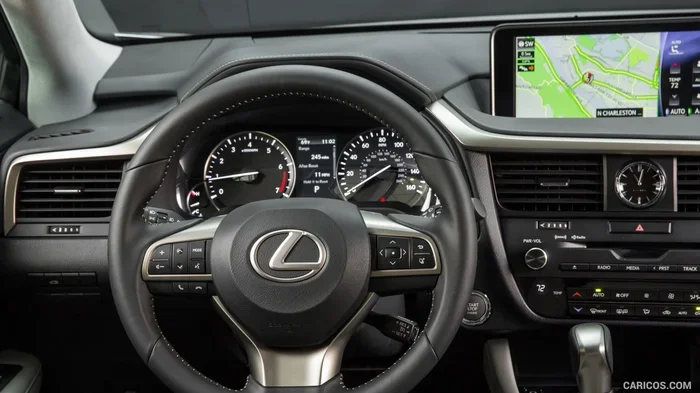
The touchscreen method is the most popular way to change the clock on a Lexus RX 350. The process is intuitive and visually guided. Here is exactly how to do it.
Step-by-Step Touchscreen Instructions
Follow these steps carefully to update your clock through the infotainment screen:
- Start your Lexus RX 350 and wait for the infotainment system to fully load. You should see the home screen with all the main menu options.
- Tap the Settings icon. This usually looks like a gear or cogwheel. It is typically located in the top right corner or bottom of the screen.
- Scroll down and select Clock or Time Settings. The exact wording may vary slightly depending on your model year.
- Tap the Time field to make it editable. You can now use the on-screen keyboard or the up and down arrows to adjust the hours and minutes.
- Choose AM or PM if your clock uses the 12-hour format. If you prefer a 24-hour format, toggle that setting on in the same menu.
- Tap Save or Confirm to lock in your new settings. The clock on your dashboard should immediately reflect the updated time.
That is it. You have successfully changed the clock on your Lexus RX 350 using the touchscreen. The entire process takes about one to two minutes once you know where to look.
Quick Tips for Touchscreen Users
- Make sure your fingers are clean and dry before tapping the screen for better responsiveness.
- If the screen is unresponsive, try restarting the infotainment system by holding the power button for five seconds.
- Some RX 350 models let you set the clock to auto-update based on your GPS location. Check the Time Zone settings to enable this feature.
How to Change the Clock Using Steering Wheel Controls
Not everyone loves using the touchscreen while driving. The good thing is that the Lexus RX 350 also lets you adjust the car clock using the steering wheel buttons. This method works great when you are parked and want a quick change without touching the screen.
Steering Wheel Clock Adjustment Steps
- Park your Lexus RX 350 and turn the ignition to the On or Accessory position. You do not need to start the engine fully, but the dashboard must be active.
- Press the Menu or Settings button on the left side of the steering wheel. This opens the main menu on the dashboard display.
- Use the up and down arrow buttons to scroll to the Clock or Settings option.
- Press the OK or Enter button to select it.
- Use the arrow buttons again to navigate to the hour or minute setting.
- Press the left or right arrow buttons to increase or decrease the selected value.
- Move to AM/PM if needed and confirm your selection by pressing OK.
This method works well if you prefer keeping your eyes on the road and your hands on the wheel. It is a great alternative to the touchscreen and is especially useful for older RX 350 models that may not have the latest infotainment interface.
Setting the Correct Time Zone on Your Lexus RX 350
Time zone settings matter more than most people realize. If your clock is off by exactly one or more hours, the time zone is likely the culprit. Your Lexus RX 350 clock can be set to automatically adjust based on your GPS location, or you can manually select your time zone.
Automatic Time Zone Setting
To enable automatic time zone updates, go to the Clock settings menu and look for the Time Zone option. Toggle it to Auto. Your RX 350 will then use GPS data to detect your current location and adjust the clock accordingly. This is especially helpful if you travel frequently across different regions.
Manual Time Zone Setting
If you prefer to set it manually, choose your specific time zone from the list provided in the settings menu. Select the city or region that matches your current location. This ensures your Lexus RX 350 display shows the correct time at all times.
Common Clock Problems and How to Fix Them
Sometimes changing the clock is not as simple as pressing a few buttons. Here are the most common problems Lexus RX 350 owners face and how to solve them.
Clock Resets After Every Shutdown
If your clock keeps resetting to 12:00 every time you turn off the car, the issue is likely a weak backup battery or a blown fuse. The clock module in your Lexus needs a small amount of constant power to retain the correct time. Check the fuse box under the hood for any blown fuses related to the clock or infotainment system. If the fuses look fine, you may need to have a technician check the backup battery. This is a simple fix and does not require a full visit to a service center. However, if you are unsure, you can always visit a Lexus dealer for professional help. You can also check if you can get your Lexus serviced at a Toyota dealer for more affordable maintenance options.
Clock Display Is Blank or Frozen
A blank or frozen clock display usually means the infotainment system needs a soft reset. Turn off the car, wait about 30 seconds, and then turn it back on. This refreshes the system and often resolves the issue. If the display remains frozen, you may need to perform a full system restart by holding the power button for 10 to 15 seconds.
Incorrect Time After Battery Replacement
After replacing your car battery, the clock will almost always need a manual reset. This is normal behavior. Simply follow the touchscreen or steering wheel steps outlined above to set the correct time again. If you also notice other settings have been wiped, such as radio presets or Bluetooth pairings, do not worry. These are normal side effects of a battery disconnect.
Clock Won’t Save New Settings
If you have followed all the steps but your Lexus RX 350 clock keeps reverting to the old time, try restarting the infotainment system first. If that does not work, there may be a software issue. Check for any available system updates through the Settings menu. Keeping your infotainment software up to date prevents many clock-related problems. In some cases, a factory reset of the system may be needed, but this should be done carefully and ideally with professional guidance.
Maintaining Your Lexus RX 350 Clock and Electronics
Keeping your clock accurate is part of overall vehicle maintenance. A well-maintained Lexus RX 350 runs better and feels more reliable. Here are a few tips to keep your electronics and clock functioning properly.
Regular Software Updates
Lexus occasionally releases software updates for the infotainment system. These updates can improve clock accuracy, fix display bugs, and add new features. Check your owner’s manual or visit a Lexus dealer to see if any updates are available for your model year.
Battery Health Checks
A healthy battery keeps all your electronics running smoothly, including the clock. Have your battery tested during every oil change or service visit. If the battery is more than three to five years old, consider replacing it proactively to avoid clock resets and other electrical issues.
Keep Your Owner’s Manual Handy
Your Lexus RX 350 owner manual contains detailed information about all settings, including the clock. If you ever get stuck, the manual is your best resource. You can also find digital versions on the Lexus website or through the myLexus app.
When to Seek Professional Help
Most clock issues are simple and easy to fix on your own. However, some situations call for professional attention. If you have tried all the methods above and your clock still does not work correctly, there may be an underlying electrical problem. A persistent blank display, repeated resets, or a clock that does not respond to any input could indicate a deeper issue with the infotainment system or the vehicle’s wiring. In these cases, it is best to consult a certified Lexus technician. You can also explore options like checking whether you can clear error codes related to electrical issues, or visit a service center for a full diagnostic check. If you are dealing with other Lexus maintenance questions, you might also find it helpful to learn about getting a Lexus oil change anywhere to keep your vehicle in top shape.
Remember, the clock is a small but important part of your daily driving experience. Taking a few minutes to keep it accurate saves you from confusion and helps you stay on schedule. Whether you use the touchscreen, the steering wheel controls, or the settings menu, changing the clock on your Lexus RX 350 is a task anyone can handle with confidence.
Final Thoughts
Now you know every way to change the clock on a Lexus RX 350. You can use the touchscreen for a visual, guided experience or the steering wheel controls for a quick and simple adjustment. You also know how to set the correct time zone, troubleshoot common problems, and maintain your clock for long-term accuracy. These are basic skills that every Lexus RX 350 owner should have in their toolkit.
The process is fast, free, and requires no special tools. Next time your clock is off, you will know exactly what to do. Keep this guide bookmarked for future reference, and share it with other Lexus owners who might find it helpful. Your Lexus RX 350 is a sophisticated vehicle, and keeping its clock accurate is just one small way to get the most out of it every single day.
Frequently Asked Questions
How do I change the clock on a Lexus RX 350 using the touchscreen?
Tap the Settings icon on your infotainment screen, select Clock or Time Settings, and then tap the Time field. Use the on-screen arrows or keyboard to adjust the hours and minutes. Tap Save or Confirm to lock in your new settings. The whole process takes about one to two minutes.
Why does my Lexus RX 350 clock reset after I replace the battery?
The clock relies on a small backup power source to remember the correct time. When you disconnect or replace the main battery, this backup power is interrupted, causing the clock to reset to a default time. Simply reset the clock manually after any battery replacement to restore the correct time.
Can I set my Lexus RX 350 clock to a 24-hour format?
Yes, you can. Go to the Clock settings menu on your touchscreen or infotainment system and look for the Time Format option. Toggle it to 24-hour format if you prefer that style. This setting is available on most RX 350 model years.
What should I do if my Lexus RX 350 clock display is frozen or blank?
First, try turning off the car and waiting about 30 seconds before turning it back on. If that does not work, hold the power button on the infotainment system for 10 to 15 seconds to force a full restart. This soft reset usually resolves a frozen or blank display.
Does the Lexus RX 350 clock update automatically for daylight saving time?
Some model years with GPS-enabled infotainment systems can update automatically. However, many RX 350 models require a manual adjustment. Check your Time Zone settings and enable automatic updates if available. Otherwise, you will need to adjust the clock yourself when daylight saving time changes.
How long does it take to change the clock on a Lexus RX 350?
It typically takes less than two minutes. Whether you use the touchscreen or the steering wheel controls, the process is quick and straightforward. Once you know the steps, you can adjust the car clock in under a minute.