How Do You Reset the Maintenance Required Light on Toyota
Resetting the maintenance required light on Toyota is easy and takes just a few minutes. This guide walks you through the exact steps for different Toyota models so you can clear that annoying dashboard warning. You will learn why the light comes on, how to turn it off safely, and when to seek professional help.
The maintenance required light on your Toyota dashboard can be frustrating. It pops up at the worst times and reminds you that your vehicle needs attention. Whether you just finished an oil change or need to clear a false alarm, resetting this light is a straightforward process. This guide covers everything you need to know about resetting the maintenance required light on Toyota, from understanding what the light means to step-by-step instructions for different models.
So why does this light even exist? The maintenance required light is part of your Toyota’s onboard computer system. It tracks your driving habits and engine hours to estimate when the next oil change or service is due. When the system determines it is time for maintenance, it triggers the warning. Resetting the light after completing the service tells the computer that the job is done and the clock has been set back. Let us dive into the details.
## What Does the Maintenance Required Light Mean?
The maintenance required light on your Toyota is a friendly reminder, not an emergency signal. It appears as a small wrench icon on your dashboard. This light is part of the Toyota maintenance schedule and is designed to keep your car running at its best.
### How the System Works
Your Toyota tracks several factors to determine when the light should come on. These include mileage driven, engine hours, and driving conditions. The system uses a preset service interval to calculate when maintenance is due. Most Toyotas default to a 5,000-mile or 6,000-mile interval, depending on the model and year.
The maintenance required Toyota system is not the same as the check engine light. The check engine light signals a problem with the engine or emissions system. The maintenance light simply means it is time for routine service. Understanding this difference helps you respond appropriately to each warning.
### Does The Wrench Light Mean An Oil Change?
Most of the time, yes. The wrench light is closely tied to your oil change schedule. Does the wrench light mean an oil change? In most cases, it does. However, it can also remind you about other scheduled services like tire rotations, fluid checks, and inspections.
The light does not always mean something is wrong with your car. Think of it as a calendar reminder. It tells you that your vehicle is due for its regular maintenance check. Ignoring it for too long can lead to overdue services, which may affect your car’s performance and longevity.
## Why You Should Reset the Maintenance Light
Resetting the maintenance required light is not just about clearing an annoying warning. It serves several important purposes for your vehicle’s health and your peace of mind.
### Keeping Accurate Service Records
When you reset the light after completing service, you sync the Toyota maintenance reminder with the actual work done. This keeps your service records accurate. If you ever sell your car or take it to a new mechanic, a clean maintenance history adds value and trust.
### Avoiding Dashboard Confusion
A lingering maintenance light can make it hard to spot new warnings. If the maintenance required light stays on after service, you might miss a different warning light that actually needs attention. Resetting it keeps your dashboard clean and informative.
### Preventing Unnecessary Stress
That little wrench icon can nag at you every time you start the car. Resetting it removes the visual distraction and lets you drive with confidence. A clean dashboard means a clear mind while you are on the road.
## How to Reset the Maintenance Required Light on Toyota
Resetting the maintenance required light on Toyota is simple. The exact steps vary slightly depending on your model and year. Below, we cover the most common methods for different Toyota vehicles.
### Method 1: Using the Trip Meter Reset (Most Common)
This method works on most Toyota models from 2005 to 2023, including the Camry, Corolla, RAV4, and Highlander.
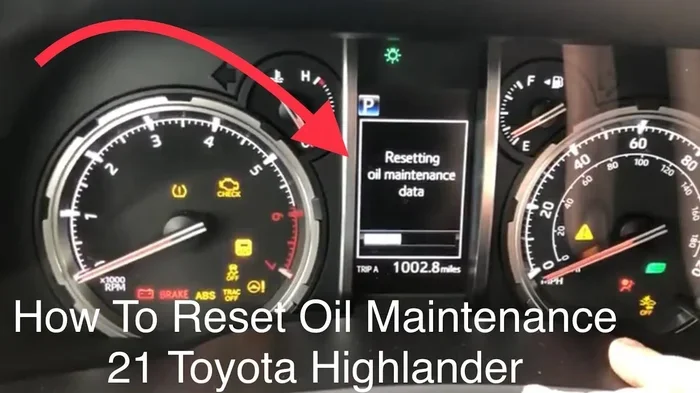
1. Turn the ignition to the “ON” position. Do not start the engine. Just press the start button once or turn the key to the “ON” setting.
2. Press the trip meter reset button. This button is usually located on the dashboard or steering wheel. Press it until the odometer screen shows “000000” or “TRIP A.”
3. Turn the ignition back to the “OFF” position. Wait a few seconds.
4. Press and hold the trip meter reset button. While holding it, turn the ignition back to the “ON” position.
5. Keep holding the button for about 10 seconds. The maintenance light should start flashing, then turn off.
6. Release the button. Turn the ignition off and then back on to confirm the light is gone.
This Toyota maintenance light reset method is the most widely used. It works because the trip meter controls the dashboard display settings. By cycling through the reset sequence, you tell the car’s computer to clear the maintenance reminder.
### Method 2: Using the Steering Wheel Controls (Newer Models)
If you drive a newer Toyota like the 2018+ Camry or RAV4, you may have digital controls on the steering wheel.
1. Press the MENU button on the steering wheel.
2. Use the arrow buttons to navigate to “Settings.”
3. Select “Maintenance” or “Vehicle Info.”
4. Find the option to reset the maintenance reminder.
5. Confirm the reset. The light should turn off immediately.
Newer Toyotas use a more digital approach. The steering wheel controls make it easy to navigate through menus. If you are unsure, check your Toyota owner’s manual for model-specific instructions.
### Method 3: Using the Multi-Function Display (Higher Trim Levels)
Some Toyota models come equipped with a multi-function display screen.
1. Press the button near the steering wheel to access the display menu.
2. Scroll to the “Vehicle” or “Maintenance” tab.
3. Select “Maintenance Reset.”
4. Hold the OK or Enter button for three seconds.
5. The maintenance light will reset.
This method is common on higher trim levels of the Camry, Highlander, and Tacoma. The Toyota maintenance light reset process is slightly different on each trim, so always refer to your manual if you are unsure.
## Common Problems After Resetting the Light
Sometimes the maintenance required light does not reset the first time. This can be frustrating, but it is usually easy to fix.
### The Light Comes Back After a Few Days
If the light returns shortly after resetting, it may mean the service was not properly recorded in the system. Double-check that the oil change or service was completed. Some Toyota models require you to enter the service data into the system manually.
### The Light Will Not Turn Off at All
This can happen if you did not hold the trip button long enough. Try the reset process again and make sure you hold the button for the full 10 seconds. If the light still will not go off, there may be a deeper issue with the Toyota dashboard system.
### The Check Engine Light Appears After Reset
If the check engine light comes on after you reset the maintenance light, do not panic. These are two separate systems. The check engine light may have been triggered independently. How can I clear a check engine code? You may need a diagnostic tool to address the check engine light separately.
## Tips to Keep Your Toyota Running Smoothly
Resetting the maintenance light is just one part of Toyota ownership. Here are some tips to keep your vehicle in top shape between services.
### Follow the Toyota Maintenance Schedule
Every Toyota comes with a recommended maintenance schedule. This schedule lists when to change the oil, replace filters, check fluids, and inspect key components. Following this schedule keeps your car reliable and resale value high.
### Keep a Service Log
Write down every service you perform. Include the date, mileage, and type of service. This log helps you track when the next service is due and provides proof of maintenance if you ever sell the car.
### Do Not Ignore Warning Lights
While the maintenance required light is not an emergency, other dashboard lights are. If you see a red or flashing warning light, address it immediately. Ignoring dashboard warnings can lead to costly repairs and safety issues.
### Use Genuine Toyota Parts
When it is time for an oil change or other service, consider using genuine Toyota parts. They are designed specifically for your vehicle and meet Toyota’s quality standards. This ensures your car continues to perform as intended.
## When to See a Professional
Most of the time, you can reset the maintenance required light yourself in minutes. However, there are situations where professional help is the right call.
### The Light Keeps Returning
If the maintenance light keeps coming back no matter how many times you reset it, there may be a sensor issue or a software problem. A Toyota dealership or qualified mechanic can run diagnostics and fix the root cause.
### You Are Uncomfortable With the Process
There is no shame in asking for help. If the reset steps feel confusing, visit a service center. Many Toyota dealerships will reset the light for free as part of a routine service visit.
### You Notice Other Warning Lights
If the maintenance light appears alongside other warnings like the check engine light or oil pressure light, do not attempt to reset it yourself. Have a professional inspect your vehicle to ensure there are no serious issues.
## Quick Tips for a Smooth Reset
Here are some quick tips to make the reset process effortless:
- Have your owner’s manual handy. It contains model-specific instructions that can save you time.
- Make sure the car is in park. This is a safety requirement before accessing dashboard settings.
- Hold the trip button firmly. A light tap will not work. You need a steady press for the full duration.
- Try the reset twice if it does not work the first time. Sometimes the system needs a second attempt to register the command.
- Check for recalls or software updates. Some Toyota models have had known issues with the maintenance light system. Are there any recalls on a 2007 Toyota Camry? Checking for recalls ensures your vehicle is up to date.
## Conclusion
Resetting the maintenance required light on Toyota is a simple task that every Toyota owner should know how to do. Whether you use the trip meter method, the steering wheel controls, or the multi-function display, the process takes just a few minutes. Understanding what the light means and how to reset it saves you time, money, and unnecessary trips to the mechanic.
Always remember that the maintenance light is a helpful tool, not a cause for alarm. It keeps you on track with your Toyota service schedule and helps maintain your vehicle’s long-term health. By following the steps in this guide, you can confidently handle the reset yourself and keep your dashboard clean and clear.
Take a moment after your next oil change or service to reset the light. It is a small action that makes a big difference in your Toyota ownership experience. Stay on top of your maintenance, and your Toyota will reward you with years of reliable performance.
Key Takeaways
- Simple Process: Resetting the maintenance light on most Toyota models involves a few easy steps using the trip meter and steering wheel controls.
- Model Variations Matter: Different Toyota years and models may require slightly different reset procedures, so always check your specific model.
- Regular Maintenance Is Key: The light is a reminder for oil changes and scheduled service. Ignoring it can lead to bigger problems down the road.
- Safety First: You can drive short distances with the light on, but it is best to address the underlying service need promptly.
- Quick Tips Help: Using the right buttons at the right time makes the reset process smooth and frustration-free.
Frequently Asked Questions
Can I Drive With the Maintenance Required Light On?
Yes, you can drive short distances with the maintenance required light on Toyota. The light is a reminder for upcoming service, not a critical warning. However, you should schedule your service soon to avoid any potential issues. Learn more about driving with the maintenance light on.
How Often Does the Maintenance Required Light Come On?
Most Toyotas trigger the maintenance light every 5,000 to 6,000 miles. This aligns with the standard Toyota maintenance schedule for oil changes and routine inspections. Some newer models adjust the interval based on driving conditions and habits.
Will Resetting the Maintenance Light Clear the Oil Life Monitor?
Yes, resetting the maintenance required light on most Toyota models also resets the oil life monitor. This clears the percentage reading and sets it back to 100%. If the oil life monitor does not reset, try the process again or consult your owner’s manual.
What Should I Do If the Maintenance Light Will Not Reset?
If the light will not turn off, try the reset process again and make sure you hold the trip button for the full 10 seconds. If it still does not work, there may be a system glitch or sensor issue. Visit a Toyota service center for professional diagnostics. Learn how to clear related dashboard resets.
Is It Safe to Reset the Maintenance Light Without Changing the Oil?
It is not recommended. Resetting the light without actually performing the service defeats the purpose of the maintenance reminder. Your Toyota needs regular oil changes to keep the engine lubricated and running smoothly. Always complete the service before resetting the light.
Can I Reset the Maintenance Light Myself or Do I Need a Mechanic?
You can easily reset the maintenance required light yourself using the trip meter or steering wheel controls. No special tools are needed, and the process takes only a few minutes. Most Toyota owners find it simple and convenient to handle at home. A mechanic is only needed if the light will not reset after multiple attempts.