How to Reset the Brake Light on a BMW Quickly and Easily
Resetting the brake light on a BMW is simpler than most drivers think. Whether the warning is caused by a burnt bulb, low brake fluid, or worn brake pads, this guide walks you through every method. You will learn quick fixes, diagnostic tricks, and when to call a pro for help.
If your brake light on a BMW is glowing on the dashboard, you are not alone. This warning can pop up for many reasons, and it can leave any driver feeling confused. The good news is that resetting the brake light on a BMW is something you can often do yourself at home. In this guide, we will walk you through every method, from simple fixes to diagnostic tricks. By the end, you will know exactly how to turn off that annoying warning and get back on the road with confidence.
The brake light on a BMW is part of the vehicle’s warning system. It alerts you to potential issues with your braking system. Sometimes it is a simple fix like a burnt bulb. Other times it signals something more serious like low brake fluid or worn brake pads. Understanding what triggers this light is the first step to fixing it. This article covers everything you need to know about how to reset the brake light on a BMW quickly and safely.
Key Takeaways
- Multiple Reset Methods: You can reset the brake light using the BMW iDrive system, by disconnecting the battery, or with a diagnostic tool.
- Common Causes: Low brake fluid, worn brake pads, and a faulty brake pad sensor are the top reasons the light stays on.
- Model-Specific Steps: Different BMW models may require slightly different reset procedures, especially newer iDrive versions.
- Safety First: Never ignore a brake warning light. If basic resets do not work, see a professional immediately.
- Prevention Matters: Regular BMW brake maintenance keeps warning lights away and extends the life of your braking system.
- DIY Friendly: Most brake light resets can be done at home with basic tools and about 10 to 15 minutes of your time.
📑 Table of Contents
Why Does the Brake Light on a BMW Come On
Before you learn how to reset the brake light on a BMW, you need to understand why it turns on in the first place. BMW vehicles use a network of sensors and indicators to keep you informed about your car’s health. The brake warning light is one of the most important alerts on your dashboard. It is designed to grab your attention and tell you something needs attention.
Many drivers assume the brake light only means the handbrake is engaged. While that is one common cause, there are several other reasons the light might appear. Let us explore the main triggers so you can better understand what your car is trying to tell you.
Understanding BMW Dashboard Warning Lights
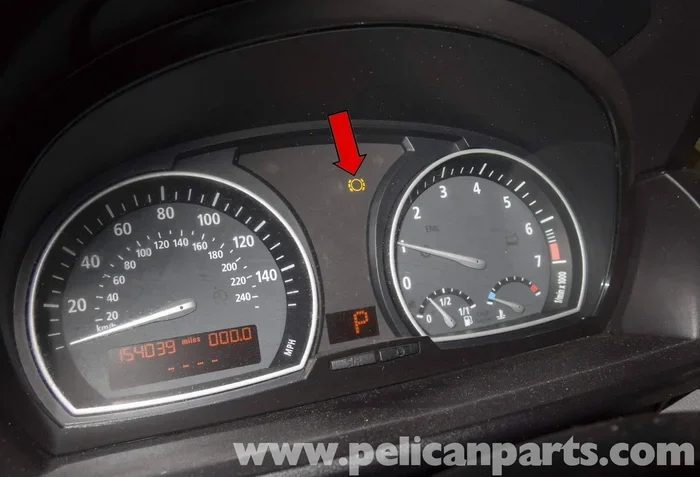
BMW dashboard lights use a color-coded system to communicate urgency. Red lights mean stop and address the issue immediately. Yellow or amber lights suggest a service is needed soon. The brake warning light typically appears in red or yellow, depending on the severity of the problem.
Just like how an airbag light can reset itself after a fault is cleared, the brake light often follows the same pattern. Once the underlying issue is resolved, the light should turn off. However, sometimes the system needs a manual reset to clear the warning. BMW dashboard lights also work similarly to other vehicle indicators, like when low engine oil shows on the dashboard as a clear alert that needs attention.
Common Triggers for the Brake Warning Light
- Handbrake Not Fully Released: This is the simplest and most common cause. Make sure your parking brake is completely down before assuming something is wrong.
- Low Brake Fluid Level: BMW monitors brake fluid levels closely. A drop in fluid triggers the warning light immediately.
- Worn Brake Pads: The brake pad wear sensor sends a signal when pads are dangerously thin. This is a safety feature designed to prevent further damage.
- Faulty Brake Light Bulb: A burnt rear brake light bulb can trigger the dashboard warning in some BMW models.
- ABS System Fault: Issues with the anti-lock braking system can cause the brake light to illuminate alongside other warnings.
- Brake Pad Wear Sensor Failure: Sometimes the sensor itself malfunctions and sends a false signal to the dashboard.
How to Reset the Brake Light on a BMW Step by Step
Now that you understand why the light comes on, let us dive into the actual reset process. There are three main methods you can use to reset the brake light on a BMW. Each method works for different situations, so choose the one that fits your needs. Always make sure your car is parked on a flat surface and the engine is off before starting any work.
Method 1: Using the BMW iDrive System
The BMW iDrive system makes it easy to reset many dashboard warnings, including the brake light. This is the most convenient method for newer BMW models equipped with the iDrive infotainment system. Here is how you can do it:
- Start your BMW and press the Start button without pressing the brake pedal.
- Press the menu button on your iDrive controller to access the main menu.
- Navigate to the Vehicle Info section using the arrow controls.
- Select Vehicle Status from the menu options.
- Look for the Check Control or Warning Messages option.
- Scroll through the messages until you find the brake warning.
- Press and hold the OK button on the iDrive controller for about three seconds.
- The system should confirm that the warning has been reset.
This BMW iDrive reset method works for most models from 2010 onward. If the light returns after driving for a few miles, there may be an underlying issue that needs attention. The iDrive system is designed to clear temporary warnings, but it cannot fix actual mechanical problems.
Method 2: Disconnecting the Battery
If the iDrive method does not work, you can try resetting the brake light by disconnecting the car battery. This method clears all stored error codes and resets the entire electrical system. It is a simple trick that works surprisingly well for many BMW owners.
Here is what you need to do:
- Turn off your BMW and remove the key from the ignition.
- Open the hood and locate the car battery.
- Using a wrench, loosen the negative terminal cable first.
- Carefully remove the cable from the battery terminal.
- Wait for at least 15 minutes. This allows the system to fully reset.
- Reconnect the negative terminal cable and tighten it securely.
- Start your BMW and check if the brake light has turned off.
Keep in mind that disconnecting the battery may also reset other settings like your radio presets and clock. Make sure you have those details handy before you start. This method is especially helpful when the brake light stays on even after you have addressed the original problem.
Some BMW owners also wonder about related electrical issues, like whether car lights on auto drain the battery. While that is a different topic, it is worth noting that electrical drain can sometimes cause warning lights to behave erratically.
Method 3: Using a BMW Diagnostic Tool
For a more thorough approach, you can use a BMW diagnostic tool to reset the brake light on a BMW. These tools connect directly to your car’s OBD-II port and read error codes from the system. They are the most reliable method for clearing stubborn warning lights.
You do not necessarily need a professional-grade tool. Many affordable OBD-II scanners work well with BMW vehicles. Here is the general process:
- Locate the OBD-II port under your dashboard on the driver side.
- Plug the diagnostic scanner into the port.
- Turn the ignition to the accessory position without starting the engine.
- Follow the scanner instructions to read the stored error codes.
- Note any codes related to the brake system.
- Use the scanner to clear the codes and reset the warning light.
- Start the engine and verify the light has turned off.
If you are wondering whether you can run diagnostics without a check engine light on your BMW, the answer is yes. The diagnostic tool communicates directly with the car’s computer system regardless of which warning lights are currently active.
Professional BMW dealerships also offer diagnostic services. However, a basic scanner costs less than a single dealership visit and can be used for future maintenance as well. This is a worthwhile investment for any BMW owner who wants to handle brake maintenance BMW style at home.
Common Reasons the Brake Light on a BMW Stays On
Sometimes resetting the brake light on a BMW does not solve the problem because the underlying cause has not been addressed. If the light comes back shortly after a reset, you need to investigate further. Here are the most common reasons the brake warning light refuses to go away.
Low Brake Fluid Level
BMW vehicles monitor brake fluid levels very carefully. The system uses a sensor in the brake fluid reservoir to detect changes. When the fluid drops below the recommended level, the brake warning light activates. This is a safety feature because low brake fluid can severely affect your stopping power.
Common reasons for low brake fluid include:
- Normal Wear Over Time: Brake pads naturally wear down, which causes the fluid level in the reservoir to drop slightly.
- Brake Fluid Leak: A leak in the brake lines, calipers, or master cylinder can cause fluid to escape. This is a serious issue that needs immediate attention.
- Recent Brake Pad Replacement: After installing new brake pads, the fluid level may need to be topped off manually.
- Temperature Changes: Extreme cold can cause brake fluid to contract, temporarily lowering the fluid level reading.
If you notice the brake light comes on after driving through water or heavy rain, check the fluid level first. Also, BMW owners should regularly check whether tire pressure can be checked on the dashboard through the iDrive system, as low tire pressure sometimes correlates with overall brake system alerts.
Worn Brake Pads and Sensors
Worn brake pads are one of the leading causes of the brake warning light on a BMW. BMW vehicles are equipped with brake pad wear sensors that directly contact the brake rotor. When the pad material wears down to a dangerous level, the sensor triggers the dashboard warning.
Here is what you should know about brake pad wear:
- Typical Lifespan: BMW brake pads generally last between 30,000 and 70,000 miles depending on driving habits and conditions.
- Urban Driving: Stop-and-go city driving wears brake pads faster than highway cruising.
- Sensor Replacement: In many BMW models, the brake pad wear sensor is a single-use component. It must be replaced every time you replace the brake pads.
- False Alerts: Sometimes the sensor itself becomes corroded or stuck and sends a false warning even when the pads are fine.
If you have recently had brake pad replacement done and the light is still on, the sensor may not have been properly reconnected. This is a common oversight that many DIY mechanics make. Always double-check that the wear sensor is seated correctly after a pad change.
Faulty Brake Light Bulb
A burnt brake light bulb can trigger the dashboard brake warning on certain BMW models. The car’s computer monitors the electrical current flowing through the brake light circuit. When it detects a break in the circuit caused by a dead bulb, it assumes there is a brake system problem.
Checking and replacing a rear brake light bulb is simple:
- Open the trunk and locate the tail light assembly.
- Remove the lens cover by twisting it counterclockwise.
- Pull out the old bulb and note its type and wattage.
- Insert the new bulb and push the lens cover back into place.
- Test the brake lights by having someone press the brake pedal while you check from behind the car.
Replacing a rear brake light bulb is one of the easiest and cheapest repairs you can do on a BMW. Keep a few spare bulbs in your trunk for emergencies. A burnt brake light bulb is a much simpler fix than dealing with a full brake system problem.
Resetting the Brake Light on a BMW by Model Series
Different BMW model series may have slightly different procedures for resetting the brake light. While the general methods we covered above apply to most models, there are some model-specific details worth noting. Here is a breakdown of how the reset process works across popular BMW series.
BMW 3 Series Brake Light Reset
The BMW 3 Series is one of the most popular models in the lineup. For F30 and G20 generation 3 Series models, the iDrive system provides a straightforward reset path. Navigate to Vehicle Info, then Check Control, and select the brake warning message. Hold the OK button to reset. On older E46 and E90 models, the battery disconnect method tends to work more reliably since these cars do not have the full iDrive reset capability for brake warnings.
BMW X Series Brake Light Reset
BMW X Series vehicles like the X3, X5, and X7 follow a similar reset process. The iDrive system on X Series models is very user-friendly. Go to the Settings menu, select Vehicle Status, and look for the Check Control messages. The brake warning should be listed there with an option to reset. X Series models with air suspension may also trigger the brake light if the rear ride height sensor detects a problem, so keep that in mind.
BMW 5 Series and 7 Series Reset
The 5 Series and 7 Series are BMW’s luxury sedans, and they come with more advanced diagnostic capabilities. These models often display more detailed error messages that can help you pinpoint the exact cause of the brake light. Use a BMW-specific diagnostic tool for the best results on these models. The professional-grade tools can read manufacturer-specific codes that generic OBD-II scanners might miss.
When to See a Professional Mechanic
There is a big difference between a simple reset and a real brake system problem. Knowing when to seek professional help can save you from a dangerous situation on the road. If you have tried all the reset methods and the brake light comes back immediately, do not ignore it.
Signs You Need Expert Help
- The Light Flashes Instead of Staying Solid: A flashing brake light usually indicates a more serious fault in the braking system.
- You Notice a Spongy Brake Pedal: This could mean air in the brake lines or a serious fluid leak.
- The Car Pulls to One Side When Braking: This suggests uneven brake wear or a stuck caliper.
- You Hear Grinding or Squealing Noises: These sounds often mean the brake pads are completely worn and metal is grinding against metal.
- Multiple Warning Lights Appear Together: If the brake light comes on alongside the ABS light or check engine light, the problem may be more complex than a simple reset.
- The Light Persists After Multiple Reset Attempts: This strongly suggests a hardware issue that needs professional diagnosis.
BMW brake systems are sophisticated and rely on precise engineering. When something goes wrong, it is best to let a trained BMW brake service technician handle the repair. A qualified mechanic has the tools and expertise to diagnose issues that go beyond what a simple reset can fix.
Tips to Prevent Brake Light Issues on Your BMW
Prevention is always better than cure, and this holds true for brake light issues on a BMW as well. Regular maintenance and attentive driving habits can keep your brake warning light from ever coming on. Here are some practical tips to help you stay ahead of potential problems.
- Check Brake Fluid Monthly: Make it a habit to inspect the brake fluid reservoir once a month. Top it off with the correct BMW-specification fluid if needed.
- Listen for Warning Sounds: Squealing or grinding noises when braking are early signs of worn pads. Address them before the warning light comes on.
- Keep Spare Bulbs Handy: A burnt brake light bulb is one of the easiest fixes. Having a spare in your trunk means you can handle it immediately.
- Follow the BMW Maintenance Schedule: Stick to the recommended service intervals for brake inspections and pad replacements.
- Avoid Riding the Brakes: Constantly pressing the brake pedal while driving causes excessive wear on pads and overheating of the braking system.
- Address Warnings Promptly: Do not ignore early warning signs. A small issue today can become a major repair tomorrow if left unchecked.
Regular brake maintenance BMW owners perform at home can go a long way in preventing unexpected warning lights. Simple checks like inspecting brake fluid levels and listening for unusual sounds take just a few minutes but can save you significant time and money in the long run.
Conclusion
Resetting the brake light on a BMW does not have to be a stressful experience. With the methods covered in this guide, you now have three reliable ways to clear the warning light: using the iDrive system, disconnecting the battery, or using a diagnostic tool. Each method has its strengths, and the best choice depends on your specific situation and BMW model.
Remember that the brake warning light exists for a reason. It is a safety feature designed to protect you and your passengers. Always address the root cause before resetting the light. If the light keeps coming back, do not hesitate to visit a professional mechanic. Your brakes are the most important safety system in your vehicle, and they deserve your full attention.
By staying proactive with regular maintenance and paying attention to early warning signs, you can keep your BMW’s braking system in excellent condition. A little prevention goes a long way toward avoiding unexpected trips to the repair shop and keeping your BMW brake system working perfectly for years to come.
Frequently Asked Questions
Can I drive my BMW with the brake light on?
You should avoid driving your BMW if the brake warning light is on and you suspect a real brake system issue. If the light is on because the handbrake is engaged or a bulb is burnt, it is generally safe to drive carefully. However, if the light is caused by low brake fluid or a sensor fault, have the vehicle inspected before driving long distances.
How much does it cost to reset the brake light on a BMW?
If you use the iDrive system or disconnect the battery, the cost is completely free. Using a diagnostic tool at home requires a one-time purchase of a scanner, which costs between $30 and $150. Visiting a dealership or mechanic for a professional reset typically costs between $100 and $300 depending on the service required.
Why does my BMW brake light come on after replacing brake pads?
This usually happens because the brake pad wear sensor was not properly reconnected or replaced during the pad change. In some BMW models, the sensor is a one-time-use component that must be replaced with every set of new pads. Check that the sensor is correctly seated and the brake fluid level is topped off after a pad replacement.
Will disconnecting the battery erase other BMW settings?
Yes, disconnecting the battery can reset several settings including radio presets, clock, window auto-up/down calibration, and some personalized comfort settings. Make sure you note any important settings before disconnecting the battery. Some BMW models may also require re-entering the radio station codes after a battery disconnect.
How long does a brake light reset last on a BMW?
A successful reset should keep the brake light off permanently as long as the underlying issue has been resolved. If the light returns within a few days of driving, there is likely an unresolved problem such as low brake fluid, a faulty sensor, or a wiring issue that needs professional diagnosis.
Can I use a generic OBD-II scanner to reset the BMW brake light?
Yes, a generic OBD-II scanner can often clear brake warning codes on a BMW. However, BMW-specific diagnostic tools like INPA or ISTA provide more detailed information and can access manufacturer-specific codes. A generic scanner works fine for basic resets, but a BMW-specific tool gives you more diagnostic power for complex issues.
=== CONCLUSION ===
Resetting the brake light on a BMW is a skill every BMW owner should have in their toolkit. Whether you use the iDrive system, disconnect the battery, or grab a diagnostic scanner, the process is straightforward and can save you time and money. Always remember to address the root cause behind the warning light before resetting it. Regular brake maintenance and prompt attention to warning signs will keep your BMW running safely and reliably for miles to come. Now you have everything you need to handle this common BMW issue with confidence and ease.