How to Recharge the AC in a Honda Civic Step by Step
Recharging the AC in a Honda Civic is a simple DIY task that can save you hundreds of dollars. This guide walks you through every step, from gathering supplies to testing your system. You will learn how to check refrigerant levels, use a recharge kit, and keep your car cool all summer long.
There is nothing worse than climbing into your Honda Civic on a hot day and hitting the AC only to get warm air. Your car’s air conditioning system works hard, and over time, it can lose refrigerant. This means the system does not cool as well as it should. The good news is that you can recharge the AC in a Honda Civic yourself. It is easier than most people think. You do not need to be a mechanic. You just need a little patience and the right tools. This guide will show you exactly how to do it step by step.
Many car owners spend hundreds of dollars at a shop for a simple AC recharge. The truth is, this is one of the easiest maintenance tasks you can do at home. Whether your Honda Civic AC is blowing warm air or just not as cold as it used to be, recharging the system can bring back that cool, refreshing air. In this article, we will cover everything you need to know. From understanding how your Honda Civic AC works to picking the right recharge kit and completing the process safely. By the end, you will feel confident doing it yourself.
Key Takeaways
- DIY Recharge Saves Money: Recharging your Honda Civic AC at home costs a fraction of what a shop charges.
- You Need Basic Tools: A recharge kit, safety gloves, and a few minutes are all you need.
- Know Your Refrigerant Type: Honda Civics typically use R-134a refrigerant. Always check your owner’s manual first.
- Safety Comes First: Wear protective gear and never overfill the system.
- Regular Maintenance Helps: Checking your AC system yearly keeps it running smoothly and efficiently.
- Know When to Call a Pro: If the AC still does not work after recharging, you may have a leak or deeper issue.
📑 Table of Contents
- Understanding Your Honda Civic AC System
- What You Will Need for the Recharge
- Step-by-Step Guide to Recharging the AC
- Common Mistakes to Avoid When Recharging AC
- When to Seek Professional Help
- Tips for Keeping Your Honda Civic AC in Top Shape
- How Often Should You Recharge Your Honda Civic AC?
- Conclusion
Understanding Your Honda Civic AC System
Before you start, it helps to understand how the AC system in your Honda Civic works. The system uses a refrigerant gas to absorb heat from inside the cabin and release it outside. The main parts include the compressor, condenser, evaporator, and expansion valve. The compressor pressurizes the refrigerant. The condenser releases heat. The evaporator cools the air that blows into your car. When refrigerant gets low, the system cannot cool properly.
The most common refrigerant used in Honda Civics made after 1996 is R-134a. Older models may use R-12, but this is rare now. Always check your owner’s manual to confirm the type. Using the wrong refrigerant can damage the system. You should also know that the AC system is sealed. If refrigerant keeps getting low, you likely have a leak. Recharging is a temporary fix. You will want to find and repair the leak for a long-term solution.
Signs Your Honda Civic AC Needs Recharging
How do you know it is time to recharge? Here are the most common signs:
- The air from the vents feels warm or only slightly cool.
- The AC clutch does not engage when you turn the system on.
- You hear unusual noises from the AC compressor.
- The airflow feels weak even on the highest setting.
- Your Honda Civic AC worked fine last summer but now does not cool at all.
If you notice any of these signs, it is a good idea to check the refrigerant level. You can do this with a simple gauge or by observing the AC performance.
What You Will Need for the Recharge
Before you begin, gather everything you need. Having all the tools ready makes the process smooth and fast. Here is a list of what you will need:
- AC recharge kit: Buy a kit that matches your refrigerant type. Most Honda Civics use R-134a. Look for kits that include a gauge and hose.
- Safety gloves: Refrigerant can cause frostbite on contact. Wear chemical-resistant gloves.
- Safety glasses: Protect your eyes from any splashing refrigerant.
- Thermometer: A simple thermometer helps you measure the temperature drop after recharging.
- Clean rag or towel: You will use this to wipe any excess moisture or refrigerant.
- Your Honda Civic owner’s manual: This tells you where the low-pressure port is located.
Most AC recharge kits cost between 20 and 50 dollars. They are available at auto parts stores and online. Buying a quality kit is worth it. Cheap kits sometimes do not include a proper gauge, which makes the process harder.
Step-by-Step Guide to Recharging the AC
Now let us get into the actual process. Follow these steps carefully and your Honda Civic AC will be blowing cold air in no time.
Step 1: Park Your Car and Turn on the Engine
Start by parking your Honda Civic on a flat surface. Turn the engine on and set the AC to the maximum cold setting. Turn the fan to the highest speed. This helps the system circulate any remaining refrigerant. It also lets you see how poorly the system is currently performing. Let the engine idle for about five minutes before you start the recharge.
Step 2: Locate the Low-Pressure Port
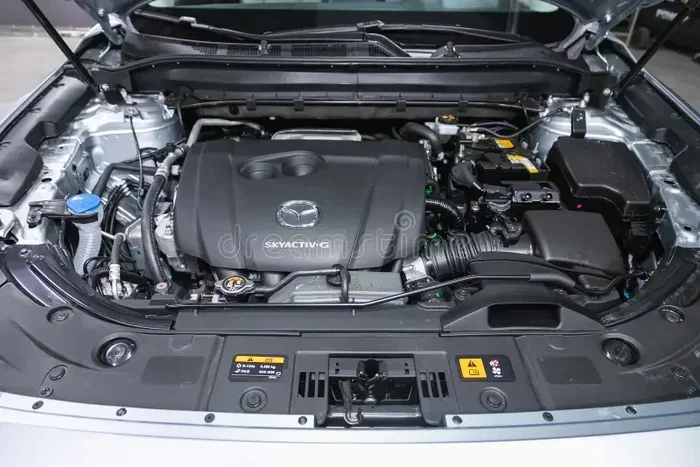
Open the hood and find the low-pressure port. In most Honda Civics, this is located on the left side of the engine bay, near the firewall. The port has a black or blue cap labeled “L” or “LOW.” The high-pressure port is smaller and labeled “H” or “HIGH.” You must always connect to the low-pressure port. Connecting to the wrong port can damage the system. If you are unsure, check your owner’s manual or look online for a diagram specific to your Honda Civic model year.
Step 3: Prepare the Recharge Kit
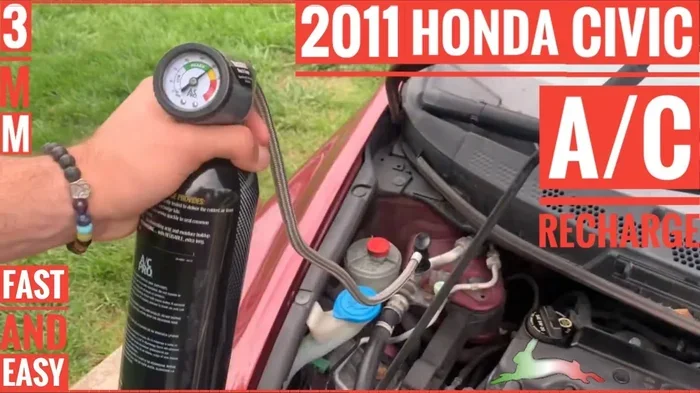
Take your recharge kit out of the packaging. Shake the can of refrigerant gently. Connect the hose from the kit to the can. Make sure the connection is tight. Then attach the gauge to the other end of the hose. The gauge will tell you how much refrigerant is in the system and how much more you need to add.
Step 4: Connect the Hose to the Low-Pressure Port
Remove the cap from the low-pressure port. Press the hose connector firmly onto the port until it clicks into place. You should hear a slight click when it is secure. Make sure the connection is tight. A loose connection can cause refrigerant to leak out, which wastes product and can be dangerous.
Step 5: Add the Refrigerant
With the hose connected, turn the can upside down. This allows the liquid refrigerant to flow into the system. Open the valve on the hose slowly. Let the refrigerant enter the system gradually. Watch the gauge as you add refrigerant. The gauge will show the pressure level. Stop adding refrigerant when the pressure reaches the recommended range. This is usually between 25 and 45 PSI for most Honda Civics, but check your manual for the exact number.
Step 6: Disconnect and Test the System
Once you have added the right amount of refrigerant, close the valve and remove the hose from the low-pressure port. Replace the cap on the port. Start the engine and turn the AC to maximum cold. Let it run for about 10 minutes. Use a thermometer to measure the air temperature coming from the vents. The air should feel noticeably colder than before. If it is still warm, you may need to add a little more refrigerant. But be careful not to overfill the system.
Step 7: Monitor the AC Performance
After recharging, drive your Honda Civic for a few days and pay attention to how the AC performs. If the air stays cold and the system holds pressure, you are all set. If the air gets warm again after a few days, you likely have a leak in the system. In that case, you should take your car to a professional for diagnosis and repair.
Common Mistakes to Avoid When Recharging AC
Recharging your Honda Civic AC is straightforward, but mistakes can happen. Here are the most common ones to avoid:
- Adding too much refrigerant: Overfilling the system can cause damage to the compressor and other components. Always follow the gauge readings and stop when you reach the recommended pressure.
- Using the wrong refrigerant type: R-134a and R-12 are not interchangeable. Using the wrong type can destroy your AC system. Double-check what your Honda Civic needs before you buy any refrigerant.
- Ignoring leaks: Recharging without fixing a leak is a waste of time and money. The refrigerant will just escape again. If your AC keeps losing charge, have a professional inspect the system.
- Not wearing safety gear: Refrigerant is cold and can cause frostbite. It can also irritate your eyes and skin. Always wear gloves and safety glasses.
- Recharging in direct sunlight or extreme heat: The gauge readings can be inaccurate if the ambient temperature is very high. Try to recharge your car in a shaded or cool area for the most accurate results.
If you want to learn more about keeping your Honda cool in extreme heat, check out our guide on how hot a car can get in the sun. Understanding the heat your car endures helps you appreciate why a working AC system is so important.
When to Seek Professional Help
There are times when a DIY recharge is not enough. If you have followed all the steps and the AC still does not blow cold air, there may be a deeper problem. Here are some situations where you should call a professional:
- The AC compressor does not engage at all, even after recharging.
- You hear grinding or squealing noises from the engine bay when the AC is on.
- You notice an oily substance around the AC lines or fittings. This is a sign of a refrigerant leak.
- The AC works for a few hours and then stops cooling again.
- The pressure gauge shows the system is empty even after adding refrigerant.
These symptoms often point to a failed compressor, a clogged expansion valve, or a major leak. A certified mechanic can run a full diagnostic on your Honda Civic AC system. They have specialized tools to detect leaks and measure system performance accurately. Sometimes the cost of a professional diagnosis is worth it to avoid making the problem worse.
Cost Comparison: DIY vs. Professional AC Recharge
One of the biggest reasons people recharge their AC at home is cost savings. Here is a simple comparison:
| Option | Cost | Time | Skill Level |
|---|---|---|---|
| DIY Recharge Kit | $20 – $50 | 30 – 45 minutes | Beginner |
| Professional Shop | $100 – $200 | 1 – 2 hours | None needed |
| Full AC Repair (if leak found) | $200 – $800+ | Varies | Professional |
As you can see, doing it yourself saves a significant amount of money. Even if you need to buy the kit once, you can use it again in future years.
Tips for Keeping Your Honda Civic AC in Top Shape
Prevention is always better than repair. Here are some simple tips to keep your Honda Civic AC system running strong:
- Run the AC regularly: Even in winter, run the AC for about 10 minutes once a week. This keeps the seals lubricated and prevents them from drying out.
- Replace the cabin air filter: A clogged cabin air filter reduces airflow and makes the AC work harder. Check it every 12,000 to 15,000 miles.
- Inspect AC lines for damage: Look under the hood periodically for cracked or worn hoses. Catching a small crack early can prevent a major refrigerant leak.
- Keep the condenser clean: The condenser sits in front of the radiator. Debris like leaves and dirt can block airflow. Rinse it gently with a garden hose when washing your car.
- Use a sunshade: Parking in the shade or using a sunshade reduces the heat load on your AC system. This means it does not have to work as hard to cool the cabin.
Want to learn more about how the heat inside your car affects everything from comfort to AC performance? Read our article on how hot a car can get in the sun for more insights. Also, if you ever need to clear a warning light that might be related to your AC or engine, our guide on how to clear a check engine code can be very helpful.
How Often Should You Recharge Your Honda Civic AC?
A well-maintained AC system should hold refrigerant for years. Most Honda Civics do not need a recharge more than once every two to three years. If you find yourself needing to recharge every year, there is definitely a leak somewhere. Do not just keep topping off the refrigerant. Have a professional inspect the entire system. Regular maintenance and timely repairs will extend the life of your Honda Civic AC and keep you comfortable on every drive.
Conclusion
Recharging the AC in your Honda Civic is one of the most satisfying DIY maintenance jobs you can do. It is affordable, straightforward, and takes less than an hour. With the right tools and a little patience, you can have cool air blowing through your vents on even the hottest days. Remember to always use the correct refrigerant, wear safety gear, and never overfill the system. If the problem persists after recharging, do not hesitate to seek professional help. Taking care of your Honda Civic AC system means taking care of your comfort and your car’s longevity. Stay cool and enjoy the drive.
Frequently Asked Questions
Can I recharge my Honda Civic AC without a recharge kit?
No, a recharge kit is essential for adding refrigerant safely and accurately. The kit includes a hose, gauge, and can adapter that make the process simple and controlled. Trying to add refrigerant without the proper tools can lead to overfilling or leaks.
How long does a Honda Civic AC recharge last?
A proper recharge should last two to three years in a well-maintained system. If the AC loses charge quickly, there is likely a leak that needs to be repaired before you recharge again.
Is it safe to recharge the AC in my Honda Civic myself?
Yes, it is safe as long as you follow the steps carefully and wear protective gloves and glasses. Always work in a well-ventilated area and never smoke near refrigerant cans. The process is designed for DIYers with no professional experience.
What happens if I overfill the AC system with refrigerant?
Overfilling can cause the AC compressor to work too hard, which may lead to premature failure. It can also reduce cooling performance instead of improving it. Always follow the gauge readings and add refrigerant slowly.
Can I use a different refrigerant type than R-134a in my Honda Civic?
No, you must use the refrigerant type specified for your vehicle. Honda Civics made after 1996 use R-134a. Using a different type can damage seals, compressors, and other AC components. Always check your owner’s manual first.
Why does my Honda Civic AC keep losing refrigerant?
The most common reason is a leak in the AC system. Leaks can occur at hose connections, the compressor seal, or the condenser. A professional mechanic can use a UV dye or electronic leak detector to find and repair the problem.