How to Program a Nissan Garage Door Opener Step by Step
Programming your Nissan garage door opener is easier than you think. This guide walks you through every step of setting up your HomeLink system, from locating the buttons to syncing your garage door remote. You will learn quick programming methods, common fixes, and pro tips to save time and frustration.
This is a comprehensive guide about How to Program Nissan Garage Door Opener.
Key Takeaways
- HomeLink System: Every modern Nissan comes with a built-in HomeLink garage door opener integrated into the vehicle.
- Three Programming Methods: You can use the standard method, the rolling code method, or the smart/programming button method depending on your garage door model.
- Battery Matters: A weak car battery can cause programming failures, so always check your battery first.
- Universal Remotes Work: If your garage door opener is older, a universal HomeLink-compatible remote solves most compatibility issues.
- Reset Is Simple: Clearing an existing garage door opener from your Nissan takes just a few seconds.
- Location Matters: Knowing where the HomeLink buttons are saves you time and confusion during programming.
[FEATURED_IMAGE_PLACEHOLDER]
How to Program a Nissan Garage Door Opener Step by Step
Have you ever pulled into your driveway and wished you could open the garage door without digging for a remote? Your Nissan has a built-in solution called HomeLink. This handy system lets you control your garage door directly from your vehicle. Programming a Nissan garage door opener takes only minutes once you know the steps.
Whether you drive a Nissan Altima, Rogue, Pathfinder, or any other model, the HomeLink process is very similar. The system uses three small buttons mounted inside your car. These buttons talk to your garage door opener and create a secure connection. Once programmed, you just press a button in your car and the door opens or closes.
In this guide, we cover every step in detail. You will learn where the buttons are, how to put your garage door opener into programming mode, and how to sync everything together. We also share troubleshooting tips and common mistakes to avoid. By the end, you will feel confident programming your garage door opener like a pro.
Before you start, make sure your car battery is fully charged. A weak battery can interrupt the programming process. Also, keep your garage door remote handy and know your garage door model. Let us dive in.
Understanding the Nissan HomeLink System
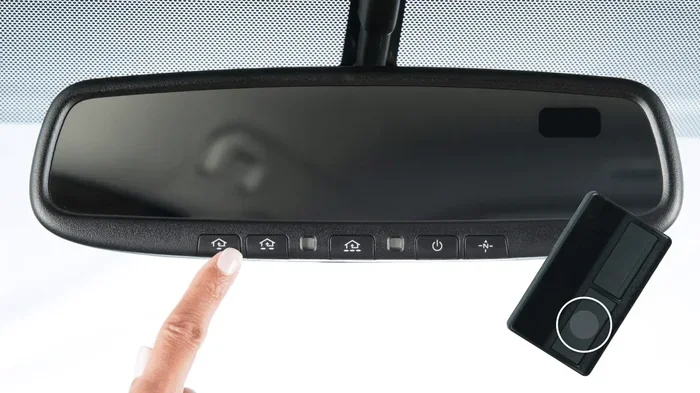
The HomeLink system is a factory-installed feature in most Nissans. It replaces the need for a separate garage door remote. Instead, three buttons sit on your console or overhead console near the sunroof. These buttons connect wirelessly to your garage door opener motor.
HomeLink works with most garage door openers made after 1993. The system uses radio frequency signals to communicate. Older openers use fixed codes while newer ones use rolling codes for better security. Your Nissan HomeLink system handles both types. This is one reason why the programming process has a few different methods.
Where Are the HomeLink Buttons in a Nissan?
The location depends on your Nissan model and year. In most vehicles, you will find the HomeLink buttons on the overhead console. This is the panel between the front seats or near the rearview mirror. In some models like the Nissan Rogue, the buttons sit on the driver side headliner.
In older Nissan models, the buttons may be on the dashboard near the steering column. Look for three small buttons labeled 1, 2, and 3. They are usually unmarked or have a small garage door icon. If you cannot find them, check your owner manual. The manual will show the exact location for your specific model.
What You Need Before Starting
Gather a few things before you begin programming. Having everything ready makes the process smooth and fast.
- Your garage door remote that works with your opener
- A fully charged car battery — low voltage can cause problems
- Your Nissan owner manual for model-specific details
- A helper if you need someone to stand by the garage door
- Patience — some methods require precise timing
Step-by-Step Programming Guide
Now let us get into the actual programming steps. We cover the most common method first, then share alternative approaches for different garage door opener types.
Step 1: Prepare Your Vehicle
Start by parking your Nissan in front of the garage. Make sure the ignition is on but the vehicle is in park. Press the brake pedal. This powers up the HomeLink system. The console should light up when you press the HomeLink buttons.
Some Nissan models require you to turn the ignition to the accessory or ON position. Do not start the engine. Just have the key in the ON position. This gives the HomeLink module enough power to pair with your remote.
Step 2: Clear Any Existing Programming
If you previously programmed a garage door opener and want to replace it, clear the old settings first. Press and hold buttons 1 and 3 on the HomeLink console for about 10 seconds. The indicator light will flash. This erases any existing garage door codes stored in the system.
Some models have a separate reset procedure. Check your owner manual if the hold method does not work. Clearing old codes ensures a clean slate for your new programming session.
Step 3: Put Your Garage Door Opener into Programming Mode
This step depends on your garage door opener brand. Most modern openers use a rolling code system. You need to put the opener into learn mode before your Nissan can pair with it.
Go to your garage and locate the garage door opener motor. Find the learn button on the motor unit. It is usually a small red, orange, or purple button near the antenna wire. Press the learn button once. The indicator light on the motor will turn on or start flashing.
You usually have 30 seconds to complete the next step. Work quickly but carefully. If the light goes out, press the learn button again and start over.
Step 4: Program the HomeLink Button
Return to your Nissan and press the HomeLink button you want to use. For a single button setup, press button 1. Hold the button down for about 20 seconds. You will see the indicator light on the HomeLink console flash or stay solid.
While still holding the HomeLink button, go back to your garage door remote. Press and hold the remote button. Point it at the HomeLink console. The HomeLink light should start flashing faster. This means the two devices are communicating.
Release both buttons at the same time. Press the HomeLink button once to test. Your garage door should respond. If it does not, repeat the process from step 3.
Step 5: Test the Connection
Always test your programming before you drive away. Sit in the Nissan and press the programmed HomeLink button. The garage door should open or close smoothly. Test both directions if your opener supports it.
Try standing at different distances to check the range. HomeLink typically works from 50 to 100 feet away. If the signal is weak, you may need to reposition the antenna or check for interference.
Alternative Method: The Smart Button Approach
Some newer Nissan models use a different programming method. Instead of holding the HomeLink button, you use the smart button on the garage door opener motor. This method works well for fixed-code openers.
Press the HomeLink button you want to program for 30 seconds. While holding it, press the smart button on the garage door motor three times quickly. Release the HomeLink button. The system should pair automatically. Test the connection right away.
Programming for Different Garage Door Opener Brands
Not all garage door openers work the same way. Different brands have slightly different programming procedures. Here is how to handle the most common brands.
Chamberlain and Craftsman Openers
Chamberlain and Craftsman openers are very common in American homes. They use a rolling code system. Press the learn button on the motor unit. Then follow the standard HomeLink programming steps above. These openers typically pair within 30 seconds.
LiftMaster Openers
LiftMaster openers work almost identically to Chamberlain since they share the same parent company. The learn button is usually red or orange. Follow the same steps and you should have no trouble pairing.
Genie Openers
Genie openers may require a slightly different approach. Some Genie models use a Smart Button instead of a learn button. The programming process is the same as the alternative method described above. If you have trouble, check the Genie manual for specific timing instructions.
Older Openers with Dip Switches
Very old garage door openers use dip switches for coding. These are less secure but still work with HomeLink. You need to match the dip switch settings on the opener motor with the HomeLink system. Open the remote control and look for tiny switches. Match them exactly. This method is less common but still supported.
Common Problems and How to Fix Them
Programming does not always go smoothly the first time. Here are the most common issues and how to solve them.
HomeLink Button Does Not Respond
If pressing the HomeLink button does nothing, check your car battery first. A low battery is the number one cause of HomeLink failures. Check your car battery voltage and recharge if needed. Also make sure the ignition is in the ON position.
Indicator Light Flashes but Does Not Pair
A flashing light means the system is searching for a signal. If it does not find one, the timing may be off. Try repeating the process more quickly. You only have a short window to complete the pairing after pressing the learn button on the motor.
Garage Door Opens but Does Not Close
This is a common issue with some HomeLink setups. It usually means the signal is weak or there is interference. Try reprogramming the button. Also check that nothing is blocking the signal path between your car and the garage door motor.
Interference from Other Devices
Other garage door openers or wireless devices can cause interference. If you live in a neighborhood with many homes, signals may overlap. Try changing the HomeLink button you are using. Button 1, 2, or 3 each operates on a different channel.
Tips for a Smooth Programming Experience
Follow these practical tips to make your programming session successful the first time.
- Work during the day — good lighting helps you see small buttons inside the garage
- Keep your remote close — hold it within 6 inches of the HomeLink console during pairing
- Be patient with timing — rushing through steps is the most common mistake
- Write down your steps — take notes if you need to try again
- Clear old codes first — always start with a clean slate
- Use fresh batteries in your remote — a weak remote battery causes pairing failures
- Reposition the antenna — the HomeLink antenna wire may need adjustment for best signal
Some people find it helpful to watch a video tutorial for their specific Nissan model before starting. Visual guides can clarify button locations and timing. The Nissan owner manual is also a valuable resource. Do not skip reading the relevant section before you begin.
If you have tried everything and still cannot get it to work, consider a factory reset of your vehicle systems. Sometimes resetting the car electronics clears up stubborn connection issues. Also check if you need to clear any check engine codes that may be affecting your vehicle systems.
Maintaining Your Nissan HomeLink System
Once you have successfully programmed your garage door opener, a little maintenance goes a long way. Keep your HomeLink system working well with these simple habits.
Check your car battery regularly. A healthy battery ensures the HomeLink system always has enough power. Clean the HomeLink buttons occasionally with a dry cloth. Dust and grime can build up on the console and affect responsiveness.
If you replace your garage door opener motor, you will need to reprogram the HomeLink system. New motors generate new codes for security reasons. The programming process is the same as described above. Just repeat the steps and you will be back up and running in minutes.
Also keep your garage door remote batteries fresh. Replace them once a year even if they seem fine. A strong remote signal makes the HomeLink pairing process much easier.
Conclusion
Programming your Nissan garage door opener is a straightforward process that anyone can do at home. With the HomeLink system, you get the convenience of opening your garage door right from your vehicle. The key is to follow each step carefully and not rush through the timing.
Remember to clear old codes first, put your garage door opener into learn mode, and pair it with the HomeLink button. If you run into trouble, check your battery, reduce interference, and try again. The process works the same across most Nissan models.
Once programmed, your Nissan garage door opener will serve you reliably for years. You will wonder how you ever managed without it. Take a few minutes today to set it up and enjoy the convenience every time you pull into your driveway.
Frequently Asked Questions
How long does it take to program a Nissan garage door opener?
The entire process takes about 10 to 15 minutes if everything goes smoothly. If you need to clear old codes or troubleshoot, it may take a little longer. Having all your materials ready before you start helps keep the process quick.
Can I program more than one garage door opener to my Nissan?
Yes, you can. Each of the three HomeLink buttons can control a different garage door or gate. Simply repeat the programming steps for each button. This is great if you have a home with multiple garage doors or a secondary gate.
Why is my Nissan HomeLink not working after programming?
The most common reason is a weak car battery. Check your battery voltage and recharge if needed. Other causes include interference from nearby devices, a weak remote battery, or incorrect timing during programming. Try reprogramming if the issue persists.
Do I need a special remote to use HomeLink on my Nissan?
No special remote is needed. HomeLink works with most garage door openers already installed in homes. If your opener is very old and uses dip switches, you may need to match the switch settings manually. Newer openers with rolling codes pair automatically using the learn button method.
Can I reset my Nissan HomeLink system to factory settings?
Yes. Press and hold buttons 1 and 3 on the HomeLink console for about 10 seconds. The indicator light will flash and all stored codes will be erased. This gives you a clean slate to start fresh programming.
Is programming a Nissan garage door opener difficult?
Not at all. The process is designed to be simple and user-friendly. Most Nissan owners can complete it in under 15 minutes. The trickiest part is the timing between pressing the learn button on the motor and the HomeLink button. Once you do it once, you will remember the steps easily.