How to Change the Battery in a 2021 Acura RDX Key Fob
Changing the battery in your 2021 Acura RDX key fob is a quick and easy DIY task. You just need a CR2032 coin cell battery, a small flathead screwdriver, and about five minutes. This guide walks you through every step so you can get back to using your remote without waiting for a dealer visit.
Your 2021 Acura RDX key fob stopped working. The buttons feel unresponsive. You’re standing in the driveway wondering what to do next. Before you call the dealer or spend money on a replacement, take a deep breath. The problem is probably just a dead battery.
Changing the battery in your 2021 Acura RDX key fob is one of the simplest maintenance tasks you can do at home. It takes about five minutes, costs just a few dollars, and requires no special skills. You do not need to visit a service center or pay for a technician to handle this minor fix.
This guide gives you everything you need. We cover the exact battery type, the tools required, and each step of the process in detail. By the time you finish reading, you will have a working remote again. Let us get into it.
Key Takeaways
- Easy DIY Job: You can swap the battery yourself in under five minutes with basic tools.
- Correct Battery Type: The 2021 Acura RDX key fob uses a standard CR2032 coin cell battery.
- No Programming Needed: After replacing the battery, your key fob should work right away without any reset.
- Reset May Be Required: If the fob doesn’t respond, you might need to reset the key fob after the battery swap.
- Cost Savings: Doing it yourself saves you time and money compared to a dealership visit.
- Preventive Tip: Keep a spare CR2032 battery in your glove box for emergencies.
📑 Table of Contents
What You Need Before Starting
Gathering your supplies ahead of time makes the whole process smoother. You do not want to pause halfway through looking for a tool. Here is your checklist.
Battery Type for the 2021 Acura RDX Key Fob
The 2021 Acura RDX remote key fob uses a CR2032 coin cell battery. This is one of the most common battery types in the world. You can find it at virtually any grocery store, pharmacy, or auto parts shop. A single CR2032 battery costs between $2 and $5.
If you are unsure about the battery type, check the label on your old battery before you toss it. The CR2032 marking should be printed right on the top. Some people wonder if they can use a different battery. The answer is no. Using the wrong battery type can damage the fob or cause it to malfunction. If you want to learn more about CR2032 batteries in vehicle keys, you can read about using a CR2032 in a Toyota key for additional context on this battery type.
Tools You Will Need
- One CR2032 battery (brand new)
- Small flathead screwdriver or a thin plastic pry tool
- A clean, soft cloth (optional, for cleaning contacts)
- A well-lit workspace
You do not need any fancy equipment. A basic flathead screwdriver works perfectly. Some people prefer using a plastic pry tool to avoid scratching the fob case. Either option gets the job done.
Step-by-Step Guide to Changing the Battery
Now let us walk through the actual process. Follow each step carefully and you will have a working key fob in no time.
Step 1: Locate the Emergency Key Blade
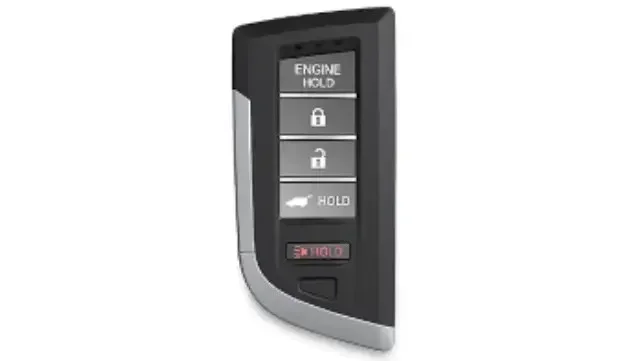
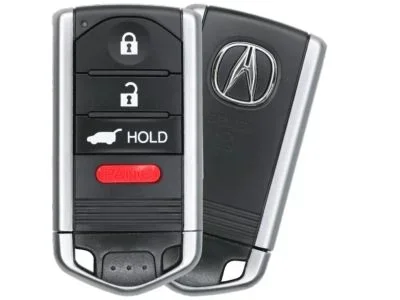
The 2021 Acura RDX key fob has a hidden emergency key blade inside it. This is a small metal key that slides out from the side of the fob. You will use it to pop open the fob case.
Look at the side of your remote. You should see a small button or latch. Press it, and the thin metal key blade will slide out. Set this aside for now. You will not need it for the battery swap, but keep it somewhere safe so it does not get lost.
Step 2: Open the Key Fob Case
Place the fob on a flat surface with the buttons facing down. You will see a small seam running along the middle of the fob. This is where the two halves of the case separate.
Insert your flathead screwdriver or plastic pry tool into the seam. Start near the bottom edge of the fob. Gently twist the screwdriver to pop the case open. Work your way around the seam slowly. Do not force it. The case clips are small but they hold firm.
If the case feels stuck, try working from a different point along the seam. Patience is your best friend here. Forcing the case can crack the plastic or damage the internal circuit board.
Step 3: Remove the Old Battery
Once the case is open, you will see the battery sitting in a small compartment. The CR2032 battery is usually held in place by a slight pressure fit or a small metal clip.
Note which direction the old battery faces. The positive side (labeled +) should be facing up. Use your screwdriver or a fingernail to gently pry the old battery out. Dispose of the old battery properly. Do not throw it in regular household trash. Many stores have battery recycling bins.
Step 4: Insert the New Battery
Take your new CR2032 battery and place it in the compartment. Make sure the positive side faces up, just like the old battery. Press the battery firmly into place until it clicks or sits snugly.
Double-check the orientation. Putting the battery in backwards is the most common mistake people make. If the battery is upside down, your key fob will not work even with a fresh battery.
Step 5: Reassemble the Key Fob
Place the top half of the fob case back onto the bottom half. Press firmly around the entire edge until all the clips snap into place. You should hear a faint click as each clip locks.
Slide the emergency key blade back into the fob if it was part of the case assembly. Test the buttons to make sure everything feels right.
Testing Your Key Fob After the Battery Change
After you reassemble the fob, stand near your vehicle and test each button. Try locking the doors, unlocking the doors, and pressing the panic button. If the remote works, you are all set.
If the buttons do not respond, do not panic. There are a few common reasons this happens. Let us look at them.
Common Issues After Battery Replacement
- The battery is inserted backwards. Open the case and flip the battery around.
- The battery is not seated properly. Remove it and press it in again firmly.
- The contacts are dirty. Use a clean cloth to wipe the battery terminals inside the fob.
- The fob needs a reset. Sometimes the system needs a quick reset after a battery swap. You can learn more about this in our guide on whether you have to reset a key fob after replacing the battery.
In most cases, the fob works immediately after the new battery goes in. The 2021 Acura RDX does not require any special programming after a simple battery change. This is great news for DIYers.
If you are wondering whether you need to do anything else after replacing the battery, check out our article on what to do after replacing a key fob battery. It covers additional steps and tips that may help.
How Often Should You Replace the Key Fob Battery?
Most CR2032 batteries last between two and four years. However, the lifespan depends on how often you use your remote. If you lock and unlock your car multiple times a day, the battery may drain faster.
Here are some signs that your key fob battery is running low:
- The remote works only when you are very close to the vehicle
- You need to press the buttons harder or multiple times
- The range of the remote feels shorter than usual
- The buttons feel less responsive
Do not wait until the fob stops working completely. When you notice these early signs, swap the battery right away. Keeping a spare CR2032 battery in your glove box is a smart habit. It saves you from being stranded with a dead fob.
Tips to Make Your Key Fob Battery Last Longer
Small habits can extend the life of your key fob battery significantly. Here are some practical tips that actually work.
- Avoid extreme temperatures. Leaving your fob in a hot car or freezing temperatures drains the battery faster. Keep it in a pocket or bag when you can.
- Do not press buttons unnecessarily. Every press uses a small amount of power. Be intentional with your remote use.
- Keep the fob away from other electronics. Some devices can interfere with the fob signal, causing it to work harder and drain the battery.
- Clean the contacts regularly. A quick wipe with a dry cloth keeps the electrical connection strong and efficient.
- Buy quality batteries. Name-brand CR2032 batteries tend to last longer than cheap generics. The small price difference is worth it.
When to Seek Professional Help
Most of the time, a battery swap fixes the problem. But sometimes the issue goes deeper than a dead battery. Here are situations where you should consider professional help.
- The fob still does not work after a new battery. This could indicate a damaged circuit board or a deeper electronic issue.
- The fob got wet or was dropped hard. Physical damage can break internal components that a new battery cannot fix.
- Your car does not detect the fob at all. This might be a problem with the vehicle’s keyless entry system, not the fob itself.
- You need a second or third key fob. Dealerships can program additional fobs for your 2021 Acura RDX.
If you are experiencing broader issues with your vehicle’s electrical system, it might be worth checking your car battery as well. Our guide on how to check your car battery can help you rule out other potential problems.
Cost Comparison: DIY vs. Dealer
Let us put the savings in perspective. A CR2032 battery costs around $3 to $5. Doing the swap yourself takes five minutes and costs nothing extra. If you take your RDX to the Acura dealer, you might pay for labor even though the fix is so simple. Some dealerships charge a diagnostic fee that could range from $50 to $100 for what is essentially a five-minute battery swap.
Doing it yourself puts money back in your pocket. And it gives you the satisfaction of handling a common car maintenance task on your own.
Final Thoughts
Replacing the battery in your 2021 Acura RDX key fob is one of the easiest maintenance tasks you will ever do. You need a CR2032 battery, a small screwdriver, and about five minutes. No special tools. No dealer appointment. No expensive service fees.
Keep this guide bookmarked. The next time your remote stops working, you will know exactly what to do. A fresh battery brings your key fob back to life in most cases, and you can get back to your day without missing a beat.
Stay proactive. When you notice the first signs of a weak fob battery, swap it out immediately. A little prevention goes a long way in keeping your Acura RDX running smoothly and your remote working flawlessly.
Frequently Asked Questions
What battery does the 2021 Acura RDX key fob use?
The 2021 Acura RDX key fob uses a CR2032 coin cell battery. This is a standard 3-volt battery that you can find at most stores. Always check the label on your old battery to confirm the type before purchasing a replacement.
Do I need to reprogram my key fob after changing the battery?
No. The 2021 Acura RDX does not require reprogramming after a simple battery swap. The remote should work immediately once you insert the new battery correctly. If it does not respond, try resetting the fob or checking the battery orientation.
How long does a key fob battery last?
A CR2032 battery in an Acura RDX key fob typically lasts between two and four years. Heavy daily use can shorten this lifespan. Watch for signs like reduced range or unresponsive buttons, and replace the battery as soon as you notice these symptoms.
Can I use a different battery type instead of CR2032?
No. The 2021 Acura RDX key fob is designed specifically for the CR2032 battery. Using a different type or size can damage the fob or prevent it from working. Always stick with the recommended battery type for the best results.
What should I do if my key fob still does not work after replacing the battery?
First, check that the battery is inserted with the correct side facing up. Next, make sure the battery is seated firmly in its compartment. If the fob still does not work, the internal contacts may need cleaning or the fob may need a reset. Visit our guide on resetting a key fob after battery replacement for detailed steps.
Is it cheaper to change the key fob battery myself or go to the dealer?
Changing the battery yourself is significantly cheaper. A CR2032 battery costs only a few dollars, and you do not need to pay for labor or diagnostics. Dealerships may charge a service fee that can range from $50 to $100 for what is essentially a quick battery replacement you can do at home.