How Do I Turn Off the Toyota Corolla Maintenance Light
The Toyota Corolla maintenance light is a helpful reminder, but it can be annoying once your service is done. Resetting the maintenance required light on a Corolla is simple and takes just a few minutes. Whether you have an older model or a newer 2020+ Corolla, this guide walks you through every method.
This is a comprehensive guide about How Do I Turn Off the Corolla Maintenance Light?.
Key Takeaways
- Multiple Reset Methods: The Toyota Corolla maintenance light can be turned off using the trip meter, steering wheel controls, or a diagnostic tool depending on your model year.
- Regular Maintenance Matters: The maintenance light is tied to your Corolla service interval and reminds you to stay on top of oil changes and inspections.
- Model Year Differences: Older Corollas use a different reset process than newer models with digital displays.
- Safety First: Always address the underlying maintenance need before resetting the light to avoid missing important service.
- Wrench Light vs. Maintenance Light: The wrench light and maintenance required light serve different purposes but are often confused.
[FEATURED_IMAGE_PLACEHOLDER]
How Do I Turn Off the Toyota Corolla Maintenance Light?
That little maintenance required light on your Toyota Corolla dashboard can really get on your nerves. You have just finished an oil change, washed your car, and everything looks great. Yet there it is, glowing on the dash like a tiny neon sign. You want it gone. You want it off. Now.
The good news is that turning off the Toyota Corolla maintenance light is one of the easiest things you can do as a car owner. You do not need a mechanic. You do not need expensive tools. In most cases, you can do it yourself in under five minutes right from your driver seat.
This guide covers every method for resetting the maintenance required light on all Toyota Corolla model years. Whether you drive a 2005 Corolla or a brand new 2024 model, you will find the right steps here. We also explain what the light means, why it comes on, and how to avoid common mistakes during the reset process.
Before you dive in, it is worth noting that the maintenance light is not the same as the check engine light. The maintenance light is a service reminder. It is your car saying, “Hey, I am due for some routine care.” Ignoring it too long can lead to missed oil changes or other simple tasks that keep your Corolla running smoothly. So let us get it taken care of properly.
For those wondering whether you can keep driving with the maintenance light on, check out our article on Can I Drive With Maintenance Required Light On Toyota for more details.
What Does the Toyota Corolla Maintenance Light Mean?
Understanding what the maintenance required light actually does is the first step to knowing how to handle it. This light is not a warning about a broken part. It is a service interval reminder built into your Corolla’s computer system.
How the Maintenance Reminder Works
Toyota programs the maintenance light to come on based on mileage intervals. Most Corollas are set to remind you every 5,000 miles or every six months, whichever comes first. The system tracks your odometer and triggers the light when the preset interval is reached.
The light typically shows as a small wrench icon or the words “MAINTENANCE REQUIRED” on the dashboard display. It is designed to prompt you to:
- Change your engine oil and filter
- Inspect fluid levels
- Check tire pressure and condition
- Perform routine inspections
Some drivers confuse the maintenance light with the wrench light. While they are related, they are not exactly the same thing. The wrench light on a Toyota often indicates a broader maintenance need, while the maintenance required light is specifically tied to the service interval. To learn more about what the wrench light means, you can read our guide on Does The Wrench Light Mean An Oil Change.
Why Does the Light Stay On After Service?
Sometimes the light does not turn off automatically after you get your car serviced. This happens because the technician may not have reset the maintenance counter in the system. It also happens when you do the work yourself. Either way, the Toyota Corolla maintenance light stays on until you manually reset it. This is completely normal and nothing to worry about.
How to Reset the Maintenance Light on Older Toyota Corolla Models
If you own a Toyota Corolla from before 2014, the reset process is a bit different than on newer models. Older Corollas use a simpler method that involves the trip meter and steering wheel controls. Here is how to do it step by step.
Step-by-Step Reset for Pre-2014 Corollas
Follow these steps carefully to reset the maintenance required light on older Corolla models:
- Turn the ignition to the ON position. Do not start the engine. Just turn the key to the “ON” or “ACC” position where the dashboard lights up.
- Locate the trip meter reset button. On most older Corollas, this is a small button on the dashboard or steering column near the trip odometer display.
- Press and hold the trip reset button. Keep holding it while you move to the next step.
- Turn the ignition key to the OFF position. Keep holding the trip button as you turn the key off.
- Turn the ignition back to ON. Still holding the trip button, turn the key back to ON. You should see the maintenance light start to flash.
- Release the trip button. The light should now be off or reset. If it is still on, repeat the process.
This method works on most Toyota Corolla models from the early 2000s through 2013. It is quick, easy, and requires no special tools.
Common Mistakes When Resetting Older Models
Here are some mistakes that trip people up when trying to reset the Toyota Corolla maintenance light:
- Releasing the trip button too early. You need to hold it throughout the entire process.
- Starting the engine during the reset. The key should stay in the ON position, not in the START position.
- Pressing the wrong button. Some Corollas have multiple buttons near the trip display. Make sure you are pressing the reset button, not the mode or set button.
How to Reset the Maintenance Light on Newer Toyota Corolla Models
Newer Toyota Corolla models, especially those from 2014 and later, use a digital display system that makes the reset process a little different. If your Corolla has a multi-information display screen, follow these steps.
Step-by-Step Reset for 2014 and Newer Corollas
Here is how to turn off the maintenance required light on modern Corolla models:
- Press the START/STOP engine switch. Do not press the brake pedal. Just press the button to put the car in accessory mode.
- Press the MENU button on the steering wheel. This brings up the vehicle information menu on the display.
- Use the arrow buttons to navigate to “Vehicle Info.” Scroll through the options until you find the maintenance or vehicle settings menu.
- Select “Maintenance Reset.” This option may also be labeled as “Reset Maintenance” or “Odometer Maintenance.”
- Hold the OK or SELECT button. Press and hold the confirmation button for about three seconds until the display shows the reset is complete.
- Turn the ignition off and back on. This confirms the reset and turns off the maintenance light.
The exact menu names may vary slightly depending on your Corolla trim level and model year. The LE, SE, and XLE trims all have slightly different display layouts, but the process is essentially the same.
Using the Steering Wheel Controls
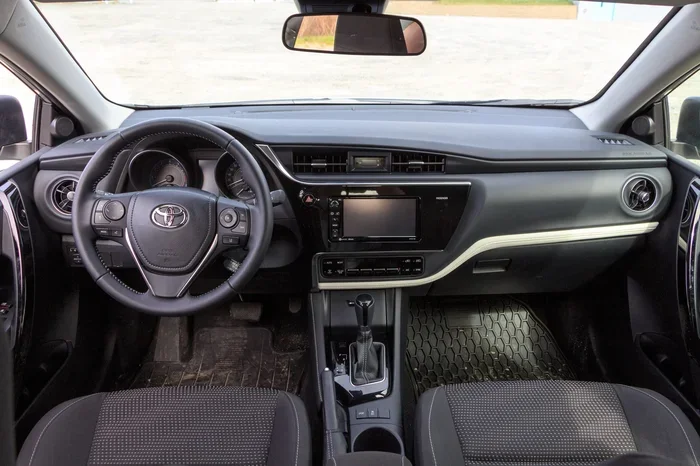
Most newer Corollas allow you to navigate the display menu using buttons on the left side of the steering wheel. These include the up and down arrow buttons, the OK button, and the MENU button. If you are not sure which button does what, look for small icons near each button on your steering wheel. The Toyota Corolla maintenance light reset is always found within the vehicle information or settings menu.
Can You Use an OBD2 Scanner to Reset the Maintenance Light?
Yes, you can use an OBD2 scanner to reset the maintenance required light on a Toyota Corolla. This method works on virtually all model years and is especially useful if the dashboard reset method does not work for your specific car.
How to Use an OBD2 Scanner
Here is the basic process for using an OBD2 diagnostic tool:
- Locate the OBD2 port. On a Toyota Corolla, the port is usually found under the dashboard on the driver side, near the steering column.
- Plug in the scanner. Connect the OBD2 device to the port.
- Turn the ignition to ON. The scanner should power up and connect to your car’s computer.
- Read the maintenance codes. The scanner will display any active codes, including the maintenance required code.
- Select “Clear Codes” or “Reset Maintenance.” Follow the on-screen prompts on the scanner to reset the service light.
- Turn the ignition off and back on. Verify that the maintenance light is now off.
Using an OBD2 scanner gives you the added benefit of checking for other codes. If you have been seeing other warning lights on your dash, the scanner can help you figure out what they mean. For more information on clearing engine codes, check out our article on How Can I Clear A Check Engine Code.
Which OBD2 Scanner Works Best?
You do not need an expensive scanner to reset the Toyota Corolla maintenance light. Basic OBD2 readers that cost under $30 will handle the job just fine. Some popular options include the Ancel OBD2 scanner and the Autel MaxiCOM series. These tools also work for other Toyota models and can clear codes on the Corolla maintenance system with ease.
Why You Should Not Ignore the Maintenance Light
It is tempting to just reset the light and forget about it. But the Toyota Corolla maintenance light exists for a reason. Ignoring it can lead to bigger problems down the road. Here is why you should take it seriously.
Oil Change Intervals
The most common reason the maintenance light comes on is that your Corolla needs an oil change. Fresh oil keeps your engine lubricated, cool, and clean. Old oil breaks down and loses its effectiveness. Over time, this can cause engine wear and reduced fuel economy. Resetting the light without changing the oil is just hiding the problem.
Fluid Checks and Tire Maintenance
The Corolla service interval also covers other important checks. These include inspecting your brake fluid, coolant level, transmission fluid, and tire condition. Skipping these checks can lead to unexpected repairs that cost much more than a simple oil change.
Resale Value
Keeping up with your Toyota Corolla maintenance schedule also protects your car’s resale value. A full service history shows potential buyers that the car was well cared for. If you reset the light but never actually do the service, you are shortchanging yourself in the long run.
Maintenance Light vs. Check Engine Light: What Is the Difference?
Many drivers confuse the maintenance required light with the check engine light. They are two completely different indicators, and understanding the difference is important.
| Feature | Maintenance Light | Check Engine Light |
|---|---|---|
| Icon | Wrench or “MAINTENANCE REQUIRED” text | Engine-shaped icon |
| Meaning | Service is due based on mileage or time | A fault has been detected in the engine or emissions system |
| Urgency | Low to moderate | Moderate to high |
| Reset Method | Trip meter or display menu reset | Requires clearing the fault code |
| Common Causes | Oil change due, routine service interval reached | Loose gas cap, sensor failure, catalytic converter issue |
If your check engine light is on instead of the maintenance light, the reset process is different. You may need to fix the underlying issue first and then use a scanner to clear the code. For more on this, read our article on How Do I Get Rid Of The Engine Management Light.
Quick Tips for Resetting the Toyota Corolla Maintenance Light
Here are some quick tips to make the reset process smooth and hassle-free:
- Do the reset after an oil change. This is the most common time to reset the light and ensures you are not skipping actual maintenance.
- Keep your owner’s manual handy. Your specific Corolla model may have slight variations in the reset process. The manual will have the exact steps for your year.
- Do not reset the light if service is not done. Resetting without actually performing the service defeats the purpose of the reminder system.
- Use quality parts. If you are doing the oil change yourself, use the recommended oil weight and filter for your Corolla. Check your manual for the correct specifications.
- Track your mileage. Even with the light reset, keep a note of when your next service is due. This helps you stay ahead of the maintenance schedule and avoid surprises.
Common Mistakes People Make When Resetting the Maintenance Light
Resetting the Toyota Corolla maintenance light is straightforward, but people do make avoidable mistakes. Here are the most common ones:
- Resetting the light without doing the actual service. This is the number one mistake. The light exists to remind you of real maintenance needs. Just turning it off does not change the fact that your car needs attention.
- Not holding the button long enough. Whether you are using the trip meter method or the display menu method, releasing the button too early will cancel the reset. Hold it for at least three to five seconds.
- Confusing the maintenance light with other warnings. If you have multiple lights on your dash, make sure you are addressing the right one. The maintenance required light is not the same as the oil pressure light, battery light, or brake warning light.
- Using the wrong reset method for your model year. A 2008 Corolla reset process is different from a 2020 Corolla reset process. Always confirm the correct method for your specific year.
If you are dealing with other dashboard lights and are unsure what they mean, it is always a good idea to consult your owner’s manual or a trusted mechanic. Understanding your Corolla dashboard warning lights helps you respond appropriately and keeps your car running safely.
How Often Does the Toyota Corolla Need Maintenance?
Knowing your Corolla maintenance schedule helps you stay ahead of the light. Toyota recommends the following general intervals for the Corolla:
- Every 5,000 miles or 6 months: Oil change, tire rotation, and basic inspection
- Every 15,000 miles: Air filter replacement and cabin filter check
- Every 30,000 miles: Spark plug replacement and brake fluid check
- Every 60,000 miles: Coolant flush and transmission fluid change
These intervals may vary depending on your driving conditions and the specific Corolla trim. If you frequently drive in stop-and-go traffic, extreme heat, or dusty conditions, you may need service more often. Always refer to your Toyota Corolla owner’s manual for the exact maintenance schedule for your vehicle.
Final Thoughts
Turning off the Toyota Corolla maintenance light is a simple process that anyone can do at home. Whether you have an older model with a trip meter reset or a newer model with a digital display, the steps are clear and manageable. Just remember that the light is a helpful reminder, not just an annoyance. It is there to keep your Corolla in top shape and your maintenance on track.
Always perform the actual service before resetting the light. Change your oil, check your fluids, and inspect your tires. Then go ahead and reset the maintenance required light so you can start fresh with your next service interval. Your Corolla will thank you with better performance, improved fuel economy, and a longer lifespan.
For more Toyota maintenance tips and guides, explore our full library of articles on Toyota care and repair. Stay on top of your maintenance schedule and enjoy the drive.
FAQs
How do I turn off the maintenance required light on my Toyota Corolla?
The method depends on your model year. For older Corollas, use the trip meter reset button while cycling the ignition. For newer models, use the steering wheel controls to navigate to the maintenance reset option in the vehicle settings menu. Both methods take just a few minutes.
Can I drive with the maintenance light on?
Yes, you can safely drive with the Toyota Corolla maintenance light on. It is a service reminder and not an urgent warning. However, you should schedule your maintenance soon to keep your car running at its best.
Why does my Corolla maintenance light keep coming back?
If the light keeps returning after you reset it, the service interval has likely been reached again. This means you need to perform the scheduled maintenance, such as an oil change, before the light will stay off.
What is the difference between the wrench light and the maintenance light?
The wrench light is a broader maintenance indicator, while the maintenance required light is specifically tied to the service interval. The wrench light may also appear for other maintenance needs. Check your owner’s manual for details on what each light means for your specific model.
Do I need a special tool to reset the maintenance light?
No, you do not need any special tools. The reset can be done using your car’s built-in trip meter or display controls. An OBD2 scanner can also be used, but it is not required for a basic maintenance light reset.
Will resetting the maintenance light affect my Toyota warranty?
No, resetting the maintenance required light does not affect your Toyota warranty. However, keeping a record of your actual maintenance is important for warranty claims. Always perform the required service and document it, even if you reset the light afterward.
Frequently Asked Questions
What is How Do I Turn Off the Corolla Maintenance Light??
How Do I Turn Off the Corolla Maintenance Light? is an important topic with many practical applications.