How Do I Clear My Toyota Maintenance Code Quickly
Clearing your Toyota maintenance code is simple and you can do it at home. This guide shows you exactly how to reset the maintenance required light on any Toyota model. You will learn quick methods, common mistakes, and when to seek professional help.
That little wrench light on your Toyota dashboard can be annoying. It keeps glowing every time you start the car. You know the one. It says maintenance required. And it stays there until you do something about it.
Good news. You do not need to visit a mechanic or pay a dealership to make it go away. Clearing your Toyota maintenance code is something you can handle yourself. It takes just a few minutes. And it works on most Toyota models from Camry to RAV4 to Tacoma.
In this guide, we walk you through every method. We cover the quick trip meter trick. We explain the OBD scanner approach. And we share tips to keep that maintenance light from coming back. Whether you drive a Toyota Camry, a Highlander, or a RAV4, this article has you covered. Let us get into it.
Key Takeaways
- Quick Reset Method: You can clear the Toyota maintenance code in minutes using the trip meter reset method.
- No Special Tools Needed: Most Toyota models allow you to reset the maintenance light without any expensive equipment.
- Know When to Worry: Not all maintenance codes are the same. Some signal real issues that need attention.
- Prevent Future Alerts: Regular oil changes and service keep the maintenance light from coming back.
- Model-Specific Steps: Different Toyota models have slightly different reset procedures. We cover the most popular ones.
- Internal Link Reference: If your check engine light is on too, check our guide on how to clear a check engine code for additional help.
📑 Table of Contents
- What Is a Toyota Maintenance Code?
- Why Does the Toyota Maintenance Light Come On?
- How to Clear the Toyota Maintenance Code
- Toyota Model-Specific Reset Instructions
- When Should You NOT Clear the Maintenance Code?
- Tips to Prevent the Maintenance Light from Coming Back
- Common Mistakes People Make When Clearing the Maintenance Code
- Expert Tips for Toyota Maintenance Code Reset
- Final Thoughts on Clearing Your Toyota Maintenance Code
What Is a Toyota Maintenance Code?
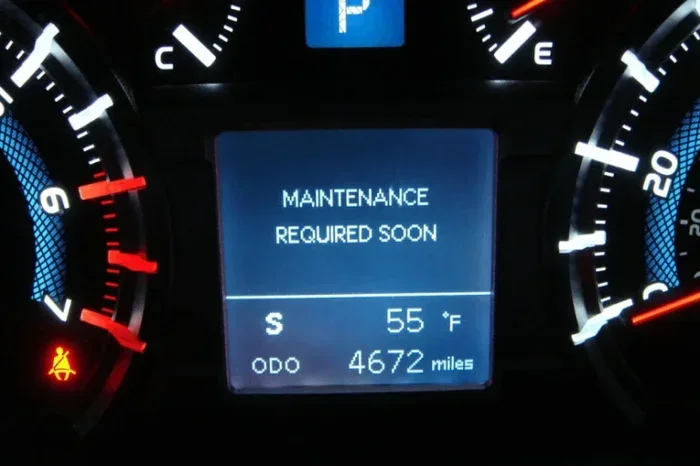
Your Toyota has a built-in maintenance reminder system. It tracks your mileage and tells you when it is time for an oil change or other scheduled service. When the system triggers, it displays a maintenance code on your dashboard. Most drivers see this as a small wrench icon or a “MAINT REQD” message.
The maintenance light is part of the Toyota maintenance schedule. It is designed to remind you to stay on top of routine care. Here is what you should know about these codes:
- Maintenance Required Light: This is the most common Toyota maintenance code. It shows a wrench symbol or says MAINT REQD.
- Check Engine Light: This is different from the maintenance light. It signals a possible problem with the engine or emissions system.
- Service Interval Codes: Some Toyotas display specific codes like “A” or “B” to indicate the type of service needed.
- Oil Life System: Many newer Toyotas use an oil life monitoring system instead of a simple mileage reminder.
The maintenance code is not an error. It is a friendly reminder. But it can be frustrating when it stays on after you have already serviced your car. That is where clearing the code comes in.
Why Does the Toyota Maintenance Light Come On?
Understanding why the light appears helps you know when to clear it and when to pay attention. The Toyota maintenance system is pretty straightforward. It uses mileage intervals to remind you about upcoming service.
Common Reasons the Maintenance Light Activates
Several things trigger the maintenance required light on your Toyota dashboard. Here are the most common reasons:
- Mileage Interval: Most Toyotas set the maintenance reminder every 5,000 miles or 6 months. This aligns with standard oil change intervals.
- Oil Change Due: The light often comes on when your Toyota oil change is approaching or overdue.
- Reset Not Completed: If you recently had service done and the mechanic did not reset the system, the light stays on.
- Battery Disconnect: Disconnecting your car battery can sometimes trigger the maintenance code as a system reset.
- Dashboard Warning Reset: After clearing other warning lights, the maintenance light may need a separate reset.
If you just had an oil change or completed your Toyota maintenance schedule, the light should be cleared. If it is not, you need to manually reset it. The next sections show you exactly how.
How to Clear the Toyota Maintenance Code
Now for the part you have been waiting for. Clearing the Toyota maintenance code is easier than most people think. There are a few different methods depending on your Toyota model and year. We cover the most popular ones below.
Method 1: The Trip Meter Reset Trick
This is the most common way to reset the maintenance light on a Toyota. It works on many models including the Camry, Corolla, RAV4, and Tacoma. Here is what you do step by step:
- Turn the ignition to ON. Do not start the engine. Just press the start button or turn the key to the ON position.
- Press the trip meter reset button. This is usually located on the dashboard near the speedometer or on the steering wheel controls.
- Hold the button for about 10 seconds. The maintenance light should start to flash.
- Release the button. The light should turn off and the trip meter should reset.
- Turn the ignition off and then back on. Check if the maintenance required light is gone.
This method works because it resets the Toyota maintenance reminder system. The car thinks you have completed your service and the reminder is no longer needed. If this does not work, try the next method.
Method 2: Using the Steering Wheel Controls
Newer Toyota models with digital displays use steering wheel buttons to reset the maintenance light. Here is how:
- Press the MENU or SETUP button on the steering wheel.
- Navigate to the vehicle settings menu. Use the arrow buttons to scroll.
- Find the maintenance or service menu. This may be labeled “Maintenance Reset” or “Service Interval.”
- Select the reset option. Confirm your choice when prompted.
- The maintenance light should turn off. If it does not, try turning the car off and back on.
This method works well for Toyotas from 2010 and newer. If your model has a touchscreen display, the steps may vary slightly. Check your owner’s manual for specific menu paths.
Method 3: Using an OBD Scanner
An OBD scanner is a handy tool for any car owner. It plugs into the diagnostic port under your steering column. You can use it to read and clear Toyota maintenance codes and other diagnostic trouble codes.
Here is how to use an OBD scanner to clear the maintenance light:
- Locate the OBD port. It is usually under the dashboard on the driver’s side.
- Plug in the scanner. Connect the OBD device to the port.
- Turn the ignition to ON. The scanner should power up.
- Read the codes. The scanner will display any active maintenance or warning codes.
- Clear the codes. Use the scanner menu to erase the maintenance code.
- Turn off the car and restart. Check if the light is gone.
If you do not have an OBD scanner, you can buy one for under $30. They are a great investment for any Toyota owner. They also help you understand what other dashboard warnings mean. If you want to learn more about clearing other Toyota warning lights, check out our guide on how to get rid of the engine management light.
Toyota Model-Specific Reset Instructions
Toyota has many models and each one may have a slightly different reset process. Here are the most popular Toyota models and their specific maintenance code reset methods.
| Toyota Model | Reset Method | Difficulty Level |
|---|---|---|
| Toyota Camry | Trip meter reset or steering wheel buttons | Easy |
| Toyota Corolla | Trip meter reset method | Easy |
| Toyota RAV4 | Steering wheel menu or trip meter | Easy |
| Toyota Tacoma | Trip meter reset or OBD scanner | Easy to Medium |
| Toyota Highlander | Steering wheel controls | Easy |
| Toyota Prius | Trip meter reset method | Easy |
For older Toyota models from before 2010, the trip meter reset method usually works best. For newer models with smart displays, the steering wheel controls are the way to go. And if you are dealing with stubborn codes, an OBD scanner never fails.
When Should You NOT Clear the Maintenance Code?
Here is something important. Not every maintenance code should be cleared right away. Sometimes that little wrench light is trying to tell you something real. Before you reset the maintenance light, ask yourself a few questions.
- Have you actually had your oil changed? If not, go get your oil changed first. Clearing the light without service just delays needed maintenance.
- Is there another warning light on? If the check engine light or another dashboard warning is also on, the maintenance code may be connected to a real problem.
- Have you had recent electrical work? If you recently disconnected the battery or worked on the electrical system, the maintenance code may be a side effect.
- Is the light flashing instead of steady? A flashing maintenance light is unusual and may indicate a deeper issue.
If you are unsure whether to clear the code, it is always safe to visit a Toyota dealership or trusted mechanic. They can run a full diagnostic check and make sure everything is okay. You can also read more about driving with the maintenance light on in our article can I drive with the maintenance required light on Toyota.
Tips to Prevent the Maintenance Light from Coming Back
Once you have cleared the Toyota maintenance code, you want it to stay off. Here are some simple tips to keep your maintenance reminder system working properly.
- Follow the Toyota maintenance schedule. Stick to the recommended service intervals in your owner’s manual. This keeps your car running well and prevents unnecessary warnings.
- Always reset the system after service. Whether you go to a dealership or do it yourself, make sure the maintenance reminder is reset after every oil change or service.
- Keep track of your mileage. Use a phone app or a notebook to track when your next service is due. This helps you stay ahead of the maintenance light.
- Use quality oil and parts. Cheap oil and filters can cause issues that trigger warning lights. Stick with manufacturer-recommended products.
- Check your dashboard regularly. A quick glance at your dashboard when you start the car can catch problems early.
Taking care of your Toyota with regular maintenance is the best way to avoid those annoying reminder lights. A well-maintained Toyota runs better, lasts longer, and saves you money on repairs down the road.
Common Mistakes People Make When Clearing the Maintenance Code
You would be surprised how many people make mistakes when trying to reset the Toyota maintenance light. Here are the most common ones to avoid.
- Turning the car off too quickly. You need to hold the trip meter button long enough. Releasing it too early means the reset does not take effect.
- Not turning the ignition to the right position. The reset process requires the ignition to be in the ON position, not the START position. Make sure the engine is not running during the reset.
- Using the wrong button. Some Toyotas have multiple buttons near the trip meter. Make sure you are pressing the correct reset button.
- Ignoring other warning lights. If the maintenance light comes back immediately, there may be an underlying issue you need to address.
- Skipping the restart step. Always turn the car off and back on after resetting. This confirms the maintenance code has been cleared.
Avoiding these simple mistakes saves you time and frustration. If you have tried all the methods and the maintenance light still will not go away, it may be time to seek professional help.
Expert Tips for Toyota Maintenance Code Reset
Here are some expert-level tips that can make the process smoother. These come from years of experience with Toyota vehicles and their maintenance systems.
- Keep your owner’s manual handy. Every Toyota model has slight differences in the reset process. The manual has the exact steps for your specific vehicle.
- Use a quality OBD scanner. A good OBD scanner does more than just clear maintenance codes. It reads all Toyota diagnostic codes and gives you real-time data.
- Reset after every oil change. Make it a habit to reset the maintenance system immediately after an oil change. This prevents the light from lingering.
- Note the date of service. Write down when you had your car serviced. This helps you track your Toyota service history and know when the next reset is due.
- Do not ignore persistent codes. If the maintenance code keeps coming back after you reset it, there is likely an underlying issue that needs professional diagnosis.
These tips may seem small, but they make a big difference in keeping your Toyota running smoothly and your dashboard warning-free.
Final Thoughts on Clearing Your Toyota Maintenance Code
Clearing your Toyota maintenance code is one of the simplest things you can do as a car owner. It takes just a few minutes and requires no special tools for most models. The trip meter reset method works on the majority of Toyota vehicles. The steering wheel button method is great for newer models. And an OBD scanner is always a reliable backup option.
Remember that the maintenance light is there to help you. It keeps you on track with your Toyota maintenance schedule. Do not ignore it. But do not panic when it comes on either. Now that you know how to clear it, you have the power to handle it yourself.
Keep up with regular oil changes and scheduled service. Your Toyota will reward you with years of reliable performance. And the next time that wrench icon pops up, you will know exactly what to do.
If you are dealing with other Toyota dashboard issues, we have plenty of resources to help. Check out our article on how to clear your TPM reset for tire pressure monitoring system guidance. And if you are curious about other Toyota maintenance topics, our site has you covered with expert advice on everything from battery health to hybrid battery care.
Keep your Toyota in great shape. Clear that maintenance code with confidence. And enjoy the peace of mind that comes with a clean dashboard and a well-maintained car.
Frequently Asked Questions
How do I clear the maintenance required light on my Toyota Camry?
To clear the maintenance required light on a Toyota Camry, turn the ignition to ON without starting the engine. Press and hold the trip meter reset button for about 10 seconds until the light starts flashing. Release the button and turn the ignition off and back on. The maintenance light should be cleared.
Can I drive my Toyota with the maintenance light on?
Yes, you can drive your Toyota with the maintenance light on. The light is a reminder for scheduled service and does not indicate a mechanical problem. However, you should not ignore it for too long. Get your oil changed and service done soon to keep your Toyota running properly.
Why does my Toyota maintenance light keep coming back after I reset it?
If the maintenance light keeps coming back, it usually means the service interval has not been properly reset in the system. It could also mean you need an oil change or other maintenance that has not been completed yet. Try resetting again following the correct steps for your model. If it persists, visit a mechanic to check for underlying issues.
Do I need an OBD scanner to clear the Toyota maintenance code?
No, you do not need an OBD scanner for most Toyota models. The trip meter reset method works on the majority of Toyotas without any special tools. An OBD scanner is helpful for stubborn codes or for reading other diagnostic information. But for a simple maintenance light reset, the built-in method is all you need.
How often should I reset my Toyota maintenance reminder?
You should reset your Toyota maintenance reminder every time you complete a service interval. This is typically every 5,000 miles or 6 months depending on your driving habits and the Toyota maintenance schedule. Always reset it after an oil change or other scheduled maintenance.
Is it safe to clear the maintenance code myself?
Yes, it is completely safe to clear the maintenance code yourself. The process does not affect your Toyota’s performance or warranty. It simply resets the maintenance reminder system. Just make sure you have actually completed the needed service before clearing the code so you do not skip important maintenance.