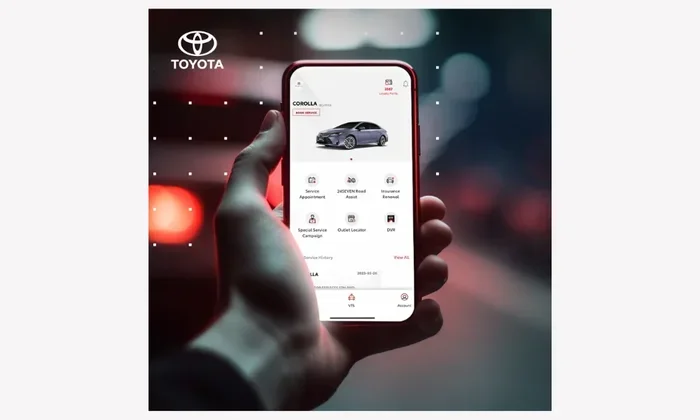
Do I Need the Toyota App This Is What Most People Miss
The Toyota App offers remote start, vehicle tracking, maintenance alerts, and smart key features that can make owning a Toyota much more convenient. Most owners don’t realize how many useful tools are packed into this free application, from checking your battery health to locating your parked car. Whether you need it depends on your driving habits, your Toyota model, and how tech-savvy you are.
Do you really need the Toyota App on your phone? It’s a question a lot of Toyota owners ask themselves after they buy their new vehicle. The truth is, the Toyota App offers a bunch of features that go far beyond what most people realize. Remote start, vehicle tracking, maintenance alerts — these are just the beginning.
Many owners download the app and barely use it. They might check their tire pressure once and forget it exists. But that would be a big mistake. The Toyota App has some genuinely useful tools that can save you time, money, and stress. This guide walks you through everything the app offers so you can decide for yourself.
The Toyota App connects your smartphone directly to your vehicle. Think of it as a digital extension of your key fob and dashboard. You get access to features that were once only possible by being physically near your car. For example, you can pre-heat your car on a cold morning or cool it down before you get in during summer. That alone makes the app valuable for many drivers.
But here’s what most people miss. The Toyota App also sends you alerts about your vehicle’s health. It can tell you when it’s time for an oil change or when a warning light shows up on your dash. Some owners have found that using the app helped them catch small problems before they turned into expensive repairs. That kind of proactive care is a game changer.
Let’s also talk about the convenience factor. You can lock your doors, honk the horn, and even flash your lights to find your car in a crowded parking lot. And if you’ve ever forgotten where you parked, the app’s GPS tracking feature shows you exactly where your Toyota is. These features add up to a smoother, more connected ownership experience.
Key Takeaways
- Remote Access: The Toyota App lets you start your engine, lock doors, and adjust climate control from your phone.
- Vehicle Health Monitoring: You can track maintenance schedules, check warning lights, and monitor battery status right from the app.
- Security Features: GPS tracking and theft alerts help protect your Toyota around the clock.
- Not Essential for Everyone: If you prefer traditional keys and don’t mind manual checks, the app is a nice-to-have, not a must-have.
- Free to Download: The app costs nothing, so there’s no financial risk in trying it out.
- Works Best with Connected Models: Newer Toyota models with built-in connectivity get the most out of the app.
- Common Issues Exist: Connection drops and login problems can happen, but most are easy to fix.
📑 Table of Contents
- What the Toyota App Can Do for You
- Who Benefits Most from the Toyota App
- Common Toyota App Features People Overlook
- When You Might NOT Need the Toyota App
- How to Get Started with the Toyota App
- Troubleshooting Common Toyota App Issues
- Toyota App vs. Traditional Key Fob: What’s the Difference?
- Is the Toyota App Worth It?
- Final Thoughts on the Toyota App
What the Toyota App Can Do for You
The Toyota App is packed with features designed to make your life easier. Let’s break them down into the most useful categories so you can see what you’d actually get.
Remote Start and Climate Control
One of the most popular features is remote start. You can fire up your engine from inside your house on a freezing morning. The app also lets you control the climate system remotely. That means you walk into a warm car in winter and a cool car in summer.
If you’re wondering whether this works with older models, check out our guide on Can I Start My Toyota Highlander With A Key for more details on key-based systems and how they compare to app-based remote start.
Vehicle Tracking and Security
The Toyota App includes GPS-based vehicle tracking. This feature is especially helpful if you park in unfamiliar areas. You can see your car’s location on a map right from your phone. The app also sends alerts if someone tries to break into your vehicle or if the alarm goes off.
Some owners worry about privacy with location tracking. That’s a fair concern. Toyota states that location data is encrypted and only shared when you give permission. Still, if you’re uncomfortable with this feature, you can turn it off in the settings.
Maintenance Alerts and Vehicle Health
The app keeps you updated on your Toyota’s maintenance needs. You’ll get notifications for oil changes, tire rotations, and scheduled services. It also monitors your car battery health and sends alerts if something looks off.
If you notice a warning light on your dashboard, the app can sometimes help you understand what it means. For deeper troubleshooting, you might want to check our article on How Do I Check My Car Battery for step-by-step guidance on diagnosing battery issues.
Smart Key and Remote Lock Features
The Toyota App works with your key fob to give you remote lock and unlock capabilities. You can also roll down your windows from the app. This is a handy feature when you forget to do it before leaving the car.
For more on window controls and key fob functions, see our guide on Can I Roll Down My Windows With My Toyota Key Fob.
Roadside Assistance and Emergency Support
Toyota App users can request roadside assistance directly through the app. You don’t need to call a separate number or explain your situation over the phone. Just tap a button, and help is on the way. This feature can be a lifesaver if you break down on a road trip or in an unfamiliar area.
Who Benefits Most from the Toyota App
Not everyone needs the Toyota App equally. Let’s look at who gets the most value from it.
New Toyota Owners
If you just bought a new Toyota, the app is almost a no-brainer. It helps you learn your vehicle’s features, track maintenance, and get comfortable with connected car technology. The app also walks you through setup and pairing, so you’re up and running quickly.
Hybrid and Electric Vehicle Drivers
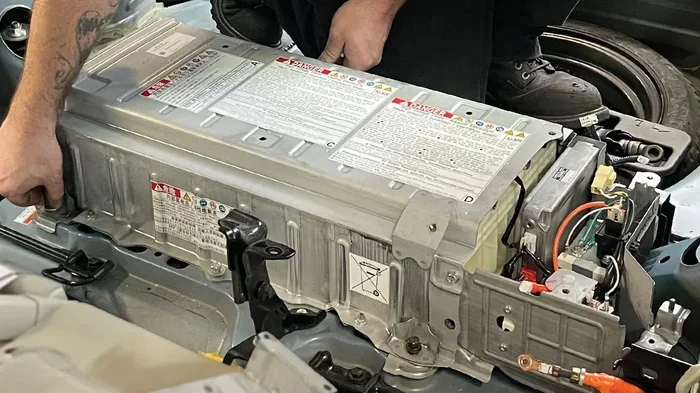
Hybrid and electric Toyota owners get extra value from the app. You can monitor your battery charge level, check your energy usage, and even find charging stations. The app also helps you track how your driving habits affect your battery life over time.
For tips on keeping your hybrid battery in top shape, check out our article on How Do I Keep My Hybrid Battery Healthy.
Frequent Travelers and Commuters
If you drive long distances or commute daily, the app’s navigation, traffic updates, and roadside assistance features are especially useful. You also get real-time vehicle diagnostics, which helps you stay on top of maintenance without visiting the dealer every month.
Common Toyota App Features People Overlook
Here are some features that many Toyota owners don’t even know exist in the app:
- Service History: The app stores your complete service history, so you can always check what work has been done on your vehicle.
- Dealer Locator: Find the nearest Toyota service center or dealership with just a few taps.
- Push Notifications: Get instant alerts about recalls, service campaigns, and special offers from your local dealer.
- Trip Logging: The app tracks your trips and provides data on fuel economy and driving patterns.
- Remote Horn and Lights: Use the app to honk your horn or flash your lights to locate your parked vehicle.
- Geofencing Alerts: Set up boundaries and get notified when your vehicle leaves a designated area.
These features might seem small on their own, but together they create a powerful toolkit for Toyota owners. The trip logging feature is especially useful if you track your mileage for work or taxes. And the geofencing alert is great for parents who want to monitor a teen driver’s habits.
When You Might NOT Need the Toyota App
Let’s be honest. The Toyota App isn’t essential for everyone. Here are situations where you might get by just fine without it.
If you prefer using a traditional key and don’t mind manual checks, the app might feel like unnecessary clutter. Some owners like the simplicity of a basic key fob and regular visits to the service center. There’s nothing wrong with that approach.
If you drive an older Toyota model that doesn’t support connected features, the app will have limited functionality. In that case, you might not get much value from downloading it. You can always check with your dealer to see if your specific model is compatible.
Also, if you’re someone who doesn’t use smartphone apps for much beyond phone calls and texting, the learning curve might not be worth it. The Toyota App does take some time to set up and explore. If that sounds like too much effort, you can skip it without any real downside.
How to Get Started with the Toyota App
Getting started with the Toyota App is straightforward. Here’s a quick walkthrough:
- Download the app from the Apple App Store or Google Play Store.
- Create an account using your Toyota credentials or register your vehicle.
- Pair your vehicle by following the on-screen instructions. You’ll need your Vehicle Identification Number (VIN).
- Explore the dashboard and familiarize yourself with the main features.
- Enable notifications so you don’t miss important alerts about your vehicle.
The setup process usually takes about 10 to 15 minutes. Once paired, the app connects to your Toyota through a built-in cellular module or your phone’s Bluetooth connection. If you run into issues during setup, don’t worry. Most connection problems are easy to resolve.
Troubleshooting Common Toyota App Issues
Like any app, the Toyota App can sometimes have hiccups. Here are the most common issues and how to fix them.
Connection Problems
If the app won’t connect to your vehicle, try these steps:
- Make sure your phone’s Bluetooth is turned on.
- Check that your vehicle’s connected services are active.
- Restart the app and try again.
- If the problem persists, you may need to factory reset your Hybrid Connect system. Our guide on How Do I Factory Reset Hybrid Connect walks you through the process step by step.
Connection issues are usually temporary and don’t indicate a serious problem. Most of the time, a simple restart fixes everything.
Login and Account Issues
Forgot your password? No worries. Use the “Forgot Password” link on the login screen. You’ll receive an email with reset instructions. If you’re still having trouble, clearing your app cache or reinstalling the app often resolves login issues.
App Crashes or Freezes
Make sure you have the latest version of the app installed. Developers release updates regularly to fix bugs and improve performance. If the app keeps crashing, try uninstalling and reinstalling it. Also, check that your phone has enough storage space.
Toyota App vs. Traditional Key Fob: What’s the Difference?
Some owners wonder whether the Toyota App replaces the need for a traditional key fob. The short answer is no. The app works alongside your key fob, not instead of it. You still need your physical key or fob for most day-to-day functions.
However, the app adds a layer of convenience that a key fob alone can’t match. With the app, you can control features from anywhere with internet access. A key fob only works within a limited range, usually about 30 to 50 feet. The app extends that range to virtually anywhere in the world.
If you’re having issues with your key fob or immobilizer system, the app can sometimes help you diagnose the problem. For more on immobilizer troubleshooting, check out our article on How Do I Fix My Immobiliser Problem.
Is the Toyota App Worth It?
After looking at all the features, the big question remains: is it worth it? The answer depends on your needs and preferences.
If you value convenience and want to stay connected to your vehicle, the Toyota App is absolutely worth it. It’s free, easy to use, and packed with features that most people don’t even know about. The remote start, vehicle tracking, and maintenance alerts alone justify the download.
On the other hand, if you’re a minimal-tech user who prefers simplicity, you might not find it essential. The app won’t hurt anything if you don’t use it, but it also won’t add much value if you ignore its features.
The bottom line is this: download the app, explore it for a week, and decide for yourself. Since it’s free, there’s no reason not to try it.
Final Thoughts on the Toyota App
The Toyota App is a powerful tool that many owners underutilize. From remote start to maintenance tracking, it offers real value for daily driving and long trips alike. Most people miss the deeper features like trip logging, geofencing alerts, and roadside assistance integration. Taking a few minutes to explore these tools can genuinely improve your ownership experience.
Whether you’re a new Toyota owner or have been driving for years, the app deserves a spot on your phone. It’s free, it’s convenient, and it keeps you connected to your vehicle in ways that weren’t possible just a few years ago. Give it a try, and you might be surprised at how much you end up using it.
Frequently Asked Questions
Is the Toyota App free to download?
Yes, the Toyota App is completely free to download from both the Apple App Store and Google Play Store. There are no hidden fees or subscription costs for the basic features. Some advanced connected services may require a paid plan depending on your vehicle model and year.
Can I use the Toyota App with any Toyota model?
The Toyota App works best with newer Toyota models that have built-in connected services. Older models may have limited or no compatibility. Check with your Toyota dealer to confirm whether your specific vehicle supports the app’s features. You can also visit our guide on Can I Start My Toyota Highlander With A Key for model-specific details.
Does the Toyota App drain my phone battery?
The app uses a small amount of battery in the background, but it shouldn’t cause significant drain. If you notice excessive battery usage, you can adjust the app’s notification settings or limit background activity in your phone’s settings. Keeping the app updated also helps optimize battery performance.
Can I use the Toyota App outside the United States?
The Toyota App works in most countries where Toyota connected services are available. However, some features may be limited or unavailable outside the U.S. If you travel frequently, check the app’s coverage map or contact Toyota customer support for details on international availability.
What should I do if the Toyota App won’t connect to my car?
Start by checking your phone’s Bluetooth and internet connection. Restart the app and try again. If the problem continues, you may need to reset your vehicle’s connected services system. For step-by-step help, see our article on How Do I Factory Reset Hybrid Connect. Most connection issues are resolved with a simple restart.
Do I need a data plan to use the Toyota App?
You need an active internet connection on your phone to use the Toyota App, whether through Wi-Fi or cellular data. Your vehicle also needs a working connected services subscription for full functionality. The app itself doesn’t require a separate data plan, but your car’s connected services plan may have its own requirements.