How Do I Remote Start My Toyota RAV4 Without the App
You can remote start your Toyota RAV4 without the app by using your key fob, the built-in remote start button, or aftermarket devices. This guide walks you through every method step by step, so you can heat or cool your vehicle before you get in. Whether you have a standard RAV4 or a RAV4 Hybrid, these techniques work reliably.
There is nothing quite like stepping into a warm Toyota RAV4 on a freezing morning or a cool one after a long day at work. Remote start makes that possible, and you do not need the Toyota app to do it. Many RAV4 owners do not realize that their vehicle has built-in ways to start the engine from a distance. Whether you lost your phone, your app is glitching, or you simply prefer a low-tech solution, this guide covers every method available to you.
We will walk through each approach in plain language. You will learn how to use your key fob, what buttons to press, and what to do if things do not work the first time. We also cover hybrid models, aftermarket add-ons, and common mistakes people make. By the end, you will feel confident starting your RAV4 remotely every single time.
Key Takeaways
- Key Fob Method: Most Toyota RAV4 models let you remote start using the key fob alone, no app required.
- Built-In Start Button: Many RAV4 trims include a physical remote start feature you can activate directly.
- Aftermarket Options: Standalone remote start systems offer extra flexibility if your RAV4 lacks factory support.
- Hybrid Models Work Too: The RAV4 Hybrid and RAV4 Prime support remote start with a few extra considerations.
- Smart Key System: Understanding your Toyota Smart Key system helps you troubleshoot when remote start fails.
📑 Table of Contents
- Why Remote Start Matters for Your Toyota RAV4
- Method 1: Remote Start Using Your Key Fob
- Method 2: Using the Built-In Remote Start Button
- Method 3: Aftermarket Remote Start Systems
- Remote Start for RAV4 Hybrid and Prime Models
- Common Mistakes to Avoid When Remote Starting
- Quick Tips for the Best Remote Start Experience
- Final Thoughts
Why Remote Start Matters for Your Toyota RAV4
Remote start is more than a luxury. It is a practical tool that improves your daily routine. In cold climates, warming up your engine and defrosting the windshield before you drive adds a layer of safety. In hot regions, cooling down the cabin protects your dashboard and makes the ride comfortable from the moment you sit down.
Here are the key reasons RAV4 owners use remote start:
- Climate control: Preheat or pre-cool your cabin before you arrive.
- Defrosting: Clear ice and fog from windows without waiting.
- Engine warm-up: Let the oil circulate and the engine reach optimal temperature.
- Convenience: Start the car from inside your home or office.
- Security: Some systems allow you to lock the doors while the engine runs.
The Toyota RAV4 comes with several ways to activate remote start. The method you choose depends on your model year, trim level, and whether you have the Toyota Smart Key system. Let us explore each option below.
Method 1: Remote Start Using Your Key Fob
The most common way to remote start a Toyota RAV4 without the app is through the key fob. Nearly every RAV4 model year supports this feature, though the exact steps vary slightly depending on the generation.
How to Remote Start With the Key Fob
Follow these steps to start your RAV4 using the physical key fob:
- Make sure you are within range of the vehicle (usually within 100 feet).
- Press the lock button on the key fob to secure all doors.
- Immediately press the remote start button (often marked with a circular arrow or a car icon).
- Hold the button for two to three seconds until the headlights flash and the engine turns over.
- Check that the engine is running by looking at the instrument cluster or listening for idle noise.
Your RAV4 will now run for a set period, typically 10 to 15 minutes. You can extend this by repeating the process if your model allows it. When you are ready to drive, approach the vehicle with the fob inside and press the push button start as normal.
Key Fob Troubleshooting Tips
If your key fob remote start does not work, try these quick fixes:
- Replace the fob battery: A weak CR2032 or CR2025 battery is the most common cause of failure.
- Stand closer to the vehicle: Range drops significantly when the battery is low.
- Check the fob signal: Make sure no other electronic device is interfering with the fob frequency.
- Re-sync the fob: Some models require you to re-pair the fob after a battery change.
For more details on key fob operations and Toyota vehicles, check out our article on Can I Start My Toyota Highlander With A Key. The process is very similar across Toyota models.
Method 2: Using the Built-In Remote Start Button
Some Toyota RAV4 trims come equipped with a dedicated remote start feature that does not rely on the key fob at all. This method uses a physical button or a sequence of buttons on the console or steering wheel area.
Which RAV4 Trims Support This?
Factory remote start availability depends on your trim and model year. Higher trims like the XLE, XSE, and TRD Off-Road often include this feature as standard or as part of a convenience package. If your RAV4 has a push button start system and a lock button on the door panel, there is a good chance it supports built-in remote start.
How to Activate the Built-In System
The exact procedure varies by model year, but here is the general process:
- Enter the vehicle and close all doors.
- Press the brake pedal and hold it.
- Press the engine start/stop button without pressing the remote start button yet.
- Within a few seconds, press and hold the remote start button on the console.
- The engine should start, and the indicator light will confirm the system is active.
Always refer to your Toyota owner’s manual for the exact sequence for your specific model year. The manual will also tell you how long the engine runs and how to cancel the remote start session.
Understanding how the Toyota Smart Key system interacts with remote start is important. The Smart Key system uses a transponder chip inside the fob to communicate with the vehicle. When you remote start, the system verifies the fob is present before allowing the engine to crank. This is a security feature designed to prevent theft.
Method 3: Aftermarket Remote Start Systems
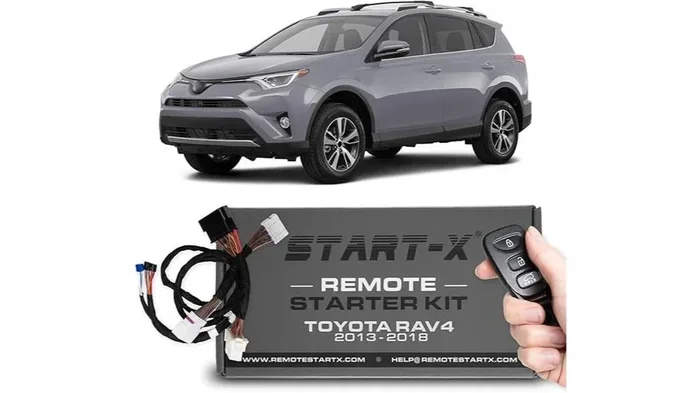
If your RAV4 does not have factory remote start or if you want more features, an aftermarket remote start system is a great option. These devices are installed under the dashboard and connect directly to the vehicle’s ignition and engine systems.
Popular Aftermarket Options
Here are some well-known brands and systems that work with the Toyota RAV4:
- Compustar: Offers long-range remote start with smartphone integration.
- Viper: Known for reliable installation and robust security features.
- Avital: A budget-friendly option with solid basic functionality.
- Pandora: Includes smartphone app control as a bonus feature.
What to Consider Before Buying
Before purchasing an aftermarket system, keep these factors in mind:
- Compatibility: Make sure the system is compatible with your RAV4 model year and engine type.
- Installation complexity: Some systems require professional installation, especially for hybrid models.
- Warranty implications: Aftermarket electronics may affect your Toyota warranty if not installed correctly.
- Range: Standard systems offer 500 to 3,000 feet of range; premium models go even further.
Having an aftermarket system installed at a Toyota dealership or a trusted auto shop ensures proper integration. If you are unsure whether an aftermarket device will void your warranty, consult your dealer. For more information on Toyota service options, you can read our article on Can I Take My Toyota To Any Dealership For Warranty Work.
Remote Start for RAV4 Hybrid and Prime Models
The RAV4 Hybrid and RAV4 Prime have unique considerations when it comes to remote start. These models use a combination of a gasoline engine and electric motors, and the remote start system must manage both power sources carefully.
How Hybrid Remote Start Works
When you remote start a RAV4 Hybrid, the gasoline engine typically runs first to warm the cabin. The electric motor may also engage depending on the temperature and battery charge level. The system is designed to be gentle on the hybrid battery and the engine during a remote start session.
Here are a few things to keep in mind with hybrid models:
- Battery charge: The hybrid battery must have enough charge to support electric motor operation during remote start.
- Running time: Remote start sessions on hybrids may be shorter than on gas-only models to protect the battery.
- Climate impact: Using remote start extensively in very cold weather can reduce the overall hybrid battery range.
If you own a RAV4 Prime (the plug-in hybrid), you can also pre-condition the vehicle while it is still plugged in. This means you can heat or cool the cabin without draining the battery, and the engine will start only when needed for driving. This is one of the best features of the Prime trim.
Common Mistakes to Avoid When Remote Starting
Even experienced RAV4 owners make mistakes when using remote start. Avoiding these common errors will save you time and frustration.
Mistake 1: Leaving the Vehicle Running Unattended Too Long
Most factory remote start systems automatically shut off after 10 to 15 minutes. If your system does not, do not leave the engine running for extended periods. This wastes fuel and can trigger the check engine light or emissions codes.
Mistake 2: Forgetting to Lock the Doors
Always lock the doors before remote starting. An unlocked vehicle with the engine running is an invitation for theft. The lock button on the fob is your first step every time.
Mistake 3: Ignoring the Key Fob Battery
A dying key fob battery will cause remote start to fail without warning. Replace the battery at least once a year, or sooner if you notice reduced range. For more on maintaining your key fob and vehicle electronics, see our guide on Can I Drive My Toyota Highlander Without A Key Fob.
Mistake 4: Remote Starting in Enclosed Spaces
Never remote start your RAV4 in a closed garage. Carbon monoxide buildup is a serious and potentially deadly hazard. Always start the vehicle in an open area with proper ventilation.
Mistake 5: Assuming All Models Have Remote Start
Not every RAV4 trim includes factory remote start. Base models and older model years may lack this feature entirely. Check your owner’s manual or confirm with your dealer before assuming the function is available.
Quick Tips for the Best Remote Start Experience
Here are some expert tips to get the most out of your RAV4 remote start system:
- Pre-program your settings: Some RAV4 models let you set the temperature before you leave the vehicle. Check the climate control menu for remote start presets.
- Use the app as a backup: Even if you prefer not to use the app daily, having it installed gives you access to features like remote lock, unlock, and vehicle status checks.
- Keep the fob in a safe place: If you lose your fob, you will not be able to remote start or drive the vehicle normally. Consider a spare fob for emergencies.
- Seasonal maintenance: In winter, make sure your engine oil is rated for cold weather. Remote start helps, but the right oil protects the engine better.
- Test regularly: Try remote start once a month to confirm the system is working. It is much better to discover an issue on a mild day than on a freezing morning.
If you also want to manage other aspects of your RAV4 without the app, you might be interested in our article about Can Two People Use The Toyota App For The Same Car. It covers shared access and account management that complements your remote start setup.
Final Thoughts
Remote starting your Toyota RAV4 without the app is simple, practical, and accessible to nearly every RAV4 owner. Whether you use the key fob method, the built-in console button, or an aftermarket system, you have options that work without relying on a smartphone application. The key is understanding your specific model and following the correct steps for your trim level.
Take a few minutes to read your owner’s manual and test each method in a safe environment. Once you know how your RAV4 responds, you will never have to step into a freezing or sweltering car again. Remote start is one of those small features that makes a big difference in your daily driving experience.
Keep your key fob battery fresh, always lock the doors before starting, and never leave the vehicle running in an enclosed space. Follow these simple habits, and your RAV4 remote start system will serve you reliably for years to come.
Frequently Asked Questions
Can I remote start my Toyota RAV4 with just the key fob?
Yes, most Toyota RAV4 models support remote start using the key fob alone. Press the lock button first, then press and hold the remote start button for two to three seconds. The engine should start within a few seconds if the fob battery is strong.
Does the Toyota app cost money to use for remote start?
The Toyota app itself is free to download, but some features require a subscription to Toyota Connected Services. However, you do not need the app at all to remote start your RAV4, as the key fob and built-in methods work independently.
Can I remote start a RAV4 Hybrid?
Yes, the RAV4 Hybrid supports remote start. The system manages both the gasoline engine and the electric motor during a remote start session. Just make sure the hybrid battery has sufficient charge for the best results.
How long does a remote start session last on a Toyota RAV4?
A factory remote start session typically lasts 10 to 15 minutes. After that, the engine automatically shuts off. You can usually repeat the process to extend the running time if needed.
Will an aftermarket remote start void my Toyota warranty?
It depends on the installation and your specific warranty terms. Having a system installed by a certified professional or at a Toyota dealership minimizes the risk of warranty issues. Always check with your dealer before installation.
What should I do if my RAV4 remote start does not work?
First, check the key fob battery and replace it if needed. Make sure you are within range of the vehicle and that all doors are locked. If the problem persists, consult your owner’s manual or visit a Toyota service center for diagnosis.
=== CONCLUSION ===
Remote starting your Toyota RAV4 without the app is straightforward once you know the right method. The key fob approach works for almost every RAV4, while the built-in console button offers a backup for models that support it. Hybrid and Prime owners have additional options to consider, and aftermarket systems provide even more flexibility when factory features fall short.
By avoiding common mistakes and following the tips in this guide, you will enjoy a comfortable, convenient driving experience every time you approach your RAV4. Keep your fob charged, your doors locked, and your engine running on your terms. The road ahead is warmer and more comfortable with a working remote start system.