How to Turn Off Daytime Running Lights on Kia Forte
Disabling daytime running lights on a Kia Forte is straightforward once you know the right method for your specific model year and trim level. Whether you use the headlight switch, the instrument cluster settings, or a fuse removal approach, this guide walks you through every option. We also cover safety considerations, battery impact, and common mistakes to avoid when turning off DRL on your Kia Forte.
This is a comprehensive guide about How to Turn Off Daytime Running Lights on a Kia Forte.
Key Takeaways
- Multiple Methods Exist: You can turn off daytime running lights on a Kia Forte using the headlight knob, the settings menu, or by removing the DRL fuse depending on your model year.
- Know Your Trim Level: Different Kia Forte trims may have different DRL configurations, so identifying your exact trim is the first step.
- Battery Impact Is Minimal: Leaving DRL on does not significantly drain your battery, but turning them off can extend bulb life slightly.
- Legal Considerations Matter: Some regions require DRL to remain active, so check local laws before disabling them.
- Dashboard Warnings Are Normal: When you turn off DRL, you may see a warning indicator on the instrument cluster that is expected and harmless.
- Professional Help Is Optional: Most owners can complete this process at home with basic tools and a few minutes of time.
[FEATURED_IMAGE_PLACEHOLDER]
How to Turn Off Daytime Running Lights on Kia Forte
If you drive a Kia Forte and find the daytime running lights annoying or unnecessary, you are not alone. Many owners want to know how to disable daytime running lights on their vehicles. The good news is that this is a task most car owners can handle themselves without visiting a dealership or mechanic. In this guide, we walk you through every method available for turning off DRL on a Kia Forte, no matter what year or trim you own.
Daytime running lights, commonly called DRL, are designed to make your vehicle more visible to other drivers during daylight hours. They are a safety feature that came standard on most modern cars. However, some Kia Forte owners prefer to turn them off for personal reasons, such as reducing glare on other drivers or simply preferring the look of the vehicle without the lights on during the day. Whatever your reason, this guide has you covered.
Before we dive into the methods, it is important to understand that the approach you use depends on your specific Kia Forte model year and trim level. Newer models from 2019 onward often have digital settings menus that make disabling DRL easy. Older models may require a different approach. We will cover all of these scenarios so you can find the right solution for your vehicle.
Understanding Daytime Running Lights on the Kia Forte
Before you attempt to turn off daytime running lights, it helps to understand how they work on the Kia Forte. DRL systems are integrated into the vehicle’s lighting system and operate automatically when the engine is running. They are not the same as your low-beam headlights. Instead, they use a lower power setting to provide visibility without draining too much energy.
How DRL Works on the Kia Forte
On most Kia Forte models, the DRL system activates automatically when you start the engine. The lights stay on as long as the vehicle is running and the parking brake is not engaged. They turn off automatically when you activate the low-beam headlights. This means that when you drive at night and flip the headlight switch, the DRL system disengages and your full headlights take over.
The Kia Forte uses LED DRLs on newer models and halogen bulbs on older ones. LED DRLs consume less power and last longer, but they can still be left on throughout your daily commute. Understanding this basic operation is key because it tells you why simply flipping the headlight switch does not always turn off DRL on newer vehicles.
Why Owners Want to Disable DRL
There are several reasons Kia Forte owners look for ways to turn off daytime running lights. Some common motivations include:
- Reducing battery wear: Even though DRLs use minimal power, some owners prefer to minimize any electrical draw when the vehicle is parked.
- Personal preference: Some drivers simply do not like the appearance of DRLs during the day.
- Reducing glare: In certain driving conditions, DRLs can create glare for oncoming traffic, especially on vehicles with higher-mounted DRLs.
- Bulb longevity: Turning off DRLs can extend the life of your headlight bulbs, saving you money on replacements.
- Regional regulations: In some areas, DRLs are not required, and owners prefer to keep their vehicle lighting minimal during the day.
No matter your reason, knowing the correct method for your specific Kia Forte is essential. Let us now move into the step-by-step methods.
Method 1: Using the Headlight Switch to Disable DRL
The simplest way to turn off daytime running lights on a Kia Forte is through the headlight switch. This method works on most model years, but the exact steps vary slightly depending on whether your Forte has a manual or automatic headlight system.
Steps for Models with a Manual Headlight System
If your Kia Forte has a manual headlight system, follow these steps:
- Start the engine and let the DRL system activate.
- Locate the headlight switch on the left side of the steering column.
- Rotate the switch to the first position (parking lights or auto position, depending on your model).
- Observe the instrument cluster. The DRL indicator should remain off, and your low-beam headlights will activate at reduced power.
- In some cases, you may need to rotate the switch fully to the off position to completely disable DRL.
Important note: On some Kia Forte trims, rotating the headlight switch to the off position does not fully disable DRL. The lights may remain on in a dimmed state. If this happens, try Method 2 instead.
Steps for Models with Automatic Headlights
For Kia Forte models equipped with automatic headlights, the process is slightly different:
- Start the engine and allow the DRL system to activate.
- Locate the headlight switch and ensure it is set to the auto position.
- Turn the headlight switch to the off position by rotating it fully counterclockwise.
- Wait a few seconds and check if the daytime running lights turn off.
- If they remain on, you may need to use the instrument cluster settings menu (see Method 2).
Some Kia Forte models with automatic headlights have a feature that keeps DRL active even when the headlight switch is off. This is a design choice by Kia to maintain visibility. If this is the case for your vehicle, do not worry. We have additional methods below that will work.
Method 2: Using the Instrument Cluster Settings Menu
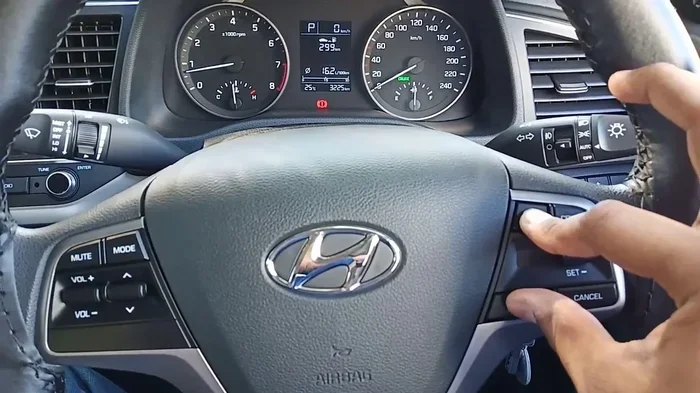
Newer Kia Forte models, particularly those from 2019 and later, come with digital instrument clusters that allow you to adjust vehicle settings directly from the steering wheel controls. This is often the easiest way to turn off daytime running lights without any tools.
Step-by-Step Guide for Digital Cluster Models
Follow these steps to disable DRL through the settings menu:
- Start your Kia Forte and ensure the vehicle is in park.
- Press the steering wheel control buttons to navigate to the Settings menu on the instrument cluster display.
- Scroll through the options until you find the Lighting or Vehicle Settings section.
- Look for an option labeled Daytime Running Lights, DRL, or Auto Headlight Settings.
- Select the option and toggle it to Off.
- Confirm the change and exit the menu.
On some Kia Forte trims, the DRL setting may be nested under a submenu called Vehicle Preferences or Display Settings. Take your time browsing through the options. The exact menu layout depends on your model year and whether your Forte has a base or premium instrument cluster.
What to Do If the Setting Is Not Available
If you cannot find a DRL toggle in the settings menu, your specific Kia Forte trim may not offer a digital disable option. In this case, you have two remaining options. You can use the headlight switch method described above, or you can proceed to Method 3, which involves the fuse box. Some trims, especially base models, do not include a DRL settings toggle in the digital cluster because the feature is controlled entirely by the vehicle’s wiring and lighting module.
It is also worth noting that some Kia Forte models sold in certain markets do not have DRL systems at all. If your vehicle was purchased in a region where DRL is not standard equipment, you may not have this feature to begin with. Check your owner’s manual to confirm whether your Kia Forte includes factory DRLs.
Method 3: Removing the DRL Fuse
If the headlight switch and settings menu methods do not work for your Kia Forte, removing the DRL fuse is a reliable alternative. This method physically disconnects the DRL circuit, preventing the lights from activating. However, this approach should be used with caution.
Locating the Fuse Box
The fuse box on a Kia Forte is typically located in two places:
- Under the hood: The engine compartment fuse box is on the left side of the engine bay, near the battery. It houses fuses for major electrical systems including the lighting circuit.
- Under the dashboard: The interior fuse box is located on the left side of the dashboard, accessible by removing a small panel to the left of the steering column.
For DRL-related fuses, you will most likely need to check the under-hood fuse box first.
Identifying the Correct Fuse
Every Kia Forte fuse box has a fuse diagram printed on the lid or in the owner’s manual. Look for a fuse labeled DRL, Daytime Running Lights, Headlight, or Lighting. The exact label varies by model year. Common fuse locations for DRL on the Kia Forte include:
- Fuse 15 in the under-hood box (common for 2014-2018 models)
- Fuse 22 in the under-hood box (common for 2019 and newer models)
- A dedicated DRL fuse in the interior box for certain trims
Use a fuse puller or a pair of needle-nose pliers to gently remove the fuse. Once removed, start the engine and verify that the daytime running lights are no longer active.
Important Warnings About Fuse Removal
Removing the DRL fuse has some important implications you should be aware of:
- Other lights may be affected: Some Kia Forte models share fuses between DRL and other lighting circuits. Removing the wrong fuse could disable parking lights or tail lights.
- Dashboard warnings: Your instrument cluster may display a warning light indicating a fuse or lighting system fault. This is normal and does not indicate a real problem.
- Resale value: If you plan to sell your Kia Forte, having a fuse removed may raise questions during a pre-sale inspection.
- Reversibility: Simply reinserting the fuse restores DRL function, so this method is fully reversible.
Always double-check the fuse diagram before removing any fuse. If you are unsure, consult your owner’s manual or ask a knowledgeable friend for help. Taking a photo of the fuse box layout before removing anything can also be very helpful.
Safety Considerations When Disabling DRL
Turning off daytime running lights on your Kia Forte comes with safety implications that every owner should understand. DRLs were engineered by Kia and automotive safety organizations to improve vehicle visibility during daylight hours. Disabling this feature changes how your vehicle appears to other drivers on the road.
Impact on Road Visibility
Studies have shown that vehicles with DRLs are easier to spot during daytime driving, especially in overcast conditions, at dawn, and at dusk. When you turn off DRLs on your Kia Forte, your vehicle becomes slightly less visible to other drivers. This does not mean driving without DRLs is dangerous, but it is something to be mindful of.
Some drivers compensate for disabled DRLs by using their low-beam headlights more frequently during the day. This is a perfectly acceptable practice and can actually improve your visibility in addition to making your car more visible to others.
Legal Requirements by Region
The legality of disabling daytime running lights varies by country, state, and province. In the United States, DRLs are not federally required, so disabling them is generally legal. However, some states and municipalities may have specific regulations regarding vehicle lighting. Before making any changes to your Kia Forte’s lighting system, it is a good idea to check your local traffic laws.
In Canada and many European countries, DRLs are mandatory on new vehicles. While this does not necessarily mean you will be fined for disabling them on an older vehicle, it is worth being aware of regional requirements. If you frequently drive across state or national borders, keeping DRLs enabled may be the simplest approach.
Impact on the Battery and Electrical System
One common concern among Kia Forte owners is whether leaving DRLs on drains the battery. The short answer is no, not in any meaningful way. Daytime running lights on the Kia Forte are designed to operate at low power and have minimal impact on the vehicle’s electrical system. However, if you leave your vehicle parked for extended periods with the engine off but the DRL circuit still active, there is a small chance of battery drain over time.
If you are concerned about battery health, you can always use the methods described in this guide to turn off DRL when the vehicle is not in use. For more information about car lights and battery drain, you may want to read about do car lights on auto drain the battery on our site.
Common Mistakes When Trying to Turn Off DRL
Many Kia Forte owners run into frustration when trying to disable daytime running lights because they make common mistakes. Avoiding these pitfalls can save you time and prevent unnecessary trips to the dealership.
Mistake 1: Assuming the Headlight Switch Always Works
The most common mistake is assuming that turning the headlight switch to off will disable DRL. On many newer Kia Forte models, the DRL system operates independently of the headlight switch. The lights stay on even when the headlights are off. Always check your owner’s manual to understand how DRL interacts with the headlight system on your specific model year.
Mistake 2: Pulling the Wrong Fuse
Another frequent error is removing the wrong fuse from the fuse box. The Kia Forte fuse box contains dozens of fuses, and many of them control different lighting functions. Pulling the wrong fuse could disable your parking lights, tail lights, or turn signals. Always verify the fuse label and diagram before removing anything.
Mistake 3: Ignoring Dashboard Warning Lights
After disabling DRL, you may see a warning light on the instrument cluster. This can be alarming if you are not expecting it. Most of the time, this warning is normal and simply indicates that the DRL system has been manually overridden. However, if the warning persists or is accompanied by other issues, it is wise to have the vehicle inspected.
Mistake 4: Not Checking the Trim Level
Different Kia Forte trims have different DRL configurations. The base LX model may have a simpler DRL system than the premium EX or GT trims. Before attempting any modification, confirm your trim level and research the specific DRL setup for that trim. This information is always in the owner’s manual.
Expert Tips for Managing DRL on Your Kia Forte
Here are some expert tips that can help you get the most out of your Kia Forte lighting system:
- Keep your owner’s manual handy: The manual contains model-specific information about DRL operation, fuse locations, and settings menus that are not always obvious.
- Use the auto headlight feature: If you find DRLs bothersome but still want good visibility, setting your headlights to auto mode can provide a balanced solution.
- Consider LED upgrades: If you do keep DRLs enabled, upgrading to LED bulbs can reduce power consumption and improve brightness.
- Clean your DRL lenses regularly: Dirty DRL lenses reduce their effectiveness and can make your vehicle less visible to other drivers.
- Test after any changes: Always test your lighting system after making any modifications to ensure all lights are working correctly.
If you are also interested in how long your vehicle can sit without being driven or how to maintain your battery health, check out our article on how long groceries can sit in a car for related vehicle care tips.
Conclusion
Turning off daytime running lights on a Kia Forte is a task that most owners can complete in just a few minutes. Whether you use the headlight switch method, the digital settings menu, or the fuse removal approach, the key is to know your specific model year and trim level before you begin. Each method has its advantages, and the right choice depends on your comfort level with automotive systems and your specific Forte configuration.
Always keep safety in mind when making changes to your vehicle’s lighting system. While disabling DRLs is perfectly fine for personal use, being aware of the visibility implications and local regulations is important. If you ever feel unsure about any step in the process, consulting a certified Kia technician is always a smart move.
With the information in this guide, you now have everything you need to take control of the daytime running lights on your Kia Forte. Try the method that best fits your vehicle and enjoy a customized driving experience that works for you.
Frequently Asked Questions
Can I turn off daytime running lights on any Kia Forte trim?
Most Kia Forte trims allow you to turn off daytime running lights, but the method varies by model year and trim level. Newer models with digital instrument clusters often have a settings menu option, while older models may require the headlight switch or fuse removal method. Check your owner’s manual for model-specific instructions.
Will turning off DRL drain my Kia Forte battery faster?
No, turning off daytime running lights will not drain your battery faster. In fact, disabling DRLs slightly reduces electrical draw on the system. The DRL system uses minimal power, so the difference in battery drain between having DRLs on and off is negligible in normal driving conditions.
Is it legal to disable daytime running lights on a Kia Forte?
In most regions of the United States, it is legal to disable daytime running lights on your Kia Forte. However, regulations vary by country, state, and municipality. If you frequently drive in different jurisdictions, check local traffic laws to ensure compliance. Some regions with strict vehicle safety standards may have specific requirements regarding DRL operation.
What should I do if my DRL warning light stays on after disabling DRL?
A DRL warning light on the instrument cluster after disabling daytime running lights is usually normal and indicates the system has been manually overridden. If the light persists after restarting the vehicle or if it appears alongside other warning lights, have your Kia Forte inspected by a qualified technician to rule out any electrical issues.
Can I re-enable DRL after turning them off?
Yes, re-enabling daytime running lights on your Kia Forte is simple. If you used the settings menu method, just toggle the option back to on. If you removed a fuse, simply reinsert it. If you adjusted the headlight switch, return it to the auto or on position. Your DRLs will activate again immediately when you start the engine.
Do daytime running lights affect the lifespan of my Kia Forte headlights?
Daytime running lights do reduce the total operating hours of your headlight bulbs, which can extend their lifespan. However, because DRLs operate at lower power than full headlights, the difference is minimal. If you want to maximize bulb life, turning off DRLs when they are not needed is a reasonable approach, especially on older Kia Forte models with halogen bulbs.