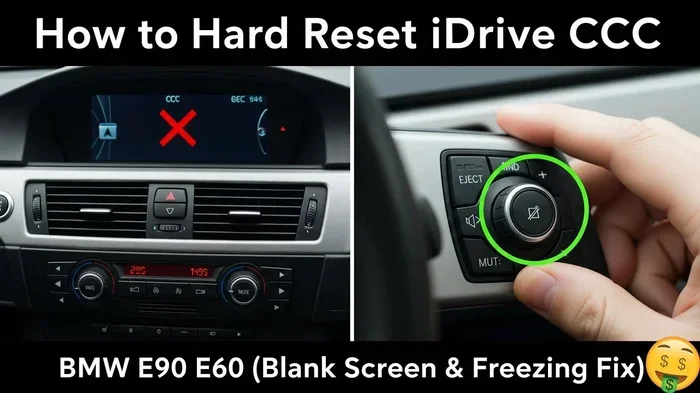
How Do I Reset My BMW Audio System Step by Step Guide
Resetting your BMW audio system is easier than you think and can solve most sound problems in minutes. Whether your screen is frozen, the audio keeps cutting out, or the iDrive is unresponsive, a simple reset often fixes everything. This step-by-step guide walks you through both soft and hard reset methods so you can get back to enjoying your music without a trip to the dealer.
Key Takeaways
- A soft reset is the safest first step and usually takes less than a minute to complete.
- A hard reset cuts power completely and can resolve deeper system glitches.
- Common audio problems like freezing, static, and no sound are often fixed with a reset.
- Preventive habits like keeping software updated can stop issues before they start.
- You do not need a dealer for most audio reset procedures.
- Know when to call a pro if the reset does not solve the problem.
📑 Table of Contents
- Why Your BMW Audio System Might Need a Reset
- How to Perform a Soft Reset on Your BMW Audio System
- How to Perform a Hard Reset on Your BMW Audio System
- Common BMW Audio Problems That a Reset Can Fix
- Preventing BMW Audio Problems in the Future
- When to Seek Professional Help for Your BMW Audio System
- Frequently Asked Questions
- Final Thoughts
Why Your BMW Audio System Might Need a Reset
Your BMW audio system is a complex piece of technology. It handles sound, navigation, Bluetooth connections, and sometimes even video playback. With all those functions running at once, things can go wrong. The screen might freeze. The sound might cut out. The whole system might stop responding to your touch.
Before you panic or book an expensive dealer appointment, try a reset. Resetting your BMW audio system clears temporary errors and refreshes the software. Think of it like restarting your phone when it acts up. Most of the time, a simple reboot solves the problem completely.
There are two main types of resets. A soft reset restarts the system without deleting any settings. A hard reset cuts power to the unit entirely. Both are safe and easy to do at home. You do not need special tools or mechanical skills. Just follow the steps in this guide and you will be back to crisp, clear sound in no time.
How to Perform a Soft Reset on Your BMW Audio System
A soft reset is the first thing you should try. It is quick, safe, and does not affect your saved settings. Most BMW audio glitches respond well to a soft reset.
Step 1: Turn Off the Ignition
Start by turning your BMW off completely. Do not just put it in accessory mode. Turn the key or press the start button until the dashboard lights go off. This ensures the audio system is fully powered down before you restart it.
Step 2: Wait 30 to 60 Seconds
Leave the car off and wait at least 30 seconds. This gives the system time to discharge any residual power. Some experts recommend waiting a full minute to be safe. This small pause is what makes the soft reset work.
Step 3: Turn the Ignition Back On
Start the car again. The BMW audio system will power back up automatically. Give it a moment to fully boot. You should see the main screen appear and hear the startup sound. Try playing music or switching to a radio station to test the system.
Step 4: Check if the Problem Is Fixed
Listen carefully. Does the sound come through clearly? Does the screen respond to your inputs? If yes, you are all set. If the problem persists, move on to the hard reset method below.
Quick Tip: If your BMW has the iDrive controller, you can also try holding it down for about 10 seconds. This forces a system restart on many BMW models. It works the same way as the ignition method but is faster.
How to Perform a Hard Reset on Your BMW Audio System
A hard reset is more thorough than a soft reset. It completely powers down the audio unit and clears deeper system errors. Use this method if the soft reset did not work or if your audio system is completely unresponsive.
Step 1: Disconnect the Negative Battery Terminal
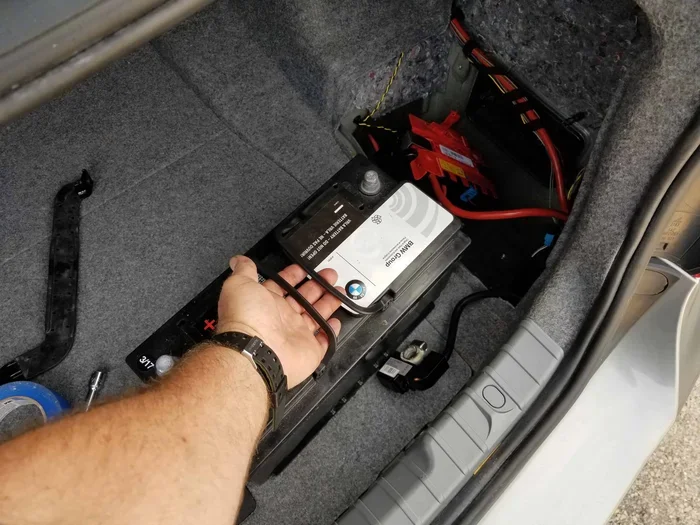
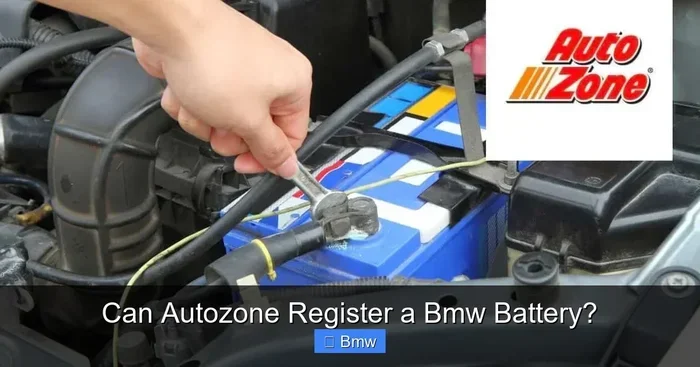
Open your hood and locate the battery. Use a wrench to loosen the nut on the negative terminal. Carefully lift the cable off the terminal and tuck it away so it cannot touch the battery again. This cuts all power to the electrical system, including the audio unit.
Important: If you have a BMW with a battery maintainer or smart charger connected, disconnect that first. You do not want it to keep powering the system while you work.
Step 2: Wait at Least 5 Minutes
Unlike the soft reset, you need to wait longer for a hard reset. Five minutes is the minimum. This allows the capacitors in the audio unit to fully discharge. Some BMW models have complex audio computers that need extra time to reset. Waiting a full 10 minutes does not hurt.
Step 3: Reconnect the Battery Terminal
Place the negative cable back onto the terminal. Tighten the nut firmly with your wrench. Make sure the connection is snug. A loose connection can cause electrical issues that mimic audio problems.
Step 4: Start the Car and Test the System
Turn the ignition on and start the engine. The BMW audio system will take a bit longer to boot after a hard reset. You may see the screen flicker or hear clicking sounds. This is normal. Let the system fully initialize before testing.
Once the main screen appears, check your audio. Play a song, switch to the radio, and test the Bluetooth connection if you use it. Everything should work smoothly now.
Quick Tip: After a hard reset, your BMW may need a few minutes to relearn certain settings. The clock might reset, and your radio presets may return to defaults. Simply reprogram these once the system is stable.
Common BMW Audio Problems That a Reset Can Fix
Not sure if your problem warrants a reset? Here are the most common BMW audio issues that a simple reset can solve.
Frozen or Unresponsive Screen
The iDrive screen goes black or stops responding to taps and swipes. This happens when the system gets overloaded with background processes. A soft reset clears the memory and brings the screen back to life.
Audio Cutting Out or Static Noise
If your music keeps cutting in and out or you hear a buzzing or static sound, the audio processor may be glitching. A reset refreshes the signal processing and usually eliminates the noise.
No Sound at All
You turn the volume up but hear nothing. This can happen after a software update or if the system enters an error state. A hard reset often restores full audio output.
Bluetooth Connectivity Issues
Your phone will not pair or keeps disconnecting from the audio system. A reset clears the Bluetooth cache and forces the system to re-establish connections properly.
Navigation Audio Glitches
The directions come through but the voice guidance sounds distorted or does not play at all. Resetting the system refreshes the navigation audio module and fixes the problem.
Keep in mind that if the problem started after you installed a new accessory or made changes to the wiring, a reset might not help. In those cases, the issue is physical, not software-related.
When a Reset Will Not Help
A reset fixes software and temporary electrical issues. It does not fix blown speakers, damaged wiring, or faulty hardware. If you hear rattling, notice physical damage to the speakers, or see visible wear on the wiring, you need a different kind of repair. Similarly, if your car shows a warning light on the dashboard along with audio problems, check the engine malfunction light or other indicators before assuming it is just an audio issue.
Preventing BMW Audio Problems in the Future
The best way to deal with audio problems is to prevent them in the first place. A few simple habits can keep your BMW audio system running smoothly for years.
Keep Your Software Updated
BMW releases software updates for the iDrive and audio systems. These updates fix known bugs and improve performance. Check for updates at your dealer or through the BMW Connected app if your model supports it. Updating is free and takes only a few minutes.
Avoid Overloading the System
Running too many apps at once can freeze the audio system. Close apps you are not using. If you are using navigation and Bluetooth at the same time, give the system a moment to process both tasks before switching between them.
Use Quality Audio Files
Low-quality or corrupted audio files can cause the system to stutter or crash. Stick to well-formatted files and avoid corrupted downloads. If you stream music, make sure your Bluetooth connection is stable.
Protect the System from Power Surges
If you add aftermarket accessories like amplifiers or subwoofers, use a power surge protector. A sudden voltage spike can damage the audio unit and cause problems that no reset can fix.
Regular Maintenance Checks
Just like you check your tire pressure or change your oil, give your audio system a quick check now and then. Make sure all connections are secure. Listen for any unusual sounds. Catching small issues early prevents bigger problems later.
Some car owners also ask about resetting other components when they work on the audio system. For example, if you have recently replaced a battery or disconnected cables, you may need to reset your key fob as well. The process is simple and similar in concept to resetting the audio system. Always refer to your owner manual for model-specific instructions.
When to Seek Professional Help for Your BMW Audio System
Most audio problems respond well to a reset. But some issues need a trained technician. Here is how to know when it is time to call in the experts.
The Reset Does Not Work
If you have tried both a soft reset and a hard reset and the problem persists, there may be a deeper hardware issue. A professional can run diagnostic tests that identify the exact cause of the problem.
You See Error Codes on the Display
Your BMW may display specific error codes related to the audio system. These codes point to particular components that need inspection or replacement. You can look up these codes yourself or bring the car to a specialist.
Physical Damage Is Visible
If you notice rattling speakers, visible cracks in the audio unit, or damaged wiring, do not try to fix it yourself. Physical damage requires professional repair or replacement of parts.
The Problem Keeps Coming Back
A reset should fix the problem for good. If the same audio issue keeps returning, there is an underlying problem that needs proper diagnosis. This could be a failing amplifier, a loose connection, or a software issue that needs a full system reflash.
Your Car Is Still Under Warranty
If your BMW is under warranty, check with your dealer before attempting any major fixes. Some warranty work must be done at an authorized dealer to keep the warranty valid. You can also check your warranty status using your VIN number before scheduling service.
When you do visit a professional, ask about their experience with BMW audio systems. Not every mechanic is familiar with BMW iDrive technology. A specialist will have the right tools and knowledge to get the job done right.
Frequently Asked Questions
How long does it take to reset a BMW audio system?
A soft reset takes less than two minutes. A hard reset takes about 10 to 15 minutes including the wait time. The actual reset process is very quick, but the waiting period is important for the system to fully discharge and restart properly.
Will resetting my BMW audio system delete my saved stations and settings?
A soft reset will not delete any settings. A hard reset may reset your radio presets and clock to default values. Your saved Bluetooth pairings and navigation preferences usually remain intact.
Can I reset my BMW audio system while driving?
No. You should always perform a reset when the car is parked and the ignition is off. Attempting to reset the system while driving is dangerous and can cause you to lose control of the audio or navigation features at an unsafe time.
Do I need any special tools to reset my BMW audio system?
No special tools are needed for a soft reset. For a hard reset, you only need a basic wrench to disconnect the battery terminal. Most people already have one in their garage. No computer or diagnostic equipment is required.
Why does my BMW audio system keep freezing?
Frequent freezing usually means the system software needs an update or there is a background process causing conflicts. Try a soft reset first. If the problem continues, check for software updates or visit a BMW specialist for a deeper diagnostic.
Is it safe to disconnect the battery to reset the audio system?
Yes, it is completely safe. Disconnecting the negative terminal for a few minutes will not harm your BMW. Just make sure you reconnect it properly and tighten the connection. If you are unsure, refer to your owner manual for battery disconnect procedures.
Final Thoughts
Resetting your BMW audio system is one of the easiest and most effective ways to solve common sound problems. Whether you choose a soft reset or a hard reset, the process is straightforward and does not require a trip to the dealer. Most BMW owners can fix their audio issues in under 15 minutes from their own driveway.
Start with the soft reset. It is fast and safe. If that does not work, move to the hard reset. The steps are simple and the results are usually immediate. And if neither reset solves the problem, it is time to see a professional who can diagnose deeper hardware issues.
Take care of your BMW audio system and it will take care of you. Regular maintenance, software updates, and a reset when things go wrong will keep your sound system running beautifully for years to come. Enjoy the drive and the music.