Do You Need to Do Anything After Replacing a Key Fob Battery
Most people don’t realize that replacing a key fob battery often requires a few extra steps. After a key fob battery replacement, you may need to resync, reprogram, or reset the device depending on your vehicle. This guide walks you through everything you need to do to get your remote working again.
You just popped open your key fob, swapped out the old battery, and snapped it back together. But now nothing happens when you press the buttons. Sound familiar? This is a frustrating moment for many car owners, and it happens more often than you might think. The truth is, do you need to do anything after replacing a key fob battery? The answer depends on your vehicle, the fob type, and the battery you used.
Some key fobs start working the moment you close the case. Others need a reset, a reprogram, or even a visit to a dealer. In this guide, we will walk you through every step you should take after a key fob battery replacement. You will learn how to resync your remote, troubleshoot common problems, and prevent issues before they happen. Whether you drive a Toyota, Honda, Ford, or something else, this article has you covered.
Key Takeaways
- Not every car needs extra steps: many key fobs work right away after a simple battery swap.
- Reprogramming is common: several vehicles require you to resync the fob after a battery change.
- Use the right battery type: most key fobs use a CR2032 coin cell battery.
- Reset procedures vary by brand: Toyota, Honda, Ford, and Chevrolet all have different methods.
- Troubleshooting helps: simple fixes like reinserting the battery or checking the contacts solve most issues.
- Preventive care extends life: keeping spare batteries and avoiding moisture helps your fob last longer.
📑 Table of Contents
- Why Your Key Fob Might Stop Working After a Battery Change
- Step-by-Step: What to Do Right After Replacing the Battery
- How to Reprogram and Resync Your Key Fob
- Common Problems After a Key Fob Battery Replacement
- When Should You Seek Professional Help?
- Preventive Tips to Avoid Future Key Fob Problems
- Expert Insights on Key Fob Maintenance
- Key Takeaways
- Conclusion
Why Your Key Fob Might Stop Working After a Battery Change
Replacing the battery seems simple enough. So why does the fob sometimes fail to work afterward? There are a few common reasons, and understanding them can save you a lot of stress.
Lost Internal Memory
Many modern key fobs store pairing information in a small memory chip. When you remove the old battery, that memory can reset. This means the fob forgets its connection to your car. The car’s receiver no longer recognizes the signal. This is the most common reason a fob stops working after a battery swap.
Wrong Battery Type or Brand
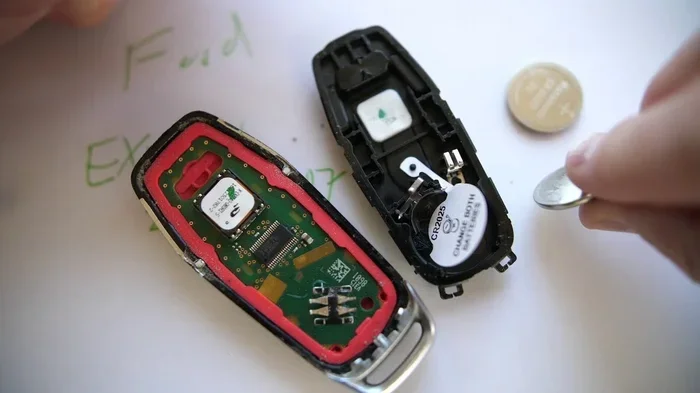
Not all batteries are created equal. Using a cheap or wrong-sized battery can cause weak signal output. Most key fobs need a CR2032 coin cell battery. If you used a different model or a low-quality brand, the fob may not have enough power to communicate with your vehicle.
Dirty or Damaged Contacts
When you open the fob case, the metal contacts inside can collect dust or develop a greenish film. This buildup blocks the electrical connection. Even with a fresh battery, a dirty contact means no signal gets through.
Static Electricity Discharge
This one surprises people. Touching the internal circuit board while changing the battery can discharge static electricity. That tiny shock can fry sensitive components. It is rare, but it does happen more often than you would expect.
Step-by-Step: What to Do Right After Replacing the Battery
Now that you know why things go wrong, let’s talk about what you should do right after a key fob battery replacement. Follow these steps in order for the best results.
Step 1: Double-Check the Battery Orientation
Before you do anything else, open the fob back up. Make sure the new battery sits in the correct direction. The positive side should face up in most fob designs. A battery put in backward will not work, and it can also drain quickly if the fob still has some power left.
Step 2: Clean the Battery Contacts
Use a dry cloth or a cotton swab to gently wipe the metal contacts inside the fob. If there is any corrosion, dip the swab in a tiny bit of white vinegar and rub gently. Let it dry completely before you insert the new battery. Clean contacts make for a strong, reliable connection.
Step 3: Press Every Button Twice
This sounds too simple, but it works. After inserting the battery, press each button on the fob twice. This helps the internal circuitry stabilize. It also lets you confirm that each button is responding before you try it on the car.
Step 4: Stand Close and Test
Go to your car and stand right next to the door. Try locking and unlocking. If it works from up close but not from across the parking lot, the battery may be weak or the fob needs reprogramming. If it does not work at all, move on to the next step.
Step 5: Try the Resync Procedure
Most vehicles have a simple resync process. We will cover the specific steps for popular brands below. But the general idea is the same: you put the car into a pairing mode and then signal the fob to reconnect.
How to Reprogram and Resync Your Key Fob
Reprogramming sounds intimidating, but it is usually straightforward. Each car brand has its own method. Here is what you need to do for the most common vehicles.
Toyota and Lexus
For most Toyota and Lexus models, insert the key into the ignition. Turn it to the “On” position without starting the engine. Press and hold the lock button on the fob for three seconds. Turn the key back to the “Off” position. Repeat this cycle three times. The doors should lock and unlock to confirm the resync worked.
Honda
Honda vehicles use a slightly different process. Turn the ignition to the “On” position. Press the lock button on the fob and hold it for five seconds. Turn the ignition off. Wait ten seconds, then repeat the whole process two more times. Honda owners report that this method works for most models from the past fifteen years.
Ford
Ford key fobs need you to cycle the ignition. Turn the key from “Off” to “On” eight times within ten seconds. The doors should lock and unlock to show the fob is in programming mode. Press any button on the fob to complete the process. Turn the key off and test the fob from a distance.
Chevrolet and General Motors
GM vehicles use the “power door lock” method. Close all doors. Insert the key and turn it to the “On” position. Press and hold the lock and unlock buttons simultaneously on the fob for fifteen seconds. Release the buttons and test the fob. This method works for most Chevrolet, Buick, and GMC models.
BMW and Luxury Brands
Luxury brands like BMW, Mercedes, and Audi sometimes require a dealer visit. However, many newer models let you resync through the infotainment system. Go to the settings menu, find the key fob or remote options, and follow the on-screen prompts. If your car does not offer this, a dealership visit may be the only option.
Common Problems After a Key Fob Battery Replacement
Even after following all the steps, things can still go wrong. Here are the most common problems and how to fix them.
The Fob Works But Has a Short Range
If your fob locks the car when you stand right next to it but fails from across the street, the battery may not be fully charged yet. Let the fob sit unused for a few hours. This allows the battery to reach its full voltage. If the range is still short after that, try a different brand of CR2032 battery.
None of the Buttons Respond
No response at all usually means the battery is not making proper contact. Open the fob and check that the battery is snug in its slot. Sometimes the battery shifts slightly during installation. Remove it, reseat it firmly, and try again.
The Car Does Not Recognize the Fob at All
This is the most serious issue. It usually means the fob needs a full reprogram, not just a resync. Follow the brand-specific steps above. If those do not work, the fob’s internal circuit board may be damaged. In that case, you will need a replacement fob or a professional to repair it.
The Keyless Entry Light Flashes But Does Nothing
A flashing light on the fob means it has power but cannot communicate with the car. This points to a pairing failure. Try the resync process again from scratch. Make sure you are following each step exactly as written. Skipping even one step can cause the process to fail.
Push Button Start Does Not Detect the Fob
For cars with push-button start, a dead or unpaired fob means you cannot start the engine. Most vehicles have a backup slot near the start button where you can place the fob directly. This bypasses the antenna and allows the car to read the chip inside the fob. Use this to get to a dealer or home to complete the reprogramming.
When Should You Seek Professional Help?
Most key fob issues resolve with a simple resync or battery reseating. But some situations call for expert help. Here is when you should stop trying to fix it yourself.
If you have tried the reprogramming steps for your specific car brand and the fob still does not work, it is time to call a professional. A locksmith who specializes in automotive keys can diagnose the problem quickly. They have the tools to reprogram most fobs on the spot. Similarly, if the fob is physically damaged, such as a cracked case or water damage, no amount of reprogramming will fix it. You need a new fob in that case.
Dealerships can also help, though they tend to charge more than independent locksmiths. The cost of a new key fob ranges from $50 to $400 depending on the car brand and fob type. Programming fees at a dealer can add another $50 to $100. A mobile locksmith often handles the same job for half the price.
One important thing to keep in mind. If your car has a smart key system with passive entry, the fob contains a transponder chip. This chip communicates with the car’s computer even without pressing a button. If this chip fails, the car will not start. A professional can replace or reprogram the transponder for you safely.
Preventive Tips to Avoid Future Key Fob Problems
The best way to deal with key fob issues is to prevent them from happening in the first place. Here are some simple habits that keep your fob working smoothly.
Keep Spare Batteries on Hand
Buy a pack of CR2032 batteries and keep them in your glove box. When the fob starts getting weak, swap it immediately. Waiting until the fob dies completely can leave you stranded, especially if you need push-button start to operate.
Avoid Extreme Temperatures
Do not leave your key fob in direct sunlight or in a freezing car overnight. Extreme heat and cold drain batteries fast and can damage the internal electronics. Keep the fob in a pocket or a shaded compartment whenever possible.
Handle With Care
Drop a key fob and the internal circuit board can crack. Even a small fracture breaks the connection between the buttons and the battery. Use a protective fob case or keep it in a dedicated pocket away from hard surfaces.
Replace the Battery Before It Dies Completely
Most key fob batteries last two to three years. Mark your calendar or set a phone reminder when you last changed it. Replacing the battery proactively prevents the sudden failure that leaves you locked out.
Keep the Fob Away from Electronics
Placing your fob near a laptop, tablet, or other strong electronic device can interfere with the signal. Some people report their fob stops working after storing it in the same drawer as a wireless charger. Keep a few inches of distance between your fob and other electronics.
Expert Insights on Key Fob Maintenance
Automotive locksmiths and car technicians agree on a few key points about key fob care. First, do not wait for the fob to stop working before changing the battery. Proactive replacement saves you from being locked out unexpectedly. Second, always use name-brand batteries like Energizer or Duracell. Generic batteries have inconsistent voltage levels that can cause intermittent fob problems.
Third, if your fob has been working fine and suddenly stops, the battery is likely not the issue. The problem is usually a programming fault or a damaged circuit board. In those cases, a simple battery change will not help. You need a professional diagnosis. Finally, keep your owner’s manual handy. It contains the exact reprogramming steps for your specific vehicle model, and it saves you time and frustration.
Key Takeaways
- Not every car needs extra steps: many key fobs work right away after a simple battery swap.
- Reprogramming is common: several vehicles require you to resync the fob after a battery change.
- Use the right battery type: most key fobs use a CR2032 coin cell battery.
- Reset procedures vary by brand: Toyota, Honda, Ford, and Chevrolet all have different methods.
- Troubleshooting helps: simple fixes like reinserting the battery or checking the contacts solve most issues.
- Preventive care extends life: keeping spare batteries and avoiding moisture helps your fob last longer.
Conclusion
So, do you need to do anything after replacing a key fob battery? The short answer is yes, in most cases. At the very least, you should test the fob immediately and try a resync if it does not work right away. Taking a few extra minutes after a key fob battery replacement can save you hours of frustration later. Follow the steps for your specific car brand, keep spare batteries handy, and treat your fob with care. A little maintenance goes a long way in keeping your remote key fob working reliably for years to come.
The process is not complicated, but it does require patience and attention to detail. Whether you drive a Toyota, Honda, Ford, Chevrolet, or a luxury brand, the principles remain the same. Replace the right battery, clean the contacts, resync the fob, and test thoroughly. If those steps do not solve the problem, a professional locksmith or dealer can help. You now have the knowledge to handle most key fob battery replacement situations with confidence.
Frequently Asked Questions
Do I need to reprogram my key fob after changing the battery?
It depends on your vehicle. Many cars require a simple resync after a battery change, while others work immediately. Check your owner’s manual for the specific reprogramming steps for your car brand and model.
What kind of battery does a key fob use?
Most key fobs use a CR2032 coin cell battery. This is a standard 3-volt battery available at almost any store. Always check your fob’s manual to confirm the correct battery type before purchasing.
Why does my key fob not work after I replaced the battery?
This usually happens because the fob lost its pairing memory when the old battery was removed. Try resyncing the fob using your car brand’s specific procedure. Also check that the new battery is inserted correctly and the contacts are clean.
How long does a key fob battery last?
A key fob battery typically lasts between two and three years. If you notice the signal getting weaker or the range shrinking, it is time to replace the battery before it dies completely.
Can I use a rechargeable battery in my key fob?
It is not recommended. Rechargeable batteries have a slightly lower voltage than standard CR2032 batteries, which can cause unreliable fob performance. Stick with a fresh, name-brand CR2032 for best results.
How much does it cost to replace a key fob?
A replacement key fob costs between $50 and $400 depending on the car brand and features. Programming fees at a dealership can add $50 to $100 more. Independent locksmiths often charge less for the same service.