Why Would a Car Computer Need to Be Reset Right Now
Your car computer, also known as the ECU, controls almost every system in your vehicle. When it malfunctions, you may notice warning lights, poor fuel economy, or strange driving behavior. Resetting the car computer can often clear error codes, restore factory settings, and solve minor glitches that cause everyday driving problems.
Have you ever been driving down the road and suddenly noticed a weird warning light on your dashboard? Or maybe your car started acting strange after a battery change, and nothing feels quite right. These frustrating moments often point to one simple solution: a car computer reset.
Your vehicle’s computer, also called the ECU or engine control unit, runs everything under the hood. It manages fuel injection, ignition timing, emissions systems, and even your power windows. When this computer gets confused or stores old error data, your car suffers. The good news is that resetting it can often fix the problem fast.
In this guide, we will walk you through exactly why a car computer needs to be reset, the signs that tell you it is time, and the simple steps you can take yourself. Whether you are a seasoned DIY mechanic or a complete beginner, this article has you covered.
Key Takeaways
- Clears Error Codes: A reset wipes stored fault codes and gives your car a fresh start.
- Fixes Minor Glitches: Many drivability issues like rough idling or stalling resolve after a reset.
- Easy DIY Process: You can reset your car computer at home with simple steps in under 30 minutes.
- Improves Fuel Economy: A fresh reset helps the ECU recalibrate and optimize fuel delivery.
- Not a Cure-All: Some problems require professional diagnostics and cannot be fixed with a simple reset.
- Battery Health Matters: A weak car battery can cause computer issues that mimic the need for a reset.
📑 Table of Contents
What Does a Car Computer Actually Do?
Before we dive into resets, let us understand what the car computer does every single day. Think of it as the brain of your vehicle. It collects data from dozens of sensors and uses that information to keep your engine running smoothly.
The Engine Control Unit (ECU)
The ECU is the main computer in your car. It monitors things like air intake, fuel mixture, exhaust output, and engine temperature. Based on all this data, the ECU makes real-time adjustments thousands of times per second. Without it, your engine simply would not run properly.
Modern vehicles have more than one computer. You may also have a transmission control module, a body control module, and a powertrain control module. Each one handles a specific area of your vehicle. But they all communicate with each other through the same network.
How the Computer Stores Data
Your car computer stores data in two ways. Short-term memory holds temporary data that changes while you drive. Long-term memory keeps learned adaptations, like how your engine idles after thousands of miles. It also stores trouble codes when something goes wrong.
Here is the key point. When a sensor sends a bad reading, the computer logs it as a code. Even after you fix the problem, that code can stay stored. This is exactly when a reset becomes necessary.
Signs Your Car Computer Needs a Reset
How do you know it is time to reset your car computer? Several clear signs can point to a computer that needs a fresh start. Let us look at the most common ones.
The Check Engine Light Stays On
This is the number one sign. If your check engine light stays on even after you have fixed the problem, old codes may still be stored in the computer. A reset clears these codes and turns off the light.
However, be careful. If the light is flashing, that means a serious problem. Do not just reset it and ignore it. Get your car checked first.
Poor Fuel Economy
Has your gas mileage dropped suddenly? A confused computer may send the wrong fuel mixture to your engine. This wastes gas and costs you money over time. A reset can help the ECU recalibrate and return to optimal fuel delivery.
Rough Idling or Stalling
If your car shakes at a stoplight or stalls unexpectedly, the computer may be sending incorrect signals to the fuel injectors or spark plugs. A reset often clears these minor errors and smooths out your idle.
Unresponsive Acceleration
When you press the gas pedal and your car hesitates or lurches, the ECU may be holding onto old throttle data. A reset clears this stored information and allows the computer to relearn your driving patterns fresh.
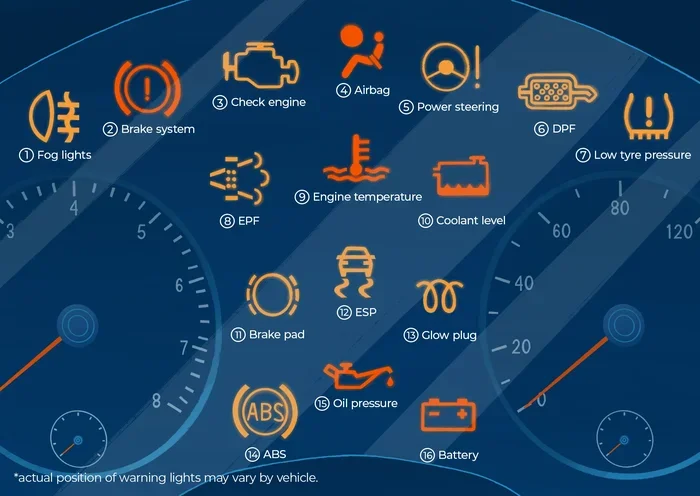
Strange Warning Lights
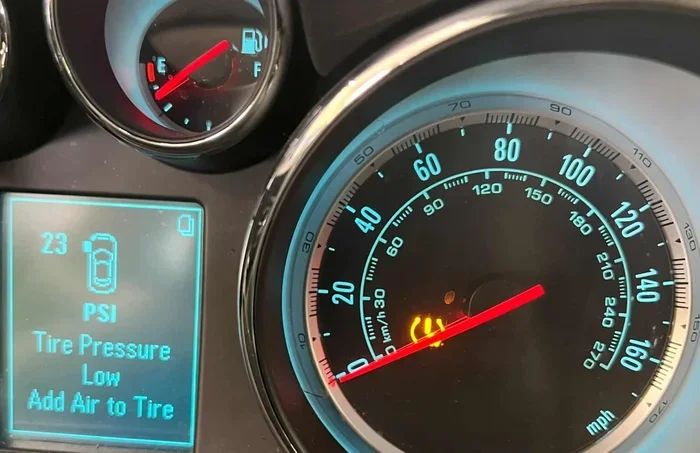
Sometimes warning lights for things like tire pressure, anti-lock brakes, or stability control pop up for no clear reason. These lights are all tied to the car computer. A reset can clear false warnings that are not linked to any real problem.
If you have recently replaced a battery or worked on your electrical system, you might also notice the key fob acting strangely afterward. In some cases, you may need to do something after replacing a key fob battery or reset the key fob system entirely. This ties directly into the car computer needing a fresh start.
Common Reasons Why a Car Computer Needs Resetting
Now that you know the signs, let us explore the actual reasons a reset becomes necessary. Understanding the cause helps you prevent the problem in the future.
After a Battery Replacement or Dead Battery
This is the most common reason. When you disconnect your car battery or the battery dies completely, the ECU loses all its stored short-term data. When power returns, the computer starts fresh. But sometimes it does not relearn things correctly on its own. A manual reset helps the computer recalibrate properly.
Interestingly, a low battery key fob can also drain your car battery over time, which creates a cycle of computer issues. Keeping your key fob battery fresh helps prevent this chain reaction.
After Repairing a Sensor or Component
Let us say you replaced a faulty oxygen sensor. The old error code may still sit in the computer’s memory even though the new sensor works perfectly. A reset clears that old code so the computer can recognize the repair and operate normally.
After Installing Aftermarket Parts
Did you add a new cold air intake, exhaust system, or performance chip? Your car computer may not recognize these changes right away. A reset gives the ECU a chance to adapt to the new parts and adjust its settings accordingly.
Software Updates and Recalls
Car manufacturers sometimes release software updates for the ECU. These updates fix bugs, improve performance, or address safety recalls. After the update is installed, a reset ensures the new software runs cleanly without leftover data from the old version.
Electrical Gremlins and Glitches
Sometimes cars just get confused. Voltage spikes, loose ground wires, or moisture in connectors can cause the computer to store false codes. A reset wipes this bad data and lets the computer start with a clean slate.
It is also worth noting that if your car will not start and the battery tests fine, the computer could be the culprit. There are several things to check when your car is not starting but the battery is fine, and a computer reset is often one of the first steps to try.
How to Reset Your Car Computer (Step-by-Step)
Resetting your car computer is easier than most people think. You do not need expensive tools or a trip to the mechanic. Follow these simple steps and you will be done in under 30 minutes.
Method 1: The Battery Disconnect Method
This is the most popular DIY method. Here is exactly how to do it:
- Turn off your engine and remove the keys from the ignition.
- Open the hood and locate the car battery.
- Using a wrench, loosen the negative terminal cable first. Always disconnect the negative cable before the positive.
- Move the cable away from the battery terminal and make sure it does not touch metal.
- Wait at least 15 minutes. Some cars need up to 30 minutes for the computer to fully discharge.
- Reconnect the negative cable first, then the positive cable.
- Turn the ignition to the “ON” position without starting the engine. Wait 30 seconds.
- Start the engine and let it idle for a few minutes.
Quick Tip: After a battery disconnect reset, your radio presets and clock may reset too. Have those codes handy if needed. Also, your car may need a few short drives to relearn your driving habits and optimize performance.
Method 2: Using an OBD-II Scanner
An OBD-II scanner is a small device that plugs into your car’s diagnostic port. This method is cleaner and more precise than the battery disconnect method.
- Find your OBD-II port. It is usually under the dashboard on the driver’s side.
- Plug the scanner into the port.
- Turn the ignition to the “ON” position.
- Follow the scanner’s menu to find the “Clear Codes” or “Reset” option.
- Select the option and wait for the scanner to confirm the reset.
- Turn off the ignition and restart the engine to verify the codes are cleared.
A quality OBD-II scanner costs between $20 and $100. It is a worthwhile investment for any car owner. You can use it to check car error codes anytime and avoid unnecessary trips to the mechanic.
Method 3: Using a Fuse Pull Method
Some mechanics prefer pulling the ECU fuse to reset the computer. This method works on certain vehicle models but not all. Check your owner’s manual first to see if your car supports this approach.
- Locate the ECU fuse in your fuse box (refer to your owner’s manual).
- Remove the fuse using fuse pullers or needle-nose pliers.
- Wait 10 to 15 minutes.
- Reinsert the fuse.
- Start the engine and let it idle.
Common Mistake: Never pull the fuse while the engine is running. Always turn the ignition off first. Also, do not confuse the ECU fuse with other fuses. Pulling the wrong one can cause electrical problems.
When to See a Professional
A car computer reset fixes many problems, but not all of them. Here are situations where you should skip the DIY approach and visit a professional mechanic.
Persistent Warning Lights After a Reset
If you reset the computer and the check engine light comes back within a few days, there is a real problem the reset is only masking. A professional mechanic can run a full diagnostic to find the root cause.
Computer Failure or Hardware Damage
Sometimes the ECU itself is physically damaged. Water intrusion, heat damage, or electrical surges can fry the computer’s circuit board. A reset will not fix hardware damage. You need a replacement or professional reprogramming.
Software Corruption
Rarely, the ECU software becomes corrupted. This can happen after a bad update or electrical surge. A professional has the tools to reflash the software properly.
Recurring Drivability Issues
If your car keeps stalling, surging, or running rough even after multiple resets, the problem is deeper than a simple computer glitch. You need a thorough inspection of the engine, sensors, and fuel system.
Sometimes electrical issues in your car can cause a chain reaction. For example, a bad alternator can create voltage problems that affect the car computer and even cause overheating issues. If you notice your car running hot along with computer warning lights, get a full electrical check done.
Preventing Future Car Computer Issues
The best way to deal with car computer problems is to prevent them in the first place. Here are simple habits that keep your ECU healthy and your car running strong.
Keep Your Battery Healthy
A weak battery is the number one enemy of your car computer. Voltage drops cause the ECU to store error codes and behave erratically. Have your battery tested regularly, especially before winter. Replace it every 3 to 5 years or as recommended by your manufacturer.
Address Warning Lights Promptly
Do not ignore dashboard warning lights. Even if your car seems to drive fine, a stored code can worsen over time. Fix the problem early and reset the computer to keep everything running smoothly.
Use Quality Fuel and Parts
Cheap fuel and low-quality aftermarket parts can confuse your car computer. Bad fuel causes sensor readings to go haywire. Poor-quality parts may not fit or function correctly, triggering error codes. Stick with reputable brands and fuel stations.
Keep Connectors Clean and Secure
Corroded or loose connectors send bad data to the ECU. Periodically check your sensor connectors and ground wires. A quick cleaning with electrical contact cleaner can prevent a host of computer issues.
Follow the Maintenance Schedule
Your owner’s manual has a maintenance schedule for a reason. Regular oil changes, air filter replacements, and spark plug updates keep all systems running properly. This reduces the strain on your car computer and helps it make accurate decisions.
Be Careful with DIY Electrical Work
If you are replacing a battery, installing a new stereo, or adding aftermarket lights, be gentle with the electrical system. Always disconnect the negative terminal first. Avoid short circuits. And if something does not work right after an electrical job, a quick reset can often solve it.
One more thing to keep in mind. If you are dealing with a TPMS reset after filling your tires with air, that is actually a computer reset too. The tire pressure monitoring system is controlled by the car computer, and resetting it follows similar principles to resetting the main ECU.
Key Takeaways
- Clears Error Codes: A reset wipes stored fault codes and gives your car a fresh start.
- Fixes Minor Glitches: Many drivability issues like rough idling or stalling resolve after a reset.
- Easy DIY Process: You can reset your car computer at home with simple steps in under 30 minutes.
- Improves Fuel Economy: A fresh reset helps the ECU recalibrate and optimize fuel delivery.
- Not a Cure-All: Some problems require professional diagnostics and cannot be fixed with a simple reset.
- Battery Health Matters: A weak car battery can cause computer issues that mimic the need for a reset.
Frequently Asked Questions
Can I drive my car immediately after resetting the computer?
Yes, you can drive your car right after a reset. However, it is best to let the engine idle for a few minutes before driving. The computer needs a short time to relearn basic parameters. During the first few drives, your car may feel slightly different as the ECU recalibrates to your driving style.
Will resetting my car computer erase my radio presets and settings?
In most cases, yes. A battery disconnect reset will clear your radio presets, clock, and sometimes power window settings. You will need to reprogram these after the reset. Using an OBD-II scanner instead of disconnecting the battery can help preserve some of these settings.
How often should I reset my car computer?
You should not reset your car computer on a regular schedule. Only reset it when you have a specific reason, such as clearing a code after a repair or fixing a recurring glitch. Frequent resets can actually confuse the ECU and cause more problems than they solve.
Can a reset fix a check engine light permanently?
Only if the underlying problem has been fixed. A reset clears the code, but if the original issue is still present, the light will come back. Think of a reset as a tool, not a permanent fix. Always address the root cause before resetting the computer.
Do I need any special tools to reset my car computer?
Not necessarily. The battery disconnect method requires only a wrench and about 15 minutes of time. If you want a cleaner approach, an OBD-II scanner is helpful. You can buy a basic scanner for around $20 at any auto parts store. No special training is required for either method.
Is it safe to reset the car computer in the rain or wet conditions?
It is not recommended. Water and electricity do not mix well. Always perform a battery disconnect or fuse pull in a dry, sheltered area. If your car has been exposed to water or flooding, have a professional inspect the electrical system before attempting any reset yourself.
=== CONCLUSION ===
A car computer reset is one of the simplest and most effective things you can do for your vehicle. Whether your check engine light is stuck on, your fuel economy has dropped, or your car is acting strangely after a battery change, a reset often solves the problem in minutes. It is cheap, easy, and does not require a trip to the mechanic.
Remember, a reset clears old codes, refreshes your ECU settings, and gives your car a clean slate. But it is not a magic fix for every problem. If the warning light returns or your car keeps running poorly, dig deeper. The real issue may need professional attention.
Keep your battery healthy, address warning lights early, and use quality parts. These simple habits go a long way toward keeping your car computer happy and your vehicle running at its best. The next time something feels off with your car, do not panic. Try a reset first. It might just be the quick fix you have been looking for.