How to Remote Start Your Mazda CX-30 With a Key Fob
Remote starting your Mazda CX-30 with a key fob is easier than you think. This guide walks you through every step, from initial setup to solving common problems. You will learn how the remote engine start feature works, what to do if it fails, and how to keep your key fob running smoothly for years.
There is something incredibly satisfying about walking out to a car that is already warm in winter or cool in summer. Remote start Mazda CX-30 technology makes this possible with just the push of a button on your key fob. Whether you are dealing with a freezing morning or a hot summer afternoon, knowing how to use this feature properly can transform your daily routine.
The Mazda CX-30 comes equipped with a smart key system that supports remote engine start in many trim levels. However, not everyone knows how to use it correctly. Some drivers struggle with the setup, while others face frustrating moments when the system simply does not respond. This guide solves all of those problems.
In this article, we will cover everything you need to know about how to remote start Mazda CX-30 with key. You will learn the step-by-step process, understand the safety features, troubleshoot common issues, and discover maintenance tips that keep your key fob working flawlessly. Let us dive in.
Key Takeaways
- Easy Setup: Remote starting your Mazda CX-30 requires just a few simple steps using the key fob and ignition system.
- Key Fob Battery Matters: A weak key fob battery is the most common reason remote start fails, so regular replacement is essential.
- Safety First: The smart key system includes built-in safety features that prevent remote start in certain conditions.
- Climate Control: You can pre-condition your vehicle’s interior temperature before getting in, making every drive more comfortable.
- Troubleshooting Is Simple: Most remote start issues can be resolved with basic checks like battery replacement and signal range verification.
- Owner’s Manual Is Your Friend: Always refer to your Mazda CX-30 owner’s manual for model-specific instructions and settings.
📑 Table of Contents
- Understanding the Remote Start Feature on the Mazda CX-30
- Step-by-Step Guide to Remote Starting Your Mazda CX-30
- Common Remote Start Problems and How to Fix Them
- How to Maintain Your Key Fob for Reliable Remote Start
- Tips and Tricks for Getting the Most Out of Remote Start
- Safety Considerations for Remote Starting Your Mazda CX-30
- Frequently Asked Questions
- Conclusion
Understanding the Remote Start Feature on the Mazda CX-30
The remote engine start feature on the Mazda CX-30 allows you to start your vehicle from a distance using the key fob. This is part of the smart key system that Mazda includes in many of its models. The system communicates wirelessly between the fob and the vehicle’s ignition system, sending a signal that starts the engine without you being inside.
Here is how the remote start system works at a basic level. When you press the remote start button on your fob, it sends a coded signal to the car’s computer. The computer verifies the signal is authentic and then engages the ignition system. The engine starts, and depending on your settings, the climate control system begins conditioning the cabin.
What You Need to Use Remote Start
Before you can use remote start, make sure you have the right setup. Not every CX-30 trim includes this feature, so it is worth checking your specific model. Here is what you typically need:
- A Mazda CX-30 equipped with the remote engine start package
- A functioning key fob with a charged battery
- The vehicle must be parked and locked
- The smart key must be within a certain proximity range
- No active check engine codes or system faults
If you are unsure whether your CX-30 has the remote start feature, check your Mazda CX-30 owner’s manual or consult your dealer. The feature is often bundled with higher trim levels or available as an optional package.
Step-by-Step Guide to Remote Starting Your Mazda CX-30
Now that you understand how the system works, let us walk through the actual process. Following these steps correctly ensures your remote start works every time.
Step 1: Lock the Vehicle
First, make sure your Mazda CX-30 is fully locked. Press the lock button on your key fob. You should hear the doors lock and see the lights flash. The remote engine start function will not activate if the vehicle is unlocked. This is a safety feature designed to prevent unauthorized access.
Step 2: Press the Remote Start Button
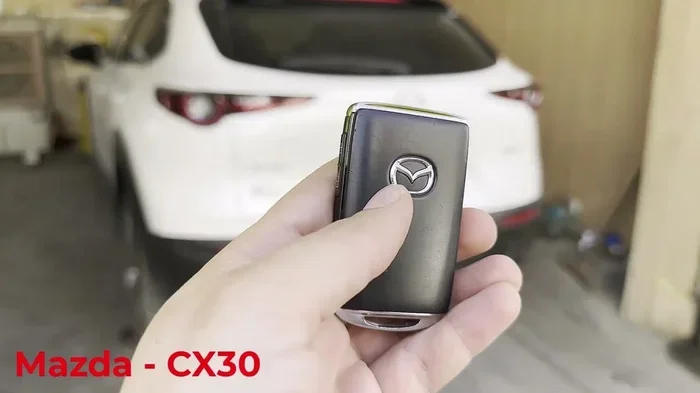
Next, locate the remote start button on your key fob. On most Mazda key fobs, this is the push button start symbol with an arrow circling it. Press this button once within the operating range of the vehicle. You should see the parking lights flash, confirming the system has received your command.
Step 3: Wait for the Engine to Start
After pressing the button, the engine should start within a few seconds. The dashboard lights will illuminate briefly, and you may hear the engine idle. The climate control system will activate automatically if it was set before you left the vehicle. This is one of the best features of remote start because it means your car is comfortable before you even step inside.
Step 4: Extend the Remote Start Session
Need more time? Most Mazda CX-30 systems allow you to extend the remote start session. Simply press the remote start button again within the first 10 minutes. The system typically allows up to two extensions, giving you a total of 20 minutes of engine run time.
Step 5: Enter the Vehicle
When you are ready to drive, approach the vehicle with your smart key in your pocket or bag. Press the push button start while pressing the brake pedal. The engine will transition from remote mode to normal driving mode. Always remember to put the vehicle in drive before moving.
Common Remote Start Problems and How to Fix Them
Even with a well-maintained vehicle, remote start issues can happen. The good news is that most problems have simple solutions. Let us look at the most common issues drivers face and how to resolve them.
Key Fob Battery Is Dead or Weak
The number one reason remote start fails is a weak key fob battery. When the battery voltage drops below a certain level, the fob cannot send a strong enough signal to reach the vehicle. If your fob feels sluggish or the range seems shorter than usual, it is time for a replacement.
Replacing the battery is straightforward. Open the key fob using the small release latch, remove the old battery, and insert a new CR2032 or CR2025 battery depending on your fob model. After replacing the battery, you may need to reset the key fob. For detailed steps on what to do after replacing your battery, check out our guide on what you need to do after replacing a key fob battery.
Vehicle Is Not Within Signal Range
The remote start system has a limited range, typically around 200 to 600 feet depending on conditions. If you are too far from the vehicle, the signal may not reach. Obstacles like thick walls, large buildings, or even dense tree cover can weaken the key fob signal. Try standing closer to the vehicle and pressing the button again.
System Malfunction or Error Codes
Sometimes the vehicle’s computer system may prevent remote start from activating. This can happen if there is an active check engine light or a stored error code. The smart key system includes safety protocols that disable remote start when it detects a potential problem.
If you suspect an error code is blocking your remote start, use an OBD-II scanner to check for codes. You can also refer to our article on how to clear a check engine code for helpful troubleshooting steps. Clearing the code may restore full functionality to your remote start system.
The Vehicle Was Not Fully Locked
This sounds obvious, but it is a surprisingly common mistake. If even one door or the trunk is slightly ajar, the remote start system will not activate. Always double-check that all doors, the trunk, and the hood are fully closed and locked before attempting to remote start your Mazda CX-30.
The Key Fob Is Inside the Vehicle
The smart key system is designed to prevent the engine from starting if the key fob is detected inside the car. This is a safety feature. If you accidentally left the fob inside and try to remote start, the system will not respond. Always make sure the fob is outside the vehicle before using the remote start function.
How to Maintain Your Key Fob for Reliable Remote Start
Taking care of your key fob goes a long way in ensuring consistent remote start performance. A little maintenance can prevent frustrating moments and extend the life of your fob significantly.
Replace the Battery Regularly
Most key fob batteries last between one and two years. Rather than waiting for the fob to stop working, get into the habit of replacing the battery annually. This keeps the signal strong and prevents unexpected failures. If you want to know whether you need to reset the fob after a battery swap, visit our page on whether you have to reset a key fob after replacing the battery.
Keep the Fob Clean and Dry
Moisture and dirt can damage the internal electronics of your key fob. Wipe it down regularly with a soft, dry cloth. Avoid dropping it in water or exposing it to extreme heat, such as leaving it on a dashboard in direct sunlight. A well-maintained fob sends a stronger, more reliable signal to your vehicle.
Store the Fob Properly
When you are not using the key fob, store it in a safe, dry place. Avoid keeping it near electronic devices that might interfere with the signal. A small fob pouch or case can protect it from damage and signal interference. Also, do not place it too close to your phone, as some electronic devices can cause signal disruption.
Check the Car Battery Too
While you are focused on the key fob, do not forget about the vehicle’s main battery. A weak car battery can also cause remote start problems. If your CX-30 is slow to start or the dashboard lights seem dim, it might be time to check the car battery. For a step-by-step guide, read our article on how to check your car battery.
Tips and Tricks for Getting the Most Out of Remote Start
Once you have the remote start feature working smoothly, you can use it even more effectively with a few smart tips and tricks.
Set Your Climate Control Before You Leave
One of the greatest benefits of remote start is pre-conditioning your vehicle. Before you leave the house, set the temperature and fan speed on your climate control system. When you press the remote start button, the system will automatically begin heating or cooling the cabin to your preferred settings.
In winter, this means no more scraping ice off your windshield or shivering during your first few minutes of driving. In summer, you can walk into a cool, comfortable car after a hot day. This small habit makes a huge difference in your daily comfort.
Use the Remote Start Timer Wisely
The standard remote start session runs for about 10 minutes. If you need more time, you can extend it by pressing the button again within that window. However, be mindful of your fuel consumption. Leaving the engine idling for extended periods wastes gas and increases emissions.
Use remote start strategically. Start the vehicle a few minutes before you need to leave, rather than starting it hours in advance. This saves fuel and keeps your engine running efficiently.
Know Your Vehicle’s Remote Start Range
Understanding the key fob range helps you use remote start more effectively. The range is typically sufficient for use inside your home, but it may not reach if you are in a basement or far across a parking lot. Stand near your vehicle when pressing the button for the best results.
Pair Remote Start with Other Convenient Features
The Mazda CX-30 offers several features that work well alongside remote start. For example, if your model has heated seats or a heated steering wheel, these can activate automatically during a remote start session in cold weather. Familiarize yourself with all the available features in your owner’s manual to get the full experience.
Safety Considerations for Remote Starting Your Mazda CX-30
While remote start is incredibly convenient, safety should always come first. Mazda has built several safety features into the smart key system to protect you and your vehicle.
The remote engine start system will not activate if the transmission is not in park. It also disables the vehicle’s drivetrain during remote start, so the car cannot move while you are away. These built-in safeguards give you peace of mind every time you use the feature.
Always park your Mazda CX-30 in a well-ventilated area before using remote start. Even though the vehicle is stationary, the engine is running and producing exhaust. Parking in an enclosed garage or near open windows can expose you to carbon monoxide. A safe parking spot ensures you enjoy the benefits of remote start without any risks.
Frequently Asked Questions
Can I remote start my Mazda CX-30 if I do not have the smart key package?
No, the remote engine start feature requires the smart key system, which is available on specific CX-30 trim levels. Check your owner’s manual or contact your Mazda dealer to confirm whether your model includes this feature. If your vehicle does not have it, you may be able to add an aftermarket remote start system, though this should be done by a professional installer.
How do I know if my key fob battery needs replacing?
Common signs of a weak key fob battery include reduced range, delayed response, and the need to press buttons multiple times. Some Mazda models also display a warning indicator on the dashboard when the fob battery is low. Replacing the battery proactively every 12 to 18 months helps prevent unexpected issues with your remote start system.
What should I do if my Mazda CX-30 remote start does not work?
Start by checking the basics. Make sure the vehicle is locked, the key fob battery is charged, and you are within range. If these are not the issue, check for any active check engine codes or system faults. Sometimes simply replacing the key fob battery and resetting the system resolves the problem. For more detailed troubleshooting, visit our guide on how to check your car battery.
Can I start my Mazda CX-30 remotely from inside my house?
Yes, the remote start system is designed to work from inside your home, provided you are within the signal range. Walls and distance can weaken the key fob signal, so standing near a window or door closest to your vehicle often helps. The typical range is between 200 and 600 feet, which covers most residential setups.
Does remote start waste a lot of fuel?
Using remote start for a few minutes before driving does consume some fuel, but the impact is minimal. Most systems run for 10 to 20 minutes total per session. To conserve fuel, use remote start only when necessary, such as during extreme weather. Avoid idling for long periods, as this wastes gas and increases your carbon footprint.
Is it safe to remote start my Mazda CX-30 in an enclosed space?
No, you should never use remote start in an enclosed garage or poorly ventilated area. The engine produces exhaust fumes that contain carbon monoxide, which is dangerous in enclosed spaces. Always park your vehicle in an open, well-ventilated area before activating remote engine start. This simple precaution keeps you and your family safe.
Conclusion
Learning how to remote start Mazda CX-30 with key is a simple process that adds real convenience to your daily life. From the initial setup to troubleshooting common issues, this guide has covered everything you need to know. The remote engine start feature works seamlessly when your key fob is maintained and the vehicle systems are in good condition.
Remember to replace your key fob battery regularly, keep the fob clean and dry, and always park safely before using remote start. These small habits make a big difference in reliability and performance. If you ever run into issues, the troubleshooting tips in this article should help you get back on track quickly.
The Mazda CX-30 is a great vehicle, and the remote start feature is one of its most practical tools. Use it wisely, take care of your equipment, and enjoy the comfort of a pre-conditioned car every time you step outside. With this knowledge in hand, you are fully equipped to make the most of your Mazda CX-30 remote start experience.