Can I Look Up My Warranty With My VIN Number Online
Yes, you can look up your warranty with your VIN number online in just a few minutes. A VIN warranty lookup gives you instant access to your vehicle’s warranty status, coverage details, and expiration date. Whether you own a new car or a certified pre-owned vehicle, this free method saves you time and helps you avoid costly surprises.
Have you ever wondered if you could pull up your car’s warranty information without visiting a dealership? The good news is that you absolutely can. Looking up your warranty with your VIN number is one of the easiest and fastest things you can do as a vehicle owner.
Your VIN number is like your car’s DNA. It holds a treasure trove of information about your vehicle, including its warranty status. Whether you want to check if your manufacturer warranty is still active or find out when your coverage ends, a simple online search can give you the answers. In this guide, we will walk you through everything you need to know about doing a VIN warranty lookup from the comfort of your home.
We will cover exactly how it works, what information you can expect to find, and the best tools to use. By the end of this article, you will feel confident running your own car warranty check anytime you need to. Let us dive in.
Key Takeaways
- VIN-based warranty lookup is free and available online: Most manufacturers and third-party tools let you check your warranty status instantly.
- Your VIN holds all the key details: It reveals your vehicle’s make, model, year, engine type, and warranty information in seconds.
- You can check multiple warranty types: Including bumper-to-bumper, powertrain, and extended warranty coverage.
- Common mistakes can delay results: Entering the wrong VIN or using unreliable tools are the top errors people make.
- Checking your warranty regularly is smart: It helps you stay on top of expiration dates, recalls, and service needs.
- Certified pre-owned vehicles still carry warranty: You can verify remaining coverage using the VIN before buying.
📑 Table of Contents
- What Is a VIN and Why Does It Matter for Your Warranty?
- How to Look Up Your Warranty Using Your VIN Number
- What Information Can You Find From a VIN Warranty Lookup?
- Types of Vehicle Warranties You Can Check With Your VIN
- Common Mistakes When Looking Up Warranty With VIN
- Tips for Getting the Most Out of Your VIN Warranty Search
- Frequently Asked Questions About VIN Warranty Lookups
- Conclusion
What Is a VIN and Why Does It Matter for Your Warranty?
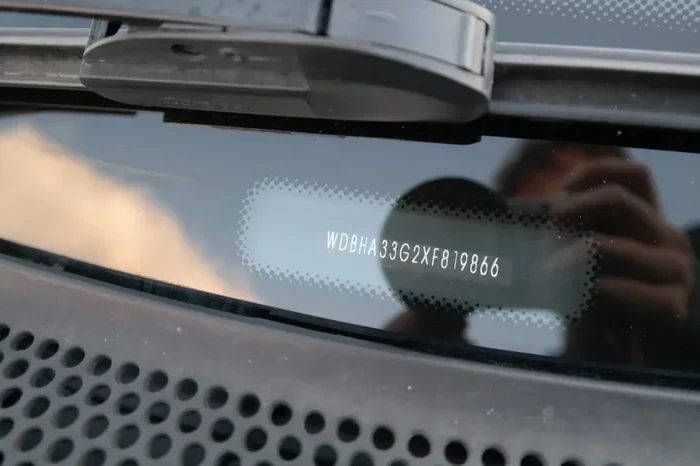
Before we get into the lookup process, let us talk about what a VIN actually is. A vehicle identification number is a unique 17-character code assigned to every vehicle manufactured since 1981. Think of it as your car’s fingerprint. No two vehicles in history share the same VIN.
This number is not just a random string of letters and numbers. Each character in your VIN tells a specific story about your vehicle. The first three characters identify the manufacturer. Characters four through eight describe your car’s features, such as the engine type, body style, and model. The ninth character is a security check digit. The tenth character tells you the model year. And the final characters reveal the assembly plant and serial number.
So why does this matter for your warranty? When you enter your VIN into a warranty lookup tool, the system reads all of this information and cross-references it with the manufacturer’s database. This is how you get accurate warranty coverage details specific to your exact vehicle. Without your VIN, you would have to describe your car in general terms and hope for the best. With it, you get precise results every time.
Where Can You Find Your VIN?
Finding your VIN is easy. You can look at several places on your vehicle and in your paperwork. Here are the most common spots:
- Dashboard: Stand outside your driver’s side door and look at the dashboard near the windshield. The VIN is usually stamped on a metal plate visible from outside.
- Driver’s side door jamb: Open your driver’s door and look for a sticker on the door frame. It lists the VIN along with tire pressure and other details.
- Vehicle title and registration: Your VIN is printed on your car title and registration documents.
- Insurance card: Your auto insurance card also lists your VIN.
- Owner’s manual: Some manuals include the VIN on the inside cover or in the warranty booklet.
How to Look Up Your Warranty Using Your VIN Number
Now let us get to the part you have been waiting for. Here is a simple step-by-step guide to running your VIN warranty lookup. You do not need any special skills or expensive tools. Anyone can do this.
Step 1: Gather Your VIN
First, locate your 17-character VIN using the tips above. Make sure you have it written down or saved on your phone. Double-check that every character is correct because even one wrong letter or number can lead to incorrect results.
Step 2: Visit Your Manufacturer’s Website
Almost every major car manufacturer offers a free warranty lookup tool on their official website. Brands like Ford, Toyota, Honda, Chevrolet, Nissan, and BMW all provide this service. Go to the brand’s website and look for a section called “Warranty,” “Vehicle Inquiry,” or “Check Coverage.”
For example, if you drive a Ford, you would go to Ford’s website and find their “Warranty & Maintenance” section. Enter your VIN there, and the system will pull up your current warranty details. Most manufacturers update their databases regularly, so the information you get is current.
Step 3: Try Third-Party VIN Decoder Tools
If you do not want to go through each manufacturer’s website, you can use a VIN decoder tool. These websites aggregate data from multiple sources and give you a comprehensive vehicle profile. Popular options include CARFAX, AutoCheck, and VinFreeCheck.
These tools often provide more than just warranty information. You can also see your vehicle’s accident history, service records, and recall status. Some of these services are free, while others charge a small fee for a full report. For a basic warranty status check, free tools usually work just fine.
Step 4: Contact Your Dealer Directly
If the online tools do not give you what you need, you can always call your local dealership. Provide them with your VIN, and their service department can pull up your warranty information in their system. This method takes a little longer, but it gives you direct access to a human expert who can answer specific questions about your coverage.
What Information Can You Find From a VIN Warranty Lookup?
A VIN-based vehicle warranty lookup gives you a surprising amount of detail. Here is what you can typically expect to find:
- Warranty status: Whether your warranty is active, expired, or still within a specific coverage period.
- Warranty expiration date: The exact date your coverage ends, so you know how much time you have left.
- Coverage type: Whether you have a bumper-to-bumper warranty, powertrain warranty, or both.
- Remaining coverage: How many miles or months of warranty protection you still have.
- Vehicle details: Make, model, year, trim level, engine size, and transmission type.
- Recall information: Any open recalls that apply to your vehicle.
- Service history: Some tools show whether your vehicle has had warranty work performed.
All of this information comes directly from the manufacturer’s database, which means it is reliable and accurate. You are not guessing or making assumptions. You are seeing the real numbers tied to your specific vehicle.
Example of What a VIN Warranty Lookup Shows
Let us say you drive a 2021 Honda Civic and you want to check your warranty. You enter your VIN into Honda’s website. The system tells you that your bumper-to-bumper warranty is active until March 15, 2026, or 36,000 miles, whichever comes first. Your powertrain warranty extends until March 15, 2028, or 60,000 miles. You also see that there are no open recalls on your vehicle. That is a lot of valuable information in just a few seconds.
Types of Vehicle Warranties You Can Check With Your VIN
Not all warranties are the same, and knowing which ones apply to your vehicle is important. When you run a VIN warranty check, you can typically access information about several types of coverage.
Bumper-to-Bumper Warranty
This is the most comprehensive warranty a manufacturer offers. It covers almost everything on your vehicle except normal wear-and-tear items like brake pads, wiper blades, and tires. A bumper-to-bumper warranty typically lasts for three years or 36,000 miles, whichever comes first. Some brands extend this coverage, so always verify with your VIN lookup.
Powertrain Warranty
The powertrain warranty covers the major components that make your vehicle move. This includes the engine, transmission, and drivetrain. Powertrain warranties tend to last longer than bumper-to-bumper coverage. Many manufacturers offer five years or 60,000 miles for powertrain protection. Some brands, like Kia and Hyundai, have become known for offering industry-leading powertrain warranties of up to 10 years or 100,000 miles.
Corrosion Warranty
This type of warranty covers rust and corrosion on your vehicle’s body. It usually lasts longer than the standard bumper-to-bumper warranty, often up to five years with no mileage limit. A VIN lookup can confirm whether your corrosion warranty is still active.
Roadside Assistance Warranty
Many new vehicles come with complimentary roadside assistance for a set period. This can include towing, flat tire changes, jump-starts, and lockout services. Checking your VIN can tell you if this benefit is still available to you.
Extended Warranty or Service Contract
If you purchased an extended warranty or service contract, this will also show up in some VIN lookups. Extended warranties are purchased separately from the manufacturer’s coverage and can extend your protection well beyond the original warranty period. Make sure to verify the terms and coverage limits of any extended warranty you hold.
Certified Pre-Owned Warranty
Buying a certified pre-owned vehicle often comes with a limited warranty backed by the manufacturer. These warranties vary by brand but typically cover powertrain components for a set period or mileage. A VIN check can confirm whether a used vehicle still has CPO warranty coverage remaining.
Common Mistakes When Looking Up Warranty With VIN
Even though a VIN warranty lookup is straightforward, people still make mistakes that cause frustration. Here are the most common errors to avoid:
Using the Wrong VIN
This sounds obvious, but it happens more often than you think. Some vehicles have multiple VINs in different locations. Always use the VIN from your dashboard or title, not one from a sticker or plate that might have been replaced or moved.
Using Unreliable Websites
Not every website that offers a VIN lookup is trustworthy. Some sites collect your data or charge hidden fees. Stick to the manufacturer’s official website or well-known third-party services like CARFAX or VinFreeCheck. If a site asks for unnecessary personal information, be cautious.
Ignoring Recall Information
One of the most valuable parts of a VIN lookup is the recall information. Many vehicle owners do not realize there are open recalls on their car. Ignoring this can put your safety at risk. Always review the recall section of your results carefully.
Assuming All Warranties Transfer to New Owners
If you are buying a used vehicle, do not assume the previous owner’s warranty transfers to you automatically. Some warranties are transferable, but many are not. Always verify the warranty status using the VIN before purchasing a used car.
Forgetting to Check Regularly
Warranty status can change over time. A vehicle that was covered last year might have expired coverage this year. Make it a habit to run a VIN warranty check at least once a year, especially around the time your original warranty was set to expire.
Tips for Getting the Most Out of Your VIN Warranty Search
To make sure your vehicle warranty lookup gives you the best results, follow these practical tips:
- Keep your VIN handy: Save it in your phone’s notes app so you always have it ready when you need it.
- Check multiple sources: Use both the manufacturer’s website and a third-party decoder for the most complete picture.
- Verify your results: If something looks off, contact your dealer directly to confirm the information.
- Set a calendar reminder: Note your warranty expiration date and set a reminder a month before it expires.
- Use the VIN for other checks too: A VIN decoder can also reveal service records, accident history, and ownership details.
- Check before buying a used car: Always run a VIN warranty lookup before purchasing a pre-owned vehicle to understand what coverage comes with it.
Expert Insight: Why Regular Warranty Checks Save You Money
According to automotive experts, many vehicle owners miss out on free repairs simply because they do not know their warranty is still active. A quick VIN warranty lookup every few months can reveal coverage you did not realize you had. This is especially true for newer vehicles where the warranty period extends well beyond what most owners expect. Taking five minutes to check your status can save you hundreds or even thousands of dollars in repair costs.
Frequently Asked Questions About VIN Warranty Lookups
Can I Look Up My Warranty With My VIN Number Online for Free?
Yes, most manufacturers offer free VIN warranty lookup tools on their official websites. Third-party services like VinFreeCheck and basic CARFAX reports are also free for basic warranty and vehicle information. You do not need to pay to check your warranty status.
What If My VIN Warranty Lookup Shows No Warranty Information?
This usually means your warranty has expired or the vehicle’s warranty was never registered in the system. Contact your dealership with your VIN and ask them to confirm the status. Sometimes there is a simple database issue that the dealer can resolve.
Can I Check the Warranty on a Used Car Using the VIN?
Absolutely. A VIN lookup works for both new and used vehicles. For used cars, the lookup will show any remaining manufacturer warranty and whether the vehicle is certified pre-owned. This is one of the best reasons to run a VIN check before buying a used car.
How Accurate Is a VIN Warranty Lookup?
The results are highly accurate because they come directly from the manufacturer’s database. However, always make sure you entered the VIN correctly. A single wrong character can lead to a mismatch. If you are unsure, verify with your dealership.
Does a VIN Warranty Lookup Show Extended Warranty Coverage?
It depends on the tool you use. Manufacturer websites typically only show the original factory warranty. Third-party VIN decoders and services like CARFAX may include extended warranty information if it was purchased and registered. For full details on an extended warranty, contact the warranty provider directly.
How Often Should I Check My Warranty With My VIN?
It is a good idea to check your warranty at least once a year. Also check before any major repairs or services to see if the work might be covered. If you are approaching your warranty expiration date, run a lookup a few months early so you are not caught off guard.
Conclusion
Looking up your warranty with your VIN number is one of the simplest and most valuable things you can do as a vehicle owner. It is fast, free, and gives you accurate information about your vehicle warranty coverage. Whether you want to know if your bumper-to-bumper warranty is still active, when your powertrain coverage ends, or if there are any open recalls on your car, a VIN lookup has the answers.
By following the steps in this guide, you can run a VIN warranty check in minutes from your phone or computer. You no longer need to visit a dealership or call customer service just to find out your warranty status. The information is right at your fingertips.
Make it a habit to check your warranty regularly. Keep your VIN saved in your phone, bookmark your manufacturer’s warranty lookup page, and set reminders to review your coverage. These small actions can save you significant time and money in the long run. Take control of your vehicle’s warranty today, and never be caught off guard by an unexpected repair bill again.