How Do You Reset the TPMS Light on a Toyota Corolla
Resetting the TPMS light on a Toyota Corolla is a straightforward process that most owners can handle at home. Whether your tire pressure monitoring system is flashing due to a simple pressure drop or a sensor glitch, this guide walks you through every method. You will learn the manual reset steps, the仪表盘 method, and when it is time to see a professional.
There is nothing quite like the sinking feeling when a warning light pops up on your dashboard. You are cruising along in your Toyota Corolla, and suddenly the TPMS light illuminates. It looks like a horseshoe with an exclamation point in the middle. For many Corolla owners, this small icon sparks a wave of worry. Is something seriously wrong with the car? Do you need to pull over right now? The good news is that a TPMS light often has a simple explanation and an even simpler fix.
The tire pressure monitoring system is a safety feature designed to alert you when one or more tires fall below the recommended pressure level. On a Toyota Corolla, this system is reliable and effective. But sometimes the light stays on even when your tires are fine. This is where knowing how to reset the system becomes incredibly useful. This guide covers everything you need to know about resetting the TPMS on your Corolla, from the basic steps to troubleshooting persistent warnings.
Before we dive into the reset process, let us talk about what the TPMS actually does and why it matters. Understanding the system helps you respond correctly when that little light appears. It also saves you time and money by preventing unnecessary trips to the mechanic. Whether you drive a 2010 Corolla or a brand-new 2024 model, the reset process is similar enough that you can handle it yourself with confidence.
Key Takeaways
- Quick Reset: Most Toyota Corolla models let you reset the TPMS light using the steering wheel controls in under a minute.
- Check Pressure First: Always verify your tire pressure before resetting — a real low-pressure issue will just trigger the light again.
- Sensor Problems: A faulty tire pressure sensor can cause the light to stay on even after a proper reset.
- Temperature Effects: Cold weather is a common cause of temporary TPMS warnings that resolve on their own.
- Professional Help: If the light persists after multiple reset attempts, a mechanic or Toyota dealer can diagnose deeper issues.
- Model Variations: Reset procedures differ slightly between Corolla generations, so check your owner’s manual for specifics.
📑 Table of Contents
- Understanding the TPMS Light on Your Toyota Corolla
- How to Reset the TPMS Light on a Toyota Corolla
- Common Reasons the TPMS Light Won’t Go Away
- When to See a Professional
- TPMS Maintenance Tips for Toyota Corolla Owners
- TPMS Reset for Different Toyota Corolla Model Years
- TPMS Reset and Your Car’s Overall Health
- Final Thoughts on Resetting the TPMS on Your Toyota Corolla
Understanding the TPMS Light on Your Toyota Corolla
The tire pressure monitoring system in your Corolla uses sensors inside each tire to measure air pressure. When one or more tires drop below the recommended PSI, the system triggers the dashboard warning. This is a safety feature. Underinflated tires can reduce fuel efficiency, cause uneven tire wear, and increase the risk of a blowout. The TPMS light helps you catch pressure problems early.
However, the TPMS light does not always mean your tires are actually low. Here are some common reasons the light might come on:
- Temperature changes: Cold weather can temporarily lower tire pressure, triggering the warning.
- Recent tire inflation: The system may not update immediately after you add air.
- Sensor battery failure: TPMS sensors have small batteries that eventually die and need replacement.
- Sensor malfunction: A damaged or faulty sensor can send incorrect readings to the car’s computer.
- After a tire change: Rotating tires or installing new ones can disrupt the sensor calibration.
- Slow leak: A small puncture or valve stem issue causes gradual pressure loss.
Knowing these causes helps you determine whether a simple TPMS reset will solve the problem or if something deeper needs attention. If your tires are properly inflated and the light still stays on, a reset is usually the next logical step.
How to Reset the TPMS Light on a Toyota Corolla
Resetting the TPMS light on a Toyota Corolla is a process you can complete in just a few minutes. The exact steps vary slightly depending on your model year, but the general method is consistent across most generations. Below, we walk you through the most common reset procedure.
Step 1: Check and Inflate Your Tires
Before you reset anything, make sure your tires are at the correct pressure. Open the driver’s door and look for the sticker on the door jamb. This sticker shows the recommended PSI for your Corolla. Typically, Toyota Corollas recommend between 30 and 35 PSI. Use a reliable tire gauge to check each tire, including the spare if applicable. Inflate any tires that are below the recommended level.
Quick Tip: Do this when the tires are cold — meaning the car has been parked for at least three hours or driven less than a mile. Driving heats up the air inside the tires and gives you a false high reading.
Step 2: Locate the TPMS Reset Button
On most Toyota Corolla models, the TPMS reset button is located beneath the steering wheel. It is a small button, often black or gray, near the lower-left area of the dashboard. Some models label it “TPMS” or “SET.” If you have trouble finding it, check your owner’s manual. It is a small, unassuming button that does exactly what you need.
Step 3: Turn the Ignition to the ON Position
Press the start button or turn the key to the ON position without starting the engine. The dashboard lights will illuminate, but the engine should not be running. This puts the car in what mechanics call “accessory mode” or “ON mode.”
Step 4: Press and Hold the TPMS Reset Button
Press and hold the TPMS reset button until the TPMS warning light on the dashboard blinks three times. This usually takes about three to five seconds. Release the button once you see the blinking pattern. The system is now in reset mode.
Step 5: Start the Engine and Drive
Start the engine and drive the car for about 15 to 20 minutes at a steady speed. The system will recalibrate and recognize the current tire pressure readings. After this drive cycle, the TPMS light should turn off and stay off. If it comes back on, there may be a deeper issue to investigate.
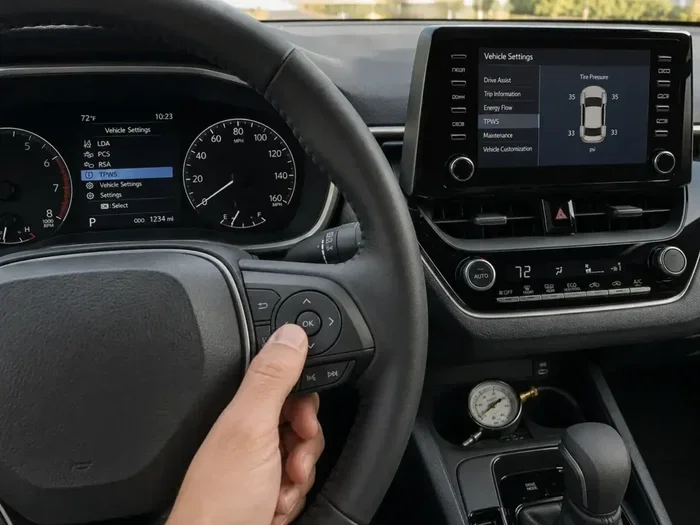
Alternative Method: Using the Steering Wheel Controls
Some newer Toyota Corolla models, especially those from 2019 and later, use the steering wheel controls and the multi-information display to reset the TPMS. Here is how it works on these models:
- Press the menu button on the steering wheel.
- Navigate to the “Vehicle Settings” or “Maintenance” menu on the display.
- Select “TPMS Reset” or “Initialize Tire Pressure Monitoring.”
- Confirm the reset when prompted.
- Drive the car for 15 to 20 minutes to allow the system to recalibrate.
This method is just as effective as the button method. If you are unsure which method applies to your specific Corolla, consult your owner’s manual or search for your model year online.
Common Reasons the TPMS Light Won’t Go Away
Sometimes, even after you follow all the steps correctly, the TPMS light stays on or comes back shortly after. This can be frustrating, but it usually points to a specific cause. Let us look at the most common reasons this happens and what you can do about each one.
Temperature and Weather Changes
Cold weather is the number one culprit for false TPMS warnings. When the temperature drops, the air inside your tires contracts, reducing pressure. A drop of just 10 degrees Fahrenheit can lower tire pressure by about 1 PSI. If you notice the light appearing on cold mornings and disappearing after you drive for a while, temperature is likely the cause. In this case, simply inflate your tires to the recommended PSI and reset the system.
Dead TPMS Sensor Battery
Each TPMS sensor has a small battery that typically lasts between five and ten years. When the battery dies, the sensor cannot communicate with the car’s computer, and the TPMS light stays on. A dead sensor battery requires sensor replacement. You can check which sensor is failing using an OBD-II scanner or by visiting a tire shop that has TPMS diagnostic equipment.
Damaged or Missing Sensor
If you recently had tires replaced or rotated, a sensor may have been damaged or not reinstalled properly. Some tire shops remove TPMS sensors during tire mounting and forget to put them back. If a sensor is missing or damaged, the system will detect a problem and keep the light on. Inspect your tires visually or ask a mechanic to check the sensors.
System Malfunction
In rare cases, the TPMS module itself malfunctions. This can happen after a battery disconnect, an electrical issue, or a software glitch. A system malfunction usually requires a professional diagnosis. A mechanic can use diagnostic tools to read the TPMS module and determine if it needs reprogramming or replacement.
When to See a Professional
Most of the time, resetting the TPMS light is a DIY task you can complete at home. But there are situations where professional help is the right call. If you have tried resetting the system multiple times and the light keeps coming back, it is time to see an expert. Similarly, if you notice physical damage to a tire or suspect a slow leak, a mechanic can properly diagnose and repair the issue.
You should also seek professional help if you see the TPMS light flashing rather than staying solid. A flashing TPMS light often indicates a more serious sensor problem that needs immediate attention. Ignoring a flashing light can lead to safety risks and potential damage to your tires.
If you are near a Toyota dealership or a trusted mechanic, they can run a full TPMS diagnostic test. This test reads each sensor’s status and identifies any failing components. It is a quick process and usually costs between $20 and $50 for the diagnostic alone. If a sensor needs replacement, the cost typically ranges from $50 to $100 per sensor, depending on your Corolla model.
For those who have dealt with persistent dashboard warning lights before, you know that sometimes the simplest fix is also the most overlooked. Before spending money on diagnostics, make sure you have checked the basics: tire pressure, tire condition, and sensor battery life. Many TPMS issues resolve with a simple reset once the root cause is addressed.
TPMS Maintenance Tips for Toyota Corolla Owners
Preventing TPMS issues starts with regular maintenance. A few simple habits can keep your tire pressure monitoring system working reliably for years. Here are some tips to keep in mind:
- Check tire pressure monthly: Make it a habit to check your tire pressure at least once a month. A simple handheld gauge costs under $15 and can save you from unexpected TPMS warnings.
- Keep a tire pressure log: Write down the pressure readings for each tire. This helps you spot trends and catch slow leaks early.
- Replace sensor batteries proactively: If your Corolla is more than seven years old, consider having the TPMS sensor batteries checked or replaced before they die unexpectedly.
- Reset after tire changes: Always reset the TPMS system after rotating tires, installing new tires, or changing a flat.
- Keep valve stems in good condition: Damaged or corroded valve stems can cause slow air leaks that trigger the TPMS light.
- Store spare tire properly: If you have a full-size spare, check its pressure regularly too. A spare with low pressure will trigger the TPMS warning.
Following these tips keeps your tires in great shape and reduces the chances of an unexpected TPMS warning. It also extends the life of your tires and improves your Corolla’s fuel efficiency. A well-maintained tire pressure monitoring system is one of the easiest ways to stay safe on the road.
TPMS Reset for Different Toyota Corolla Model Years
The reset process is similar across most Corolla generations, but there are small differences worth noting. Here is a quick overview of how the process varies by model era:
2003 to 2008 Toyota Corolla
Older Corolla models typically use the physical TPMS reset button beneath the steering wheel. The process involves pressing and holding the button with the ignition in the ON position. These models do not have multi-information displays, so the button method is the only option.
2009 to 2013 Toyota Corolla
Mid-generation Corollas follow the same button reset process. Some models from this era also allow you to reset the system through the trip meter display. Refer to your owner’s manual for the exact menu path if the button method does not work.
2014 to 2018 Toyota Corolla
These models introduced more advanced display systems. The reset procedure is similar to the button method, but some trims also support reset through the vehicle information display. The steering wheel controls make navigation easier.
2019 and Newer Toyota Corolla
Newer Corollas feature touchscreen displays and more digital controls. The TPMS reset is typically done through the vehicle settings menu on the touchscreen. The process is intuitive and user-friendly, with clear on-screen prompts guiding you through each step.
Regardless of your model year, the core reset process remains the same: check tire pressure, press the reset button or navigate the menu, and drive to recalibrate. If you are unsure about your specific model, the owner’s manual is your best resource.
TPMS Reset and Your Car’s Overall Health
The TPMS is just one of many warning systems in your Toyota Corolla. Understanding how it fits into the bigger picture of car maintenance helps you become a more informed owner. Tire pressure affects everything from handling and braking to fuel economy and tire longevity. Keeping your TPMS system in good working order is a small investment that pays big dividends.
If you have ever dealt with other dashboard warning lights, you know the importance of addressing them promptly. A check engine light can indicate engine or emissions issues. The oil pressure light signals low oil levels. Each warning light serves a purpose, and the TPMS is no different. It protects your tires, your safety, and your wallet by catching pressure problems before they become expensive repairs.
For Corolla owners who like to handle maintenance themselves, resetting the TPMS is one of the easiest and most satisfying DIY tasks you can do. It takes just a few minutes and requires no special tools. Once you have done it a couple of times, it becomes second nature. You will feel confident knowing you can handle this common issue without visiting a shop or spending money on a simple reset.
Final Thoughts on Resetting the TPMS on Your Toyota Corolla
Resetting the TPMS light on a Toyota Corolla is a simple process that most owners can complete in under ten minutes. The key is to first confirm that your tires are properly inflated, then follow the reset steps for your specific model year. Whether you use the physical reset button or the steering wheel menu controls, the process is straightforward and effective.
If the light persists after a reset, do not ignore it. A recurring TPMS warning often signals a deeper issue such as a failing sensor, a dead battery, or a slow leak. Addressing these problems promptly keeps your Corolla safe and running at its best. Regular tire maintenance and periodic TPMS checks go a long way in preventing unexpected warnings and costly repairs.
Remember, your Toyota Corolla is a reliable and well-engineered vehicle. The TPMS system in your car is designed to keep you informed and safe. By understanding how it works and how to reset it, you take an active role in maintaining your car’s health. Keep this guide handy, and the next time that TPMS light comes on, you will know exactly what to do.
Stay proactive with your tire maintenance, and your tire pressure monitoring system will continue to serve you well for miles to come. A little attention to your tires today saves you time, money, and stress tomorrow.
Frequently Asked Questions
Can I drive my Toyota Corolla with the TPMS light on?
You can drive short distances with the TPMS light on, but it is not recommended. The light means your tire pressure may be too low, which affects handling and safety. Check your tire pressure as soon as possible and inflate to the recommended level before driving long distances.
How long does a TPMS sensor battery last on a Toyota Corolla?
TPMS sensor batteries typically last between five and ten years. The exact lifespan depends on driving conditions, climate, and how frequently the system is used. If your Corolla is older and the TPMS light keeps coming back, a dead sensor battery is a common cause.
Why does my TPMS light come on when it rains or gets cold?
Cold temperatures cause the air inside your tires to contract, which lowers tire pressure. A drop of just a few PSI can trigger the TPMS warning. This is normal and usually resolves once you inflate the tires to the proper level and reset the system.
Do I need special tools to reset the TPMS on a Toyota Corolla?
No special tools are needed for most Corolla models. The reset process uses the TPMS button under the steering wheel or the steering wheel controls and display. A basic tire pressure gauge is helpful for checking your tire pressure before resetting.
What should I do if the TPMS light flashes and then stays solid?
A flashing TPMS light followed by a solid light often indicates a malfunction in the TPMS system itself. This could be a faulty sensor, a communication error, or a wiring issue. Visit a Toyota dealer or qualified mechanic for a diagnostic check to identify the exact problem.
Can I reset the TPMS light myself, or do I need to visit a mechanic?
You can absolutely reset the TPMS light yourself at home. The process is quick and does not require any special equipment. However, if the light keeps returning after multiple resets, a mechanic can help diagnose underlying issues with the sensors or the system itself.
=== CONCLUSION ===
Knowing how to reset the TPMS light on a Toyota Corolla is an essential skill for every Corolla owner. It saves time, money, and the stress of dealing with unexpected dashboard warnings. The process is simple, fast, and something you can handle on your own with just a few basic steps. Always start by checking your tire pressure, then follow the reset procedure that matches your model year. If the problem persists, do not hesitate to seek professional help for a proper diagnosis.
Regular maintenance and a proactive approach to tire care keep your TPMS system working reliably. Your Toyota Corolla is built to last, and with the right care, it will keep you safe and comfortable on every drive. Bookmark this guide, share it with fellow Corolla owners, and drive with confidence knowing you can handle a TPMS warning whenever it appears.
For more information on related car maintenance topics, check out our guide on how to clear your TPM reset or learn about checking your car battery for other common dashboard issues. If you ever need help with a persistent check engine light, our article on clearing a check engine code offers helpful troubleshooting steps too.