Do All Cars Come With Navigation?
Do all cars come with navigation? The short answer is no. While many modern vehicles offer factory navigation systems as standard or optional features, a significant number of cars still ship without any built-in GPS capability. Understanding your options for car navigation systems can save you money and help you choose the right setup for your driving needs.
You walk into a car dealership. You see sleek screens on the dashboard. You assume every car has GPS. But here is the truth. Not all cars come with navigation. It is one of those things most people never think about until they are lost on a road trip. The reality of car navigation systems is more complicated than you might think. Some vehicles include it as standard. Others leave it out entirely. And some offer it only in expensive trim levels. This guide breaks it all down. You will learn what to expect. You will discover your options. And you will know exactly how to get directions no matter what car you drive.
The world of GPS tracking and in-car infotainment systems has changed dramatically in the last decade. Ten years ago, a built-in navigation unit was a luxury. Today, many people rely on their phones instead. But phones are not always the best solution. Signal drops. Screen sizes vary. Mounts can be annoying. A good navigation system in your car solves all of these problems. The question is whether your car has one. Let us find out.
Key Takeaways
- Not all cars include navigation: Many base models skip built-in GPS to keep costs low.
- Factory navigation varies by trim level: Higher trims and luxury brands are more likely to include it.
- Aftermarket options are affordable and powerful: You can add navigation to almost any car with a standalone unit or smartphone app.
- Smartphone integration has changed the game: Apple CarPlay and Android Auto make built-in navigation less essential than before.
- Map updates matter: Built-in systems can become outdated if you don’t keep maps current.
- Consider your driving habits: Frequent travelers benefit more from dedicated navigation than occasional drivers.
📑 Table of Contents
What Is a Car Navigation System?
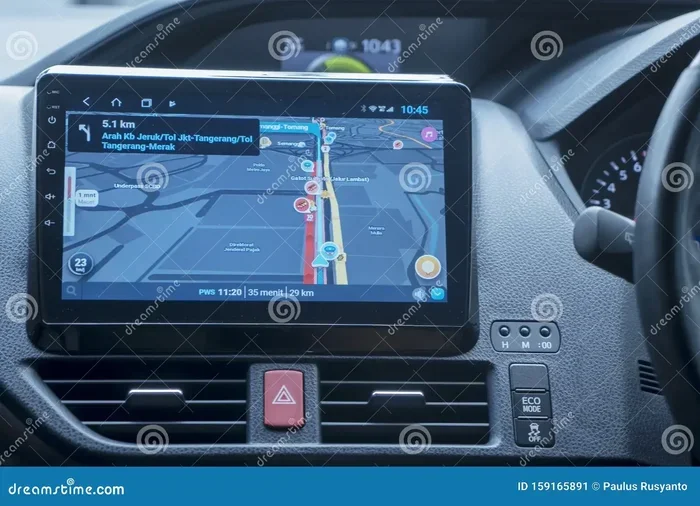
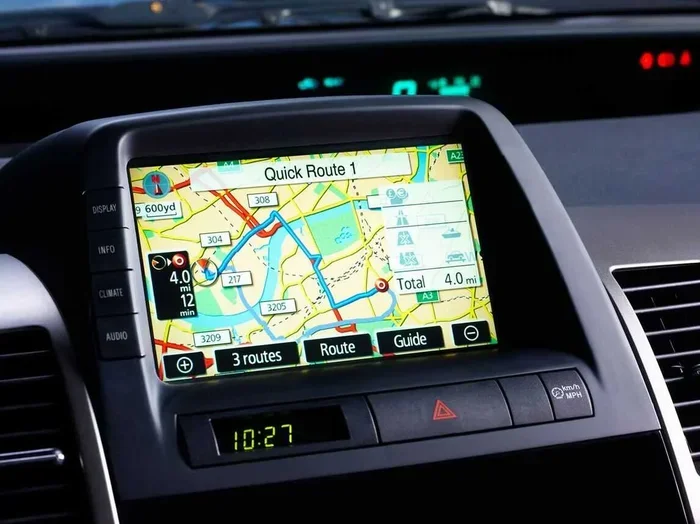
A car navigation system is a built-in tool that helps you find directions. It uses satellite navigation signals to pinpoint your location. Then it maps a route to your destination. Most systems include a touchscreen display on the dashboard. You type in where you want to go. The system gives you turn-by-turn navigation with voice prompts. Some units also show traffic conditions. Others suggest nearby gas stations or restaurants. A GPS antenna inside the car connects to satellites orbiting the Earth. This is how the system knows exactly where you are at any moment.
Modern factory navigation systems do much more than just give directions. They integrate with your car’s audio system. They display backup camera feeds. They can even control climate settings. The infotainment system has become the brain of the modern car. Navigation is just one feature it handles. Some systems work offline. Others need an internet connection. This distinction matters a lot when you are choosing a setup that works for you.
Do All Cars Come With Navigation?
The direct answer is no. Not all cars come with navigation. Many entry-level vehicles skip it completely. Manufacturers often leave it out of base trims to keep the sticker price low. A base Honda Civic or Toyota Corolla might not include GPS. But a top-trim Honda Accord or Toyota Camry likely will. The same pattern holds for almost every brand. The more expensive the model, the more likely it includes a built-in GPS unit.
Here is a quick look at how navigation availability breaks down across different types of vehicles:
- Economy cars: Often do not include navigation in any trim level.
- Midsize sedans: May include it as an optional package or in higher trims.
- Luxury vehicles: Almost always include navigation as standard or a very common option.
- Trucks and SUVs: Vary widely. Some include it, many do not in base models.
- Electric vehicles: Most include navigation because range planning depends on it.
The trend is shifting. More cars now offer smartphone integration through Apple CarPlay or Android Auto. These systems pull up navigation apps from your phone and display them on the car screen. This has made dedicated built-in navigation less important to many buyers. But it is not the same as a true factory navigation system. There are real differences in reliability and functionality.
Why Some Cars Skip Navigation
Car manufacturers have a reason for leaving navigation out. It costs money to install. A quality GPS unit with a large screen and updated maps adds several hundred dollars to the build cost. For budget-focused buyers, that is money they would rather spend elsewhere. Also, many people now use their phones for directions. Automakers noticed this trend. They decided to cut costs and let buyers bring their own solutions. This keeps the base price competitive. It also means the car appeals to a wider audience.
How to Tell if a Car Has Navigation
Before you buy a car, check a few things. Look at the dashboard. Does it have a large touchscreen? That is a good sign. But not all touchscreens are navigation screens. Check the owner’s manual. Look for words like “navigation system” or “GPS.” You can also ask the salesperson directly. When looking at used cars, check the infotainment menu. If you see a maps or directions icon, it likely has navigation built in. If not, you may need to add it yourself.
Types of Car Navigation Systems
Not all navigation is the same. There are three main types you will encounter. Each has its own strengths and weaknesses. Understanding them helps you make the best choice for your car.
Factory Built-In Navigation
This is the original type of OEM navigation. It comes installed from the factory. The system is built into the car’s infotainment system. It uses the car’s own GPS antenna and processing power. Factory systems are integrated seamlessly. They look and feel like part of the car. They often control audio, climate, and other settings from one screen. The downside is cost. Factory navigation adds to the price of the car. It can also become outdated. Map updates may cost extra money. And if the system breaks, repairs can be expensive.
Aftermarket Navigation Units
An aftermarket navigation unit is a separate device you install yourself or have a shop install. These units bolt into your dashboard. They replace or sit above your factory stereo. Brands like Garmin and Pioneer make popular aftermarket GPS units. These systems are powerful. They often include features factory systems do not. You get fresh map updates every year. Many support wireless navigation and real-time traffic. The biggest advantage is price. You can get a great aftermarket unit for a fraction of what factory navigation costs. The downside is that it does not blend in as nicely. It may not integrate with your car’s other systems as smoothly.
Smartphone-Based Navigation
Today, many drivers use their phones for directions. Apps like Google Maps, Waze, and Apple Maps are free and constantly updated. When you connect your phone through Apple CarPlay or Android Auto, the app shows up on your car screen. This is called smartphone-based navigation. It is convenient. It is free. And the maps are always current. The problem is reliability. Your phone might lose signal. The mount might vibrate loose. And you are still looking at a phone screen, not a purpose-built car display. Still, for many drivers, this is all the driving directions they need.
Built-In Navigation vs. Smartphone Apps: A Comparison
Which option is better? That depends on your needs. Here is a side-by-side look at the two most popular approaches to car navigation.
| Feature | Built-In Navigation | Smartphone Apps |
|---|---|---|
| Cost | Included with car or $500-$2,000 extra | Free |
| Map Updates | Often paid, sometimes yearly | Automatic and free |
| Signal Dependency | Works offline with preloaded maps | Needs internet for live traffic |
| Screen Size | Large, built into dashboard | Small to medium, depends on phone |
| Integration | Full integration with car systems | Limited through CarPlay/Android Auto |
| Reliability | Very reliable, dedicated hardware | Depends on phone and mount quality |
| Traffic Updates | Available on newer models | Real-time and always current |
| Voice Commands | Built into car system | Uses phone assistant (Siri, Google) |
As you can see, both options have clear advantages. Built-in systems win on integration and reliability. Smartphone apps win on cost and freshness of data. Many car buyers today choose a middle path. They skip factory navigation but use Apple CarPlay or Android Auto to get the best of both worlds.
How to Add Navigation to Any Car
Your car does not have navigation? No problem. You have several great options. Adding GPS navigation to any car is easier than you think. You do not need to be a mechanic. Here are the best ways to get directions in your vehicle.
Option 1: Use a Smartphone Mount and App
This is the simplest and cheapest method. Buy a good phone mount for your dashboard or windshield. Download Google Maps or Waze. Mount your phone and start navigating. This approach costs under $30 in most cases. It works with any car. The only downside is you are relying on your phone for everything. Make sure your phone has a strong data connection. Keep it charged. A portable battery pack helps on long trips.
Option 2: Install an Aftermarket Navigation Unit
If you want a dedicated screen without the cost of factory navigation, an aftermarket GPS unit is a great choice. You can find quality units for $150 to $400. Brands like Garmin offer reliable portable navigation devices. Some aftermarket units replace your factory radio. They include Bluetooth, backup cameras, and even CarPlay compatibility. Installation ranges from easy plug-and-play to moderate DIY. If you are not comfortable with wiring, a local shop can handle it for you.
Option 3: Upgrade Your Infotainment System
Some cars allow you to replace the entire infotainment unit. This is common with newer vehicles that have removable head units. You can install a new unit that supports wireless navigation, Apple CarPlay, and Android Auto. This gives you a modern navigation experience without the price tag of factory options. Companies like Alpine, Kenwood, and Sony make excellent upgrades. This is a great option for older cars that still have good speakers and sound systems.
Quick Tips for Adding Navigation
- Always check your car’s compatibility before buying a new unit.
- Look for units that support both Apple CarPlay and Android Auto.
- Consider a unit with a backup camera for added safety.
- Buy a mount with a strong adhesive or spring-loaded grip.
- Keep your maps or app data updated for the best experience.
Common Mistakes People Make with Car Navigation
Even experienced drivers make mistakes with their navigation systems. Avoiding these errors saves time and frustration.
Mistake 1: Forgetting to update maps. A GPS tracking system is only as good as its map data. Roads change. New businesses open. Streets get renamed. If you do not update your maps, you will follow directions that no longer exist. Most factory systems let you download updates. Aftermarket units often need a USB update or annual subscription.
Mistake 2: Relying solely on GPS without common sense. GPS units do not always know about road closures or construction. They will sometimes send you down a dirt road or a dead-end street. Use your judgment. If a route looks wrong, trust your instincts and check a map.
Mistake 3: Ignoring signal issues. Satellite navigation needs a clear view of the sky. Tall buildings, tunnels, and dense forests can block signals. If your navigation app loses signal, it may give you wrong directions. Download offline maps when possible. This ensures you always have guidance even without data.
Mistake 4: Choosing the cheapest option. A $50 portable GPS unit might seem like a deal. But it often has a small screen, outdated maps, and poor voice guidance. Spending a little more gets you a unit that actually works well and lasts longer.
The Future of Car Navigation
What does the future hold for GPS navigation in cars? The technology is evolving fast. Several trends are shaping what comes next.
Augmented reality navigation is one exciting development. Instead of looking at a separate screen, arrows and directions appear directly on your windshield through a heads-up display. BMW and Mercedes are already testing this technology. It shows you the real road with directional overlays. This makes navigation feel more natural and safer.
AI-powered route planning is another big step forward. Future systems will learn your driving habits. They will suggest the best route based on time of day, traffic patterns, and your preferences. Some cars already use AI to predict where you want to go based on your calendar and past trips.
Connected car technology is making navigation systems smarter every year. Cars will communicate with each other and with traffic infrastructure. This means real-time updates about accidents, road work, and congestion. The days of driving in circles while your GPS recalculates may soon be over.
One thing is clear. Built-in navigation is becoming more accessible. Even economy cars are starting to include it as standard. But smartphones will remain a powerful competitor. The best approach is to understand your options and choose what works for your lifestyle.
Key Takeaways
- Not all cars include navigation: Many base models and economy vehicles skip built-in GPS entirely.
- Factory systems vary by brand and trim: Luxury cars and higher trims are far more likely to include navigation.
- Aftermarket units are affordable and effective: You can add navigation to any car for $150-$400.
- Smartphone apps are a free alternative: Apple CarPlay and Android Auto bring navigation to any car with a compatible screen.
- Keep your maps updated: Outdated maps lead to wrong turns and frustration.
- Consider your driving needs: Frequent travelers benefit most from dedicated navigation systems.
Frequently Asked Questions
Do all new cars come with GPS navigation?
No, not all new cars come with GPS navigation. Many base trim levels skip it to keep prices low. Always check the features list before purchasing a vehicle.
Can I add navigation to a car that does not have it?
Yes, you can absolutely add navigation to any car. Options include smartphone mounts with apps, aftermarket GPS units, and infotainment system upgrades. Each method has its own cost and complexity level.
Is smartphone navigation as good as built-in navigation?
For most drivers, smartphone navigation is just as good. Apps like Google Maps and Waze offer real-time traffic, free map updates, and voice guidance. The main advantage of built-in systems is better integration and offline reliability.
How much does factory navigation cost as an add-on?
Factory navigation typically adds $500 to $2,000 to the price of a car. The exact cost depends on the brand, model, and features included. Sometimes it is bundled with other tech packages at a lower effective price.
Do navigation systems need an internet connection?
It depends on the system. Built-in units often work offline with preloaded maps. Smartphone apps need data for live traffic and real-time rerouting. Downloading offline maps ensures you can navigate without a signal.
Are portable GPS units still worth buying?
Yes, portable GPS units are still worth buying in certain situations. They are great for renters, travelers, and anyone who wants a dedicated device without installing anything in their car. They are affordable and easy to use.
=== CONCLUSION ===
The answer to whether all cars come with navigation is a clear no. Many vehicles still ship without any built-in GPS capability. But that does not mean you are stuck without directions. You have plenty of options. You can choose factory navigation in a higher trim. You can install an aftermarket navigation unit yourself. Or you can simply use your phone with a mount and a great app. Each approach has its merits. The right choice depends on your budget, your driving habits, and how much you value a dedicated screen on your dashboard.
Car navigation has come a long way from the bulky devices of the past. Today’s systems are fast, accurate, and more affordable than ever. Whether you drive a brand-new SUV or a used sedan, you can have reliable driving directions at your fingertips. Take the time to explore your options. Your future self will thank you the next time you find yourself in an unfamiliar area with confidence and a clear route ahead.