Can I Register My Car Online Complete Guide For Beginners
Yes, you can register your car online in most states, and it is simpler than you think. This complete guide walks beginners through every step of the online car registration process. You will learn what documents you need, how to avoid common mistakes, and expert tips to save time and money.
Have you ever stood in a long line at the DMV, wondering if there was an easier way? You are not alone. Thousands of car owners ask themselves the same question every year. The good news is that can I register my car online has become a real possibility for millions of people. This guide will show you exactly how it works, what you need, and how to avoid the pitfalls that trip up so many beginners.
Vehicle registration can feel confusing, especially if you are doing it for the first time. There are forms, fees, documents, and different rules depending on where you live. But the process has changed a lot in recent years. Most state motor vehicle agencies now offer online vehicle registration services that make the whole thing faster and easier. Whether you are buying a new car, moving to a new state, or simply renewing your current registration, this guide covers everything you need to know.
Key Takeaways
- Online registration is available: Most US states now let you register your car online through their DMV or DMV equivalent portal.
- You need specific documents: Proof of ownership, insurance, ID, and payment are required before you start.
- It saves time and hassle: Skipping the in-person visit means less waiting and fewer trips to the registration office.
- Eligibility varies by state: Some states restrict online registration for first-time registrants or certain vehicle types.
- Common mistakes delay the process: Missing documents, incorrect fees, and expired insurance are top reasons for rejection.
- Renewal is also online: Once registered, you can renew your vehicle registration online each year.
📑 Table of Contents
- What Is Online Car Registration?
- Can I Register My Car Online?
- What You Need Before You Start
- Step-by-Step Guide to Registering Your Car Online
- Common Mistakes to Avoid
- Tips for a Smooth Registration Process
- Online Registration vs. In-Person Registration
- What to Do If Your Online Application Is Denied
- Final Thoughts
What Is Online Car Registration?
Online car registration means completing your vehicle registration through a digital portal instead of visiting a physical office. State departments of motor vehicles, or DMVs, have built websites and apps that let car owners submit their information, upload documents, and pay fees from home. This is part of a broader shift toward online DMV services that started gaining momentum before the pandemic and accelerated quickly after 2020.
The process is not the same everywhere. Some states allow full online registration for all vehicle types. Others limit it to renewals or specific situations. But the core idea is the same: you use a computer or phone to handle registration tasks that used to require an in-person visit. This saves time, reduces paperwork, and makes life much easier for busy car owners.
How Does It Work?
When you register a car online, you typically follow these steps:
- Visit your state’s official DMV website or portal.
- Log in or create an account.
- Enter your vehicle and personal information.
- Upload required documents like proof of ownership and insurance.
- Pay the registration fee online.
- Receive your registration confirmation and sticker by mail.
Some states issue digital registration stickers that you can display on your phone. Others still mail a physical sticker. Either way, the process is designed to be straightforward and user-friendly.
Can I Register My Car Online?
The short answer is yes, in most cases. The longer answer depends on your state, your situation, and the type of vehicle you own. So let us break this down so you know exactly where you stand.
Many states now fully support online car registration for renewals and even first-time registrations. States like Arizona, California, Florida, and Texas have robust online systems that handle millions of transactions every year. However, some states still require in-person visits for certain situations, such as first-time registration or vehicles with liens. Always check your state’s specific rules before you begin.
Who Can Register Online?
Eligibility for online registration varies, but here are some general guidelines:
- You must have a valid driver’s license or state ID.
- Your vehicle must pass inspection requirements, if applicable.
- You need current auto insurance that meets state minimums.
- Some states require that your address is up to date with the DMV.
- First-time registrants may need to visit in person for their initial registration.
If you meet these basic criteria, there is a strong chance you can complete your vehicle registration online. When in doubt, visit your state DMV website or call their customer service line for clarification.
Which States Allow Full Online Registration?
Here is a quick look at how different states handle online car registration:
- California: Offers online registration renewal through the DMV website for eligible vehicles.
- Texas: Allows online registration through the TxDMV portal for most passenger vehicles.
- Florida: Supports online registration renewal and certain new registrations.
- Arizona: Has a user-friendly MVD website for both renewal and new registration.
- New York: Offers online services for renewals and some registration changes.
- Colorado: Allows online registration through the DMV Express portal.
These are just examples, and the rules change frequently. Always verify current policies on your state’s official site before relying on online services.
What You Need Before You Start
Gathering your documents ahead of time is one of the best things you can do. Walking into the process unprepared is the fastest way to get frustrated. Here is a clear checklist of what you will typically need.
Proof of Ownership
This is the most critical document. You need something that proves the vehicle belongs to you. Common options include:
- A vehicle title with your name on it.
- A bill of sale from the seller.
- A manufacturer’s certificate of origin for new vehicles.
- A previous registration certificate in some cases.
If you bought the car from a dealership, they usually handle the title transfer paperwork. But if you bought from a private seller, make sure the title is signed over to you and free of any liens.
Proof of Insurance
Every state requires car insurance before you can register a vehicle. You will need to show proof that your policy is active and meets the state’s minimum coverage requirements. Most states accept digital insurance cards, but some still want physical copies. Check your state’s rules to be safe.
Identification and Address Proof
You will also need a valid form of identification, such as a driver’s license or state ID. Additionally, some states require proof of residency, like a utility bill or lease agreement. Make sure your address is current because the registration sticker and documents will be mailed there.
Payment Method
Online registration requires a payment method. Most portals accept debit cards, credit cards, and sometimes electronic checks. Be prepared to pay car registration fees, which vary by state and vehicle type. Some states charge based on the vehicle’s value, weight, or age, so the fee can range widely.
Step-by-Step Guide to Registering Your Car Online
Now that you know what you need, let us walk through the actual process. Following these steps will help you avoid confusion and keep everything moving smoothly.
Step 1: Visit Your State DMV Website
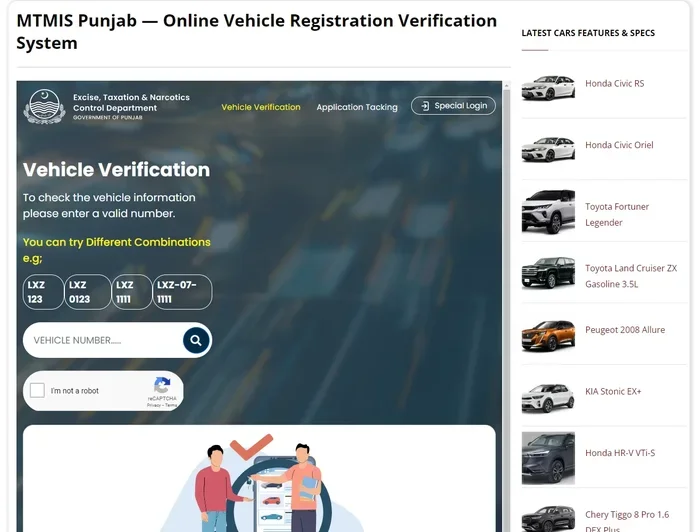
Go to your state’s official DMV or motor vehicle agency website. Look for the registration or vehicle services section. Avoid third-party sites that charge extra fees. The official government site is always free to use.
Step 2: Log In or Create an Account
Most state portals require you to create an account or log in with existing credentials. You will usually need your driver’s license number, vehicle identification number, and some personal details. Take your time entering this information correctly.
Step 3: Enter Vehicle Information
You will be asked to provide details about your vehicle, including the make, model, year, VIN, and odometer reading. Double-check every piece of information before submitting. Errors here can cause delays or rejections.
Step 4: Upload Required Documents
Upload clear copies of your title, insurance card, and any other required documents. Make sure the images are readable and all four corners of each document are visible. Blurry or cropped documents are a common reason for processing delays.
Step 5: Pay the Registration Fee
After reviewing your information, you will be directed to the payment page. Pay the required registration fee using your preferred payment method. Save or print the confirmation receipt for your records.
Step 6: Receive Your Registration
Once your payment is processed, you will receive a confirmation email or message. Your registration documents and sticker will arrive by mail within a few weeks. Some states offer expedited processing for an additional fee.
Quick Tips for Each Step
- Tip 1: Bookmark your state DMV website to avoid fake sites.
- Tip 2: Have all documents scanned and ready before you start.
- Tip 3: Use a strong password for your DMV account to protect your identity.
- Tip 4: Check processing times so you know when to expect your documents.
Common Mistakes to Avoid
Even with a clear guide, mistakes happen. Knowing the most common pitfalls can save you time and frustration. Here are the errors that trip up the most people.
Submitting Expired or Incomplete Documents
One of the top reasons online registration applications get rejected is expired documents. If your insurance has lapsed or your title is outdated, the system will flag it. Always check the expiration dates on every document before you upload them.
Entering Incorrect Vehicle Information
Typos happen, but even small errors can cause big problems. Entering the wrong VIN, odometer reading, or vehicle year can delay your car registration process. Go slowly and verify each entry against your actual documents.
Paying the Wrong Fee Amount
Registration fees vary based on your vehicle’s age, weight, value, and your county. Paying the wrong amount can result in your application being held up. Use the fee calculator on your state DMV website to determine the exact amount before you pay.
Ignoring Mail Delivery Times
After you submit your online application, it takes time to process. Do not assume your registration is active the moment you pay. Wait for your documents to arrive in the mail before driving your vehicle. If you need temporary proof of registration, check whether your state offers a printable confirmation page.
Using Unauthorized Third-Party Websites
Some websites charge hefty fees to help you register your car online. These are not affiliated with your state DMV. Always use the official government website to avoid unnecessary charges and protect your personal information.
Tips for a Smooth Registration Process
A little preparation goes a long way. These expert-backed tips will help you breeze through your online registration with minimal headaches.
Start Early
Do not wait until the last minute. Registration deadlines are strict, and late fees can add up quickly. Start the process at least two weeks before your current registration expires. This gives you a buffer in case anything goes wrong.
Keep Digital Copies of Everything
Scan or photograph every document before you begin. Save them in a folder on your phone or computer. If anything gets lost in the upload process, you will have backups ready to go immediately.
Check for Recalls or Outstanding Tickets
Some states will not process your registration if there are outstanding tickets or if the vehicle has an open recall. Clear any unresolved issues before you apply. This one step saves a lot of headaches down the road.
Set Reminders for Renewal
Once you have successfully registered your car online, set a calendar reminder for renewal. Most states allow online renewal, so the process will be even easier the next time around. Staying on top of renewal dates keeps you compliant and avoids late penalties.
Contact Support if Needed
If you get stuck at any point, do not guess. Contact your state DMV’s customer support team. They can walk you through the process and answer specific questions about your situation. Most agencies offer phone support, live chat, or email assistance during business hours.
Online Registration vs. In-Person Registration
You might wonder whether online registration is really better than going in person. Both methods have their advantages, and the right choice depends on your situation.
Online registration saves you time and eliminates the need to travel. You can complete the process from home at any hour. It is ideal for renewals and straightforward cases. On the other hand, in-person registration gives you face-to-face access to DMV staff. This can be helpful if your situation is complex or if you need to resolve an issue on the spot.
For most standard registrations, online is the faster and more convenient option. But if you are registering a vehicle for the very first time, have a complicated ownership history, or live in a state with limited online services, an in-person visit might still be necessary.
What to Do If Your Online Application Is Denied
A denial does not mean the end of the road. It usually means there is something that needs fixing. Here is what to do next:
- Read the denial notice carefully. It will explain exactly what went wrong.
- Check for missing documents or incorrect information.
- Fix the issues and resubmit your application.
- If you do not understand the denial, contact your state DMV for clarification.
- Keep records of all communications in case you need to escalate the issue.
Most denials are easy to resolve once you know what caused them. Stay calm, review the feedback, and take corrective action.
Final Thoughts
So, can I register my car online? Yes, absolutely. The process has become more accessible, more efficient, and more user-friendly than ever before. With the right documents, a bit of preparation, and patience, you can handle your vehicle registration from the comfort of your home. Whether you are a first-time car owner or simply looking to renew your current registration, online services make it easier to stay compliant without wasting a whole day at the DMV.
Remember to check your state’s specific requirements, avoid the common mistakes outlined in this guide, and take advantage of the tips that work best for your situation. The more prepared you are, the smoother the process will be. Happy registering, and drive safely.
Frequently Asked Questions
Is online car registration available in all states?
No, not all states offer full online registration. Some states allow online renewals but require in-person visits for first-time registrations. Check your state DMV website for the latest information on available services.
How long does online car registration take to process?
Processing times vary by state, but most applications are handled within 2 to 4 weeks. Some states offer expedited processing for an additional fee. You will receive a confirmation email once your application is submitted.
Can I register a car I bought from a private seller online?
In many states, yes. You will need the signed title, proof of insurance, and payment for the registration fee. However, some states require first-time registrants to visit a DMV office in person. Always verify your state’s rules.
What if I do not have a computer or internet access?
Many public libraries and community centers offer free computer access. You can also visit your local DMV office to complete registration in person. Some states even allow registration by mail if online access is not an option.
Are there extra fees for registering a car online?
Most state DMV websites do not charge extra fees for online registration. However, third-party websites may add unnecessary surcharges. Always use your state’s official portal to avoid extra costs.
Can I renew my vehicle registration online every year?
Yes, most states allow online renewal for subsequent years after your initial registration. You will typically receive a renewal notice in the mail or by email before your registration expires. Just log in, confirm your details, and pay the fee.
=== CONCLUSION ===
Can I register my car online? The answer is a clear yes for most car owners in most states. This guide has walked you through everything from understanding what online registration is, to gathering your documents, to completing the process step by step. You now know what you need, what to avoid, and how to make the experience as smooth as possible.
The key takeaway is simple: preparation is everything. Have your documents ready, use the official state website, and take your time entering information correctly. With these habits, you can handle your vehicle registration without stress and without wasting hours in line.
Start today. Visit your state DMV website, check your eligibility, and take the first step toward stress-free registration. You will wonder why you did not do it online sooner.