How to Reset the Oil Light on a 2017 Alfa Romeo Giulia
Resetting the oil light on your 2017 Alfa Romeo Giulia is a quick and easy process you can do at home. This guide walks you through the exact steps to clear the maintenance reminder after an oil change. You will also learn what the oil light means, why it matters, and when to seek professional help.
Changing the oil in your car is one of the most important maintenance tasks you can do. But once the fresh oil is in, there is one more step many people forget. You need to reset the oil light. On a 2017 Alfa Romeo Giulia, this process is simpler than most drivers think. In this guide, we walk you through every step with clear instructions.
The oil light on a 2017 Alfa Romeo Giulia is your car’s way of telling you it is time for an oil change. Once you have completed the service, that light needs to be cleared manually. If you do not reset it, the annoying warning will stay on and distract you every time you start the car. The good news is that you do not need a mechanic or expensive tools to handle this.
Whether you changed the oil yourself or had it done at a shop, this guide will help you turn off the maintenance reminder. We will also cover what the different oil warnings mean and how to avoid common mistakes. By the end, you will feel confident tackling this task on your own.
Key Takeaways
- Simple Process: Resetting the oil light on a 2017 Alfa Romeo Giulia takes just a few minutes using the steering wheel controls.
- No Tools Needed: You do not need any special equipment or a dealership visit to complete the reset.
- Safety First: Always check your actual oil level before resetting the light to avoid engine damage.
- Common Issue: The oil maintenance reminder is a normal part of the Giulia’s oil life monitoring system.
- Know When to Seek Help: If the light persists after resetting, it may signal a deeper issue that needs professional attention.
📑 Table of Contents
- Understanding the Oil Light on Your 2017 Alfa Romeo Giulia
- Why You Should Reset the Oil Light After an Oil Change
- Step-by-Step Guide to Reset the Oil Light
- Common Mistakes When Resetting the Oil Light
- When to See a Professional
- Tips for Keeping Your Giulia’s Oil System in Top Shape
- Frequently Asked Questions
- Conclusion
Understanding the Oil Light on Your 2017 Alfa Romeo Giulia
Before you reset anything, it helps to understand what the light is actually telling you. The 2017 Alfa Romeo Giulia uses an intelligent oil life monitoring system. This system tracks your driving habits and engine conditions to estimate when the oil needs replacing. It does not just count miles. It also considers factors like engine temperature, driving style, and load conditions.
The dashboard warning light on the Giulia can appear in a few different ways. Each one sends a slightly different message about your engine health.
What the Oil Change Reminder Looks Like
On the 2017 Giulia, the oil maintenance reminder typically shows a symbol that looks like an oil can with drops coming out of it. This icon appears on the instrument cluster behind the steering wheel. When you see this light, it means the car’s computer has determined that the oil life has reached zero percent.
It is important to note that this light is not the same as the oil pressure warning. The oil pressure warning is usually red and shaped like an oil can with a drip. That light means something is seriously wrong right now. If you see a red oil pressure light, pull over safely and check your oil level immediately. Ignoring this could lead to severe engine damage.
On the other hand, the maintenance reminder is typically yellow or amber. It is a scheduled service indicator, not an emergency. Still, you should not ignore it for too long. Old oil loses its ability to lubricate and protect engine parts. Over time, this can cause increased wear and even engine overheating.
How the Oil Life System Works
The 2017 Alfa Romeo Giulia uses a sophisticated algorithm to track oil life. The system monitors several inputs including engine revolutions, temperature cycles, and driving duration. Based on this data, it calculates when the oil has degraded to the point where it needs replacement.
When the system determines that the oil life is spent, it triggers the maintenance reminder. After you add fresh oil and replace the filter, the system still thinks the oil needs changing until you manually reset it. This is where the reset procedure comes in.
Why You Should Reset the Oil Light After an Oil Change
Some drivers wonder if resetting the oil light is really necessary. The answer is yes. Here is why it matters.
First, the persistent warning light is distracting. Every time you turn the key, that yellow icon stares back at you. It can be stressful and take your attention away from the road. Clearing it gives you peace of mind.
Second, the reset helps your car track the next service interval accurately. When you clear the old reminder, the oil life system starts fresh. It recalculates based on your new oil and driving patterns. This means you get a more accurate estimate for the next oil change.
Third, leaving the light on can sometimes cause confusion during inspections or when selling the car. A clean dashboard shows that the vehicle has been properly maintained.
It is also worth noting that the 2017 Giulia uses synthetic oil in most configurations. Synthetic oil tends to last longer than conventional oil, which means the reset procedure is even more important to keep the service tracking accurate.
Step-by-Step Guide to Reset the Oil Light
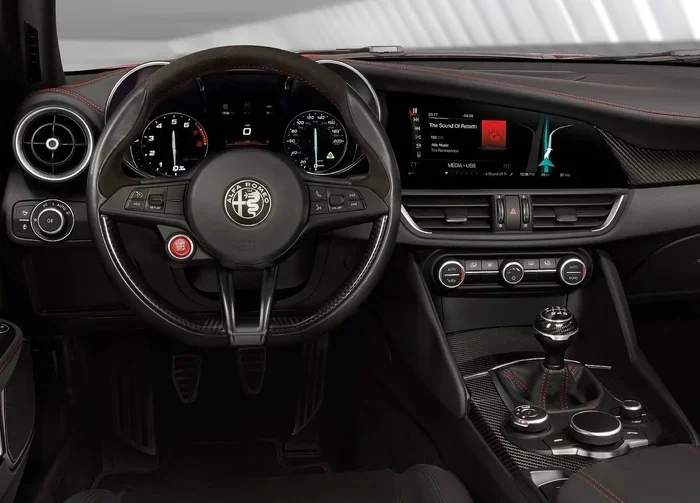
Now let us get to the part you have been waiting for. Resetting the oil light on a 2017 Alfa Romeo Giulia is straightforward. You will use the steering wheel controls to navigate the infotainment system. No special tools are required.
What You Need Before Starting
Before you begin, make sure you have the following:
- The ignition key or push-button start
- The steering wheel control buttons (up, down, and OK/enter)
- Your new oil and filter already installed
- A few minutes of quiet time
It is also a good idea to check the actual oil level with the dipstick before resetting. You want to make sure the oil is at the proper level. If the oil is low, the light may come back soon after you reset it. And if you are curious about how low oil affects your engine, low oil can indeed cause a car to overheat, which is something you want to avoid.
Reset Procedure Step by Step
Follow these steps carefully to reset the maintenance reminder:
- Turn the ignition to the ON position. Do not start the engine. Just press the start button once or turn the key to the ON setting. The dashboard lights will illuminate.
- Press the MENU button on the steering wheel. This brings up the main infotainment menu on the instrument display.
- Use the up and down arrows to navigate to Settings. Scroll through the options until you find the Settings icon. Press the OK button to select it.
- Look for Vehicle Settings or Maintenance. Within the Settings menu, scroll down to find the maintenance or vehicle settings option. Select it by pressing OK.
- Find the Oil Life Reset option. This should be listed as “Oil Life Reset” or “Maintenance Reset.” Select it.
- Press and hold the OK button for several seconds. The system will prompt you to confirm the reset. Hold the button until the display shows the reset is complete.
- Turn the ignition off and then back on. This confirms the reset. The oil light should no longer appear on the dashboard.
If the light is still on after following these steps, do not panic. Sometimes the system needs a second attempt. Repeat the process and make sure you hold the OK button long enough during step six. The system can be a bit finicky.
For drivers who also want to clear other dashboard warnings, it helps to understand that some lights behave differently. If you are dealing with other warning indicators, you might find it useful to learn about running diagnostics without a check engine light to get a fuller picture of your vehicle’s health.
Alternative Method Using the Instrument Cluster
Some owners of the 2017 Alfa Romeo Giulia have reported a slightly different method. On certain trim levels, you can reset the oil light directly through the instrument cluster without going through the full infotainment menu. Here is how:
- Turn the ignition to ON without starting the engine.
- Press the trip button on the steering wheel repeatedly until the oil life percentage display appears.
- Press and hold the trip button for about 10 seconds.
- The display should flash and then reset to 100 percent.
- Turn the ignition off and back on to confirm.
This method works on many Giulia models but may vary slightly depending on your specific trim and infotainment version. If the first method does not work for you, try this alternative approach.
Common Mistakes When Resetting the Oil Light
Even simple tasks can go wrong if you are not careful. Here are the most common mistakes drivers make when resetting the oil light on their 2017 Alfa Romeo Giulia.
Resetting Without Checking the Oil Level
This is the number one mistake. Before you reset the light, always verify that the oil level is correct. The reset procedure only clears the reminder. It does not add oil. If your oil is low, the light will come right back on after a few drives. Use the dipstick to check the level and top off if needed.
Not Holding the Button Long Enough
The reset process requires you to hold the OK or trip button for a sustained period. A quick tap will not work. You need to hold it for at least 5 to 10 seconds until the display responds. Many people give up too early and think the procedure is not working.
Starting the Engine During the Reset
You must keep the engine off during the reset process. If you accidentally start the engine, the system may exit the menu. Turn the ignition to ON only, not START. The engine should not crank.
Ignoring Persistent Lights
If the light comes back after resetting, do not just reset it again and ignore it. A recurring oil light could indicate a real problem. Low oil level, a faulty oil sensor, or an oil leak could all be the cause. If the light persists, it is worth investigating further.
When to See a Professional
Most of the time, resetting the oil light is a simple DIY job. But there are situations where professional help is the right call.
If you have followed the reset procedure multiple times and the light keeps coming back, something deeper may be going on. The oil pressure sensor could be malfunctioning. There could be an oil leak that is slowly draining the system. Or the oil life monitor itself may need recalibration.
Similarly, if you notice other warning lights on the dashboard alongside the oil light, do not ignore them. A combination of warnings could signal a serious engine problem. In that case, you should schedule a visit to a qualified mechanic or an Alfa Romeo dealership as soon as possible.
For owners who are unsure about any aspect of their Giulia’s maintenance, it is always a good idea to consult the owner’s manual. The manual provides specific guidance for your model year and trim level. It also lists the recommended oil change schedule and the type of oil to use.
Regular maintenance goes a long way toward keeping your car healthy. Beyond just resetting the oil light, staying on top of routine services like tire rotations, brake inspections, and fluid checks will help your 2017 Alfa Romeo Giulia run smoothly for years to come.
Tips for Keeping Your Giulia’s Oil System in Top Shape
Resetting the oil light is just one part of oil maintenance. Here are some extra tips to keep your Giulia running strong.
- Use the recommended oil grade. The 2017 Giulia typically requires 0W-20 or 5W-30 synthetic oil. Check your owner’s manual to confirm the correct specification for your engine.
- Change the oil filter every time. A fresh filter ensures proper oil flow and filtration. Do not reuse old filters.
- Set a reminder for your next change. After resetting the light, note the date and mileage in your phone or on the windshield. This helps you stay on track.
- Check for leaks regularly. Look under your car for any fresh oil spots. Early detection of leaks can prevent bigger problems.
- Monitor oil life between changes. The Giulia’s oil life percentage drops gradually. Keep an eye on it so you are never caught off guard.
Taking care of your oil system is one of the best investments you can make in your car’s longevity. Fresh oil keeps all the internal components lubricated and cool. It prevents premature wear and helps the engine run efficiently.
And while you are under the hood, it is also worth checking other fluid levels. Coolant, brake fluid, and transmission fluid all play critical roles in keeping your Giulia safe and reliable. A few extra minutes of checking can save you from costly repairs down the road.
Frequently Asked Questions
Can I drive my 2017 Alfa Romeo Giulia with the oil light on?
The maintenance reminder is not an emergency, so you can drive a short distance to get the oil changed. However, you should not drive for extended periods with the light on. Old oil loses its protective properties and can lead to increased engine wear. If the light is red and not yellow, pull over immediately and check your oil level.
How often does the oil light need to be reset on a 2017 Alfa Romeo Giulia?
The oil light needs to be reset every time you get an oil change. The 2017 Giulia’s oil life system tracks usage and triggers the reminder based on driving conditions. After replacing the oil and filter, a simple reset clears the warning and starts the countdown for the next service interval.
What happens if I do not reset the oil light after an oil change?
If you do not reset the light, the maintenance reminder will stay on indefinitely. It will continue to display every time you start the car. While it does not affect the car’s performance, it is annoying and can mask other important warnings. Always reset it after each oil change to keep your dashboard clear.
Can low oil cause the check engine light to come on?
Yes, low oil can trigger the check engine light in some cases. The engine control module monitors oil pressure, and if it drops too low, it may activate the warning. If you are seeing both the oil light and the check engine light at the same time, check your oil level right away. You can also learn more about how low oil affects your dashboard warnings by reading about whether low engine oil shows on the dashboard.
Is resetting the oil light the same as changing the oil?
No, resetting the oil light does not change the oil. It simply clears the maintenance reminder on the dashboard. The actual oil change involves draining the old oil, replacing the filter, and adding fresh oil. Both steps are necessary for proper engine care. Always perform the oil change first, then reset the light.
What oil does the 2017 Alfa Romeo Giulia use?
The 2017 Alfa Romeo Giulia typically requires full synthetic 0W-20 oil for the turbocharged 2.0-liter engine. Some models with the 2.9-liter V6 may use a different grade. Always refer to your owner’s manual for the exact specification. Using the wrong oil can affect engine performance and trigger the maintenance light prematurely.
Conclusion
Resetting the oil light on your 2017 Alfa Romeo Giulia is a quick and satisfying task. It takes just a few minutes and requires nothing more than the steering wheel controls. Whether you use the infotainment menu or the instrument cluster method, the process is straightforward and easy to remember.
The key is to never skip the actual oil change. The reset only clears the reminder. Fresh oil and a new filter are what truly protect your engine. Make both steps part of your regular maintenance routine and your Giulia will reward you with smooth, reliable performance.
Keep this guide handy for your next oil change. Bookmark it, share it with fellow Giulia owners, and never let that annoying yellow light linger on your dashboard again. Your car will thank you, and so will your peace of mind.