Will Disconnecting the Battery Reset Anti-Theft System
Yes, in many cases disconnecting the battery can reset your anti-theft system, but it is not always a guaranteed fix. The method works differently depending on your vehicle’s make, model, and the type of security system installed. This guide walks you through the exact steps, explains when it will not work, and shares safer alternatives to get your car running again without unnecessary frustration.
You turn the key or push the start button, and nothing happens. The dashboard lights flicker. The anti-theft light blinks steadily like a warning you cannot ignore. Your mind races through every possible cause, and one thought keeps popping up: will disconnecting the battery reset anti-theft?
This is one of the most common questions car owners ask when their vehicle suddenly refuses to cooperate. The good news is that a battery disconnect solves the problem for many vehicles. The bad news is that it does not work for every car or every situation. Understanding how your anti-theft system works and what happens when you disconnect power can save you time, money, and a lot of stress.
In this guide, we will walk through the entire process step by step. You will learn why the security system activates, when pulling the battery terminals actually helps, and what to do if it does not. We will also cover common mistakes that make the problem worse and share practical tips to keep your vehicle secure without getting locked out.
Key Takeaways
- Battery disconnect can reset anti-theft: Removing the battery terminals clears temporary memory in many vehicles and resets the security light.
- It does not always work: Some advanced systems store codes in the ECU or require a specific relearn procedure that a simple disconnect cannot fix.
- Safety first: Always follow proper steps when disconnecting your battery to avoid damaging electronics or losing stored settings.
- Key fob plays a role: A low battery key fob can sometimes trigger false anti-theft alerts, so checking the fob battery is a smart first step.
- Professional help may be needed: If the disconnect method fails, a dealership or locksmith with the right tools can reprogram your system.
📑 Table of Contents
- What Is an Anti-Theft System and How Does It Work?
- Will Disconnecting the Battery Reset Anti-Theft?
- Step-by-Step: How to Disconnect Your Battery Safely
- When Disconnecting the Battery Will Not Reset Anti-Theft
- Other Ways to Reset Your Car Anti-Theft System
- Common Mistakes That Make Anti-Theft Problems Worse
- Preventing Anti-Theft Issues Before They Start
- When to Seek Professional Help
- Final Thoughts
What Is an Anti-Theft System and How Does It Work?
Before you can fix something, you need to understand what it does. Every modern vehicle comes with some form of theft prevention built in. These systems are designed to stop someone from hot-wiring your car or driving away with it. They range from simple alarms to sophisticated computer-based immobilizers that prevent the engine from starting unless the correct key or fob is present.
How the Basic System Works
Most anti-theft systems rely on a transponder inside your key or key fob. When you insert the key or press the start button, the car’s computer sends a signal. The transponder responds with a unique code. If the code matches, the system disarms and lets the engine start. If it does not match, the immobilizer locks out the fuel or ignition system.
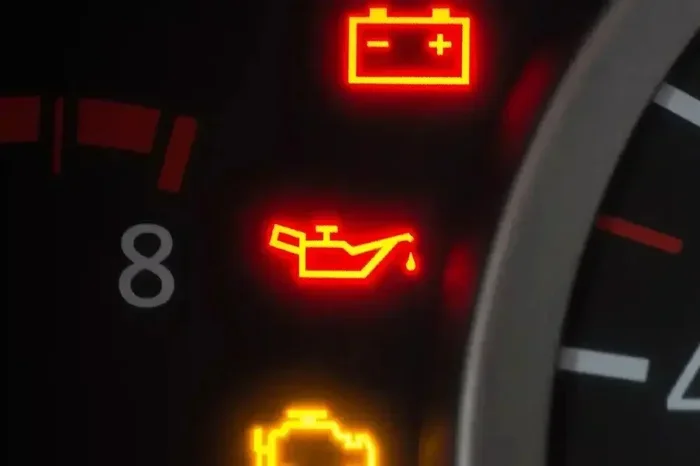
You will often see a small flashing light on the dashboard when the system is active. This is the security indicator light, and it is normal for it to glow for a few seconds after you turn the key to the ON position. If it keeps flashing after the engine should be running, something has gone wrong.
Common Types of Anti-Theft Systems
Different vehicles use different levels of security technology. Here is a quick look at the most common types:
- Passlock System (GM vehicles): Uses a resistance value in the ignition lock cylinder to verify the key.
- VATS System (older GM cars): Relies on a visible resistor strip on the key blade.
- Ford SecuriLock: Uses a transponder chip embedded in the key head.
- Toyota Smart Key System: Detects the key fob’s presence inside the vehicle and allows push-button starting.
- Aftermarket Alarms: Installed separately and often include remote start, shock sensors, and tilt sensors.
Each system responds differently to a power loss. Knowing which type your car uses helps you predict whether a battery disconnect will reset the anti-theft or leave the system locked.
Will Disconnecting the Battery Reset Anti-Theft?
This is the big question, and the answer is: it depends. In many cases, yes. But in others, no. Let us break down exactly what happens when you disconnect the battery and why it sometimes works and sometimes does not.
Why Disconnecting Works on Many Vehicles
When you remove the battery cables, you cut power to the entire electrical system. This includes the body control module, the powertrain control module, and the anti-theft unit. These components store temporary data in their short-term memory. A full power loss wipes that memory clean.
Once you reconnect the battery, the systems reboot. The anti-theft module goes through its normal initialization process. The security light stops flashing. The engine can start normally again. For simple false alarms or temporary glitches, this is often all it takes.
When Disconnecting Does Not Work
Unfortunately, not every vehicle clears its anti-theft memory with a simple disconnect. Here are situations where pulling the battery will not help:
- Stored fault codes in the ECU: Some modules retain security codes even without power, especially in newer vehicles with advanced computers.
- Passlock or VATS recalibration needed: Certain GM vehicles require a specific relearn procedure after the battery is disconnected. Simply clearing power is not enough.
- Aftermarket alarm systems: These often have their own backup batteries or memory retention circuits that survive a main battery disconnect.
- Corroded or damaged wiring: If the problem is a short circuit or damaged sensor, disconnecting the battery only masks the symptom temporarily.
If you have already tried the disconnect method and your car still will not start, do not keep trying repeatedly. Each failed attempt can deepen the security lockout and make the problem harder to resolve. Move on to the alternative methods we cover below.
Step-by-Step: How to Disconnect Your Battery Safely
If you decide to try the battery disconnect method, following the right steps matters. Doing it wrong can damage sensitive electronics or trigger additional security features. Here is a safe, clear process you can follow.
What You Will Need
- A adjustable wrench or socket set (usually 10mm)
- Safety gloves and eye protection
- A memory saver device (optional but recommended for newer cars)
- Your vehicle owner’s manual
The Step-by-Step Process
- Turn off the ignition and remove the key. Make sure all accessories are off.
- Open the hood and locate the battery. Identify the negative terminal (marked with a minus sign).
- Disconnect the negative cable first. Use your wrench to loosen the nut and lift the cable off the terminal. Always negative first to avoid short circuits.
- Disconnect the positive cable second. This is the cable with the plus sign.
- Wait at least 15 minutes. This gives the capacitors in the modules enough time to fully discharge and forget stored error states.
- Reconnect the positive cable first. Tighten it securely.
- Reconnect the negative cable last. Tighten it firmly.
- Turn the ignition to the ON position (do not start yet). Wait for the dash lights to come on and the anti-theft light to stop flashing.
- Start the engine. If the reset worked, your car should start normally.
Pro tip: If your car has a memory saver device plugged into the OBD port, you can keep it connected during the disconnect. This preserves your radio presets, power window settings, and other learned preferences. It also helps the computer reboot more smoothly without losing important adaptive data.
One thing to watch for: after reconnecting, your radio may ask for a security code. This is normal on many brands. Check your owner’s manual or the paperwork that came with the vehicle for the code. If you do not have it, you may need to contact the dealership.
When Disconnecting the Battery Will Not Reset Anti-Theft
Sometimes the security system is not the problem at all, or the problem is deeper than a simple power reset can fix. Recognizing these situations early saves you from wasted effort and prevents further damage.
Signs That a Battery Disconnect Will Not Help
- The anti-theft light stays on solid, not flashing, after you reconnect the battery.
- The engine cranks but will not fire, even after waiting 15 minutes.
- You see a message on the dashboard about security system malfunction.
- The key fob does not communicate with the car at all, even with a fresh battery installed.
- Multiple electronic systems act erratically after the reconnect.
In these cases, the issue likely involves a faulty sensor, a damaged control module, or a deeper wiring problem. A simple battery terminal disconnect cannot fix hardware failures. You will need professional diagnostic tools to read the fault codes and pinpoint the real cause.
What to Do Instead
If the disconnect method fails, try these steps before visiting a mechanic:
- Check your key fob battery. A weak fob battery can mimic anti-theft problems. If you are dealing with a fob that is not communicating, this is often the culprit. You might also want to check whether you need to reset your key fob after replacing the battery.
- Try a spare key. If your primary key has a damaged transponder, the spare might bypass the issue entirely.
- Cycle the ignition. Turn the key to the ON position, wait 10 minutes, turn it off, and repeat this three times. Some vehicles will exit security lockout mode after this relearn sequence.
- Check for recalls or technical bulletins. Some vehicle models have known anti-theft issues that the manufacturer has already addressed.
These simple checks resolve the problem more often than people expect. Many drivers rush to the dealership when a dead key fob battery or a simple relearn procedure would have done the trick.
Other Ways to Reset Your Car Anti-Theft System
If the battery disconnect does not work for your vehicle, there are other proven methods to reset the anti-theft system. Each method targets a different type of security lockout, so choosing the right one depends on your specific symptoms.
Method 1: The Ignition Cycle Relearn
This method works well on many Ford and GM vehicles. Here is how it goes:
- Insert the key into the ignition.
- Turn the key to the RUN position (do not start).
- Wait 10 minutes. Watch the anti-theft light.
- When the light turns off, turn the key back to OFF.
- Wait 5 seconds.
- Repeat this cycle two more times (three total).
- On the fourth cycle, try to start the engine.
The car’s computer relearns the key’s transponder code during these cycles. Once it accepts the code, the immobilizer releases and the engine starts.
Method 2: The OBD-II Scanner Reset
For vehicles that store anti-theft codes in the onboard diagnostics system, an OBD-II scanner can clear them. You will need a scanner that supports security module access, not just a basic code reader. Many auto parts stores will let you borrow one for free. Simply plug it in, read the codes, and select the option to clear them. This method works best when the security light is on but the engine still cranks normally.
Method 3: Key Fob Resynchronization
Sometimes the problem is not with the car’s computer but with the key fob’s communication. The fob may have drifted out of sync with the receiver. Most vehicles have a resync procedure detailed in the owner’s manual. Generally, it involves pressing specific button combinations on the fob while standing near the vehicle. If you are unsure, check whether doing anything after replacing a key fob battery might be relevant to your situation.
Common Mistakes That Make Anti-Theft Problems Worse
When you are frustrated and your car will not start, it is easy to make mistakes that turn a simple fix into a bigger problem. Here are the most common errors drivers make when dealing with anti-theft system issues.
Mistake 1: Repeatedly Trying to Start the Car
Every failed start attempt adds to the security lockout counter on many vehicles. After a certain number of failures, some systems enter a prolonged lockout period that can last hours. If the car will not start after two or three tries, stop and try a different approach.
Mistake 2: Disconnecting the Wrong Cable
Always disconnect the negative terminal first. Removing the positive cable first creates a risk of short-circuiting the battery through your wrench and the car’s frame. This can blow fuses, damage sensors, or even cause a spark that leads to burns or fire.
Mistake 3: Not Waiting Long Enough
Fifteen minutes is the minimum recommended wait time. Some vehicles, especially those with complex computer networks, benefit from 30 minutes or more. Rushing this step means the modules may not fully reset, and the anti-theft system may retain its locked state.
Mistake 4: Ignoring the Key Fob
Many drivers focus entirely on the car and forget about the key fob itself. A low battery in the fob can prevent communication with the vehicle and trigger the anti-theft light. This is a quick and easy fix that costs less than a dollar in batteries. If your fob battery is weak, it might also be draining your car battery over time. You can learn more about this in our article on whether a low battery key fob can drain a car battery.
Preventing Anti-Theft Issues Before They Start
The best way to deal with an anti-theft problem is to avoid one in the first place. A few simple maintenance habits can keep your vehicle security system working reliably for years.
Replace Key Fob Batteries on Schedule
Do not wait for the fob to stop working entirely. Most key fob batteries last 12 to 24 months. Set a reminder on your phone to replace them proactively. This prevents the communication failures that often trigger false anti-theft alerts.
Keep Your Keys Away from Strong Electronics
Key fobs contain small electronic components that can be affected by strong magnetic fields or radio frequency interference. Avoid storing keys near large speakers, transformers, or powerful motors. This keeps the transponder functioning accurately.
Use the Correct Key or Fob
Aftermarket replacement keys are convenient and much cheaper than dealer keys, but not all of them come with properly programmed transponders. If you need a spare key, ask your dealer or a qualified locksmith to program it correctly. A poorly programmed key can cause intermittent anti-theft lockouts that are incredibly frustrating to diagnose.
Regular Maintenance Checks
During routine service, ask your mechanic to inspect the ignition lock cylinder and the wiring around the anti-theft sensor. Corrosion, wear, and loose connections are common causes of security system failures. Catching these early prevents unexpected lockouts.
When to Seek Professional Help
There is no shame in calling a professional when the problem goes beyond a simple reset. If you have tried the battery disconnect method, the ignition cycle relearn, and checked your key fob battery without success, it is time to bring in expert help. A qualified mechanic or locksmith can access diagnostic equipment that reads the specific fault codes in your security module.
Before you visit the dealership, consider calling a local automotive locksmith. They often have the same diagnostic tools at a fraction of the cost. Dealerships are convenient, but they also charge premium rates for services that a skilled locksmith can perform just as effectively.
Also, keep in mind that if your vehicle is still under warranty, the dealership may cover the cost of diagnosis and repair. Check your warranty terms before paying out of pocket for anything related to the anti-theft system.
Final Thoughts
So, will disconnecting the battery reset anti-theft? For many drivers, the answer is yes. A simple battery disconnect clears temporary glitches, resets the security light, and gets your car running again in under an hour. But it is not a magic fix for every vehicle or every situation.
The key is to approach the problem calmly and methodically. Start with the simplest solutions: check your key fob battery, try a spare key, and attempt the ignition cycle relearn. If those do not work, move on to the battery disconnect. And if nothing works, do not hesitate to call a professional.
Your car’s anti-theft system is there to protect you and your vehicle. Understanding how it works and how to troubleshoot it puts you in control. You will spend less time worrying and more time driving with confidence, knowing that your car is secure and your problem is solved.
Frequently Asked Questions
Can a dead key fob battery cause the anti-theft light to come on?
Yes, absolutely. A weak or dead key fob battery can prevent the transponder signal from reaching the car’s receiver. When the car does not detect the correct signal, it assumes a theft attempt and activates the anti-theft system. Replacing the fob battery is often the simplest fix.
How long should I wait after disconnecting the battery before reconnecting?
At least 15 minutes is recommended. This gives the capacitors in the vehicle’s modules time to fully discharge and forget stored error states. For some newer vehicles with complex computer systems, waiting up to 30 minutes may improve the reset results.
Will disconnecting the battery erase my radio presets and settings?
It can. Many vehicles lose radio presets, power window calibration, and other learned settings when the battery is fully disconnected. Using a memory saver device plugged into the OBD port can preserve these settings during the process.
What should I do if the anti-theft light stays on after a battery disconnect?
If the light remains on or the car still will not start after a disconnect, try the ignition cycle relearn method. If that also fails, check your key fob battery and try a spare key. If none of these work, a professional diagnostic scan is the next best step.
Can an aftermarket alarm system interfere with factory anti-theft?
Yes. Aftermarket alarm systems can sometimes conflict with the factory security module, especially if they are not installed correctly. Wiring errors or incompatible modules can cause persistent anti-theft warnings and starting problems.
Is it safe to disconnect the battery every time the anti-theft light comes on?
Occasional disconnects are generally safe, but making it a habit is not recommended. Repeated power losses can reset adaptive learning data in the engine and transmission modules, which may cause rough shifting or poor fuel economy until the systems relearn. Use this method only when needed.