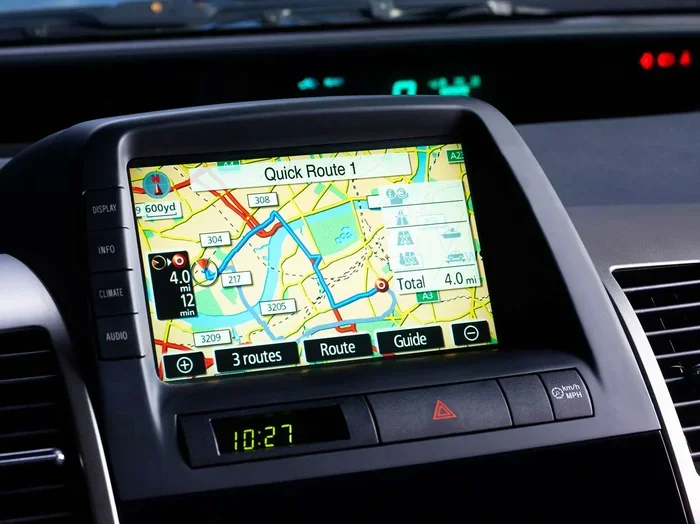
How to Stop the Navigation System in a Car for Good
Stopping the navigation system in a car is easier than most drivers think. Whether you want to turn off GPS to save battery, reduce distractions, or simply prefer using your phone, this guide covers every method. You will learn step-by-step instructions, troubleshooting tips, and expert advice to fully disable your car’s navigation system for good.
You are driving down the highway. The GPS map is glowing on your dashboard. Turn-by-turn directions keep popping up. And you just want it all to stop.
It happens to almost every driver at some point. Maybe you already know the route. Maybe you prefer using your phone. Or maybe the constant beeping and blinking is just too much. Whatever the reason, knowing how to stop the navigation system in a car is a useful skill every driver should have.
In this guide, we walk you through every method you can use. We cover everything from simple screen taps to deeper system settings. You will also find troubleshooting tips for when things do not work as expected. By the end, you will know exactly how to turn off GPS and manage your car’s navigation with confidence.
Key Takeaways
- Multiple Methods: There are several ways to stop the navigation system in a car, from simple screen taps to deep system settings.
- Saves Battery Life: Turning off GPS navigation reduces power drain on your car battery and infotainment system.
- Reduces Distractions: Disabling map directions helps drivers stay focused on the road.
- Works Across Brands: The steps apply to most car models including Toyota, Honda, Ford, and BMW.
- Troubleshooting Tips Included: Learn what to do when the navigation won’t turn off.
- Expert Insights: Get professional advice on managing your car’s GPS tracking and infotainment settings.
📑 Table of Contents
- Why Drivers Want to Stop the Navigation System in a Car
- How to Stop the Navigation System in a Car: Step-by-Step Methods
- How Car Navigation Systems Work
- Comparison: Built-In Navigation vs. Phone Navigation
- Troubleshooting: When the Navigation System Will Not Turn Off
- Expert Tips for Managing Your Car Navigation System
- Common Mistakes People Make With Car Navigation
- How to Stop the Navigation System in a Car for Different Brands
- Final Thoughts: Taking Control of Your Car Navigation
Why Drivers Want to Stop the Navigation System in a Car
Before we dive into the how, let us talk about the why. Understanding your reasons helps you choose the right method. There are several common reasons drivers want to disable their GPS navigation.
Saving Battery and Power
Your car’s navigation system uses a lot of power. The GPS receiver constantly communicates with satellites. The screen stays lit. The map data loads in the background. All of this drains energy. If you park your car for long periods, a running navigation system can drain your battery. This is especially true for older vehicles with smaller batteries.
Reducing Driving Distractions
Safety comes first. Constant map updates and voice prompts can pull your attention away from the road. Some drivers find the navigation voice annoying or distracting. Others get stressed when the system recalculates routes constantly. Turning off the navigation helps you stay calm and focused behind the wheel.
Using a Better Alternative
Many drivers prefer using their smartphone for directions. Apps like Google Maps or Waze often offer better traffic data. They also get updated more frequently than built-in car systems. If you rely on your phone, keeping the car navigation on just creates clutter on the dashboard screen.
Privacy Concerns
GPS tracking is a real concern for many people. Your car’s navigation system stores location history. It knows everywhere you have been. Some drivers prefer to turn this off to protect their privacy. Disabling the navigation system is one way to limit this data collection.
How to Stop the Navigation System in a Car: Step-by-Step Methods
Now let us get into the practical part. There are several ways to stop the navigation system in a car. The exact steps vary depending on your vehicle make and model. But the general methods apply to most cars on the road today.
Method 1: Press the Power or Off Button on the Screen
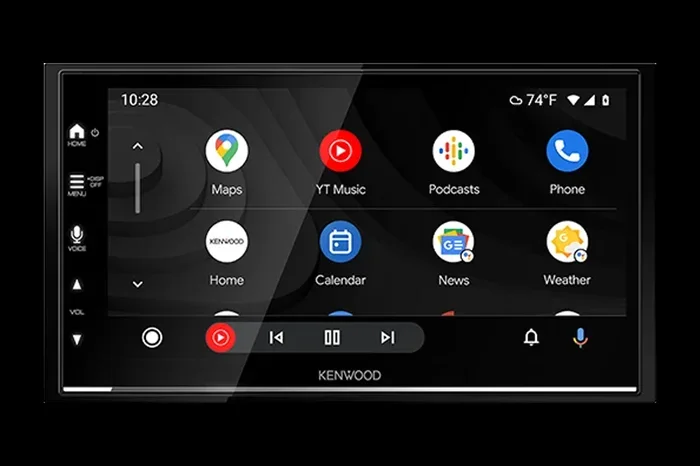
This is the simplest approach. Most car navigation screens have a power button or an off option. Look for a menu icon on the dashboard display. Tap it. Then look for a button that says “Navigation Off” or “Turn Off Map.”
For many vehicles, you can also press and hold the power button for a few seconds. This brings up a quick menu. From there, you can select the option to disable the navigation feature. The GPS icon on your car display should disappear once you do this.
Quick Tip: If you cannot find the off button, try swiping down from the top of the infotainment screen. Many car systems hide quick settings there.
Method 2: Use the Car’s Infotainment Settings Menu
Most modern cars have a dedicated settings area for the infotainment system. This is where you can control the navigation system more deeply.
Here is how to access it:
- Tap the “Settings” icon on your car’s main screen.
- Look for a section called “Navigation,” “GPS,” or “Location.”
- Toggle the navigation feature off.
- Some systems also let you turn off the GPS receiver entirely.
This method works for most vehicles. Whether you drive a Toyota, Honda, Ford, Chevrolet, or BMW, the general path is similar. You go into settings, find the navigation option, and switch it off.
Quick Tip: If your car uses a rotary knob or physical buttons instead of a touchscreen, navigate through the menu using those controls. The settings layout is similar, just controlled differently.
Method 3: Turn Off GPS Location Services
Another effective way is to disable the GPS location services on your car’s system. This stops the car from receiving satellite signals entirely. Without a GPS signal, the navigation system cannot show your location or provide directions.
Here is how to do it:
- Go to your car’s Settings menu.
- Find the “Location Services” or “GPS” section.
- Toggle the location setting to “Off.”
- The navigation system will automatically deactivate.
This method is especially useful if you want to stop all location tracking. It also saves battery life because the GPS receiver stops searching for satellites.
Method 4: Use the Car’s Voice Command
Many cars now come with voice control features. You can use voice commands to turn off the navigation system. Simply press the voice button on your steering wheel and say something like “Turn off navigation” or “Stop GPS.”
Voice commands work well when you are driving and do not want to take your hands off the wheel. The exact phrase depends on your car’s system. Some popular systems include Ford SYNC, BMW iDrive, and Toyota Entune. Check your owner’s manual for the exact voice commands your car supports.
Method 5: Restart the Infotainment System
Sometimes the navigation system just freezes or will not respond to normal controls. In these cases, restarting the infotainment system often solves the problem.
To restart:
- Press and hold the power button on the car display for 10 to 15 seconds.
- The screen will go black and then restart.
- Once it boots back up, the navigation system may be off.
- If not, go into settings and toggle it off.
This is a quick fix that works for most car brands. It clears temporary glitches and resets the system. Think of it like restarting a computer when it gets stuck.
Method 6: Disconnect the Navigation Module (Advanced)
For drivers who want a permanent solution, disconnecting the navigation module is an option. This involves accessing the car’s electrical system and unplugging the GPS antenna or navigation unit.
This method is more advanced. We recommend it only for experienced DIYers. Here is what you need to know:
- The GPS antenna is usually mounted on the car roof or behind the dashboard.
- You may need to remove trim panels to access it.
- Unplug the antenna cable carefully.
- Some cars also have a fuse for the navigation system that you can remove.
Warning: Disconnecting the navigation module may void your car’s warranty. Check with your dealer first if your vehicle is still under warranty. Also, this method disables all navigation features, including Bluetooth mapping and location-based services.
How Car Navigation Systems Work
Understanding how your car’s navigation system works helps you manage it better. The system relies on a few key components working together.
The GPS Receiver
Every navigation system has a GPS receiver. This small chip inside your car picks up signals from GPS satellites orbiting the Earth. It uses these signals to calculate your exact location. The receiver works 24 hours a day, even when you are not actively using the map.
The Infotainment Display
The infotainment screen shows you the map, route, and directions. It also displays your current location with a blinking icon. The display stays active whenever the navigation system is on. This is what draws power from your car’s battery.
Map Data and Software
Your car stores map data either on a built-in hard drive or a memory card. Some newer cars stream map data over a cellular connection. The software processes this data to calculate routes and provide turn-by-turn guidance.
The GPS Antenna
The GPS antenna receives signals from satellites. It is usually a small, flat module mounted on the roof of the car. A cable connects the antenna to the navigation unit inside the dashboard. Without a working antenna, the navigation system cannot determine your location.
Knowing these components helps you understand why the system uses power and how to control it. When you want to stop the navigation system, you are essentially cutting off communication between these parts.
Comparison: Built-In Navigation vs. Phone Navigation
Many drivers wonder whether they should use the car’s built-in navigation or rely on their phone instead. Here is a quick comparison to help you decide.
| Feature | Built-In Navigation | Phone Navigation |
|---|---|---|
| Screen Size | Larger, built into dashboard | Smaller, handheld |
| GPS Accuracy | High, dedicated receiver | High, uses phone GPS chip |
| Map Updates | Less frequent, may cost extra | Frequent, free with app updates |
| Battery Drain | Drains car battery | Drains phone battery |
| Distraction Level | Can be high with voice prompts | Moderate, adjustable |
| Offline Use | Usually works offline | Works offline if maps downloaded |
| Traffic Data | Varies by car model | Real-time, usually better |
| Privacy | Stores location history in car | Stored on phone, easier to clear |
As you can see, both options have pros and cons. The built-in system offers a larger screen and hands-free convenience. But phone apps often provide better traffic data and more frequent updates. If you prefer using your phone, turning off the car’s navigation system makes a lot of sense.
Troubleshooting: When the Navigation System Will Not Turn Off
Sometimes you try everything and the navigation system just will not stop. This can be frustrating. Here are some common issues and how to fix them.
The GPS Icon Keeps Flashing
If the GPS icon stays on even after you turn off navigation, the GPS receiver may still be active. Try turning off location services entirely. If that does not work, restart the infotainment system. A full restart usually stops the GPS from searching for signals.
The Screen Freezes on the Map
A frozen map screen is a common problem. It often happens after a software glitch. To fix it, restart the infotainment system by holding the power button for 10 to 15 seconds. If the screen still freezes, check for software updates in the settings menu.
Navigation Turns Back On Automatically
Some cars have a setting that automatically starts the navigation when you turn on the ignition. To fix this, go to Settings and look for “Auto-Start Navigation.” Toggle it off. This stops the system from launching the map every time you start the car.
The System Says GPS Signal Lost
If your car says the GPS signal is lost, the antenna may have a problem. Check that the antenna cable is securely connected. Also, make sure there are no obstructions on the roof where the antenna is mounted. Heavy snow or a roof rack can sometimes block the signal.
Quick Tip: If none of these fixes work, consult your car’s owner manual. Every vehicle has unique settings and troubleshooting steps specific to its model.
Expert Tips for Managing Your Car Navigation System
We asked experienced auto technicians and car care experts for their best advice on managing navigation systems. Here is what they had to say.
Tip 1: Update Your Maps Regularly. Even if you plan to turn off the navigation, keeping map data current is important. Outdated maps can cause errors and slow down the system when you do decide to use it.
Tip 2: Clear Your Location History. Most car navigation systems store a history of places you have visited. Clearing this data regularly protects your privacy. You can usually find this option in the Navigation Settings under “History” or “Saved Locations.”
Tip 3: Use the Silent Mode. If you do not want to turn off navigation entirely, try using silent mode. This turns off voice prompts while keeping the map visible. It reduces distractions without losing route guidance.
Tip 4: Set a Default Destination. Some cars let you set a default home or work address. This prevents the navigation from searching for a random location every time you start the car. It also reduces unnecessary GPS activity.
Tip 5: Keep the Software Updated. Car navigation systems receive software updates just like smartphones. These updates fix bugs and improve performance. Check for updates at least once a month, especially if you use the navigation system frequently.
Common Mistakes People Make With Car Navigation
There are several mistakes drivers make when dealing with their car’s navigation system. Avoiding these can save you time and frustration.
- Forgetting to turn off GPS after use. Leaving the GPS on drains your car battery over time. Always turn it off when you are done.
- Ignoring software updates. Outdated software causes glitches and reduces accuracy. Keep your system up to date.
- Not clearing saved locations. Too many saved addresses slow down the system and compromise your privacy.
- Using the navigation while driving in unfamiliar areas without a backup. Always have a phone or paper map as a backup.
- Trying to DIY repairs without professional help. Disconnecting wiring or removing components incorrectly can damage your car’s electrical system.
By avoiding these mistakes, you keep your navigation system running smoothly. You also protect your car’s battery and your personal data.
How to Stop the Navigation System in a Car for Different Brands
Different car brands have slightly different methods for disabling navigation. Here is a quick guide for popular brands.
Toyota and Lexus
For Toyota and Lexus vehicles, press the “Nav” button on the dashboard. Then select “Navigation Off” from the menu. You can also go to Settings, find the Navigation section, and toggle it off. Some models allow you to completely disable the GPS receiver in the Location Settings.
Honda and Acura
Honda and Acura cars use the infotainment screen for navigation. Tap the “Home” button, then select “Settings.” Go to “Navigation” and turn it off. Honda also lets you disable the GPS antenna through the location services menu.
Ford and Lincoln
Ford vehicles use the SYNC system. Press the “Nav” button on the steering wheel or screen. Select “Navigation Off.” You can also go to Settings, then “Navigation,” and toggle the system off. For Ford models with a touchscreen, swipe down from the top and tap the navigation icon to turn it off quickly.
BMW and Mercedes-Benz
BMW and Mercedes-Benz have more advanced infotainment systems. For BMW, press the MENU button and select “Navigation.” Then choose “Turn Off Navigation.” For Mercedes, tap the map icon, then select “Navigation Off” from the menu options. Both brands also allow you to disable GPS tracking through the Privacy Settings.
Chevrolet and GMC
Chevrolet and GMC vehicles use the MyLink or Infotainment system. Tap the Settings icon, then go to “Navigation.” Toggle the system off. You can also press and hold the power button on the screen to access quick settings and turn off the map display.
Final Thoughts: Taking Control of Your Car Navigation
Knowing how to stop the navigation system in a car gives you more control over your driving experience. Whether you want to save battery, reduce distractions, protect your privacy, or simply use a better navigation app on your phone, the methods in this guide cover all the bases.
Start with the simple methods like pressing the off button or using the settings menu. If those do not work, try restarting the system or disabling GPS location services. For more permanent solutions, consider disconnecting the navigation module or using your phone exclusively for directions.
Remember, every car is different. Your owner manual is the best resource for model-specific instructions. Use the tips and troubleshooting advice in this guide to handle any navigation issue that comes your way. With the right knowledge, you can manage your car’s navigation system with ease and confidence.
Take a few minutes today to explore your car’s infotainment settings. Familiarize yourself with the navigation controls. You will be glad you did the next time you need to turn off the map in a hurry. Safe driving!
Frequently Asked Questions
Can I turn off the GPS without turning off the entire infotainment system?
Yes, you can. Most car navigation systems allow you to disable the GPS feature while keeping the infotainment screen active. Go to your car’s Settings, find the Navigation or GPS section, and toggle it off. The radio, Bluetooth, and other infotainment features will continue to work normally.
Does turning off the navigation system save car battery?
Yes, it does. The GPS receiver and navigation software use power continuously. When you turn off the navigation system, the GPS stops searching for satellite signals. This reduces the power draw on your car battery. It is especially helpful when your car sits parked for long periods.
Will disabling the navigation system affect my car’s warranty?
It depends on how you disable it. Simply turning off the navigation through the settings menu will not affect your warranty. However, physically disconnecting wires or removing the GPS antenna may cause issues. Always check with your dealer before making any hardware changes to your vehicle.
How do I know if my car’s navigation system is turned off?
Look for the GPS icon on your dashboard or infotainment screen. When the navigation system is off, the GPS icon should disappear or change to a disabled state. You can also check the Navigation settings menu. If the toggle is off, the system is disabled.
Can I use my phone for navigation while the car’s GPS is turned off?
Absolutely. Many drivers prefer using their phone for navigation because apps like Google Maps and Waze offer better real-time traffic data. You can mount your phone on the dashboard or windshield and use it as your primary navigation tool while the car’s system stays off.
What should I do if the navigation system keeps turning back on?
This usually happens because of an auto-start setting. Go to your car’s Settings, find the Navigation section, and look for an option called “Auto-Start Navigation” or “Auto-Enable GPS.” Toggle it off. If the problem persists, try restarting the infotainment system or resetting it to factory settings.
=== CONCLUSION ===
Learning how to stop the navigation system in a car is straightforward once you know the right steps. From simple screen taps to deeper system settings, you now have multiple methods to choose from. You understand why drivers want to disable GPS, how the system works, and what to do when things go wrong.
Take control of your car’s navigation today. Try the methods in this guide and find what works best for your vehicle. You will enjoy a cleaner dashboard, better battery life, and fewer distractions on the road. Share this guide with friends who struggle with their car’s GPS system. Together, you can all become smarter, more confident drivers.