How Long Does A Toyota Software Update Take To Finish
A Toyota software update typically takes between 30 minutes and 2 hours, depending on the type of update and where it is performed. Dealer-installed updates may take longer than over-the-air updates, and the Toyota update process involves downloading, installing, and verifying the new vehicle software. Understanding what affects Toyota update time helps you plan accordingly and avoid frustration.
Toyota vehicles are packed with smart technology. From the infotainment system to safety features like Toyota Safety Sense, your car runs on software. Just like your phone or laptop, this software needs regular updates to work its best. But here is the big question most Toyota owners ask: how long does a Toyota software update take to finish?
The answer is not as simple as a single number. A Toyota software update can take anywhere from 20 minutes to over two hours. The exact Toyota update time depends on several things. These include the type of update, where you get it done, your vehicle model, and even your internet connection. In this guide, we break down everything you need to know about the Toyota update process. You will learn what to expect, how to prepare, and how to avoid common pitfalls.
Whether you are planning a trip to the dealer or waiting for an over-the-air download, this article has you covered. Let us walk through the full Toyota software installation journey step by step.
Key Takeaways
- Average update time: Most Toyota software updates take 30 minutes to 2 hours at a dealer or service center.
- Over-the-air updates are faster and can be done from home without visiting a service center.
- Factors like internet speed, update size, and vehicle model all affect how long the process takes.
- Never interrupt a Toyota software update as it can cause serious issues with your vehicle systems.
- Regular updates improve safety features, infotainment, and overall performance of your Toyota vehicle.
- Contact Toyota tech support if your update gets stuck or fails after multiple attempts.
📑 Table of Contents
- What Exactly Is A Toyota Software Update?
- How Long Does A Toyota Software Update Take?
- The Toyota Software Update Process Step By Step
- Common Issues And How To Avoid Them
- Tips To Make Your Toyota Software Update Smooth
- Why Regular Software Updates Matter For Your Toyota
- Final Thoughts On Toyota Software Update Time
What Exactly Is A Toyota Software Update?
A Toyota software update is a digital refresh for your vehicle’s computer systems. Think of it like updating the apps on your phone. Toyota releases these updates to fix bugs, improve performance, and add new features. The Toyota system update can touch many parts of your vehicle.
How Toyota Software Updates Work
Your Toyota has multiple computers called electronic control units, or ECUs. Each one manages a different part of the car. The engine computer, the infotainment unit, and the safety systems all run on software. When Toyota releases an update, it targets specific ECUs. The Toyota firmware update replaces old code with new code. This process ensures your vehicle stays current with the latest improvements.
Some updates are small and only fix a minor Toyota software glitch. Others are major and can add entirely new capabilities. For example, Toyota has pushed updates that improved fuel economy and enhanced the Toyota connected services experience. The size of the update directly affects how long the whole process takes.
Types Of Toyota Software Updates
Not all Toyota vehicle software updates are the same. Here are the main types you might encounter:
- Over-the-air updates: These download wirelessly to your car. You do not need to visit a dealer. This is the fastest way to get a Toyota update.
- Dealer-installed updates: You bring your car to a Toyota service center. A technician connects your vehicle to specialized equipment. This method handles larger, more complex updates.
- Recall-related software updates: These fix safety issues identified by Toyota or regulators. They are often mandatory and free of charge.
- Infotainment updates: These focus on the touch screen, navigation, and audio systems. They improve responsiveness and add new features.
Each type of update has a different Toyota update duration. Over-the-air updates are usually the quickest. Dealer-installed updates take more time because of the setup and verification steps involved.
How Long Does A Toyota Software Update Take?
The Toyota update duration varies widely. Let us look at real-world timeframes so you know what to expect.
Typical Update Timeframes
Here is a general breakdown of how long different types of Toyota software updates take:
- Over-the-air updates: 15 to 45 minutes. The download happens in the background while you drive or park. Installation usually takes just a few minutes.
- Dealer-installed updates: 1 to 2 hours. This includes the time spent connecting the vehicle, downloading the update, installing it, and running diagnostics.
- Major recall updates: 2 to 3 hours. These are comprehensive and may require multiple system checks after installation.
- Infotainment-only updates: 20 to 60 minutes. These focus on the audio and navigation systems and are usually quicker.
If you are wondering how long you will be at the dealership, plan for at least two hours. This gives you a comfortable buffer. Rushing through the Toyota update process can lead to mistakes or skipped steps.
Factors That Affect Update Duration
Several things can make your Toyota update time longer or shorter. Here are the key factors:
- Internet speed: If you are doing an over-the-air update, a slow connection means a longer download. A strong Wi-Fi signal speeds things up significantly.
- Update size: A small bug fix downloads and installs fast. A major Toyota firmware update with new features takes more time.
- Vehicle model and year: Newer Toyota models with more advanced systems may take longer to update. Older models with simpler software update faster.
- Dealer workload: If the service center is busy, you may wait before your update even starts. Scheduling an appointment helps avoid this delay.
- Number of updates needed: Sometimes your vehicle needs more than one update. Each additional update adds to the total Toyota software update time.
The Toyota Software Update Process Step By Step
Understanding the Toyota update process helps you feel more prepared. Here is exactly what happens from start to finish.
Preparation Before The Update
Before any Toyota software installation begins, a few things need to happen. If you are visiting a dealer, the technician will first check your vehicle identification number, or VIN. This tells them which software version your car currently has. They will then pull up any available updates for your specific model.
If you are doing an over-the-air update, make sure your car is parked in an area with a strong Wi-Fi signal. Turn off any unnecessary accessories. Some owners also like to Can I Take My Toyota To Any Dealership For Warranty Work before scheduling an update visit. This ensures you choose the right service center for your needs.
Here are a few quick prep tips:
- Make sure your battery is fully charged or the engine is running.
- Close all apps on the infotainment system.
- Do not start the update right before a long drive.
- Have your service records handy if visiting a dealer.
What Happens During The Update
Once the Toyota software update begins, the vehicle goes into a dedicated update mode. The screen may show a progress bar or a message saying the system is updating. During this time, you should not use the car. Do not start the engine. Do not turn on the lights. Do not press any buttons on the dashboard.
The installation process involves several stages. First, the new software downloads to the vehicle’s system. Then it installs onto the relevant ECUs. Finally, the system runs a verification check to make sure everything is working correctly. This verification step is crucial. It confirms that the Toyota system update was successful and that no files are corrupted.
If something goes wrong during this process, the vehicle may revert to the previous software version. This is a safety feature built in by Toyota. It prevents your car from being left in an incomplete or unstable state.
Post-Update Steps
After the Toyota software update finishes, the system will restart. The infotainment screen may take a minute or two to fully load. You might see a confirmation message that the update was successful. The technician at the dealer will also run a quick diagnostic test to verify everything is working properly.
It is a good idea to test a few features right after the update. Check your navigation system. Try the Bluetooth connection. Test the backup camera. If anything seems off, let the technician know immediately. Most issues are quick to resolve, but catching them early saves time later.
Common Issues And How To Avoid Them
While Toyota software updates are generally smooth, problems can happen. Here are the most common issues and how to prevent them.
Update Failures And Interruptions
The biggest risk during any Toyota update process is an interruption. If the car loses power mid-update, the software can become corrupted. This is a serious problem that may require a full system restore at the dealer.
To avoid this, always make sure your vehicle has enough fuel or battery charge before starting an update. For dealer visits, the technician will typically run the update with the engine on and the battery charged. For over-the-air updates, park your car and leave it undisturbed until the process is complete.
Another common issue is a failed download. If your Wi-Fi signal drops during an over-the-air update, the download may not complete. Toyota’s system usually detects this and pauses the process. You can resume once the connection is stable. But if the download fails repeatedly, you may need to try a different network or visit a dealer instead.
When To Contact Toyota Support
Most Toyota software updates go smoothly. But sometimes things do not work as expected. If your update takes longer than the estimated Toyota update duration, do not panic. Large updates can sometimes take extra time. However, if your car has been “updating” for more than three hours, it is time to take action.
Contact Toyota tech support or visit your local Toyota service center. They can run diagnostics and determine if the update is stuck. In most cases, a simple reset fixes the problem. But ignoring a stuck update for too long can lead to bigger issues with your Toyota vehicle software.
Tips To Make Your Toyota Software Update Smooth
A little preparation goes a long way. Follow these tips to make your Toyota software update as easy and fast as possible.
Best Practices For Successful Updates
- Check for updates regularly. Toyota releases updates several times a year. Make it a habit to check your infotainment system monthly.
- Schedule dealer visits in advance. If you need a dealer-installed update, book an appointment. This reduces your wait time at the service center.
- Keep your car plugged in during updates. A full battery ensures the update cannot be interrupted by a low-power shutdown.
- Read the update notes. Toyota usually lists what each update fixes or improves. This helps you understand the value of the Toyota update process.
- Be patient. Do not try to speed up the process by restarting the car or turning off the system. Let the update run its full course.
How To Check If Your Toyota Needs An Update
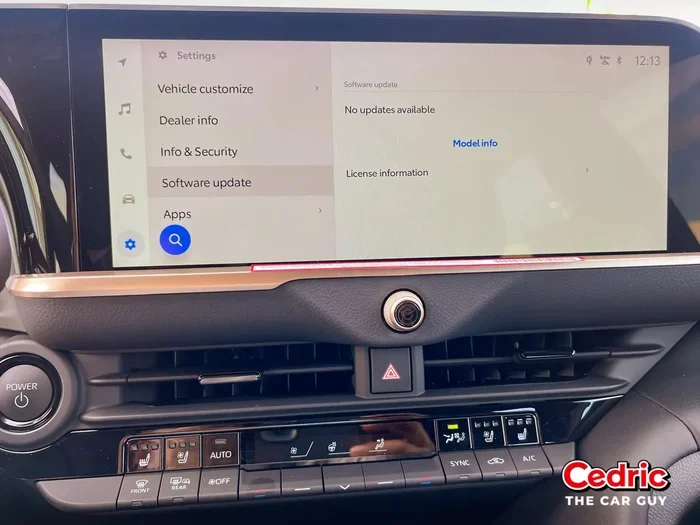
Checking for available updates is simple. On most newer Toyota models, go to the Settings menu on your infotainment screen. Look for a section called “Software Update” or “System Update.” If an update is available, the screen will show you the details and the estimated Toyota update time.
You can also check through the Toyota app on your phone. The app connects to your vehicle and notifies you when new updates are ready. This is especially convenient for owners who prefer over-the-air updates. It keeps you informed without ever stepping foot in a dealership.
Some older Toyota models do not support over-the-air updates. For these vehicles, you will need to visit a dealer or service center for any Toyota software fix or upgrade. Knowing which category your car falls into helps you set the right expectations for Toyota update duration.
Why Regular Software Updates Matter For Your Toyota
It is easy to put off a Toyota software update. Life gets busy, and the car seems to be running fine. But skipping updates can cost you in the long run. Here is why staying current matters.
First, updates improve safety. Toyota regularly enhances its Toyota TSS update features through software patches. These patches can improve automatic emergency braking, lane departure warnings, and adaptive cruise control. A simple update could make your daily commute safer for you and your family.
Second, updates fix annoying bugs. Maybe your navigation system takes too long to load. Or the Bluetooth connection drops randomly. A Toyota software update often resolves these small frustrations. The fix might be a tiny code change, but the impact on your daily driving experience is big.
Third, updates add new features. Toyota has used software updates to introduce new entertainment options, improved voice recognition, and better fuel efficiency maps. Keeping your Toyota connected services current means you always have access to the latest technology.
Finally, regular updates help maintain your vehicle’s resale value. A car with the latest software is more attractive to buyers. It shows the vehicle has been well cared for and is up to date with the latest improvements.
How Toyota Compares To Other Brands
Toyota is not the only automaker offering software updates. Many brands now provide over-the-air updates similar to Tesla. However, Toyota’s approach is more phased. They are gradually rolling out wireless update capabilities across their lineup. Some older models still rely entirely on dealer visits for any Toyota software update. Understanding where your vehicle fits in this timeline helps you plan for the right Toyota update process.
Final Thoughts On Toyota Software Update Time
The Toyota software update process is straightforward once you know what to expect. Most updates take between 30 minutes and 2 hours. Over-the-air updates are the fastest, while dealer-installed updates take a bit longer due to the hands-on service involved. The key is to be patient, prepared, and never interrupt the process.
Regular updates keep your Toyota running safely and smoothly. They fix bugs, improve performance, and sometimes add exciting new features. Whether you handle it through the Toyota app or visit your local dealer, staying on top of your Toyota vehicle software is one of the best things you can do for your car.
So the next time you see a notification about a Toyota software update available, do not ignore it. Set aside the time, follow the steps in this guide, and enjoy a better-driving Toyota afterward. Your car will thank you for it.
Frequently Asked Questions
Can I drive my Toyota while a software update is installing?
No, you should never drive during a Toyota software update. The vehicle needs to remain stationary and powered on. Driving during an update can corrupt the software and cause serious system failures. Wait until the process is fully complete before starting the engine.
Are Toyota software updates free?
Most Toyota software updates are free of charge, especially recall-related updates. However, some dealer visits may incur labor costs if the update is not covered under warranty or a recall. Check with your local Toyota service center for specific pricing details before your appointment.
How often does Toyota release software updates?
Toyota releases updates several times a year, though the frequency varies by model. Newer models with over-the-air capabilities receive updates more regularly. Older models may only get updates when you visit a dealer. Staying proactive and checking for updates monthly is a smart habit.
What happens if my Toyota software update fails?
If a Toyota software update fails, the system usually reverts to the previous version automatically. Your car should still function normally. However, contact Toyota tech support or visit a dealer if you notice any warning lights or unusual behavior after a failed update attempt.
Can I cancel a Toyota software update once it starts?
It is not recommended to cancel a Toyota system update once it has begun. Interrupting the process can leave your vehicle in an unstable state. If you must stop the update, consult a technician at your Toyota service center for safe guidance.
Do I need an internet connection for all Toyota software updates?
Over-the-air updates require a Wi-Fi connection. Dealer-installed updates use the service center’s dedicated equipment and do not need your car to have internet access. If your vehicle does not support wireless updates, a dealer visit is the only way to get a Toyota firmware update.