How to Turn Off the Maintenance Light on a 2015 Toyota
The maintenance light on a 2015 Toyota can be a real nuisance, but you can turn it off in minutes. This guide shows you exactly how to turn off the maintenance light on a 2015 Toyota with simple button presses. You’ll also discover what triggers the light and how to keep it from coming back.
So your maintenance required light on a 2015 Toyota just popped on, and you are not sure what to do. You are not alone. Thousands of Toyota owners see that little wrench or maintenance symbol every few months and wonder if something is seriously wrong. The good news is that the process is almost always simple. You can turn off the light yourself with just a few button presses. This guide will walk you through the exact steps for a 2015 Toyota Camry, Corolla, RAV4, or any other model from that year. We will also explain what the light means, why it comes on, and how to avoid common reset mistakes.
Many drivers panic when a warning light appears on the dashboard. They think the engine is damaged or the car is about to break down. That is not the case with the maintenance required light. It is a service interval indicator. It simply tells you that it is time for routine care, like an oil change or tire rotation. Still, ignoring it for too long can lead to skipped maintenance, which might affect your car’s health over time. That is why knowing how to turn off the maintenance light on a 2015 Toyota is a handy skill. It lets you clear the reminder after you have completed the service. Let us dive into the details.
Key Takeaways
- Resetting the light is quick: You can turn off the maintenance required light on a 2015 Toyota in under two minutes using the trip meter and steering wheel buttons.
- It does not mean your car is broken: The light is simply a reminder for scheduled maintenance, usually an oil change.
- You can still drive safely: The maintenance light does not affect vehicle operation, but you should address it soon.
- Avoid common mistakes: Do not hold the wrong buttons or turn the key to the wrong position, or you may need to repeat the process.
- Regular maintenance keeps the light off: Following the Toyota maintenance schedule prevents the light from returning.
- Know the difference between lights: The maintenance required light is not the same as the check engine light or the wrench light, though they can be related.
📑 Table of Contents
- What the Maintenance Required Light Means on a 2015 Toyota
- What Triggers the Maintenance Light on a 2015 Toyota
- Step-by-Step: How to Turn Off the Maintenance Light on a 2015 Toyota
- Common Mistakes to Avoid When Resetting the Maintenance Light
- Can You Keep Driving With the Maintenance Light On?
- Maintenance Tips to Keep the Light Off and Your Car Healthy
- Conclusion
What the Maintenance Required Light Means on a 2015 Toyota
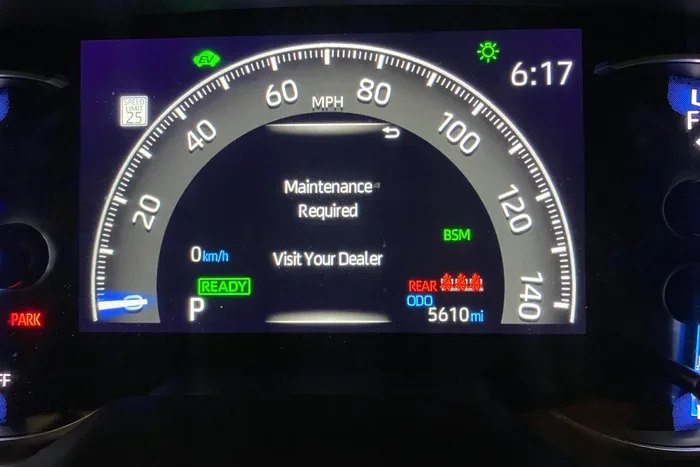
The maintenance required light on a 2015 Toyota is a yellow or orange symbol that looks like a wrench or the word “MAINT” on the dashboard. It is part of the Toyota Maintenance Minder system. This system tracks engine hours, driving habits, and mileage to estimate when your car needs attention. It does not measure oil quality directly, but it uses a time-based algorithm. When the algorithm decides your service interval is due, it triggers the light.
You might see different messages depending on your model. Some Toyotas display “MAINT REQD,” while others show a wrench icon. Both mean the same thing. The car needs scheduled maintenance. This could be an oil and filter change, a tire rotation, or a multi-point inspection. The light is not a sign of a mechanical failure. It is a friendly nudge from your vehicle’s computer. Understanding this removes a lot of stress. You are not dealing with a breakdown; you are just staying on top of routine care.
How the Toyota Maintenance Minder Works
The Maintenance Minder system uses a combination of factors to determine service intervals. It looks at engine revolutions, temperature, and time. If you drive mostly in stop-and-go traffic, the system may trigger the light sooner. If you drive at steady highway speeds, it might allow more miles. The system also tracks the last service date and mileage. Once you reset the light after a service, the computer starts a new cycle. This ensures you get regular maintenance without relying on a fixed mileage alone. For a 2015 Toyota, the system is designed to be intuitive and reliable.
What Triggers the Maintenance Light on a 2015 Toyota
Several things can cause the maintenance required light to illuminate on your 2015 Toyota. The most common reason is simply that the preset maintenance interval has been reached. Most Toyotas set this interval at 5,000 miles or six months, whichever comes first. If you have driven 5,000 miles since the last reset, the light will appear. Time can also trigger it. Even if you drive very few miles, the system will remind you after six months.
Other triggers include driving conditions. Frequent short trips, heavy loads, or towing can shorten the interval. The system recognizes harder driving and may prompt service earlier. Sometimes the light comes on after a battery disconnect or a jump start, because the computer loses its service data. In rare cases, a faulty sensor or a glitch in the instrument cluster can cause a false light. But those situations are uncommon. The vast majority of the time, it is just a scheduled reminder. If you are unsure, you can always check your Toyota maintenance schedule in the owner’s manual.
Maintenance Light vs. Check Engine Light vs. Wrench Light
It is easy to confuse the maintenance required light with other dashboard warnings. The check engine light is red or yellow and shaped like an engine. It indicates a problem detected by the onboard diagnostics system, often related to emissions or sensor faults. The wrench light, which is common on Toyotas, is the maintenance required light. However, some people ask, does the wrench light mean an oil change? The answer is usually yes, but it can also signal other scheduled services. If you have a different warning, like the check engine light, you will need a different approach. For example, if you are dealing with a check engine code, you might need to learn how can I clear a check engine code, because that process is different from resetting the maintenance light.
| Light | Color | Symbol | Meaning | Urgency |
|---|---|---|---|---|
| Maintenance Required | Yellow/Orange | Wrench or MAINT | Scheduled service due | Low – service soon |
| Check Engine | Yellow/Red | Engine outline | Emissions or sensor issue | Medium – check soon |
| Oil Pressure | Red | Oil can | Low oil pressure | High – stop and check |
| Battery/Charging | Red | Battery icon | Charging system fault | High – pull over |
Knowing the difference helps you respond correctly. The maintenance light is the least urgent of the bunch. You can safely drive for a few days or even a week while you schedule service. But if you see a red light, you should stop and investigate immediately.
Step-by-Step: How to Turn Off the Maintenance Light on a 2015 Toyota
Now for the part you have been waiting for. Resetting the maintenance required light on a 2015 Toyota is a straightforward process. You do not need any special tools or a trip to the dealer. You can do it in your driveway or garage. The steps below work for most 2015 Toyota models, including the Camry, Corolla, RAV4, and Tacoma. Just follow along carefully.
What You Need Before Starting
- The car key or push-start button
- The steering wheel controls (for trip meter)
- A few minutes of your time
Make sure the car is parked and the engine is off. You will be working with the ignition and the trip meter. If your car has a push-button start, you can use the key fob to cycle the ignition. The goal is to get to the trip meter display without starting the engine fully.
Step 1: Turn the Ignition to the ON Position
Insert the key into the ignition and turn it to the “ON” position. Do not start the engine. You just want the dashboard lights to come on. If you have a push-start vehicle, press the start button once without pressing the brake pedal. The instrument cluster will light up, and you will see the odometer or trip meter screen.
Step 2: Access the Trip Meter Reset Mode
Locate the trip meter reset button on the steering wheel or the instrument panel. On most 2015 Toyotas, it is a small button on the right side of the steering wheel, near the indicator stalks. Press and hold the trip meter reset button. While holding it, move to the next step.
Step 3: Cycle the Ignition Off and Back On
While still holding the trip meter reset button, turn the ignition key back to the “OFF” position. Wait a second. Then, turn the key back to the “ON” position. Keep holding the trip meter reset button for a few more seconds after the key is in the ON position. You should see the odometer or trip meter display change. It might show “000000” or start blinking.
Step 4: Release the Button and Confirm
Release the trip meter reset button. The display should now show a maintenance light reset confirmation, or the light itself should turn off. Turn the ignition off and then on again to verify. The maintenance required light should be off. If it is still on, repeat the steps. Sometimes it takes two attempts, especially if the car was recently started.
Quick Tip: If the light does not turn off after two tries, make sure you are holding the trip meter button long enough. You need to hold it for at least 10 seconds while cycling the ignition. Some models require you to press and hold the “ODO/TRIP” button while turning the key. Check your owner’s manual for the exact sequence.
Common Mistakes to Avoid When Resetting the Maintenance Light
Resetting the maintenance light is simple, but small mistakes can cause frustration. Here are the most common errors people make, and how to avoid them.
Mistake 1: Turning the Key Too Quickly
Rushing through the ignition cycle is the number one reason the reset fails. You need to pause for a full second in the OFF position before moving back to ON. The car’s computer needs time to register the reset command. If you just flick the key quickly, the system misses the signal.
Mistake 2: Releasing the Trip Button Too Early
You must hold the trip meter button throughout the entire process. If you let go too soon, the system will not enter the reset mode. Count slowly in your head. Hold for at least five seconds before you start turning the key.
Mistake 3: Starting the Engine During the Process
Do not press the brake and start the engine while you are trying to reset the light. The process must be done with the engine off. Starting the engine cancels the reset sequence. Turn the key to ON only, never to START.
Mistake 4: Confusing the Trip Meter with the Odometer
On some Toyotas, you need to scroll the display to the trip meter, not the main odometer. Use the steering wheel buttons to switch between the odometer and the trip meter until you see the trip A or trip B screen. Then proceed with the reset. If you are on the wrong screen, the light will not respond.
Common Mistakes: Skipping the pause at OFF, releasing the button too soon, starting the engine, and not selecting the trip meter display. Avoid these, and your reset will work the first time.
Can You Keep Driving With the Maintenance Light On?
Many drivers wonder, can I drive with maintenance required light on Toyota? The answer is yes. The maintenance required light does not indicate a safety issue or a mechanical problem. Your car will continue to run normally. The light is simply a service reminder. You can drive to the grocery store, commute to work, or even take a road trip with the light on.
However, you should not ignore it for too long. The light means your car is due for routine maintenance. Skipping oil changes or inspections can lead to reduced fuel efficiency, poor engine performance, and eventually more serious repairs. Think of the light as a gentle nudge, not an alarm. It is there to help you keep your car in good shape. If you have the light on, schedule a service appointment within the next week or two. In the meantime, your car is perfectly safe to drive.
Some drivers also ask about the wrench light. If you see a wrench symbol, it is the same as the maintenance required light. The wrench light on Toyota models often means the same thing as the maintenance required light. It is not an emergency. You can drive with it on, but you should address it soon. For more information about what the wrench light means, you can read the dedicated guide on wrench light meaning an oil change.
Maintenance Tips to Keep the Light Off and Your Car Healthy
Once you have successfully turned off the maintenance light, you want to keep it off until the next service interval. Here are some practical tips to help you do that and keep your 2015 Toyota running strong.
Follow the Toyota Maintenance Schedule
Check your owner’s manual for the recommended maintenance intervals. Most 2015 Toyotas call for an oil change every 5,000 miles or six months. Sticking to this schedule ensures the maintenance light only comes on when it should. If you do your own oil changes, reset the light immediately after you finish. This keeps the system accurate.
Use Quality Oil and Filters
Toyota recommends using Genuine Toyota Motor Oil or an equivalent high-quality synthetic blend. Pair it with a genuine Toyota oil filter. Cheap oil or filters can break down faster, leading to earlier trigger of the maintenance light. Investing in quality fluids protects your engine and keeps the reminder at bay.
Keep a Service Log
Maintain a simple log of every service you perform. Write down the date, mileage, and type of service. This helps you track when the next interval is due. It also provides proof of maintenance if you ever sell the car. A well-documented service history is a big selling point.
Address Other Dashboard Warnings Promptly
While the maintenance light is low priority, other lights are not. If you see a red or flashing warning, stop and investigate. For example, the oil pressure light or the battery light requires immediate attention. The maintenance light is just one part of your car’s communication system. Learn to read the other symbols, and you will stay ahead of problems.
Expert Insight: Many owners try to reset the light before they actually complete the service. This defeats the purpose of the Maintenance Minder. Always perform the maintenance first, then reset the light. The system tracks your driving after the reset, and it will remind you again at the correct interval. Resetting it too early just delays the reminder and may lead to missed services.
Conclusion
Turning off the maintenance light on a 2015 Toyota is a quick and easy task. You do not need a mechanic, a special tool, or a dealership visit. With just a few button presses, you can clear the reminder and get back on the road. Remember, the light is a helpful nudge for routine care, not a sign of danger. Follow the steps in this guide, avoid the common mistakes, and you will reset the light like a pro. Keep up with your Toyota maintenance schedule, and the light will only come on when it is truly time for service. Your car will thank you with better performance and a longer life.
Frequently Asked Questions
Will the maintenance required light come back after I reset it?
Yes, it will return when the next service interval is reached. The Toyota Maintenance Minder system tracks your driving and will trigger the light again after roughly 5,000 miles or six months, depending on your driving habits.
Can I turn off the maintenance light without doing an oil change?
You can reset the light without changing the oil, but you should not. The light is a reminder for scheduled maintenance. Ignoring it can lead to poor engine performance and reduced fuel efficiency over time.
What if the maintenance light stays on after I reset it?
If the light remains on, double-check that you followed the steps correctly. Make sure you held the trip meter button long enough and cycled the ignition properly. If it still does not turn off, consult your owner’s manual or visit a Toyota service center for assistance.
Is the maintenance required light the same as the check engine light?
No, they are different. The maintenance required light is a service reminder, while the check engine light indicates a problem with the engine or emissions system. If you see a check engine light, you should address it promptly.
How often does the maintenance light come on for a 2015 Toyota?
For most 2015 Toyota models, the maintenance light comes on every 5,000 miles or every six months, whichever comes first. Driving conditions can affect this interval, so always check your owner’s manual.
Can I drive my 2015 Toyota with the maintenance light on for a long time?
You can drive safely with the maintenance light on for a few days or weeks, but it is best to schedule service soon. Prolonged driving without maintenance can lead to engine wear and reduced performance.