Do Toyota Highlanders Have a Heads-Up Display – Full Guide
Yes, select Toyota Highlander trims come equipped with a heads-up display, but it is not standard across all models. The HUD is typically available on higher-end trims like the Limited and Platinum. This guide breaks down exactly which years and trims offer the Toyota Highlander heads-up display, what it can do, and how you can add one if your model doesn’t have it.
Do you own a Toyota Highlander or are you thinking about buying one? You might be wondering whether this popular SUV comes with a heads-up display. The short answer is yes, but with some important caveats. Not every Highlander model includes this handy feature, and knowing which trims and years offer it can save you a lot of time and frustration.
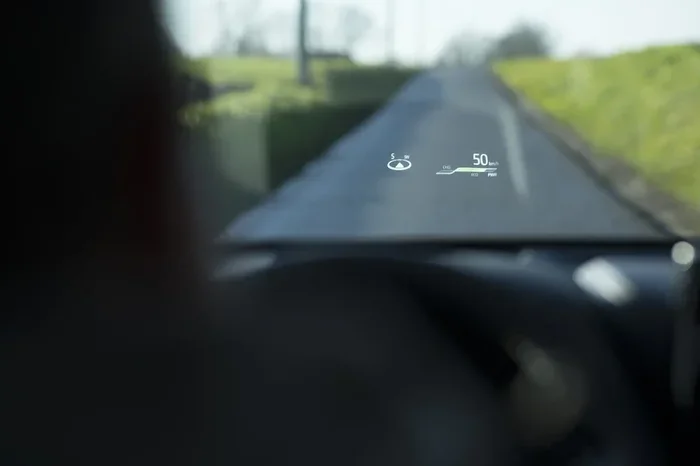
A Toyota Highlander heads-up display projects key driving information right onto your windshield. This means you can see your speed, navigation directions, and other alerts without ever taking your eyes off the road. It is one of those features that once you have it, you wonder how you ever drove without it.
In this guide, we will walk you through everything you need to know about the HUD in the Toyota Highlander. We will cover which trims have it, what it displays, how it works, and what you can do if your model does not come with one. Whether you are a current Highlander owner or shopping for a new one, this guide has you covered.
Key Takeaways
- Select trims only: The HUD is not standard on all Toyota Highlanders. It is mostly found on Limited and Platinum trims.
- Year matters: HUD availability depends on the model year and trim level of your Highlander.
- Safety boost: A heads-up display keeps your eyes on the road by projecting speed, navigation, and safety alerts onto the windshield.
- Aftermarket options exist: You can add a HUD to any Highlander model using aftermarket kits or mirror-mounted displays.
- Not the same as the infotainment screen: The HUD is a separate feature from the Toyota audio and touchscreen display system.
- Related feature: If you are interested in other Toyota tech features, check out whether you can get a heads-up display on the RAV4 as well.
📑 Table of Contents
- What Is a Heads-Up Display and Why Does It Matter?
- Which Toyota Highlander Trims Include a Heads-Up Display?
- What Does the Toyota Highlander HUD Display?
- How Does the HUD Technology Work in the Highlander?
- Can You Add a Heads-Up Display to Any Toyota Highlander?
- Toyota Highlander HUD vs. Infotainment Screen: What Is the Difference?
- Common Issues and Tips for Toyota Highlander HUD Owners
- Final Thoughts
What Is a Heads-Up Display and Why Does It Matter?
A heads-up display, commonly called a HUD, is a transparent display that shows information on the windshield or a special film attached to it. Instead of looking down at your dashboard or infotainment screen, you see the data right in your line of sight. This is a big deal for driving safety because it reduces the need to take your eyes off the road.
Most HUDs project the following information:
- Vehicle speed
- Navigation turn-by-turn directions
- Cruise control settings
- Traffic sign recognition alerts
- Fuel level and range
- Safety system warnings
The Toyota Highlander heads-up display is part of a broader trend in the automotive industry toward safer, more intuitive driving experiences. Car manufacturers know that distracted driving is a leading cause of accidents, and features like HUDs directly address that problem. When your eyes stay on the road, reaction times improve and the risk of collisions drops.
It is worth noting that not all Toyota Highlander display systems are HUDs. The touchscreen infotainment system is a different thing entirely. The HUD sits above the dashboard and projects light onto the windshield, while the infotainment screen is mounted on the center console. Both are useful, but they serve different purposes.
Which Toyota Highlander Trims Include a Heads-Up Display?
The availability of a heads-up display in the Toyota Highlander depends largely on the trim level and model year. Toyota does not offer the HUD as standard on every trim. Instead, it is reserved for the more premium versions of the SUV.
Highlander Limited Trim
The Limited trim is where you will most commonly find the Toyota Highlander heads-up display. This trim comes loaded with premium features, and the HUD is part of that package. If you are looking for a Highlander that has a HUD without paying for the top-tier Platinum trim, the Limited is your best bet.
Highlander Platinum Trim
The Platinum trim is the flagship of the Highlander lineup. It includes everything the Limited has, plus a few extra perks. The heads-up display comes standard on the Platinum, along with upgraded leather seating, a premium audio system, and advanced driver-assistance features.
Other Trims and the HUD
Lower trims like the LE, SE, and XSE generally do not include a factory heads-up display. If you are shopping for a used Highlander and the HUD is a must-have, make sure to check the trim level before you buy. You can also look at the vehicle’s window sticker or ask the seller directly.
Here is a quick comparison of HUD availability across popular Highlander trims:
- LE: No factory HUD
- SE: No factory HUD
- XSE: No factory HUD
- Limited: HUD included
- Platinum: HUD included
Keep in mind that Toyota updates its feature offerings each year. Always check the specific model year you are interested in. For more details on what the Highlander offers, you can also read about whether Toyota Highlanders are good overall.
What Does the Toyota Highlander HUD Display?
The Toyota Highlander heads-up display is designed to show the most important driving information without cluttering your view. Here is a breakdown of what you can expect to see projected on your windshield:
Speed Display
The most basic and essential HUD feature is the speedometer. Your current speed is displayed in large, easy-to-read digits right in front of you. This is incredibly useful because you do not have to glance down at the instrument cluster to check how fast you are going.
Navigation Directions
If your Highlander has the navigation system, the HUD can show turn-by-turn directions. An arrow indicates the next turn, and the distance to the turn is displayed clearly. This is especially helpful in unfamiliar areas where you might otherwise be tempted to stare at the map on the center screen.
Driver Assistance Alerts
The Toyota Highlander comes with a suite of Toyota safety features, and the HUD can relay some of these alerts. For example, you might see a warning if the system detects a potential collision or if you are drifting out of your lane. These real-time alerts make the HUD a valuable safety tool.
Cruise Control and Adaptive Cruise
If you use cruise control or adaptive cruise control, the HUD can show your set speed and the distance to the vehicle ahead of you. This keeps all the relevant information in one place without requiring you to look away from the road.
How Does the HUD Technology Work in the Highlander?
Understanding how the Toyota Highlander HUD works can help you appreciate the technology more. The system uses a small projector mounted behind the dashboard. This projector sends light onto a special reflective area on the windshield or a dedicated film that is applied to the glass.
The light forms images that appear to float in front of you, typically about two to three meters away from the windshield. This distance is carefully calibrated so that your eyes can focus on the display without losing sight of the road ahead. The result is a clear, readable image that does not obstruct your view.
The HUD in the Highlander is not the brightest or most advanced system on the market, but it gets the job done well. In daylight conditions, you might need to adjust the brightness setting to keep the display readable. Most models allow you to control this through the infotainment system or a dedicated HUD control on the steering wheel.
One thing to note is that the HUD works best with a clean windshield. Dirt, cracks, or tinting can interfere with the projection and make the display harder to read. If you have recently replaced your windshield or applied tint, you might notice a difference in how the HUD appears.
Can You Add a Heads-Up Display to Any Toyota Highlander?
The good news is that you are not stuck without a HUD if your Highlander does not come with one. There are several options for adding a heads-up display to any model year or trim. Let us explore the most common approaches.
Aftermarket HUD Kits
Aftermarket HUD kits are widely available and range in price from around $100 to $500. These kits typically mount on the dashboard and project information onto a small film attached to the windshield. They connect to your vehicle’s OBD-II port to pull data like speed and RPM. Some higher-end kits also integrate with your phone for navigation.
When shopping for an aftermarket HUD, look for one with good brightness settings, a wide angle of view, and easy installation. Brands like HUDWAY and Navdy are popular choices that work well with the Toyota Highlander.
Mirror-Mounted HUD Displays
Another option is a mirror-mounted display that attaches to your rearview mirror. These units project information onto a small transparent screen built into the mirror. They are clean, unobtrusive, and do not require any windshield modification. The downside is that they can be more expensive than dashboard-mounted kits.
Smartphone HUD Apps
If you want a budget-friendly option, smartphone HUD apps can turn your phone into a basic heads-up display. You mount your phone on the dashboard, and the app projects navigation, speed, and other data onto the windshield using the phone’s screen. This is not as polished as a factory HUD, but it works in a pinch.
No matter which option you choose, make sure the display does not obstruct your view or become a distraction. Safety should always come first. If you are interested in other Highlander tech features, you might also want to check out whether you can start your Toyota Highlander with a key or if you can drive it without a key fob.
Toyota Highlander HUD vs. Infotainment Screen: What Is the Difference?
People sometimes confuse the heads-up display with the Toyota infotainment touchscreen, but they are two different systems with different purposes. Here is a quick breakdown:
- HUD: Projects information onto the windshield. Keeps your eyes on the road. Shows basic driving data like speed and navigation.
- Infotainment Screen: Mounted on the center console. Used for media, climate control, and detailed navigation maps. Requires you to look down at the screen.
Both systems are valuable, but they complement each other. The HUD handles quick-glance information, while the infotainment screen handles more detailed interactions. Toyota designed the Highlander with both systems to give drivers the best of both worlds.
If you are comparing the Highlander to other SUVs, you might also wonder about the RAV4. Check out whether the RAV4 offers a heads-up display for a side-by-side comparison of Toyota’s HUD offerings.
Common Issues and Tips for Toyota Highlander HUD Owners
While the Toyota Highlander heads-up display is a great feature, it does come with a few quirks. Here are some common issues and tips to keep your HUD working at its best:
Brightness Issues
The most common complaint about HUDs is readability in bright sunlight. If the display is hard to see during the day, try adjusting the brightness level in the settings. You can also angle the HUD module slightly to reduce glare.
Windshield Compatibility
Not all windshields are compatible with HUD projection. If you have a replacement windshield installed, make sure it is HUD-compatible. Some aftermarket windshields have a special dot matrix pattern that allows the HUD image to project clearly. A non-HUD windshield can make the display appear blurry or faded.
Display Flickering
If your HUD flickers or goes blank intermittently, it could be a loose connection or a faulty projector unit. Check the connections behind the dashboard first. If the problem persists, you may need to have the HUD module inspected by a qualified technician.
Keep It Clean
A dirty windshield can scatter the HUD projection and make it hard to read. Clean your windshield regularly, especially in the area where the HUD image appears. This simple habit can make a big difference in display clarity.
Final Thoughts
The Toyota Highlander heads-up display is a fantastic feature that adds both convenience and safety to your driving experience. Whether you are cruising on the highway or navigating through city traffic, having key information projected right on your windshield keeps your eyes where they belong: on the road. The HUD is most commonly found on the Limited and Platinum trims, so if this feature is important to you, prioritize those trims when shopping.
If your Highlander does not have a factory HUD, do not worry. There are plenty of aftermarket options that can bring this technology to any model. From budget-friendly dashboard kits to premium mirror-mounted displays, you have choices that fit different needs and budgets.
Take some time to explore what the Toyota Highlander offers in terms of display technology and driver-assistance features. A heads-up display is just one of the many ways Toyota has designed the Highlander to keep you safe, informed, and comfortable on every drive. Whether you are a first-time Highlander buyer or a long-time owner, understanding the HUD can help you get the most out of your SUV.
Frequently Asked Questions
Do all Toyota Highlanders have a heads-up display?
No, not all Toyota Highlanders come with a heads-up display. The HUD is typically only available on the Limited and Platinum trims. Lower trims like the LE, SE, and XSE usually do not include a factory HUD. Always check the specific trim and model year before assuming the feature is present.
Can I add a heads-up display to my Toyota Highlander if it does not have one?
Yes, you can add an aftermarket HUD to any Toyota Highlander. Options range from affordable dashboard-mounted kits to premium mirror-mounted displays. Some kits connect to your vehicle’s OBD-II port for data, while others use your smartphone for navigation and speed information.
What information does the Toyota Highlander HUD show?
The Toyota Highlander HUD typically displays your vehicle speed, navigation directions, cruise control settings, and safety system alerts. The exact information shown depends on your model year and the features equipped on your vehicle.
Is the HUD visible in bright sunlight?
The HUD can be harder to read in bright sunlight, but you can adjust the brightness settings to improve visibility. Tilting the HUD module slightly can also help reduce glare. If you find the display unreadable during the day, these simple adjustments usually solve the problem.
Does the windshield need to be special for the HUD to work?
Yes, the windshield needs to be HUD-compatible for the projection to work clearly. Aftermarket windshields that are not designed for HUD use can cause the display to appear blurry or faded. If you need a windshield replacement, make sure to ask for an HUD-compatible glass.
Which Toyota Highlander model years offer the heads-up display?
The heads-up display has been available on the Toyota Highlander for several model years, primarily on the Limited and Platinum trims. Availability can vary by year, so it is always best to check the specific features for the model year you are considering. You can also ask a dealer or check the vehicle’s window sticker for confirmation.