How Do You Reset Dashboard After Oil Change Toyota Corolla
Resetting the dashboard after an oil change on a Toyota Corolla is a simple process that clears the maintenance reminder and oil change indicator. Whether you have a 2010, 2015, or 2023 model, the steps are quick and easy to follow. This guide walks you through every method so your Corolla’s dashboard stays accurate and clean after each service.
You just got your Toyota Corolla an oil change. The mechanic hands you the keys, you drive off, and then you notice it. That little warning light or message on the dashboard is still there. It says “Maintenance Required” or maybe the wrench icon is glowing. It’s annoying, and you want it gone.
Here’s the good news. Resetting the dashboard after an oil change on a Toyota Corolla is incredibly easy. You don’t need a mechanic. You don’t need to go back to the shop. In most cases, you can do it yourself in under two minutes. This guide covers every method for every Corolla model year, so no matter what year you drive, you’ll find the right steps.
We’ll also cover what those dashboard lights actually mean, common mistakes people make when resetting, and how to avoid confusion between different warning symbols. By the end, you’ll be a pro at Toyota Corolla dashboard maintenance and your car will look clean and current after every oil change.
Key Takeaways
- Multiple reset methods exist: You can use the trip meter, steering wheel buttons, or the information display to reset your Toyota Corolla dashboard after an oil change.
- The process takes under two minutes: Most reset procedures are fast and don’t require any special tools or dealer visits.
- Different model years use different methods: Older Corollas use a simpler trip meter approach, while newer models may have digital displays with menu options.
- Don’t confuse the wrench light with serious warnings: The maintenance light is different from the check engine light or oil pressure warning.
- Resetting after every oil change keeps your records accurate: This helps you track service intervals and maintain your vehicle properly.
- Common mistakes can prevent a successful reset: Holding buttons too briefly or turning the ignition off too early are the most frequent errors.
📑 Table of Contents
- Why You Need to Reset the Dashboard After an Oil Change
- How to Reset the Dashboard on a Toyota Corolla
- What the Wrench Light Means on Your Toyota Corolla
- Common Mistakes When Resetting the Dashboard
- How to Know If the Reset Was Successful
- Maintenance Schedule for Your Toyota Corolla
- When to Visit a Professional
- Final Thoughts on Resetting Your Toyota Corolla Dashboard
Why You Need to Reset the Dashboard After an Oil Change
When you get an oil change, your Toyota Corolla tracks the service through its maintenance reminder system. The system counts down the remaining miles until the next oil change is due. After the mechanic changes your oil, that counter doesn’t reset automatically. You have to do it manually.
Here’s why this matters. If you don’t reset it, the wrench light or “Maintenance Required” message stays on. That’s distracting. It also makes it harder to track when your next oil change is actually due. Keeping your dashboard accurate helps you stay on top of Toyota Corolla maintenance and prevents you from missing service windows.
Some people ignore the light and just drive with it. That’s fine for a few days. But if you sell the car or take it to a new mechanic, a persistent maintenance light can send the wrong message about your vehicle’s care history. A clean dashboard tells a story of good maintenance.
The Difference Between Dashboard Warning Lights
Before you reset anything, it helps to understand what you’re looking at. Toyota Corollas have several lights on the dashboard, and they all mean different things. Knowing the difference prevents unnecessary panic and helps you handle each situation correctly.
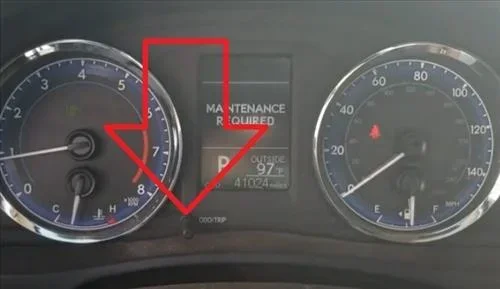
The maintenance reminder light usually looks like a wrench. It’s yellow or orange. It comes on based on mileage intervals, not because something is broken. This is the light you reset after an oil change. It’s basically a friendly nudge from your car saying, “Hey, I’m due for service.”
The check engine light looks very different. It’s typically red or yellow and shaped like an engine. This light means something is actually wrong with the engine or emissions system. You should not ignore it. If you clear the check engine light without fixing the underlying problem, it will just come back. For more on this, check out our guide on how to clear a check engine code.
The oil pressure warning light is another critical one. It looks like an oil can with a drip. If this light comes on while driving, pull over immediately. It means your oil pressure is too low, which can cause serious engine damage. This is not the same as the maintenance reminder and should never be ignored.
Some Corollas also display a tire pressure monitoring light. This looks like a horseshoe with an exclamation point. If you need to reset this after checking your tires, our article on how to clear your TPM reset has detailed steps.
How to Reset the Dashboard on a Toyota Corolla
Now let’s get into the actual steps. The method depends on your Corolla model year. We’ve broken it down into three categories to make it easy to find the right one for your car.
Method 1: Using the Trip Meter (Older Models, 2000-2013)
If you have an older Toyota Corolla, the trip meter method works great. This is the most common approach for models from the early 2000s through 2013.
Follow these steps carefully:
- Turn the ignition to the “ON” position. Don’t start the engine. Just press the start button or turn the key to the position where the dashboard lights up.
- Press the trip meter reset button. This is usually on the dashboard near the speedometer or on the steering wheel. Hold it down.
- Watch the display. You should see the trip meter reading start to flash or change.
- Continue holding the button for about 3-5 seconds. The maintenance light should start blinking.
- Release the button. Then press it again briefly to confirm the reset.
- Turn the ignition off and then back on. Check if the maintenance light is gone.
If the light is still there, try the process again. Sometimes it takes two attempts. Make sure you hold the button long enough. This is the most common mistake people make.
Method 2: Using the Steering Wheel Controls (2014-2019 Models)
Newer Toyota Corollas from 2014 to 2019 use steering wheel controls to navigate the dashboard display. The process is slightly different but still straightforward.
Here’s what to do:
- Press the “Menu” or “Settings” button on the steering wheel. This opens the vehicle information display.
- Use the arrow buttons to scroll to “Vehicle Info” or “Maintenance.”
- Select the oil life or maintenance reminder option.
- Press and hold the “OK” or “Reset” button. Hold it for about 3 seconds.
- The display should show the maintenance counter resetting to zero.
- Press “Back” or “Exit” to save the changes.
Quick tip: If you can’t find the maintenance menu, try pressing the “Trip” button on the steering wheel first. Some Corolla models group the maintenance reset under the trip display settings. Also, make sure the car is in “Park” and the parking brake is engaged before you start.
Method 3: Using the Multimedia Display (2020 and Newer Models)
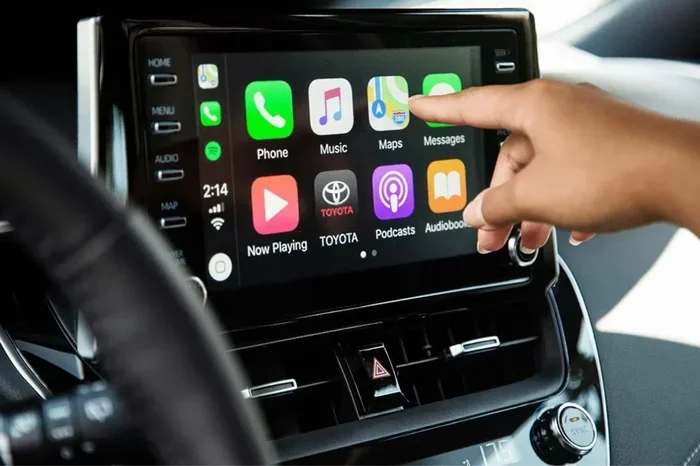
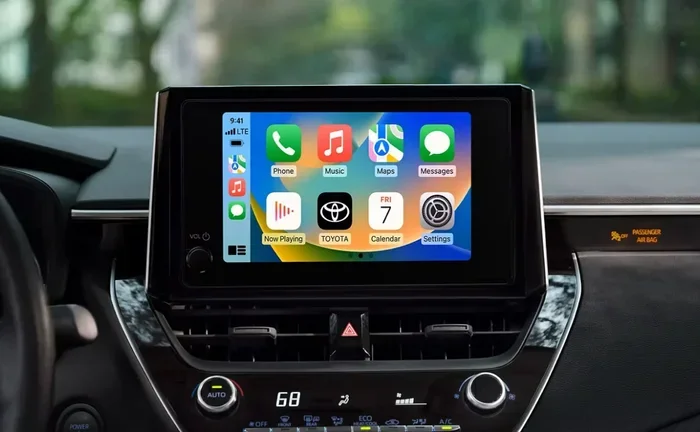
The latest Toyota Corollas have touchscreen displays. The reset process goes through the infotainment system.
Here’s the step-by-step:
- Press the “Home” button on the touchscreen.
- Navigate to “Settings.” It’s usually a gear icon.
- Select “Vehicle” or “Vehicle Settings.”
- Look for “Maintenance” or “Oil Life System.”
- Choose “Reset” next to the oil life indicator.
- Confirm the reset when prompted.
- Turn the car off and back on to verify the light is gone.
If your touchscreen isn’t responding, try holding the power button for 10 seconds to restart the system. Then try the reset again. This works the same way as a phone restart.
What the Wrench Light Means on Your Toyota Corolla
The wrench light is one of the most common dashboard symbols that confuse Corolla owners. Many people think it means the car is broken. That’s not true. The wrench light is simply a maintenance reminder.
When you see the wrench icon, it means your car has reached its scheduled service interval. For most Toyota Corollas, this happens every 5,000 miles or every 6 months, whichever comes first. The light is based on the oil life monitoring system that tracks your driving conditions and mileage.
After you get an oil change, the mechanic should reset this light for you. But they don’t always do it. That’s why knowing how to reset it yourself is so valuable. For more information about what the wrench light actually indicates, our article on does the wrench light mean an oil change explains it in detail.
Here are a few things to keep in mind about the wrench light:
- It’s not an emergency. You can drive safely to the nearest service center.
- It’s not the same as the check engine light. The wrench light is purely about scheduled maintenance.
- It resets after an oil change. Once the oil is fresh, the counter starts over.
- It may come on in different driving conditions. Short trips, towing, or extreme temperatures can trigger it sooner.
Common Mistakes When Resetting the Dashboard
Even though the reset process is simple, people make mistakes all the time. Here are the most common errors and how to avoid them.
Turning the Ignition Off Too Soon
The biggest mistake is letting go of the reset button too early. You need to hold it for at least 3-5 seconds. If you release it after one second, nothing happens. Be patient and hold steady. Watch the display for any changes before you let go.
Not Turning the Ignition to the Right Position
Some people try to reset the dashboard while the engine is running. That can work on some models, but it’s not the recommended approach. Always start with the ignition in the “ON” position without starting the engine. This puts the systems in the right mode for a reset.
Confusing the Trip Meter with the Odometer
On older Corollas, the trip meter and odometer share the same display. If you’re looking at the wrong one, you won’t see the maintenance light blinking. Make sure you’re viewing the trip meter before you start the reset process. Press the trip button to cycle through the display modes if needed.
Forgetting to Turn the Car Off and Back On
After you complete the reset, some models require you to turn the ignition off and then back on to confirm the change. Don’t skip this step. If you just leave the car in the “ON” position, the reset might not save properly.
Trying to Reset When the Oil Level Is Low
This is a sneaky one. If your oil level is critically low, the car might not allow the maintenance reminder to reset. Always check your oil level before resetting. Top it off if needed. This ensures the reset is accurate and your oil life system starts with the right baseline.
How to Know If the Reset Was Successful
After you complete the reset steps, you need to verify that it worked. Here’s how to check.
Look at the dashboard. The wrench light or “Maintenance Required” message should be gone. The trip meter might show zero or start blinking briefly, which is normal.
Start the engine. With the engine running, glance at the dashboard. No maintenance light should appear. If the light comes back on immediately, the reset didn’t take. Try the process again and hold the button longer.
Drive for a few minutes. Sometimes the light takes a moment to fully clear. Give the car a short drive around the block. If the light stays off, you’re all set.
Check the maintenance menu. On newer Corollas, you can go back into the settings and verify that the oil life counter has reset to 100% or full. This confirms the system recognizes the fresh oil change.
If you’ve tried all the steps and the light won’t go away, there might be an underlying issue. In that case, it’s worth visiting a mechanic to check for other problems. Sometimes the engine management system has a fault that triggers the maintenance light even after an oil change. You can learn more about dealing with persistent dashboard lights in our article on how to get rid of the engine management light.
Maintenance Schedule for Your Toyota Corolla
Resetting the dashboard is just one part of staying on top of your Corolla’s maintenance. Here’s a quick overview of the recommended service intervals.
| Service | Interval | Dashboard Indicator |
|---|---|---|
| Oil Change | Every 5,000 – 10,000 miles | Wrench light / Maintenance Required |
| Tire Rotation | Every 5,000 – 7,500 miles | No specific light |
| Brake Inspection | Every 10,000 miles | Brake warning light (if needed) |
| Air Filter Replacement | Every 15,000 – 30,000 miles | No specific light |
| Transmission Fluid | Every 30,000 – 60,000 miles | No specific light |
| Timing Belt (if applicable) | Every 60,000 – 100,000 miles | No specific light |
Keeping a maintenance log helps a lot. Every time you get service, write down the date, mileage, and what was done. This makes it easy to track your Corolla’s health over time and proves the vehicle has been well maintained if you ever sell it.
When to Visit a Professional
Most of the time, you can reset the Toyota Corolla dashboard yourself at home. But there are situations where professional help makes sense.
If the maintenance light keeps coming back after you reset it, there might be a deeper issue. The oil life sensor could be malfunctioning. Or there could be a code stored in the car’s computer that needs to be cleared. A professional mechanic has the tools to read these codes and address the root cause.
Similarly, if you’re not comfortable working with your car’s dashboard controls, there’s no shame in asking for help. Many quick-lube shops will reset the maintenance light for free when you get your oil changed. Just ask them to do it before you leave.
Also, if you notice other warning lights along with the maintenance reminder, don’t just reset them and move on. Multiple lights together can signal a serious problem. Get your car inspected right away if you see the check engine light, oil pressure light, or battery warning light at the same time as the maintenance reminder.
Final Thoughts on Resetting Your Toyota Corolla Dashboard
Resetting the dashboard after an oil change is one of the simplest yet most important things you can do for your Toyota Corolla. It takes less than two minutes, it doesn’t cost anything, and it keeps your car’s maintenance tracking accurate.
Remember to identify which reset method matches your model year. Older Corollas use the trip meter method, while newer models rely on steering wheel controls or the touchscreen display. Take your time, follow the steps carefully, and verify the reset worked.
Keeping your dashboard clean and accurate is a small habit that pays off big. It helps you stay on schedule with oil changes, it makes your car easier to sell, and it gives you peace of mind every time you get behind the wheel. Your Toyota Corolla is a reliable machine. Treat it well, and it will reward you with years of dependable service.
Now that you know how to reset the dashboard, the next time you get an oil change, you can handle it yourself. No waiting, no extra trips, no fees. You’ve got this.
Frequently Asked Questions
How long does it take to reset the dashboard after an oil change on a Toyota Corolla?
The entire process takes less than two minutes for most Corolla models. Older models with trip meters take about 30 seconds, while newer models with touchscreen displays might take a minute or so to navigate the menus. The key is knowing which method matches your specific model year.
Will resetting the dashboard clear the check engine light?
No, resetting the maintenance reminder does not clear the check engine light. These are two separate systems. The check engine light requires a different reset process and usually indicates an actual problem that needs to be addressed first. If you need help with the check engine light, check out our guide on clearing a check engine code.
Why does the maintenance light come back after I reset it?
If the maintenance light returns shortly after resetting, it usually means the oil life system hasn’t detected the oil change yet. Try driving for a few miles and resetting again. If the light persists, the oil life sensor might be faulty or the oil level could be too low. Have a mechanic check the oil level and sensor if the problem continues.
Do I need any special tools to reset the Toyota Corolla dashboard?
No special tools are needed at all. You only need the car’s ignition and the buttons on the dashboard, steering wheel, or touchscreen. Every reset method uses controls that are already built into the vehicle. You don’t need to buy any equipment or visit a dealer.
Can I reset the dashboard without starting the engine?
Yes, in most cases you can reset the maintenance light without starting the engine. You just need to turn the ignition to the “ON” position. This powers up the dashboard electronics without running the engine. Some older models may require the engine to be running, but the vast majority of Corollas allow a reset with the engine off.
How often should I reset the maintenance reminder on my Toyota Corolla?
You should reset the maintenance reminder every time you get an oil change or scheduled service. This keeps the counter accurate and ensures the light only comes on when the next service is actually due. Most Corolla owners reset their dashboard every 5,000 to 10,000 miles depending on their driving conditions and oil type.