How to Reset Oil Life Indicator on a 2021 Honda Civic
Resetting the oil life indicator on a 2021 Honda Civic is a quick and easy process you can do at home. This guide walks you through the exact steps to clear your oil life reminder after an oil change. Follow our simple instructions and keep your Honda maintenance system accurate and up to date.
So you just changed the oil on your 2021 Honda Civic. Great job! But now there is a little reminder sitting on your dashboard, and you want it gone. You are not alone. Many Honda Civic owners ask the same question every time they change their oil: how do I reset the oil life indicator?
The good news is that resetting the oil life on a 2021 Honda Civic is simple. You do not need a mechanic. You do not need expensive tools. All you need is a few minutes and this guide. We will walk you through every step clearly and calmly. By the end, your dashboard will be clean and your maintenance system will be ready for the next oil change.
Keeping your oil life system accurate is important for your engine health. The system tracks driving conditions and tells you when it is time for service. When you ignore the reset, the reminder stays on and can become annoying. More importantly, an inaccurate system can mess up your maintenance schedule. Let us fix that right now.
Key Takeaways
- Easy DIY Process: You can reset the oil life indicator on your 2021 Honda Civic in just a few minutes without visiting a mechanic.
- Multiple Methods Available: The 2021 Civic offers both a steering wheel button method and a touchscreen method depending on your trim level.
- Regular Resets Matter: Keeping your oil life system accurate helps track maintenance intervals and protects your engine.
- No Special Tools Needed: All you need is access to your dashboard controls and a few minutes of your time.
- Prevents False Warnings: A properly reset system ensures you get accurate oil change reminders at the right time.
- Related Maintenance Matters: Checking your car battery and clearing error codes go hand in hand with overall vehicle care.
📑 Table of Contents
- Why Resetting the Oil Life Indicator Matters
- What You Need Before Starting
- How to Reset Oil Life on a 2021 Honda Civic Using Steering Wheel Controls
- How to Reset Oil Life Using the Touchscreen (Higher Trim Levels)
- Common Problems When Resetting Oil Life
- How Often Should You Reset the Oil Life System?
- Tips for Keeping Your 2021 Honda Civic in Top Shape
- Expert Insight: Why Honda’s Oil Life System Is Better Than Mileage-Based Reminders
- Key Takeaways
Why Resetting the Oil Life Indicator Matters
The oil life system on your 2021 Honda Civic is smart. It does not just count miles. It watches how you drive. It tracks things like engine temperature, driving speed, and stop-and-go conditions. Based on all of this, it calculates when your oil needs changing. That is why the system is better than a simple mileage-based reminder.
But here is the catch. After you change your oil, the system does not know you did it. It keeps counting down from where it left off. That is why you need to reset it manually. If you skip the reset, the old reminder stays on your dashboard. It can distract you while driving. It can also make you ignore real warnings later.
Think of the oil life indicator as your car’s way of talking to you. When it resets properly, the conversation stays clear. When it does not reset, you get mixed signals. A clean reset keeps communication between you and your vehicle honest and accurate.
What You Need Before Starting
Before you begin, gather a few simple things. You do not need anything fancy. Here is what to have ready:
- Your 2021 Honda Civic key or push-start button
- Access to the steering wheel controls or touchscreen
- A few minutes of quiet time
- Your owner’s manual (optional but helpful)
Make sure your car is in a parked position. Turn off the engine. You do not need to start the engine for most reset methods. The 2021 Honda Civic makes this process easy whether you have the base trim or a higher-end model.
How to Reset Oil Life on a 2021 Honda Civic Using Steering Wheel Controls
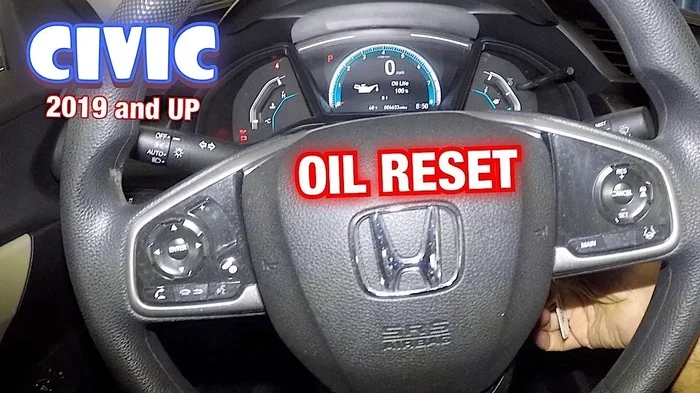
This is the most common method for the 2021 Honda Civic. Most trims use the steering wheel buttons to reset the oil life indicator. Follow these steps carefully:
Step 1: Turn the ignition to the ON position
Press the start/stop button without pressing the brake pedal. Or turn the key to the ON position. Do not start the engine. You just want the dashboard lights to come on. The screen should be active and ready for input.
Step 2: Press the MENU button on the steering wheel
Use the left steering wheel controls to find the MENU button. Press it once. This opens the main settings menu on your dashboard display. You will see several options on screen.
Step 3: Navigate to the Vehicle Settings
Use the up and down arrow buttons to scroll through the menu. Look for “Vehicle Settings” or “System Settings.” Press the OK or Enter button to select it. The next screen will show more options.
Step 4: Find the Oil Life Reset Option
Scroll down until you see “Oil Life” or “Maintenance.” This is where the system tracks your oil change interval. The display might show a percentage like 15% or 80%. That number represents how much life is left in your oil.
Step 5: Hold the RESET button
Press and hold the RESET button on the steering wheel for about 10 seconds. You will see the oil life percentage start to flash. Keep holding until it resets to 100%. Once it reaches 100%, release the button.
Step 6: Turn the ignition off and back on
Turn the car off completely. Wait a few seconds. Then turn it back on to check the dashboard. The oil life reminder should be gone. If the message still appears, repeat the steps. Sometimes it takes two tries.
Quick Tip: If your steering wheel controls feel sticky or unresponsive, clean them gently with a dry cloth. Dirt and grime can build up over time and make buttons harder to press.
How to Reset Oil Life Using the Touchscreen (Higher Trim Levels)
If your 2021 Honda Civic has a touchscreen display, the process is slightly different but just as simple. The touchscreen method works on trims that come with Honda’s infotainment system. Here is how to do it:
Step 1: Tap the Home Screen
With the car in the ON position, tap the home button on the touchscreen. This brings you to the main menu. You will see icons for different settings and features.
Step 2: Tap the Settings Icon
Look for the gear icon or the word “Settings.” Tap it to open the system menu. From here, you can adjust everything from audio preferences to maintenance reminders.
Step 3: Select Vehicle Maintenance
Scroll through the settings menu and tap on “Vehicle Maintenance” or “Maintenance Info.” This section holds all your service reminders and oil life data.
Step 4: Choose Oil Life Reset
Tap on “Oil Life” to see the current percentage. Then look for a button that says “Reset” or “Reset to 100%.” Tap it. The system will ask you to confirm the reset.
Step 5: Confirm the Reset
A confirmation message will appear. Tap “Yes” or “Confirm.” The system will reset the oil life to 100%. The reminder on your dashboard should disappear immediately.
Step 6: Verify the Reset
Turn the car off and back on again. Check the dashboard display. The oil life message should be gone. The percentage should read 100%. If it does not, repeat the touchscreen steps carefully.
Quick Tip: If the touchscreen is slow to respond, try restarting the infotainment system first. Hold the power button for 10 seconds. The screen will turn off and back on. This often fixes minor glitches.
Common Problems When Resetting Oil Life
Sometimes things do not go as planned. Here are the most common issues people face when resetting the oil life on a 2021 Honda Civic. We also include solutions for each one.
The Reset Button Does Not Work
If pressing the RESET button does nothing, try holding it for longer. Some models require a full 15 seconds of continuous holding. Also check that you are in the ON position and not the ACC position. The system needs full power to accept the reset command.
The Oil Life Percentage Will Not Change
This can happen if the car’s computer is busy processing other data. Turn the ignition off completely. Wait 30 seconds. Then try again. If the percentage still will not change, you may need to disconnect the battery briefly. This resets the car’s computer. However, be careful when disconnecting the battery. Make sure you know how to check your car battery safely before doing this.
The Reminder Keeps Coming Back
If the oil life message returns after a few days, the reset may not have fully completed. Go through the steps again slowly. Make sure you hold the RESET button long enough. Watch for the 100% confirmation on screen before releasing the button.
The Display Shows an Error Message
Rarely, the system may show an error during the reset process. This usually happens when you interrupt the reset mid-way. Turn the car off completely. Wait one minute. Start the process over from the beginning. If the error persists, you may want to consult your owner’s manual or visit a Honda dealer.
Can I Clear the Oil Life Reminder Without Resetting?
No. The oil life reminder is tied directly to the maintenance system. You cannot simply turn off the display without resetting the counter. The system needs to acknowledge the oil change by resetting to 100%. This is a safety feature designed to keep you on track with proper maintenance.
For related maintenance tasks, if you ever need to clear a check engine code, the process is similar but uses different menu options. Always make sure you address the root cause of any warning light before clearing it.
How Often Should You Reset the Oil Life System?
You should reset the oil life system every time you change your oil. This is the golden rule. Every single oil change means one reset. The 2021 Honda Civic uses an intelligent system. It adjusts the next service interval based on your driving habits after each reset.
If you change your oil every 5,000 miles, the system will track that pattern. If you use synthetic oil and drive under normal conditions, you might go 7,500 miles between changes. The system learns from your reset patterns. That is why accuracy matters so much.
Some owners ask if they can just ignore the reminder and reset it whenever they want. The answer is no. The system is designed to monitor real driving conditions. Resetting it without actually changing the oil can lead to degraded engine performance over time. Always pair your reset with a genuine oil change.
Tips for Keeping Your 2021 Honda Civic in Top Shape
Resetting the oil life is just one part of car maintenance. Here are some extra tips to keep your Civic running smoothly for years to come:
- Check your oil level monthly. Use the dipstick under the hood. Top off if needed between oil changes.
- Use the right oil type. Check your owner’s manual for the recommended viscosity. Most 2021 Civics use 0W-20 synthetic oil.
- Keep your maintenance records. Write down every oil change date and mileage. This helps you track service intervals.
- Reset other maintenance reminders too. The same process applies to tire rotation reminders and transmission service alerts.
- Watch for other dashboard warnings. If you see a check engine light or any unusual indicator, address it promptly. You can learn more about clearing warning codes in our guide on how to clear a check engine code.
Taking care of small maintenance tasks like resetting the oil life indicator adds up. It keeps your car reliable and helps you avoid bigger problems down the road. Your 2021 Honda Civic is a well-engineered vehicle. Give it the care it deserves.
Expert Insight: Why Honda’s Oil Life System Is Better Than Mileage-Based Reminders
Honda’s oil life monitoring system is more advanced than simple mileage counters. Traditional reminders just count miles since your last oil change. They do not account for how you drive. A driver who sits in heavy traffic all day puts more stress on oil than a driver who cruises on open highways. Honda’s system understands this difference.
The oil life algorithm analyzes several inputs. These include engine RPM, temperature fluctuations, idle time, and driving patterns. When you reset the system after an oil change, you give it a fresh baseline. It then builds a new, personalized service schedule based on your actual driving conditions.
This is why the reset matters so much. A proper reset keeps the algorithm working correctly. A skipped or incomplete reset can cause the system to recommend oil changes too early or too late. Neither outcome is good for your engine.
If you are dealing with multiple reset systems on your Civic, the process for resetting tire pressure monitoring is similar in concept. You can find guidance on how to handle those resets in our article about clearing TPMS reset issues.
Key Takeaways
- Reset after every oil change: This keeps your maintenance system accurate and your reminders reliable.
- Use steering wheel buttons or touchscreen: Choose the method that matches your 2021 Honda Civic trim level.
- Hold the RESET button for 10 to 15 seconds: Do not release too early. Wait for the 100% confirmation.
- Turn the car off and back on to verify: This confirms the reset was successful.
- Do not reset without changing the oil: Always pair the reset with a genuine oil change.
- Address error messages promptly: If problems persist, consult your owner’s manual or a Honda dealer.
- Combine with regular maintenance checks: Things like checking your car battery and monitoring other systems keep your Civic in excellent shape.
Frequently Asked Questions
How do I know when to reset the oil life on my 2021 Honda Civic?
You should reset the oil life indicator immediately after completing an oil change. The system does not automatically know you changed the oil. It needs you to manually reset it so the maintenance tracker starts fresh. Look for the oil life reminder message on your dashboard display as your signal that it is time to reset.
Can I reset the oil life without changing the oil?
You technically can, but you should not. Resetting the oil life without changing the oil tricks the maintenance system into thinking fresh oil is in the engine. This can lead to missed oil changes and potential engine wear over time. Always perform an actual oil change before resetting the indicator.
What if the oil life reset does not work on my 2021 Honda Civic?
Try the steps again slowly and make sure you hold the RESET button for at least 10 seconds. Turn the car completely off, wait 30 seconds, and try again. If the problem continues, consult your owner’s manual or visit a Honda dealership. Sometimes the system needs a professional diagnostic tool to fully reset.
How long does the oil life reset take on a 2021 Honda Civic?
The entire process takes less than five minutes. The actual reset only requires holding the button for 10 to 15 seconds. The rest of the time is spent navigating the menu and confirming the reset. It is one of the quickest maintenance tasks you can do on your Civic.
Does resetting the oil life clear other maintenance reminders?
No. The oil life reset only clears the oil change reminder. Other maintenance alerts like tire rotation, transmission service, and brake inspection need to be reset separately. Each reminder has its own reset procedure within the vehicle settings menu.
Will resetting the oil life affect my Honda warranty?
No. Resetting the oil life indicator is a standard feature built into your vehicle. It does not affect your warranty in any way. Honda designed the system for owners to use after every oil change. You are fully within your rights to reset it as often as needed.
=== CONCLUSION ===
Resetting the oil life on your 2021 Honda Civic is a simple task that keeps your car running at its best. Whether you use the steering wheel buttons or the touchscreen, the process takes just a few minutes. The key is to do it every time you change your oil. This keeps your maintenance system accurate and your reminders trustworthy.
Do not let that annoying dashboard light stick around any longer. Follow the steps in this guide and reset your oil life indicator today. Your Honda Civic will thank you with better performance and longer engine life. Keep up with regular maintenance, and your Civic will serve you well for many miles to come.