How to Reset Acura MDX Warning Lights Fast and Easy
Resetting Acura MDX warning lights is simpler than most owners think. Whether it is a check engine light, maintenance reminder, or a blinking dashboard symbol, this guide walks you through every method. You will learn fast, safe resets for common Acura MDX warning lights without visiting a dealer.
Your Acura MDX dashboard is designed to keep you informed. When a light pops up, it can feel stressful and confusing. You might wonder if something is seriously wrong with your vehicle. The good news is that many Acura MDX warning lights are easy to address. In most cases, you can handle the reset yourself in just a few minutes.
This guide covers every common warning light on the Acura MDX. You will learn exactly how to reset each one. We also share tips to prevent false alerts and help you know when a light means business. Whether you are a new MDX owner or have driven one for years, this guide has something valuable for you.
The dashboard on your MDX uses a combination of symbols and colors. Red lights usually mean stop and check immediately. Yellow or amber lights suggest a less urgent issue. Green and blue lights simply show that a system is active. Understanding these basics helps you respond appropriately.
Before you start resetting anything, take a moment to identify the specific light. Each symbol represents a different system. The Acura MDX dashboard lights follow a standard layout across model years. Once you know what the light means, choosing the right reset method becomes much easier.
## Understanding Acura MDX Warning Lights
Warning lights exist for one reason: to protect you and your vehicle. Each light connects to a specific system or sensor. When something goes wrong, the sensor triggers the light on your dash. Sometimes the cause is minor. Other times, it points to a real problem that needs attention.
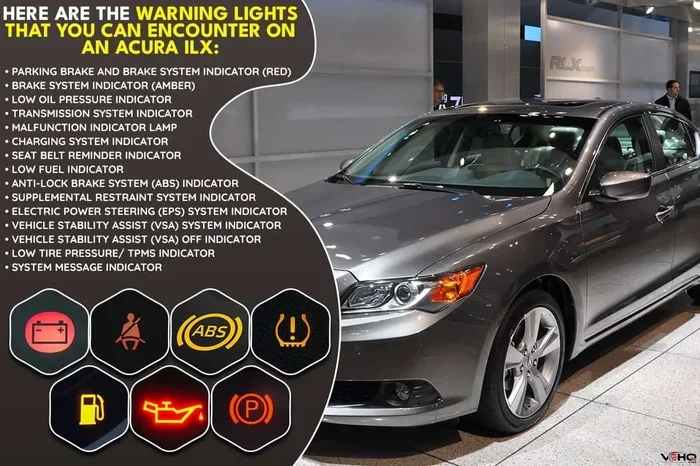
The most common categories of warning lights on the MDX include engine alerts, maintenance reminders, tire pressure warnings, and safety system notifications. Let us break them down so you can quickly identify what is on your dashboard.
### Common Warning Light Types
– Check Engine Light: This is the most well-known warning. It can trigger for something as simple as a loose gas cap or something more serious like a misfire.
– Maintenance Required Light: This light comes on based on mileage intervals. It simply reminds you that service is due.
– TPMS Light: The Tire Pressure Monitoring System light warns you when tire pressure is low or uneven.
– Oil Pressure Warning: A red oil can symbol means your oil level or pressure is below safe levels.
– Battery/Charging Warning: This light indicates a potential issue with your charging system or battery.
– Brake System Warning: This light can mean the parking brake is engaged or that brake fluid is low.
Each of these lights has a specific reset process. We will walk through them one by one in the sections below.
## How to Reset the Maintenance Required Light
The maintenance required light is the easiest to reset on the Acura MDX. This light is purely a mileage-based reminder. It does not indicate a mechanical problem. You can turn it off in just a few steps.
### Step-by-Step Reset Process
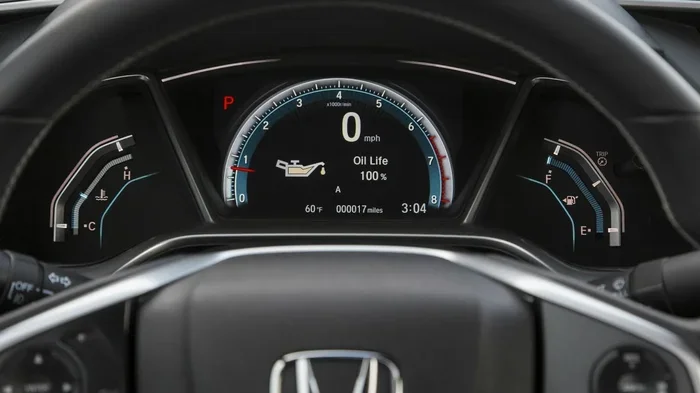
First, turn your ignition to the “ON” position. Do not start the engine. Just press the start button without stepping on the brake. Next, locate the steering wheel controls. Use the buttons on the right side of the steering wheel to navigate the display menu.
Scroll to the “Maintenance” or “Service” option. Press the “Select” button to enter that menu. You should see an option to reset the service interval. Confirm the reset, and the light will turn off. The entire process takes about 30 seconds.
If your MDX has a traditional instrument cluster instead of a digital display, the process is slightly different. Turn the ignition to “ON.” Then, press and hold the trip meter reset button on the instrument cluster. Hold it for about 10 seconds until the maintenance light starts to flash and then turns off.
### Quick Tips for Maintenance Light Resets
Always reset the light after completing your actual service. This keeps your service records accurate. If you just had an oil change, make sure the technician has reset the light before you leave the shop. Some Acura MDX service centers do this automatically, but it never hurts to double-check.
## Resetting the Check Engine Light on Acura MDX
The check engine light can be tricky. It is the one light that makes most drivers nervous. Unlike the maintenance light, the check engine light connects directly to your vehicle’s engine management system. When the Acura MDX check engine light comes on, it means the onboard computer has detected a fault.
### Why Does the Check Engine Light Come On?
Several things can trigger this light. A loose or damaged gas cap is the most common and simplest cause. Other triggers include oxygen sensor issues, catalytic converter problems, spark plug failures, and EVAP system leaks. Sometimes the light comes on due to a temporary sensor glitch.
### Method 1: The Ignition Cycle Reset
This is the simplest method and works for many minor triggers. Start by turning off your engine. Wait about 30 seconds. Then, turn the ignition back to “ON” without starting the engine. Wait another 30 seconds. Start the engine and drive for a few minutes. If the issue was minor, the light may turn off on its own.
This method works because the vehicle’s computer needs a few driving cycles to re-evaluate the sensor data. If the fault is no longer present, the computer clears the code automatically.
### Method 2: Using an OBD-II Scanner
For a more reliable reset, use an OBD-II scanner. Plug the scanner into the diagnostic port under your steering column. Turn the ignition to “ON.” The scanner will communicate with your vehicle’s computer. You can read any stored trouble codes and then clear them.
This method is especially useful because it tells you exactly what triggered the light. You can address the root cause before resetting. If you are unsure about what the codes mean, many auto parts stores offer free code reading. You can also clear a check engine code at home with a basic scanner.
### Method 3: Disconnecting the Battery
Some owners choose to disconnect the battery to reset all warning lights. This method works but comes with trade-offs. You will lose your radio presets, clock settings, and possibly some stored adaptation data. To do this, disconnect the negative battery terminal first. Wait at least 15 minutes. Then reconnect it and start the engine.
This method should be your last resort. It does not address the underlying issue that triggered the light in the first place.
## Resetting the TPMS Light
The Tire Pressure Monitoring System light is another common alert on the Acura MDX. Low tire pressure, temperature changes, or a slow leak can all trigger this light. Before you reset it, make sure your tires are properly inflated. Resetting without checking pressure will just cause the light to come back.
### How to Reset the TPMS Light
First, check all four tires and the spare. Inflate them to the recommended pressure listed on the driver’s side door jamb. Next, drive your MDX at speeds above 30 mph for about 10 minutes. The system should automatically recalibrate.
If the light stays on, you can try a manual reset. With the ignition in the “ON” position, locate the TPMS reset button. It is usually found beneath the steering wheel. Press and hold it until the TPMS light blinks three times. Release the button and start the engine.
Some owners also ask about clearing a TPM reset after inflating tires. The process is similar and usually resolves within one driving cycle.
## Resetting Other Dashboard Warning Lights
Beyond the maintenance, check engine, and TPMS lights, your MDX has several other warning indicators. Let us look at how to handle the most common ones.
### Oil Pressure Warning Light
A red oil can symbol means trouble. Do not ignore this light. First, pull over safely and check your oil level. If the oil is low, add the recommended type and amount. Once you have topped off, the light should turn off after a few minutes of driving. If the light stays on even with proper oil levels, visit a mechanic immediately. Low oil pressure can cause serious engine damage.
### Battery and Charging Warning Light
This light looks like a battery icon. If it comes on while driving, it means your charging system may have a problem. Check your battery terminals for corrosion. Make sure the cables are tight. If everything looks fine, the alternator may be failing. A failing alternator will drain your battery and leave you stranded. Have the charging system tested as soon as possible.
### Brake Warning Light
The brake warning light can mean a few things. First, check if the parking brake is fully released. If it is, the light might indicate low brake fluid. Check the brake fluid reservoir under the hood. Top it off if needed. If the light persists, your brake pads may be worn thin. Have your brakes inspected promptly.
## When to See a Professional
Not every warning light should be handled at home. Some signals point to issues that require professional tools and expertise. Understanding the difference saves you time and prevents costly mistakes.
### Lights That Need Immediate Attention
– Red brake warning light that does not go away after releasing the parking brake
– Red oil pressure light that stays on after adding oil
– Engine temperature warning light (overheating gauge in the red zone)
– Airbag warning light that stays illuminated
If any of these lights appear, do not continue driving if possible. Pull over safely and arrange for a tow or roadside assistance. These are serious issues that can compromise your safety.
### Lights You Can Monitor
Yellow or amber lights generally allow you to drive to a service center. The check engine light in steady mode (not flashing) usually falls into this category. A flashing check engine light, however, is different. It indicates a severe misfire that can damage your catalytic converter. Pull over and get your vehicle inspected right away.
## Preventing Unnecessary Warning Lights
The best way to deal with warning lights is to prevent them from appearing in the first place. Regular maintenance goes a long way toward keeping your dashboard clear. Here are some simple habits that help.
### Regular Maintenance Schedule
Stick to the factory-recommended maintenance intervals for your Acura MDX. Regular oil changes, tire rotations, and fluid checks keep all systems running smoothly. When you stay current with service, many warning lights simply never appear.
### Quick Daily Checks
Make it a habit to glance at your dashboard when you start the car. Every light should turn off within a few seconds of starting the engine. If a light stays on, take note of it. Addressing small issues early prevents them from becoming bigger problems.
### Keep Your Gas Cap Tight
This sounds too simple, but a loose gas cap is the number one cause of the check engine light. After every fill-up, give the gas cap a firm twist until it clicks. This one habit alone can save you from unnecessary trips to the mechanic.
## Expert Insights on Dashboard Warning Lights
Experienced Acura technicians agree that many warning light resets are straightforward. However, they emphasize one key point: always diagnose before you reset. Clearing a light without understanding the cause is like hiding a smoke alarm instead of checking for fire.
The Acura MDX has a sophisticated network of sensors and computers. Each system communicates with the others. A single issue can sometimes trigger multiple lights. For example, a weak battery can cause the check engine light, the battery warning, and even erratic TPMS readings. Understanding the root cause helps you fix the problem completely the first time.
Many owners also benefit from keeping a basic OBD-II scanner at home. These devices are affordable and easy to use. They give you peace of mind and save you money on diagnostic fees. If you frequently deal with minor warning lights, a scanner is a worthwhile investment.
## Key Takeaways
Key Takeaways
- Multiple Reset Methods: You can reset Acura MDX warning lights using the steering wheel controls, the infotainment system, or a simple ignition cycle.
- Safety First: Always check the underlying cause before resetting any dashboard light to avoid missing a serious issue.
- Common Lights Are Easy: Maintenance required lights, TPMS alerts, and oil change reminders are among the simplest to reset at home.
- Tools Help: An OBD-II scanner makes clearing codes faster and more accurate than manual methods.
- Know When to Seek Help: Some warning lights signal problems that need professional diagnosis, not just a reset.
- Prevent Future Alerts: Regular maintenance and timely Acura MDX service reduce unnecessary warning light appearances.
Key Takeaways
- Maintenance Light Reset: Use the steering wheel controls or trip meter button to reset the service interval light in under a minute.
- Check Engine Light: Start with a simple ignition cycle or OBD-II scanner. Always check the gas cap first.
- TPMS Light: Inflate tires to the proper pressure, then drive for 10 minutes or use the manual reset button.
- Oil and Battery Lights: Check fluid levels and connections before attempting a reset. These can signal serious problems.
- Know When to Get Help: Red flashing lights and overheating warnings need immediate professional attention.
- Prevention Works: Regular maintenance and good daily habits keep your dashboard clear and your MDX running smoothly.
## Conclusion
Resetting Acura MDX warning lights does not have to be complicated. Most common lights can be cleared with simple steps you can do at home. The maintenance light, TPMS alert, and minor check engine triggers are all manageable with the right approach.
The key is to always understand what the light means before you reset it. A warning light is your vehicle’s way of communicating with you. Respect it, investigate it, and then address the root cause. Once you know the issue, the reset process is usually quick and straightforward.
Keep this guide handy for the next time a light pops up on your dashboard. With the right knowledge, you can handle most situations confidently. Your Acura MDX is a well-engineered vehicle, and with proper care, it will keep running beautifully for years to come.
## Frequently Asked Questions
How do I reset the maintenance light on my Acura MDX?
You can reset it using the steering wheel controls or the trip meter button. Turn the ignition to ON, navigate to the maintenance menu, and select reset. For older models, press and hold the trip reset button for about 10 seconds with the ignition on.
Can I drive with the check engine light on?
If the light is steady and not flashing, you can usually drive carefully to a service center. However, if the light flashes, pull over immediately and get your vehicle towed. A flashing light indicates a serious misfire that can cause engine damage.
Why does my TPMS light come back after I reset it?
The light usually comes back because the tire pressure is still low or uneven. Always check and inflate your tires to the proper level before resetting. Temperature changes can also cause temporary pressure drops that trigger the light.
Do I need a special tool to reset Acura MDX warning lights?
For most lights, no special tool is needed. The maintenance light and TPMS light can be reset with steering wheel controls. However, a basic OBD-II scanner is very helpful for clearing check engine codes and diagnosing the root cause.
How long does it take for a warning light to come back after resetting?
If the underlying issue is resolved, the light should stay off. Some lights may take a few driving cycles to fully clear. If a light returns immediately or within a few days, there is likely an unresolved issue that needs attention.
Is it safe to disconnect the battery to reset warning lights?
It is generally safe but not recommended as a first option. Disconnecting the battery will clear all lights, but you will lose your radio presets, clock settings, and some adaptive settings. It also does not fix the actual problem that triggered the light in the first place.
Frequently Asked Questions
What is How to Reset Acura MDX Warning Lights?
How to Reset Acura MDX Warning Lights is an important topic with many practical applications.