How Do I Reset My Nissan Bluetooth Quickly and Easily
A Nissan Bluetooth reset is the fastest way to solve connection problems, audio cutting out, or pairing failures. Whether you own a Nissan Altima, Rogue, or Maxima, this guide walks you through every reset method clearly and simply. You will learn how to reset your Bluetooth settings, re-pair your devices, and prevent future issues.
Have you ever been driving your Nissan and suddenly your Bluetooth just stops working? Maybe your favorite podcast keeps cutting out, or your phone simply refuses to connect to the car’s audio system. It is frustrating, especially when you rely on hands-free calling or streaming music during your daily commute.
The good news is that a Nissan Bluetooth reset almost always fixes the problem. You do not need to be a tech expert. In this guide, we will walk you through every step clearly and simply. By the time you finish reading, you will know exactly how to reset your Bluetooth, why it stopped working, and how to keep it running smoothly for years to come.
We covered this topic in detail because Bluetooth issues are one of the most common problems Nissan owners face. Whether you drive a sedan, SUV, or truck, the reset process is very similar across most models. Let us get started right away.
Key Takeaways
- Soft Reset: A quick restart of the infotainment system that fixes most minor Bluetooth glitches.
- Hard Reset: A full factory reset of the Bluetooth module that clears all paired devices and settings.
- Re-Pairing: After a reset, you must re-pair your phone to restore full functionality.
- Common Causes: Software glitches, outdated firmware, and too many paired devices often trigger Bluetooth problems.
- Prevention Tips: Regular updates and keeping paired devices minimal help avoid future issues.
- Professional Help: Some issues may require a visit to a Nissan dealer or certified technician.
📑 Table of Contents
- Why Your Nissan Bluetooth Might Need a Reset
- How to Reset Nissan Bluetooth Step by Step
- Common Nissan Bluetooth Problems and How to Fix Them
- How to Re-Pair Your Device After a Reset
- Preventing Future Bluetooth Issues in Your Nissan
- When to Seek Professional Help
- Final Thoughts on Resetting Your Nissan Bluetooth
Why Your Nissan Bluetooth Might Need a Reset
Before we dive into the steps, it helps to understand why Bluetooth problems happen in the first place. Knowing the cause makes the fix much easier. Most Nissan owners experience Bluetooth issues for a few common reasons.
Software Glitches and Minor Bugs
Like any electronic system, your Nissan infotainment system runs on software. Over time, small bugs can build up and cause the Bluetooth module to behave strangely. A simple software glitch might make your phone disconnect randomly or refuse to pair at all. A soft reset clears these temporary issues quickly.
Too Many Paired Devices
Your Nissan Bluetooth system can only handle a certain number of paired devices at once. If you have connected multiple phones, tablets, and other devices, the system can get confused. This often leads to connection drops or slow pairing. Clearing the Bluetooth memory through a reset helps a lot here.
Outdated Firmware
Nissan releases firmware updates for the infotainment system from time to time. If your system is running an older version, it may not work well with newer phones or operating systems. In some cases, a reset after an update is necessary to make everything work properly again.
Hardware Issues
Sometimes the problem is not software at all. A loose connection, a damaged antenna, or a faulty Bluetooth module can cause persistent issues. These cases need professional diagnosis. But before you assume it is hardware, always try a reset first.
How to Reset Nissan Bluetooth Step by Step
Now let us get into the actual steps. There are two main ways to perform a Nissan Bluetooth reset: a soft reset and a hard reset. We will cover both methods in detail so you can choose the one that fits your situation.
Method 1: Soft Reset (Quick Restart)
A soft reset is the fastest way to fix minor Bluetooth issues. It simply restarts the infotainment system without erasing any of your settings or paired devices. Think of it like restarting your phone when it acts up.
Step 1: Turn off your Nissan engine and put the car in park.
Step 2: Press and hold the power button on the infotainment screen for about 10 to 15 seconds.
Step 3: The screen will go black and the system will restart. Wait for it to fully boot up.
Step 4: Try connecting your phone again and see if the issue is resolved.
This method works for most minor Bluetooth problems. It takes less than a minute and does not delete anything. If the issue persists, move on to the hard reset method.
Method 2: Hard Reset (Factory Reset of Bluetooth)
A hard reset clears all Bluetooth settings and paired devices from your Nissan system. This is a deeper reset that fixes more stubborn problems. Use this method if the soft reset did not work.
Step 1: Turn off the engine and make sure the car is in park.
Step 2: Go to the Settings menu on your infotainment screen.
Step 3: Look for the Bluetooth or Phone menu. Select it.
Step 4: Find the option to delete all paired devices. Confirm the action.
Step 5: Go back to the main Settings menu and select the option to reset the system to factory defaults.
Step 6: Wait for the system to complete the reset. This may take a few minutes.
Step 7: Restart the car and try pairing your device again.
Keep in mind that a hard reset will erase all your Bluetooth pairings. You will need to reconnect each device after the reset. This is a small trade-off for fixing a stubborn Bluetooth problem.
Some Nissan models also allow you to perform a reset by disconnecting the car battery for about 15 minutes. This method works similarly to a factory reset of the electrical system. However, it is a more advanced step and should only be done if you feel comfortable working with your car’s battery.
Common Nissan Bluetooth Problems and How to Fix Them
Bluetooth issues come in many forms. Here are the most common problems Nissan owners face, along with quick fixes for each one.
Bluetooth Not Pairing with Phone
If your phone will not pair with your Nissan, first make sure Bluetooth is turned on both on your phone and in the car. Turn off Bluetooth on both devices, wait 30 seconds, and then turn them back on. Try pairing again. If it still fails, a Nissan Bluetooth reset should clear any interference from old pairings.
Audio Keeps Cutting Out
Intermittent audio usually happens when the signal is weak or when too many devices are competing for the connection. Move your phone closer to the car’s antenna (usually near the rear windshield). Also, delete any unused paired devices to free up the Bluetooth channel. A soft reset often fixes this problem as well.
Phone Connects but No Sound
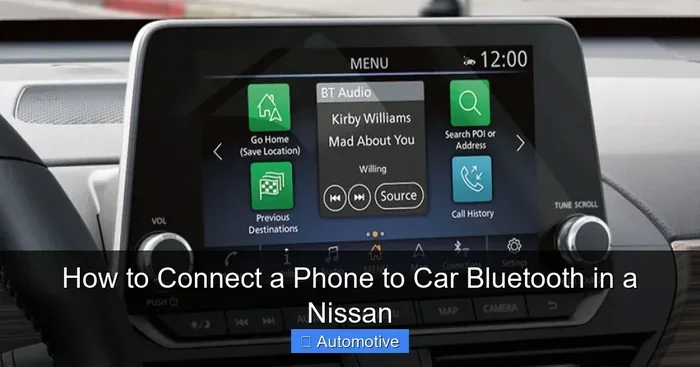
This is a common issue that many people overlook. Check the audio source on your infotainment screen. Make sure it is set to Bluetooth Audio or BT Audio, not Radio or Aux. Also, check your phone’s volume and the car’s volume separately. Both need to be turned up for sound to work.
Bluetooth Connects but Calls Have No Audio
If your music plays fine but phone calls have no sound, the issue is usually with the phone’s permissions. Go to your phone’s Bluetooth settings, find your Nissan, and make sure the “Phone Audio” or “Call Audio” option is enabled. A quick reset of the Bluetooth connection often fixes this too.
Car Shows “Device Not Found” Error
This error means the car cannot detect your phone. First, make sure your phone’s Bluetooth is visible or discoverable. Then try moving your phone closer to the car’s screen. If the error persists, remove the car from your phone’s Bluetooth memory and try pairing fresh after a reset.
How to Re-Pair Your Device After a Reset
After performing a Nissan Bluetooth reset, you will need to re-pair your devices. This is a simple process, but doing it correctly the first time saves a lot of frustration later.
Step 1: On your phone, go to Settings and turn on Bluetooth.
Step 2: Make sure your phone is set to be visible or discoverable.
Step 3: On your Nissan’s infotainment screen, go to the Bluetooth or Phone menu.
Step 4: Select the option to search for new devices or add a new device.
Step 5: Your phone should appear in the list on the car’s screen. Tap on it.
Step 6: Confirm the pairing on both your phone and the car’s screen.
Step 7: Test the connection by playing music or making a call.
It is a good idea to only pair the devices you use most often. Keeping your paired device list short helps the Bluetooth system run more smoothly and reduces the chance of future problems.
Quick Tips for Smooth Re-Pairing
- Always update your phone’s software before re-pairing.
- Restart your phone before attempting to pair it with the car.
- Make sure no other devices are actively connected to the car’s Bluetooth during pairing.
- If pairing fails, try turning the car’s infotainment system off and on again.
- Keep your phone within three feet of the car’s screen during the pairing process.
Preventing Future Bluetooth Issues in Your Nissan
The best way to deal with Bluetooth problems is to prevent them from happening in the first place. A few simple habits can keep your Nissan Bluetooth running smoothly for a long time.
Keep Your System Updated
Nissan occasionally releases software updates for the infotainment system. These updates often include fixes for Bluetooth connectivity issues. Check with your dealer or visit a Nissan service center to see if any updates are available for your model.
Limit Paired Devices
As mentioned earlier, too many paired devices can slow down your Bluetooth system. Delete devices you no longer use. A clean Bluetooth memory helps the system run faster and more reliably.
Restart Regularly
Just like your phone, your car’s infotainment system benefits from regular restarts. A soft reset every few weeks keeps the software running smoothly. Think of it as a quick maintenance habit.
Avoid Interference from Other Devices
Other electronic devices can sometimes interfere with your Nissan Bluetooth signal. If you notice connection problems, try turning off other Bluetooth devices in the car, such as tablets or smartwatches, and see if the connection improves.
Store Your Car Properly
Extreme temperatures can affect electronic components, including the Bluetooth module. If possible, park your Nissan in a garage or shaded area. This protects the infotainment system and helps it last longer.
When to Seek Professional Help
Most Bluetooth issues resolve after a reset or re-pairing. But sometimes the problem is deeper than a simple software glitch. Here are signs that you should take your Nissan to a professional.
If you have tried both a soft reset and a hard reset and the Bluetooth still does not work, there may be a hardware issue. Similarly, if the Bluetooth works intermittently and the problem gets worse over time, the Bluetooth module itself could be failing. In these cases, a certified Nissan technician can run diagnostic tests to find the root cause.
It is also worth noting that some Bluetooth problems are related to the car’s overall electrical system. For example, if you have other electrical issues like flickering lights or dashboard warnings, the Bluetooth problem might be a symptom of a larger issue. In that situation, you might want to clear a check engine code first to see if there are any related error codes.
Visiting a dealer or trusted mechanic ensures the problem is fixed correctly the first time. Do not hesitate to seek help if the Bluetooth issues persist after trying all the reset methods in this guide.
Final Thoughts on Resetting Your Nissan Bluetooth
A Nissan Bluetooth reset is one of the simplest and most effective ways to fix connection problems. Whether you choose a soft reset for quick fixes or a hard reset for deeper issues, the process is straightforward and takes only a few minutes. Most Nissan owners can solve their Bluetooth problems without ever leaving their driveway.
Remember to keep your paired device list clean, update your system regularly, and restart your infotainment system occasionally. These small habits go a long way in preventing future Bluetooth headaches. And if the problem persists, do not be afraid to seek professional help.
Your Nissan Bluetooth system is designed to make your driving experience better. A quick reset brings it back to working order so you can enjoy hands-free calling, streaming music, and navigation without any interruptions. Take a few minutes today to reset your system if you have been experiencing issues, and you will be back on the road with full connectivity in no time.
Frequently Asked Questions
How long does a Nissan Bluetooth reset take?
A soft reset takes less than a minute. A hard reset may take 5 to 10 minutes because the system needs to clear all settings and restart. Re-pairing your devices after the reset adds a few more minutes. Overall, the entire process is quick and easy.
Will a Nissan Bluetooth reset delete my music or contacts?
No, a Bluetooth reset only clears Bluetooth settings and paired devices. Your music library, contacts, and other data on your phone remain untouched. The car’s infotainment system also keeps your radio presets and most other settings intact.
How often should I reset my Nissan Bluetooth?
You do not need to reset your Bluetooth regularly. Only reset it when you experience connection problems. However, performing a soft reset once a month can help keep the system running smoothly. Think of it as occasional maintenance rather than a routine task.
Can I reset the Bluetooth without turning off the engine?
It is always safest to perform a reset with the engine off and the car in park. This ensures the system shuts down properly and restarts correctly. Some models may allow a soft reset while the car is running, but turning it off first is the recommended approach.
What should I do if my Nissan Bluetooth still does not work after a reset?
If the reset does not fix the problem, try re-pairing your device from scratch. Make sure your phone’s Bluetooth is updated and visible. If the issue persists, there may be a hardware problem. In that case, visit a Nissan dealer or certified technician for a professional diagnosis.
Is there a difference between resetting Bluetooth and resetting the entire infotainment system?
Yes, there is a difference. A Bluetooth reset only affects the wireless connection and paired devices. A full infotainment system reset affects all settings, including radio presets, navigation data, and display preferences. Always choose the Bluetooth reset first unless you are experiencing broader system issues.