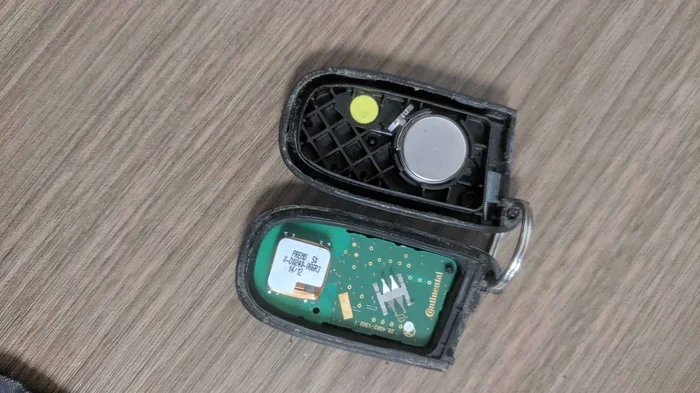
Why Is My Key Fob Not Working Even With New Batteries
A key fob not working with new batteries is more common than you think and usually has a simple fix. Corrosion, improper battery seating, signal interference, and programming issues are the top reasons your key fob battery replacement might not solve the problem. This guide walks you through every possible cause and shows you exactly how to bring your car key fob back to life.
You just popped open your car key fob, slid in a fresh battery, and closed it up. You press the button. Nothing happens. You press it again. Still nothing. It is frustrating, confusing, and honestly a little scary when you are standing by your car in a parking lot. You did everything right. You bought new batteries. So why is your key fob not working even with new batteries?
The truth is, a key fob not working with new batteries is one of the most common car owner complaints. And the reasons are almost always fixable. Most people assume the problem is the battery itself. But in reality, there are at least half a dozen other culprits that can stop your remote key fob from sending a signal. Some are super simple to fix. Others might need a little more attention.
This article covers every single reason your key fob might still be dead after a battery swap. We will walk through the causes, the fixes, and the preventive steps you can take so this never happens again. Whether you drive a sedan, SUV, or truck, this guide applies to almost every vehicle on the road today.
Key Takeaways
- Battery Orientation Matters: Putting the battery in upside down is one of the most common reasons a key fob still fails after a replacement.
- Corrosion Kills Signals: Even with a brand-new battery, corroded contacts inside the key fob will block the electrical connection.
- Signal Interference Is Real: Other electronics, metal objects, and even certain parking structures can weaken or block your remote key fob signal.
- Reprogramming May Be Needed: Some vehicles require you to resync the key fob after a battery change, especially with newer models.
- Cheap Batteries Fail Fast: Not all key fob batteries are equal. Using a low-quality CR2032 can cause the problem to return within weeks.
- Know When to Replace the Whole Unit: If the key fob is physically damaged or over five years old, a full replacement might be the smarter choice.
📑 Table of Contents
- Common Reasons Your Key Fob Fails Even With Fresh Batteries
- How to Tell If Your Key Fob Battery Is Actually Dead
- Step-by-Step Guide to Replacing Your Key Fob Battery
- Hidden Culprits That Block Your Key Fob Signal
- When to Replace the Entire Key Fob Instead of Just the Battery
- Preventive Tips to Keep Your Key Fob Working Longer
- Expert Insights on Key Fob Troubleshooting
- Key Takeaways
- Conclusion
Common Reasons Your Key Fob Fails Even With Fresh Batteries
Before you panic or rush to the dealership, take a breath. Nine times out of ten, the issue is something small and easy to fix. Let us break down the most common reasons your electronic key fob refuses to work after you have already replaced the battery.
Wrong Battery Orientation
This sounds silly, but it happens all the time. The CR2032 battery or whatever type your key fob battery uses has a positive and negative side. If you place it in upside down, the circuit does not complete. Your key fob will be completely dead even though you just put in a brand-new cell.
Check the inside of your key fob carefully. There is usually a small + and minus symbol printed on the battery compartment. Match the battery exactly. If you are unsure, take a photo of the old battery before you remove it so you remember the correct orientation.
Dirty or Corroded Battery Contacts
This is the number one hidden culprit. Over time, tiny amounts of moisture can seep into the key fob. This causes battery corrosion on the metal contacts. Even with a perfectly good new battery, corrosion acts like a wall. It blocks the electrical current from flowing through the circuit.
You might not always see the corrosion with the naked eye. It can look like a thin white or greenish film on the battery terminals. A quick wipe with a cotton swab dipped in white vinegar or rubbing alcohol can clear this right up. Let it dry completely before you insert the new battery.
The Battery Itself Is Defective
Not all batteries are created equal. Sometimes you buy a pack of key fob batteries and one of them is already dead or weak. This is surprisingly common with store-brand or expired stock. A dead key fob battery that just came out of the package is more common than most people realize.
If you replaced the battery and nothing changed, try a different battery from a different pack or a different brand. Stick with trusted names like Energizer, Duracell, or Panasonic. They cost only a little more but they are far more reliable for your key fob signal needs.
Key Fob Needs Reprogramming
Here is something many car owners do not know. On certain vehicle models, changing the key fob battery can reset the internal memory. This means the key fob loses its pairing with your car. The remote key fob still has power, but it is no longer synced to the vehicle’s immobilizer system.
This is especially common with newer cars that use proximity sensor technology. If your key fob suddenly stops working after a battery change, reprogramming might be all you need. Most vehicle manuals include simple reprogramming steps. You can also check online for your specific make and model.
How to Tell If Your Key Fob Battery Is Actually Dead
Before you assume the new battery is the problem, let us make sure the old one was actually dead. Sometimes the symptoms of a failing key fob battery overlap with other issues.
Signs Your Key Fob Battery Was Low
Your car key fob gives you warning signs long before it dies completely. Watch for these clues:
- Reduced range: You have to stand right next to the car for the lock button to work. A healthy key fob range should reach from your pocket across a parking lot.
- Intermittent response: The lock button works sometimes but not others. This is a classic sign of a weakening key fob battery.
- Delayed response: There is a noticeable pause between pressing the button and the car responding.
- Dashboard warning: Many modern vehicles display a low key fob battery warning on the instrument cluster.
The Coin Cell Test
If you want to test whether your old battery was truly dead, try the coin cell test. Place the battery flat side up on a table. Touch a small piece of wire or a key to the top of the battery and the bottom edge at the same time. If the battery is good, it will get warm. If it does nothing, the battery was already dead and you need a fresh one.
Step-by-Step Guide to Replacing Your Key Fob Battery
Replacing the battery in your remote key fob is simple. But doing it the wrong way can cause new problems. Follow these steps carefully to make sure your key fob battery replacement actually works.
Step One: Get the Right Battery
Most car key fobs use a CR2032 battery. But some models use CR2025 or other sizes. Check your vehicle manual or look at the old battery before you buy the replacement. Using the wrong size will not work, even if the battery is brand new.
Step Two: Open the Key Fob Carefully
Most key fobs have a small seam running along the edge. Use a flathead screwdriver or a key fob opening tool to gently pry it apart. Go slow. You do not want to crack the plastic housing. Some key fobs use a small release button or latch. Check yours before forcing it open.
Step Three: Remove the Old Battery
Note the orientation of the old battery before removing it. Take a photo if you need to. Use a plastic tool to pop the battery out. Avoid using metal tools directly on the contacts. You do not want to accidentally create a short circuit inside the key fob.
Step Four: Clean the Contacts
This step is easy to skip but incredibly important. Use a dry cotton swab or a cloth dipped in a tiny bit of rubbing alcohol to gently clean both the battery contacts and the inside of the key fob housing. Let everything dry completely before moving to the next step.
Step Five: Insert the New Battery
Place the new key fob battery in the correct orientation. The positive side usually faces up. Push it firmly into place. Make sure it sits flat and does not wobble. A loose battery will cause intermittent key fob not responding issues.
Step Six: Snap the Key Fob Back Together
Align both halves of the key fob and press them together until you hear the clip click. Do not force it. If the two halves do not line up, the key fob might not seal properly, which can lead to moisture damage over time.
Step Seven: Test Immediately
Stand within a few feet of your car and test all the buttons. Lock, unlock, trunk release, and panic alarm if your model has one. If nothing works, open the key fob again and double-check the battery orientation. Nine times out of ten, the problem is right there.
Hidden Culprits That Block Your Key Fob Signal
Sometimes the key fob battery is perfectly fine. But something else is blocking the signal between your remote key fob and the car. These hidden culprits are easy to overlook.
Electronic Interference
We live in a world full of electronics. Cell phones, USB chargers, Bluetooth devices, and even other key fobs can create signal interference. If you are trying to unlock your car while standing next to a cell tower or inside an electronics store, your key fob signal might get drowned out.
The fix is simple. Move away from other electronics and try again. If your key fob range improves when you step away from interference, that confirms the problem was not the battery.
Metal Objects and Physical Barriers
Your car key fob uses a low-frequency radio signal. Metal objects block these signals effectively. If you keep your key fob in a metal tin, a wallet with a metal magnetic closure, or a pocket full of keys and coins, the signal might not reach your car.
Try holding the key fob directly against the car door handle or the start button. If it works from that position but not from your pocket, the metal barrier was the issue.
Extreme Temperatures
Cold weather is a key fob battery killer. Temperatures below freezing can reduce the voltage output of even a brand-new battery. If you live in a cold climate, this might explain why your key fob not working with new batteries only happens in winter.
Keep your key fob in an inside pocket close to your body. Your body heat helps maintain the battery voltage. In extreme heat, the opposite can happen. The battery can drain faster or even leak. Avoid leaving your key fob on the dashboard in direct sunlight.
Moisture and Water Damage
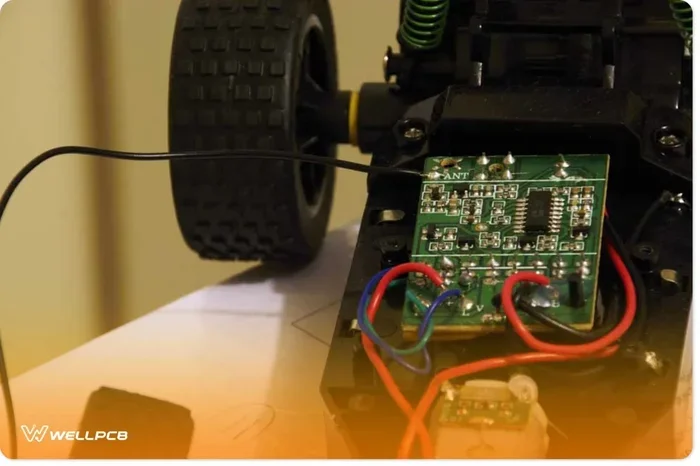
If your key fob battery compartment has ever been exposed to water or heavy humidity, moisture might have gotten inside. This can damage the internal circuit board. Even after you replace the battery, a water-damaged key fob will not work properly.
Signs of moisture damage include a foggy interior, rust on the circuit board, or a key fob that works intermittently. If you suspect water damage, you may need to replace the entire key fob unit or have it professionally repaired.
When to Replace the Entire Key Fob Instead of Just the Battery
Sometimes a new battery is not enough. If you have tried everything and your key fob still not working with new batteries, it might be time to consider replacing the whole unit.
Physical Damage to the Key Fob
If your key fob has been dropped, stepped on, or crushed, the internal components might be broken. A cracked circuit board or damaged key fob buttons will not respond no matter what battery you use. In these cases, battery replacement is not the solution.
Age of the Key Fob
Most car key fobs last between five and ten years with proper care. If yours is older than five years and you are constantly replacing the battery, the internal electronics are likely wearing out. A full key fob replacement at this point is more cost-effective than repeatedly buying new batteries.
Aftermarket Key Fob Considerations
If you decide to replace the entire key fob, you have options. OEM (original manufacturer) key fobs are the most reliable but also the most expensive. Aftermarket key fob battery units from reputable brands work well for most vehicles and cost significantly less. Just make sure the aftermarket fob is compatible with your specific vehicle model and year.
Preventive Tips to Keep Your Key Fob Working Longer
The best way to deal with a key fob not working issue is to prevent it from happening in the first place. Here are simple habits that extend the life of your remote key fob and keep it working reliably.
Replace the Battery Every Two to Three Years
Do not wait for the key fob to die completely. Replace the key fob battery on a schedule. Every two to three years is a good rule of thumb. This prevents the frustration of being stranded with a dead fob at the worst possible moment.
Keep the Key Fob Dry
Moisture is the enemy of electronics. Avoid leaving your car key fob in the bathroom, near the kitchen sink, or in the glove compartment where condensation can build up. A small silica gel packet in your key fob case can help absorb excess moisture.
Store It Away from Strong Magnets and Electronics
Strong magnetic fields can interfere with the key fob signal and even damage the internal circuitry. Keep your key fob away from large speakers, magnetic phone mounts, and power tools. A dedicated key fob holder or pouch is a great investment.
Use Quality Batteries
Saving a few cents on a cheap battery is not worth the hassle. Always use name-brand key fob batteries from reputable manufacturers. They provide consistent voltage, last longer, and are far less likely to leak or corrode inside your key fob.
Handle the Key Fob with Care
Your key fob buttons and internal electronics are delicate. Avoid dropping it, sitting on it, or exposing it to extreme pressure. A protective silicone case can add a layer of shock absorption without adding bulk.
Expert Insights on Key Fob Troubleshooting
Automotive technicians who work on key fob troubleshooting daily say the same thing: most key fob problems are simpler than car owners think. The battery is usually not the real issue. It is the contacts, the orientation, or a simple sync problem that causes the headache.
One master technician shared that he sees at least five customers a week who bring in their car because the key fob not working with new batteries. In almost every case, the fix takes less than two minutes. Usually it is a corroded contact or a battery placed in backward.
The biggest mistake people make? They assume the problem is complicated and immediately take the car to the dealership. A quick check of the battery orientation and a cleaning of the contacts solves the issue in most cases. You can do this yourself at home with no special tools.
If you have tried all the fixes and your key fob still not working with new batteries, it is perfectly reasonable to visit a trusted auto locksmith or dealership. They have diagnostic tools that can check the key fob signal strength and the vehicle receiver. But start with the simple fixes first. You will save time and money.
Key Takeaways
- Battery Orientation Matters: Putting the battery in upside down is one of the most common reasons a key fob still fails after a replacement.
- Corrosion Kills Signals: Even with a brand-new battery, corroded contacts inside the key fob will block the electrical connection.
- Signal Interference Is Real: Other electronics, metal objects, and even certain parking structures can weaken or block your remote key fob signal.
- Reprogramming May Be Needed: Some vehicles require you to resync the key fob after a battery change, especially with newer models.
- Cheap Batteries Fail Fast: Not all key fob batteries are equal. Using a low-quality CR2032 can cause the problem to return within weeks.
- Know When to Replace the Whole Unit: If the key fob is physically damaged or over five years old, a full replacement might be the smarter choice.
Conclusion
A key fob not working with new batteries does not mean you have a big problem. In most cases, the fix is quick, free, and something you can do in under five minutes. Start with the basics. Check the battery orientation. Clean the contacts. Try a different battery. Rule out signal interference. These simple steps solve the vast majority of key fob not working issues.
If those steps do not work, move on to reprogramming the key fob or checking for internal damage. And remember, prevention is your best tool. Use quality batteries, keep the key fob dry, and handle it with care. Your car key fob will reward you with years of reliable service.
Do not let a stubborn key fob ruin your day. Use the tips in this guide, and you will have your remote key fob working again before you know it. Share this article with a friend who might be dealing with the same frustrating problem. A little knowledge goes a long way when it comes to key fob troubleshooting and key fob battery replacement.
Frequently Asked Questions
Why does my key fob work sometimes but not others after a battery change?
This usually points to a loose battery connection or intermittent corrosion on the contacts. Open the key fob and make sure the new key fob battery is seated firmly. Clean the metal contacts with rubbing alcohol and a cotton swab. If the problem persists, the battery itself might be defective.
Can a new key fob battery be dead right out of the package?
Yes, this happens more often than you would think. Batteries can sit on store shelves for months, and some lose charge over time. Always buy from reputable retailers and check the expiration date on the battery packaging before you purchase.
Do I need to reprogram my key fob after replacing the battery?
On most vehicles, you do not need to reprogram after a simple battery swap. However, certain models especially newer ones with proximity sensors and push-button start do require resyncing. Check your vehicle manual or search online for your specific make and model.
How far should my key fob work from the car?
A healthy key fob range is typically between 30 and 60 feet under normal conditions. If you have to stand right next to the car for the buttons to work, your key fob battery might be weak or the contacts might be dirty. Signal interference from other electronics can also reduce the effective range.
What type of battery does my key fob use?
The majority of car key fobs use a CR2032 coin cell battery. Some older or specialty models use CR2025 or other sizes. Check the battery compartment of your key fob or your vehicle manual to confirm the correct type before purchasing a replacement.
When should I stop troubleshooting and replace the entire key fob?
If you have tried a new battery, cleaned the contacts, verified the orientation, and ruled out interference, and the key fob still does not work, it is time to consider a full replacement. Physical damage, water exposure, or age-related electronic failure are the most common reasons the entire unit needs to be replaced rather than just the battery.