How Do I Activate Cruise Control for a Smoother Ride
Learning how to activate cruise control is one of the easiest ways to make long drives more comfortable and less tiring. This guide walks you through every step, from finding the right buttons to setting your preferred speed. You will also learn when to use it, when to turn it off, and how different systems work.
Have you ever been stuck on a long highway drive and felt your foot cramp up from keeping your foot on the accelerator? That is where how do I activate cruise control becomes a game changer. Cruise control is a handy feature found in most modern vehicles that lets you maintain a steady speed without pressing the gas pedal.
Whether you are planning a road trip or just commuting on the highway, knowing how to use this feature properly makes a big difference. In this guide, we will walk you through everything you need to know. We will cover the basics, the different types of systems, and even some expert tips you will not find in most owner’s manuals.
By the end of this article, you will feel confident hitting that cruise control button every time you climb behind the wheel. Let us dive in and make your rides smoother and more enjoyable.
Key Takeaways
- Easy Activation: Activating cruise control is simple and usually involves a few buttons on your steering wheel or stalk.
- Multiple Types Exist: Standard cruise control and adaptive cruise control serve different purposes on the road.
- Safety First: Knowing when to cancel or resume cruise control keeps you safe in changing traffic conditions.
- Fuel Savings: Using cruise control on highways can improve your fuel efficiency over long trips.
- Common Mistakes Matter: Avoiding errors like using cruise control in heavy traffic prevents accidents.
- Expert Tips Help: Small adjustments and smart habits make your cruise control experience much better.
📑 Table of Contents
- What Is Cruise Control and Why Should You Use It?
- How to Activate Cruise Control: Step by Step
- Types of Cruise Control Systems
- When to Use Cruise Control and When to Turn It Off
- Common Cruise Control Mistakes to Avoid
- Expert Tips for Getting the Most Out of Cruise Control
- Frequently Asked Questions About Cruise Control
- Conclusion
What Is Cruise Control and Why Should You Use It?
Cruise control is an automatic speed regulation system built into your vehicle. Once activated, it takes over the throttle and keeps your car moving at a set speed. You do not need to press the accelerator pedal at all. This feature has been around for decades but has evolved a lot over the years.
So why should you bother using it? There are several real benefits that make it worth turning on every time you hit the highway.
Reduces Driver Fatigue on Long Trips
Driving for hours on end can wear you out. Your foot gets sore, your leg cramps, and your focus starts to drift. How do I activate cruise control to fix this? Simply press the on button, set your speed, and let the car do the work. Your foot rests, your body relaxes, and you arrive at your destination feeling less tired.
Improves Fuel Efficiency
Maintaining a constant speed is better for your gas tank than constantly speeding up and slowing down. Cruise control helps you avoid unnecessary acceleration. Over a long road trip, this can add up to real savings at the pump. Many drivers notice a noticeable improvement in their miles per gallon when they use cruise control on highways.
Helps Maintain Safe Speeds
It is easy to unintentionally speed up when you are focused on the road ahead. Cruise control locks in your chosen speed. This means you stay within the legal limit and avoid the temptation to push the pedal harder without realizing it.
How to Activate Cruise Control: Step by Step
Now let us get to the heart of the matter. How do I activate cruise control in my specific car? The process is very similar across most vehicles, but the exact button locations can vary. Let us break it down step by step.
Step 1: Find the Cruise Control Buttons
Start by looking at your steering wheel. Most modern cars have cruise control buttons built into the wheel itself. Some older models or trucks use a stalk on the steering column instead. Look for icons that look like a speedometer with an arrow or buttons labeled “ON,” “OFF,” “SET,” and “RES.”
Here is a quick list of the most common buttons you will find:
- ON/OFF: Turns the cruise control system on or off.
- SET: Sets the current speed as your cruise control speed.
- RES (Resume): Returns to the previously set speed after canceling.
- ACCEL/COAST: Adjusts your speed up or down in small increments.
- Cancel: Temporarily turns off cruise control without clearing the set speed.
Step 2: Turn the System On
Press the ON button. You should see a light appear on your dashboard. This light is usually green or white and shows that the cruise control system is ready. The light often looks like a small speedometer icon. If you do not see any light, check your owner’s manual for the exact location of the button.
Step 3: Reach Your Desired Speed
Drive at the speed you want to maintain. This could be 65 mph on the interstate or 55 mph on a two-lane road. Make sure you are at a steady speed before moving to the next step. Wait a few seconds for your speed to stabilize.
Step 4: Press the SET Button
Once you are at your target speed, press the SET button. Your car will now maintain that speed automatically. You can take your foot off the accelerator right away. The dashboard light should change to confirm that cruise control is now active. Some vehicles also display the set speed on the instrument cluster.
Step 5: Adjust Speed If Needed
Did you set the speed too high or too low? No problem. Use the ACCEL and COAST buttons to make small adjustments. Each press typically changes your speed by 1 or 2 mph. Some vehicles let you hold the button for faster adjustments. Always make changes gradually and safely.
Step 6: Cancel or Resume Cruise Control
If you need to slow down for traffic or a curve, press the Cancel button or tap the brake pedal. The car will return to manual control, but your set speed stays saved. To go back to your set speed, simply press the RES button. This is incredibly convenient when traffic clears up on the highway.
Types of Cruise Control Systems
Not all cruise control systems are the same. Over the years, automakers have developed several different versions. Understanding the differences helps you know exactly what to expect when you press those buttons.
Standard Cruise Control
This is the traditional cruise control system. It maintains a fixed speed you set. It works great on open highways with steady traffic flow. However, it does not adjust for cars slowing down ahead of you. You will need to cancel it manually and reapply when the road clears. How do I activate cruise control for this type? The same steps apply. Just remember that you are responsible for maintaining a safe following distance.
Adaptive Cruise Control (ACC)
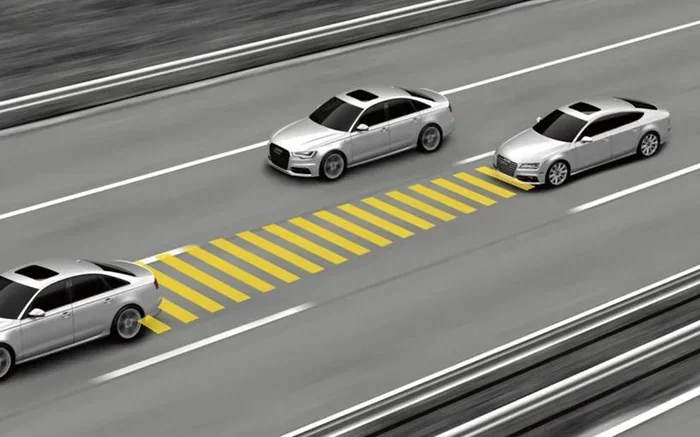
Adaptive cruise control is the more advanced version. It uses radar sensors and cameras to detect vehicles ahead. When a slower car enters your lane, the system automatically slows down to maintain a safe following distance. Once the road clears, it accelerates back to your set speed. This is a huge upgrade for highway driving and heavy traffic situations.
Many new cars now come with adaptive cruise control as standard or available on higher trim levels. Brands like Toyota, Honda, Ford, and Tesla all offer their own versions of this technology.
Stop and Go Cruise Control
This is an even more advanced form of adaptive cruise control. It can bring your car to a complete stop in traffic jams and then resume moving when the car ahead of you starts driving again. This feature is especially helpful in congested city highways and stop-and-go commuting situations.
Speed Limiter Function
Some vehicles offer a speed limiter instead of traditional cruise control. This does not maintain speed on its own. Instead, it prevents you from exceeding a set top speed. You still control the accelerator, but the car will not let you push past the limit. This is great for keeping yourself in check during long drives.
When to Use Cruise Control and When to Turn It Off
Knowing when to use cruise control is just as important as knowing how to activate it. Using it in the wrong situations can be dangerous or counterproductive.
Great Times to Use Cruise Control
- Open highways with steady traffic flow: This is where cruise control shines. The road is clear, speeds are consistent, and you can relax your foot.
- Long road trips: On cross-country drives, cruise control reduces fatigue significantly. You will arrive more refreshed.
- Flat or gently rolling terrain: Cruise control works best on relatively flat roads. The system can maintain speed without struggling on steep hills.
- Familiar routes you know well: If you drive the same highway every day, cruise control helps you maintain a consistent pace.
Times When You Should Turn It Off
- Heavy traffic or stop-and-go conditions: Standard cruise control will not slow down for traffic ahead. You need manual control here.
- Wet or icy roads: Sudden acceleration from cruise control can cause skidding on slippery surfaces. Always turn it off in poor weather.
- Winding or hilly roads: Cruise control may struggle on steep inclines and sharp curves. Manual throttle gives you better control.
- Night driving in unfamiliar areas: You need full attention on the road. Keeping your foot near the pedals helps you react quickly.
- Construction zones: Speed limits change frequently in work zones. Cruise control does not adapt to these changes quickly enough.
Quick Tips for Safe Cruise Control Use
Here are some practical tips to keep in mind every time you use cruise control:
- Always keep your hands on the steering wheel, even when cruise control is active.
- Stay alert and ready to brake or steer at any moment.
- Do not rely on cruise control to maintain a safe following distance with standard systems.
- Turn off cruise control before entering sharp curves or exits.
- Use the cancel button rather than the off button if you plan to resume shortly.
- Adjust your set speed based on road conditions, not just the posted limit.
Common Cruise Control Mistakes to Avoid
Even experienced drivers make mistakes with cruise control. Being aware of these errors helps you stay safe and get the most from the feature.
Forgetting to Cancel in Bad Weather
This is one of the most dangerous mistakes. Rain, snow, and ice create slippery road conditions. If your cruise control accelerates unexpectedly on a wet surface, you could lose traction. Always switch off cruise control when weather conditions are less than ideal.
Using It in Heavy City Traffic
Standard cruise control does not work well in heavy traffic. You will need to constantly cancel and resume, which defeats the purpose. In these situations, just drive manually and keep your foot on the pedals.
Setting the Speed Too High
It is tempting to set cruise control at the maximum speed limit or even above it. This leaves little room for error. Always set a comfortable, legal speed that gives you time to react to unexpected situations.
Ignoring the Dashboard Indicators
Your car tells you a lot through dashboard lights. If the cruise control indicator is flashing instead of staying solid, something may be wrong. A flashing light often means the system has detected an issue or cannot maintain the set speed. Pull over safely and check your owner’s manual.
Not Knowing the Difference Between Cancel and Off
Many drivers confuse the Cancel and Off buttons. Pressing Off erases your stored set speed completely. Pressing Cancel temporarily disables cruise control but keeps the speed saved for later. Use Cancel if you think you will need to resume soon.
Expert Tips for Getting the Most Out of Cruise Control
You know the basics now. Here are some expert-level tips that will elevate your cruise control game and make every drive more comfortable.
Predict the Road Ahead
Even with cruise control engaged, look far ahead down the road. If you see a hill coming up, you might want to cancel and manually slow down before the incline. This prevents your car from struggling on the uphill and gives you a smoother overall ride.
Use the Resume Feature Wisely
The RES button is your best friend after canceling cruise control. After passing a slower vehicle or navigating a curve, just press RES and your car returns to the set speed. This saves you from having to manually accelerate back to your preferred pace.
Combine Cruise Control with Proper Following Distance
If your car has adaptive cruise control, set your following distance to at least three seconds. This gives you plenty of room to react. On the highway, a three-second gap is the minimum safe following distance even without cruise control.
Keep Your Vehicle Well Maintained
Cruise control relies on your vehicle’s throttle system, sensors, and electronics. Regular maintenance keeps everything running smoothly. Make sure your throttle body is clean, your sensors are unobstructed, and your electrical connections are in good shape. A well-maintained car responds better to cruise control commands.
Know Your Vehicle’s Specific System
Every car brand and model has slight differences in how cruise control works. Some use steering wheel buttons, while others use a lever on the left side of the steering column. Spend a few minutes reading the cruise control section of your owner’s manual. You will discover features and settings you did not know existed.
Upgrade When Possible
If your older vehicle does not have cruise control or has only a basic version, consider an aftermarket upgrade. Many adaptive cruise control kits are available that can be professionally installed. These upgrades can significantly improve your highway driving experience and add resale value to your vehicle.
Frequently Asked Questions About Cruise Control
Here are some common questions drivers ask about activating and using cruise control. These answers will clear up any remaining confusion.
Can I Activate Cruise Control at Any Speed?
Most vehicles require you to be moving at a minimum speed before you can activate cruise control, usually around 25 to 30 mph. You cannot set cruise control while parked or at very low speeds. Check your vehicle’s manual for the exact minimum speed requirement. Once you are above that threshold, simply follow the steps we outlined earlier to set your cruise control.
Does Cruise Control Save Gas?
Yes, cruise control can improve fuel efficiency, especially on long highway drives. By maintaining a steady speed, it prevents unnecessary acceleration and deceleration. However, the savings are most noticeable on flat, open roads. On hilly terrain, cruise control may actually use more fuel as the system works harder to maintain speed on inclines.
What Is the Difference Between Cruise Control and Adaptive Cruise Control?
Standard cruise control maintains a fixed speed you set. It does not respond to other vehicles on the road. Adaptive cruise control uses sensors and cameras to detect cars ahead and automatically adjusts your speed to maintain a safe following distance. Adaptive cruise control is the more advanced and convenient option for highway driving.
Can I Use Cruise Control in the Rain?
It is not recommended to use cruise control on wet roads. When you activate cruise control on a slippery surface, the system may accelerate unexpectedly if your tires lose traction. This can lead to a loss of vehicle control. Always turn off cruise control in rainy, snowy, or icy conditions and drive manually for maximum safety.
How Do I Know if My Car Has Cruise Control?
Check your steering wheel for buttons labeled ON, OFF, SET, and RES. If your car has cruise control, these buttons will be present. Some vehicles use a lever on the steering column instead. You can also check your owner’s manual or look for a cruise control indicator light on the dashboard when you turn the system on.
Is It Safe to Use Cruise Control Overnight on a Long Drive?
While cruise control helps reduce fatigue, it does not replace the need for an alert driver. If you are driving overnight on a long trip, take regular breaks every two hours. Cruise control can help during the stretches when you feel alert, but never rely on it as a substitute for proper rest. Pull over and rest if you feel drowsy at any point during your drive.
Conclusion
Mastering how do I activate cruise control is a simple skill that transforms your driving experience. From reducing fatigue on long road trips to improving fuel efficiency, this feature offers real benefits every time you hit the highway. You now know the step-by-step activation process, the different types of systems available, and when to use or avoid cruise control.
Remember to always stay alert, use the feature responsibly, and take advantage of the expert tips we shared. Cruise control is a tool to assist you, not replace your attention behind the wheel. Use it wisely, and it will make every drive smoother, safer, and more enjoyable.
Next time you climb into your car and head out on the highway, go ahead and give cruise control a try. Once you get comfortable with it, you will wonder how you ever drove without it. Happy travels and smooth rides ahead.