Is It Possible To Turn Off Lane Departure Warning System
Yes, you can turn off lane departure warning in most vehicles. The process varies by car brand and model, but it is usually found in the driver assistance settings on the dashboard or infotainment screen. Disabling this feature is a personal choice that drivers make for various reasons, from reducing false alerts to dealing with sensor issues.
Have you ever been driving down a highway and suddenly heard a loud beep or felt your steering wheel vibrate? That is your lane departure warning system doing its job. But what if you are tired of it? What if the alerts keep going off even when you are driving perfectly? Can you simply turn it off? The short answer is yes. The longer answer is a bit more nuanced, and that is exactly what we are going to explore today.
Whether you own a Toyota, a Ford, a Honda, or a BMW, the ability to manage your driver assistance features gives you more control behind the wheel. In this article, we will walk you through everything you need to know about turning off lane departure warning. We will cover how the system works, why drivers disable it, the step-by-step process for different car brands, and whether it is safe to do so. By the end, you will have all the answers you need to make an informed decision about your vehicle’s safety settings.
Key Takeaways
- You can turn off lane departure warning in most cars: The setting is usually buried in the infotainment system or steering wheel controls.
- Disabling is not illegal in most places: However, it may affect your insurance or safety standing.
- False alerts are the #1 reason drivers disable it: Missing road markings, dirty sensors, and winding roads cause most issues.
- Different brands hide the setting in different menus: Toyota, Ford, Honda, and BMW all have unique paths.
- Lane departure warning and lane keeping assist are not the same: One warns you; the other takes action.
- Re-enabling is just as easy as turning it off: You can toggle the feature on and off anytime.
- Professional drivers often disable it: But everyday drivers should think twice before turning it off.
📑 Table of Contents
- What Is a Lane Departure Warning System?
- Why Do Drivers Want to Turn Off Lane Departure Warning?
- How to Turn Off Lane Departure Warning in Different Vehicles
- Is It Safe to Disable Lane Departure Warning?
- Lane Departure Warning vs. Lane Keeping Assist — What Is the Difference?
- Common Problems and False Alerts with Lane Departure Warning
- How to Decide Whether to Keep or Disable Lane Departure Warning
- Conclusion
What Is a Lane Departure Warning System?
Before we dive into how to turn it off, let us first understand what it actually does. A lane departure warning system, often abbreviated as LDW, is an advanced driver assistance feature designed to alert you when your vehicle starts to drift out of its lane without a turn signal activated. The system uses cameras, sensors, and sometimes radar to monitor the road markings around your car.
When the system detects that you are crossing a lane line, it triggers a warning. This warning can take several forms:
- Audible alert: A beep or chime sounds inside the cabin.
- Steering wheel vibration: The wheel shakes to grab your attention.
- Dashboard warning light: A symbol on the instrument cluster flashes.
- Seat vibration: Some newer cars vibrate the seat to warn you.
The goal is simple: keep you aware and prevent accidents caused by unintentional lane drifting. This is especially helpful during highway driving or when driver fatigue sets in on long trips. The lane departure warning system is part of a broader family of advanced driver assistance systems, or ADAS, that modern vehicles use to improve road safety.
How Does the System Detect Lane Lines?
The system relies on a forward-facing camera, usually mounted near the rearview mirror. This camera scans the road ahead for lane markings. When it sees solid or dashed white or yellow lines, it tracks your vehicle’s position relative to those lines. If your car moves too close to or crosses a line without a turn signal, the alert triggers. However, the system can struggle with faded markings, construction zones, or bad weather. These are common causes of false alerts that frustrate many drivers.
Why Do Drivers Want to Turn Off Lane Departure Warning?
There are many reasons why a driver might want to disable lane departure warning. It is not always because they are being reckless. Sometimes the system just does not work well in certain conditions. Let us look at the most common reasons drivers choose to turn it off.
False Alerts on Winding or Narrow Roads
If you live in a hilly area or frequently drive on curvy back roads, your lane departure warning system may go off constantly. The camera can lose track of lane lines on sharp curves, causing repeated beeping that is both annoying and distracting. Many drivers in rural areas face this problem regularly.
Construction Zones and Faded Road Markings
Construction zones are a nightmare for lane departure systems. The road markings are often temporary, covered, or completely missing. When the system cannot find any lines, it may either stop working entirely or throw constant warnings. Either way, it is frustrating and can make you lose trust in the technology.
Sensor Calibration Issues
Over time, the camera or sensors that power the lane departure warning can become misaligned or dirty. A dirty windshield near the camera, a recent windshield replacement, or even a minor accident can throw off the sensor calibration. When this happens, the system may give false warnings or fail to work at all. In these cases, some drivers choose to turn off the feature until the sensor is recalibrated.
Driver Preference and Comfort
Some drivers simply do not like being constantly reminded about their lane position. They feel the alerts are intrusive and prefer to rely on their own driving skills. This is especially common among experienced drivers who have been driving for decades without any assistance systems.
How to Turn Off Lane Departure Warning in Different Vehicles
The process for disabling lane departure warning varies depending on your car’s make, model, and year. Most modern vehicles give you the option to turn it off, but the location of the setting differs from brand to brand. Below, we walk you through the steps for some of the most popular car manufacturers.
How to Turn Off Lane Departure Warning in Ford Vehicles
Ford vehicles make it relatively easy to manage your driver assistance features. Here is how you can turn off the system:
- Press the steering wheel controls to access the main menu on the touchscreen.
- Navigate to Settings, then select Driver Assistance.
- Look for Lane Keeping Aid or Lane Departure Warning.
- Toggle the switch to turn it off.
- Some Ford models also allow you to use a steering wheel button to disable the feature temporarily.
How to Turn Off Lane Departure Warning in Toyota and Lexus
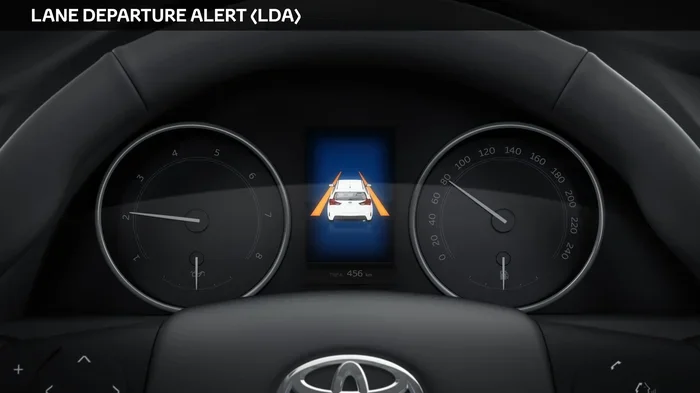
Toyota and Lexus vehicles use the Lane Departure Alert system. Here is how to manage it:
- Start the vehicle and look for the Settings icon on the infotainment screen.
- Go to Vehicle Settings, then select Driver Assistance.
- Find the Lane Departure Alert option.
- Select it and choose Off or adjust the sensitivity level.
- Some Toyota models also have a physical LDW button near the steering column.
How to Turn Off Lane Departure Warning in Honda and Acura
Honda and Acura use the Lane Departure Warning System (LDWS). Here is the process:
- Press the Settings button on the steering wheel or touchscreen.
- Navigate to Vehicle Settings and then Driver Assist.
- Locate the Lane Departure Warning setting.
- Switch it to Off or adjust the sensitivity.
- Honda also offers a dedicated button on the steering wheel for quick access in some models.
How to Turn Off Lane Departure Warning in BMW
BMW vehicles offer a more integrated approach to managing ADAS features:
- Press the iDrive controller to open the main menu.
- Go to Vehicle Settings, then Driver Assistance.
- Select Lane Departure Warning.
- Choose to turn it off or adjust the warning sensitivity.
- BMW also allows you to manage this through the iDrive touchscreen or voice commands in newer models.
Quick Tips for Finding the Setting
Not sure where to look? Here are some quick tips:
- Check your owner’s manual: It will have the exact path for your specific model.
- Use the search function: Many infotainment systems let you search for “lane departure” directly.
- Look for a steering wheel button: Some cars have a dedicated LDW button for quick toggling.
- Check the dashboard: When the system is active, the dashboard warning light will show a lane-departure symbol. Pressing it may toggle the system.
Is It Safe to Disable Lane Departure Warning?
This is the big question, and the answer depends on your driving habits, environment, and comfort level. Let us break it down.
When It Is Okay to Turn It Off
There are perfectly valid situations where turning off your lane departure warning makes sense:
- Driving on unpaved or gravel roads: The system is not designed for roads without clear lane markings.
- Navigating tight roundabouts or hairpin turns: The system may trigger false alerts during tight maneuvers where lane crossing is intentional.
- During sensor calibration issues: If the camera is dirty or misaligned, false alerts can be dangerous because they cause driver distraction.
- In heavy snow or rain: When road markings are completely covered, the system cannot function properly.
In these situations, turning off the feature is a practical choice. Many OEM settings even allow you to adjust the sensitivity so that the system is less aggressive without fully disabling it.
When You Should Keep It On
There are also times when keeping the lane departure warning system active is a smart move:
- Highway driving: This is where the system shines. Long stretches of highway with clear markings are exactly where lane departure warnings prevent accidents.
- When you are tired: If driver fatigue is setting in, the system acts as an extra set of eyes.
- In unfamiliar areas: When driving in new cities or complex road systems, the alerts help keep you on track.
- For new drivers: Teenagers and new drivers benefit greatly from having this safety net in place.
What Happens If You Disable It?
When you turn off lane departure warning, the system stops monitoring your lane position. You will no longer receive audible alerts, steering wheel vibrations, or dashboard warnings if you drift out of your lane. Some vehicles also disable related features like road departure mitigation when the core warning system is turned off. It is important to understand that disabling this feature removes a layer of protection that could save your life in certain situations.
Expert Insights on Safety
“Lane departure warning systems have been shown to reduce single-vehicle, sideswipe, and head-on collisions by a significant margin,” says the Insurance Institute for Highway Safety. The data clearly shows that these systems save lives. However, experts also agree that drivers should have the ability to manage these features based on their specific driving conditions. The key is awareness: know when the system helps you and when it gets in the way.
Lane Departure Warning vs. Lane Keeping Assist — What Is the Difference?
Many people confuse lane departure warning with lane keeping assist, but they are two different systems. Understanding the difference is important, especially if you are trying to manage your vehicle’s safety features.
| Feature | Lane Departure Warning | Lane Keeping Assist |
|---|---|---|
| Primary Function | Alerts you when you drift out of lane | Gently steers the car back into the lane |
| Driver Action Required | You correct the steering | System takes partial control |
| Warning Type | Beep, vibration, or dashboard light | Steering input, sometimes combined with alerts |
| Can It Be Turned Off? | Yes, in most vehicles | Yes, in most vehicles |
| Best For | Alerting distracted or fatigued drivers | Hands-free driving on highways (with adaptive cruise control) |
Some vehicles bundle these two features together under one umbrella. When you turn off lane departure warning, it may or may not also disable the lane keeping assist function. Check your owner’s manual to understand exactly what gets turned off and what stays active. In some cars, you can keep lane keeping assist on while disabling the warning alerts, giving you the best of both worlds.
The lane centering feature, which is an extension of lane keeping assist, actively keeps your car positioned in the center of the lane. This is often used alongside adaptive cruise control for a near hands-free driving experience on highways. Be aware that disabling the warning system does not always affect these other features.
Common Problems and False Alerts with Lane Departure Warning
Even when you keep the lane departure warning system turned on, it can cause problems if it is not working properly. Understanding these issues can help you decide whether to disable lane departure warning temporarily or seek professional help.
Dirty or Obstructed Cameras
The forward-facing camera that powers the lane departure warning is usually mounted behind the rearview mirror. If this camera becomes dirty, covered by a snow buildup, or obstructed by a windshield sticker, the system will not work correctly. This often leads to false alerts or a complete system failure.
Faded or Missing Road Markings
Not all roads have clear, visible lane markings. Older roads, unpaved roads, and roads in poor repair can confuse the system. When the camera cannot detect lines, it may either stop working or trigger constant warnings, depending on how the OEM settings are configured.
After Windshield Replacement
If you have had your windshield replaced, the camera calibration may be off. This is a very common issue that leads to erratic lane departure warning behavior. Always have the sensor calibration checked after any windshield work to ensure the system functions properly.
Software Updates and Recalls
Sometimes, the problem is not hardware but software. Manufacturers occasionally release software updates that address bugs in the lane departure warning system. If you are experiencing persistent issues, check with your dealer to see if a software update is available for your vehicle.
How to Decide Whether to Keep or Disable Lane Departure Warning
Making the decision to turn off your lane departure warning comes down to a few key factors. Here is a simple framework to help you decide:
- Assess your driving environment: Do you spend most of your time on well-marked highways, or do you drive on rural roads with faded markings?
- Evaluate your driving habits: Are you a focused, attentive driver, or do you sometimes get drowsy or distracted?
- Check the system’s reliability: Is the system giving you constant false alerts, or is it working as intended?
- Consider your comfort level: Do the alerts help you drive safer, or do they cause stress and distraction?
- Review your vehicle manual: Understand exactly what gets disabled and what stays active when you turn off the system.
If the system is causing more harm than good, there is no shame in turning off lane departure warning temporarily. You can always re-enable it later when conditions improve. The goal of any safety feature is to make you a better, safer driver, not to frustrate you into ignoring it entirely.
When to Seek Professional Help
If you have tried adjusting the settings and the system still does not work properly, it may be time to visit a dealership or qualified mechanic. Persistent issues with the lane departure warning system could indicate a deeper problem with the camera, wiring, or software. A professional can perform a full sensor calibration and make sure everything is functioning as it should.
Conclusion
The short answer to the question “Can lane departure warning be turned off?” is a definitive yes. Most vehicles allow you to disable lane departure warning through the infotainment system, steering wheel controls, or a dedicated button. Whether you choose to keep it on or turn it off depends on your driving conditions, personal preferences, and how well the system works in your specific vehicle.
Lane departure warning is a valuable safety feature that has helped prevent countless accidents on roads around the world. However, it is not perfect, and there are legitimate reasons to turn it off temporarily. The key is to stay informed, understand your vehicle’s settings, and make decisions that keep you and others safe on the road. Take the time to explore your car’s driver assistance settings, and do not be afraid to adjust them to suit your needs.
Remember, you are in control of your vehicle. The technology is there to assist you, not to replace your judgment. Use it wisely, and it will make your driving experience safer and more enjoyable.
Frequently Asked Questions
Can I turn off lane departure warning while driving?
Yes, in most vehicles, you can toggle the lane departure warning system on or off while driving. However, it is always safest to adjust settings when the car is stationary or at a complete stop. Check your vehicle’s manual for specific guidance on when and how to change these settings while in motion.
Will turning off lane departure warning affect my car’s warranty?
No, turning off lane departure warning does not void your vehicle’s warranty. The feature is designed to be user-adjustable by the manufacturer. However, if a safety-related incident occurs and the system was disabled, your insurance company may ask about the status of your driver assistance features.
Does turning off lane departure warning also turn off lane keeping assist?
Not always. In many vehicles, lane departure warning and lane keeping assist are separate settings. You may be able to turn off the warning alerts while keeping the lane centering function active. Check your owner’s manual or the vehicle settings menu to see how these features are configured in your specific model.
Why does my lane departure warning keep going off even when I am driving correctly?
This is usually caused by faded road markings, dirty cameras, sensor misalignment, or driving on unpaved roads. The system relies on clear lane lines to function properly. If the camera is dirty or the road markings are unclear, it can trigger constant false alerts. Cleaning the camera or having the sensor recalibrated often resolves the issue.
Is it legal to turn off lane departure warning?
Yes, it is legal to turn off lane departure warning in most countries and states. The feature is designed as an optional assistance tool, not a mandatory requirement. However, some commercial fleet operators and certain insurance programs may have specific rules about keeping safety features enabled at all times.
Can I permanently disable lane departure warning?
Yes, you can permanently turn off lane departure warning if you choose to do so. Most vehicles allow you to save your preference so the system stays off until you manually re-enable it. However, we recommend keeping the system active for highway driving and tiring conditions, as it provides an extra layer of safety.