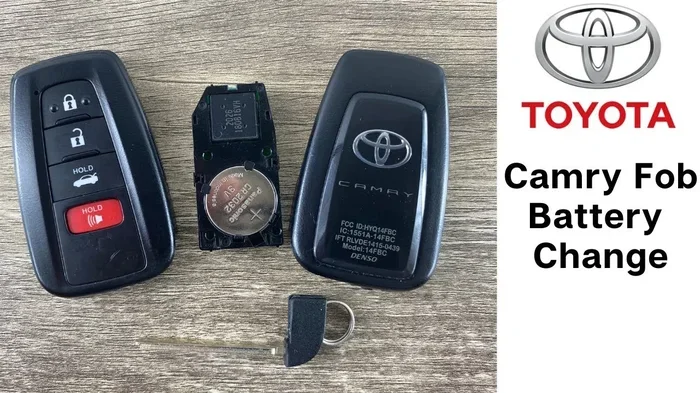
Why Toyota Key Fob Not Working After Battery Replacement
A Toyota key fob not working after battery replacement is a common frustration. Most of the time, the issue is simple and fixable at home. Whether you need to reprogram the fob, reseat the battery correctly, or address a deeper electrical problem, we have you covered. This guide walks you through every likely cause and solution step by step.
You press the button on your Toyota key fob and nothing happens. You just replaced the battery, so everything should be fine, right? Wrong. This is one of the most common frustrations Toyota owners face, and it can be incredibly annoying. The good news is that a Toyota key fob not working after battery replacement is usually caused by something simple that you can fix yourself.
Let us walk through every possible reason this happens and exactly how to fix it. Whether you drive a Toyota Camry, a Toyota Highlander, or any other Toyota model, this guide will help you get your remote back in working order. We will cover battery orientation, reprogramming steps, cleaning tips, and when it is time to call a professional.
Key Takeaways
- Wrong battery orientation or type: A common reason your Toyota key fob not working after battery replacement is simply a battery placed in the wrong direction or the wrong size.
- Reprogramming may be required: After swapping the key fob battery, many Toyota models need a quick reset to restore full function.
- Corroded or dirty contacts cause issues: Battery acid or grime on the contacts can block the signal even with a fresh battery installed.
- Immobilizer interference is real: Your Toyota’s immobilizer system may not recognize the fob after a battery swap, requiring a specific reset sequence.
- Know when to see a professional: If basic fixes do not work, a Toyota dealer can diagnose deeper issues with your Toyota remote or key system.
- Use the right battery: Always use a CR2032 battery (or the type specified for your model) to avoid compatibility problems.
- Sit in your Toyota with all doors closed.
- Insert the key into the ignition (or press the start button without pressing the brake, depending on your model).
- Within 5 seconds, press and release the lock or unlock button on the fob.
- Wait for the doors to lock or the lights to flash, confirming the fob is paired.
- Test the fob from outside the vehicle.
- The fob still does not work after you have tried every troubleshooting step above.
- Your Toyota dashboard shows a key fob warning light or message.
- The fob works intermittently, sometimes working and sometimes not.
- You notice the physical fob is cracked, water-damaged, or the buttons feel loose.
- Multiple fobs for the same vehicle are all failing at the same time.
📑 Table of Contents
Why Does Your Toyota Key Fob Stop Working After a New Battery?
You did everything right. You bought a new battery, popped open the fob, and swapped it out. But now your Toyota remote does absolutely nothing. Before you panic, take a breath. There are several perfectly normal reasons this happens, and most of them have easy solutions.
The key fob battery replacement process seems straightforward, but small details matter. A tiny misalignment, a dirty contact, or a missed reprogramming step can all cause the same frustrating result: a dead fob. Understanding why this happens is the first step toward fixing it.
Toyota key fobs use a small coin-cell battery, usually a CR2032, to power the remote functions. When that battery dies or gets replaced incorrectly, the fob loses its connection to your vehicle. The immobilizer system, the signal transmitter, and the internal electronics all depend on that tiny battery to function properly.
Here is the most important thing to remember: replacing the battery is only half the job. Making sure everything is set up correctly after the swap is just as important. Let us dive into the specific reasons your fob might not be working.
Battery Orientation Matters More Than You Think
This is the number one cause of a Toyota key fob not working after battery replacement. The CR2032 battery has a positive side and a negative side, and it must face the correct direction inside the fob. If the battery is upside down, the fob will not power on at all.
Take a close look at the old battery before you remove it. Notice which side was facing up. Now look at the new battery. The positive side (usually marked with a “+” and a smooth face) should face up in most Toyota fob models. If you place it backward, you will get zero signal output.
Some Toyota fobs have a small diagram inside the battery compartment showing the correct orientation. If yours does not, look for the “+” marking on the battery itself and match it to the compartment markings. This tiny detail solves the problem more often than you would think.
The Wrong Battery Type Can Cause Problems
Not all key fob batteries are the same. While most Toyota models use a CR2032, some older or specialty models may require a different type. If you grabbed the wrong battery at the store, your fob simply will not work, no matter how carefully you installed it.
Check your Toyota owner manual or look up your specific model online to confirm the correct battery type. Using a battery with the wrong voltage or size can damage the fob’s internal circuitry. Stick with the recommended type every time you replace the battery.
If you are unsure whether you can use a CR2032 in your Toyota key, check our detailed guide on Can I Use a CR2032 in a Toyota Key. It covers compatibility for every Toyota model and saves you from buying the wrong battery.
Common Reasons Your Toyota Key Fob Won’t Work
Now that you understand the battery basics, let us look at the other common culprits. A Toyota key fob not working after battery replacement can stem from several different sources, and identifying the right one is key to fixing it quickly.
Dirty or Corroded Battery Contacts
Over time, battery acid, dust, and moisture can build up on the metal contacts inside your key fob. Even with a brand-new battery, a dirty contact means the electrical connection is weak or broken. Your fob simply cannot send a signal to your car.
Look inside the battery compartment. Do you see any white, green, or bluish residue on the metal contacts? That is corrosion, and it blocks the electrical current. You can clean it easily with a cotton swab dipped in white vinegar or rubbing alcohol. Gently rub the contacts until they shine, then let them dry completely before inserting the new battery.
After cleaning, press the fob buttons a few times. If the signal returns, the corrosion was the problem. If not, move on to the next possible cause.
The Fob Needs Reprogramming After Battery Swap
Here is something many Toyota owners do not expect: replacing the battery can sometimes reset your fob’s programming. The fob loses its pairing with your vehicle, and now it cannot communicate properly. This is especially common on newer Toyota models with advanced push button start systems.
Reprogramming a Toyota key fob is not complicated, but it does require following a specific sequence. The exact steps vary by model and year, so we will cover the general process below. The good news is that most reprogramming can be done at home in just a few minutes.
If you are dealing with an immobilizer issue after a battery change, you may want to read our guide on How Do I Fix My Immobiliser Problem for additional troubleshooting steps.
Signal Range and Interference Issues
Sometimes the fob is actually working fine, but something is blocking its signal. Metal objects, electronic devices, and even your own body can interfere with the key fob signal. If you replaced the battery while standing next to your laptop or a large metal surface, temporary interference might be the culprit.
Try standing away from other electronics and test the fob from a closer distance to your vehicle. Walk up to the car and press the unlock button while holding the fob right near the door handle. If it works up close but not from a distance, the fob itself is fine, but something in your environment is causing interference.
The Old Battery Was Not Actually Dead
This one sounds surprising, but it happens more often than you would think. You replaced the battery because the fob was weak, but the old battery still had some life left. Meanwhile, the real problem was something else entirely, like a faulty transmitter or a blown internal fuse.
If you saved the old battery, you can test it with a multimeter to check its voltage. A healthy CR2032 should read around 3 volts. If the old battery read well below that, your replacement should have fixed the issue. If the old battery was still strong, something else is going on, and we will cover that below.
How to Fix a Toyota Key Fob After Battery Replacement
Now for the part you have been waiting for: how to actually fix the problem. Below is a step-by-step troubleshooting guide that covers every common fix for a Toyota key fob not working after battery replacement. Work through these steps in order, and you will likely solve the issue without any special tools.
Step 1: Verify the Battery Installation
Open the fob back up and double-check everything. Is the battery the correct type? Is it the right orientation? Are the contacts clean and free of debris? Take the battery out, inspect the compartment, and put it back in carefully. Sometimes simply removing and reinserting the battery fixes a loose connection.
Make sure the battery snaps or sits firmly in place. A slightly misaligned battery can lose contact when you press the buttons. You should feel a slight snap or secure fit when the battery is properly seated.
Step 2: Reset the Fob by Removing the Battery
Here is a simple trick that works surprisingly often. Remove the battery from the fob entirely. Wait about 30 seconds. Then reinsert the battery and try the fob again. This hard reset clears any temporary glitches in the fob’s internal memory.
Some Toyota models respond well to this simple reset. It is like restarting a phone. The fob clears its short-term memory and re-establishes a fresh connection with your vehicle. This is especially helpful if you suspect the battery swap triggered a minor software glitch.
Step 3: Reprogram the Toyota Key Fob
If the reset did not work, you may need to fully reprogram the fob. The process varies by Toyota model and year, but here is the general approach that works for most vehicles:
For a detailed walkthrough specific to your model, check your Toyota owner manual or search online for your exact year and model. Some newer Toyota vehicles with smart key systems may require a slightly different process.
If reprogramming does not resolve the issue and you still cannot start my Toyota Highlander with a key or use the fob functions, it is time to explore deeper causes.
Step 4: Check for Immobilizer or Anti-Theft System Issues
Toyota vehicles have a sophisticated immobilizer system that prevents the car from starting without the correct fob. After a battery replacement, the immobilizer may not recognize the fob as a valid key. This is a security feature, not a malfunction.
To reset the immobilizer, try this sequence: insert the physical key (if your model has one) into the ignition and turn it to the “ON” position. Wait 10 seconds, then turn it back to “OFF.” Remove the key and try using the fob again. This often re-establishes the connection between the fob and the immobilizer system.
If you are dealing with a Toyota Highlander or another model where the fob does not work even after reprogramming, the immobilizer may need professional attention. Visit our page on Can I Start My Toyota Highlander With A Key for model-specific guidance.
Step 5: Inspect the Fob for Physical Damage
It is easy to overlook, but physical damage to the fob itself can prevent it from working. Dropping the fob, exposing it to water, or pressing too hard on the buttons can damage the internal circuit board. Even a new battery cannot fix a broken circuit board.
Look closely at the fob for cracks, loose buttons, or signs of water damage. If the fob looks damaged, the battery replacement will not solve the problem. In that case, you may need a replacement fob or professional repair.
When to Visit a Toyota Dealer for Key Fob Help
Most Toyota key fob not working after battery replacement issues can be fixed at home. But sometimes, the problem goes beyond what a DIY fix can handle. Knowing when to seek professional help saves you time, frustration, and potentially money.
Signs You Need Professional Help
Watch for these warning signs that indicate the issue is beyond a simple battery fix:
If you notice any of these signs, it is time to visit a Toyota dealer or a qualified automotive locksmith. They have specialized diagnostic tools that can read the fob’s internal diagnostics and identify problems you cannot see with the naked eye.
What to Expect at the Dealer
A Toyota dealer can reprogram your fob, replace the internal circuitry, or provide a brand-new fob if needed. The cost varies depending on your model and the extent of the problem. A simple reprogramming session is usually affordable, while a full fob replacement can run higher.
You can also take your Toyota to any dealership for warranty-related work, depending on your situation. Check our guide on Can I Take My Toyota To Any Dealership For Warranty Work for more details on dealer options.
How to Prevent Key Fob Problems in the Future
Prevention is always better than cure. Once you get your Toyota key fob working again, you want to keep it that way. A few simple habits can extend the life of your fob and prevent future issues after battery replacements.
Use the Right Battery Every Time
Always use a high-quality CR2032 battery from a reputable brand. Cheap batteries may seem like a savings, but they often die faster and can leak acid, causing corrosion inside your fob. Name-brand batteries from Duracell, Energizer, or Panasonic are reliable choices.
Keep Your Fob Clean and Dry
Moisture is the enemy of electronic devices. Avoid dropping your fob in water, leaving it in a wet pocket, or storing it in humid environments. Wipe the fob down occasionally with a dry cloth to remove dust and grime that can build up around the buttons and battery compartment.
Replace the Battery Before It Dies Completely
Most key fob batteries last 2 to 4 years. If you notice the signal getting weaker or the range decreasing, do not wait for the fob to stop working entirely. Replace the battery proactively. This prevents the frustration of a dead fob at the worst possible moment, like when you are rushing out the door.
Store Your Fob Properly
Do not store your fob near strong magnets, large metal objects, or electronic devices that emit strong signals. A drawer or a dedicated fob holder is the best storage spot. Proper storage reduces signal interference and protects the internal electronics from damage.
Final Thoughts
A Toyota key fob not working after battery replacement is almost always a solvable problem. In most cases, the fix is as simple as correcting the battery orientation, cleaning the contacts, or reprogramming the fob. You do not need to be a mechanic to handle these steps, and you do not need to spend money on a dealership visit for the common issues we covered.
Start with the basics: check the battery type, verify the orientation, clean the contacts, and try a hard reset. If those steps do not work, move on to reprogramming and immobilizer resets. Only if none of these solutions work should you visit a Toyota dealer for professional diagnosis.
Remember, your Toyota remote is a small but essential part of your daily driving experience. Taking care of it with regular maintenance and prompt battery replacements keeps it working smoothly for years. Share this guide with a fellow Toyota owner who might be dealing with the same frustration, and enjoy the convenience of a fully functioning key fob.
Frequently Asked Questions
Why did my Toyota key fob stop working right after I changed the battery?
The most common reason is that the battery was installed in the wrong orientation or the wrong type was used. Another frequent cause is that the fob needs to be reprogrammed after the battery swap. Try reseating the battery correctly and running a reset sequence to restore function.
Can a dead key fob battery prevent my Toyota from starting?
Yes, on models with push button start, a dead or weak fob battery can prevent the car from recognizing the key. Even if the physical key is present, the vehicle may not start without a properly functioning fob signal. This is a security feature designed to prevent unauthorized starting.
What type of battery does my Toyota key fob use?
Most Toyota key fobs use a CR2032 coin-cell battery. However, some older or specialty models may use a different type. Always check your Toyota owner manual or look up your specific model to confirm the correct battery before purchasing a replacement.
How do I reprogram my Toyota key fob after replacing the battery?
Sit in your Toyota with all doors closed, insert the key into the ignition, and within 5 seconds press and release the lock or unlock button on the fob. Wait for the doors to lock or lights to flash, confirming the pairing. Test the fob from outside the vehicle. Exact steps vary by model, so consult your owner manual for specifics.
Should I clean the battery contacts in my Toyota key fob?
Yes, cleaning the contacts is a great troubleshooting step. Corrosion or grime on the metal contacts can block the electrical connection even with a new battery. Use a cotton swab with white vinegar or rubbing alcohol, gently clean the contacts, let them dry, and reinsert the battery.
When should I take my Toyota to a dealer for key fob issues?
Take your Toyota to a dealer if the fob still does not work after trying all DIY troubleshooting steps, if your dashboard shows a key fob warning light, or if the fob is physically damaged. A dealer has specialized diagnostic tools to identify issues that are not visible from the outside.