How to Turn on MMI in Your Audi Q5 Step by Step Guide
Turning on the MMI system in your Audi Q5 is easy once you know where to look. Whether you have the classic MMI controller or the newer touchscreen version, this guide walks you through every method. You will learn the power button location, startup sequence, and how to navigate the home screen like a pro.
The Audi Q5 is one of the most popular luxury SUVs on the road today. It comes packed with technology that makes driving more enjoyable and safer. One of the standout features is the MMI system, which stands for Multi Media Interface. If you just bought an Audi Q5 or are still figuring out the tech, you might be wondering how to turn on MMI in Audi Q5 vehicles. This guide will walk you through every step in plain, simple language.
The MMI system is essentially the brain of your car’s entertainment and information features. It controls your navigation, audio, phone connections, and even some vehicle settings. Think of it as the command center for everything tech-related in your Audi Q5. But knowing how to power it on and use it properly makes a huge difference in your daily driving experience.
Whether you have the older MMI system with a physical controller or the newer touchscreen version, this guide covers it all. We will break down each method step by step so you can get started right away. No technical jargon, no confusing manuals, just straightforward instructions that anyone can follow.
Key Takeaways
- The MMI power button is located on the center console near the gear shifter in most Audi Q5 models.
- You can turn on MMI using the touchscreen on newer Audi Q5 models with the MMI touch display.
- Understanding the home screen layout helps you access navigation, media, and settings faster.
- Common issues like a dead battery or frozen screen can prevent MMI from turning on properly.
- Regular software updates keep your MMI system running smoothly and unlock new features.
📑 Table of Contents
What Is MMI and Why Does It Matter?
MMI stands for Multi Media Interface. It is Audi’s proprietary system for managing all the digital features in your car. The system has been evolving since the early 2000s, and the latest versions in the Audi Q5 are incredibly powerful. They offer crisp graphics, voice control, and seamless smartphone integration.
Knowing how your MMI system works matters for a few key reasons. First, it helps you access navigation without pulling out your phone. Second, it lets you control your music, podcasts, and audiobooks directly from the car. Third, it connects your phone for hands-free calling and texting, which keeps you safer on the road.
The Evolution of MMI in Audi Vehicles
Audi has been refining the MMI system for over two decades. The early versions relied heavily on a small screen and a rotary dial on the center console. Modern Audi Q5 models now feature large color touchscreens that respond to finger taps and swipes. Some versions even support handwriting recognition and natural voice commands.
The latest MMI systems also connect to Audi connect, which provides real-time traffic updates, online weather forecasts, and streaming music services. This is a big leap from the older systems that relied solely on offline maps and FM radio. Understanding which version of MMI your Audi Q5 has helps you use it to its full potential.
Why You Should Learn to Use MMI Properly
Many Audi Q5 owners barely touch the MMI system because they find it confusing at first. But once you learn the basics, you will wonder how you ever drove without it. The system reduces distractions by keeping your eyes on the road and your hands on the wheel. It also provides features like rear-seat entertainment and parking sensors that enhance the overall driving experience.
Plus, a well-functioning MMI system can actually help maintain your car’s value. Buyers of used luxury SUVs look for vehicles with working technology. A fully operational MMI system signals that the car has been well cared for.
How to Turn On MMI in Your Audi Q5 Step by Step
Now let us get into the heart of the matter. There are a few different ways to turn on the MMI system depending on your Audi Q5 model year and trim level. We will cover each method below so you can find the one that works for your vehicle.
Method 1: Using the MMI Power Button
The most traditional way to turn on MMI in Audi Q5 models is by pressing the power button. This button is typically located on the center console, right next to the gear shifter or the climate control panel. Look for a symbol that looks like a power icon or the letters MMI.
Here is exactly what to do:
- Start your Audi Q5 by pressing the engine start button with the brake pedal pressed.
- Look at the center console between the front seats. The MMI power button is usually in this area.
- Press the MMI power button once and wait a few seconds for the screen to light up.
- The home screen will appear showing your navigation map, media controls, and phone options.
On some Audi Q5 models, the MMI system turns on automatically when you start the engine. If the screen does not light up, try pressing the power button firmly. Sometimes the button needs a deliberate press to register.
Method 2: Using the Touchscreen Display
Newer Audi Q5 models come with a larger touchscreen that serves as the main MMI interface. To turn on MMI using the touchscreen, you simply need to tap the screen once after starting the car. The display should wake up and show the home screen.
If the touchscreen is unresponsive, it might be in sleep mode. Try pressing and holding the power button for a few seconds until the screen flashes. This forces the system to restart and turn on the MMI display.
One thing to note is that the touchscreen version of MMI in the Audi Q5 supports pinch-to-zoom, swipe gestures, and on-screen keyboard input. These features make it much easier to enter destinations into the navigation system or search for music.
Method 3: Using the MMI Controller Dial
Some Audi Q5 models still use the classic MMI controller, which is a small dial or joystick located in the center console. This controller lets you navigate through the MMI menus without touching a screen. To turn on MMI using this method, simply press the center of the dial after starting the car.
The MMI controller has become a signature feature of Audi vehicles. It provides tactile feedback that many drivers prefer over touchscreen controls. You can use it to scroll through menus, select options, and adjust volume with a simple twist or press.
Understanding the MMI Home Screen and Controls
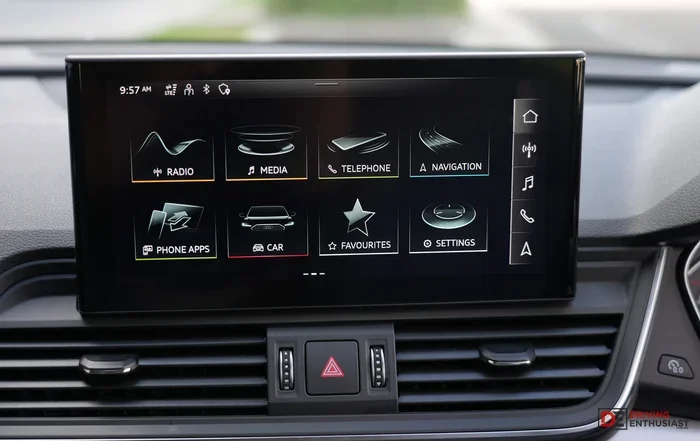
Once you successfully turn on MMI in your Audi Q5, you will see the home screen. This screen is your gateway to all the car’s digital features. Understanding how it is laid out helps you use the system more efficiently.
Main Sections of the MMI Home Screen
The MMI home screen is typically divided into several key sections. At the top, you will see the time, signal strength, and connection status. The main area displays either a navigation map or the currently playing media. At the bottom, you will find shortcut icons for different functions.
Here are the main sections you will encounter:
- Navigation: Shows your map, route, and turn-by-turn directions.
- Media: Lets you switch between radio, Bluetooth audio, and streaming services.
- Phone: Displays your connected phone and call history.
- Settings: Gives you access to display brightness, sound settings, and system preferences.
- Car Settings: Controls things like suspension mode, drive select, and MMI display settings.
Using the MMI Controller vs. Touchscreen
The controller dial and the touchscreen both achieve the same goal, but they feel very different to use. The controller provides physical feedback, which some drivers find safer because it keeps your eyes on the road. The touchscreen feels more modern and intuitive, especially for younger drivers who are used to smartphones.
You can switch between input methods in the MMI settings. Simply go to the display or system settings and choose your preferred control method. Some Audi Q5 owners even use both methods together, using the touchscreen for map zooming and the controller for menu navigation.
Voice Control Features in MMI
Most Audi Q5 models with MMI also support voice commands. You can activate voice control by pressing the voice button on the steering wheel or on the MMI controller. This lets you make calls, set navigation destinations, and change the radio station without taking your hands off the wheel.
Voice control is especially useful when you are driving in heavy traffic or bad weather. It keeps your attention focused on the road while still letting you access the full MMI functionality. The system recognizes natural language, so you can speak commands like “navigate to the nearest gas station” or “play my jazz playlist.”
Common MMI Issues and How to Fix Them
Even the best car technology can sometimes act up. If your MMI system is not turning on or is behaving strangely, do not panic. Most issues have simple solutions that you can try at home.
MMI Screen Is Black or Unresponsive
A black screen is one of the most common MMI issues. This usually happens when the system has frozen or the display has gone into deep sleep mode. To fix this, try holding the power button for 10 to 15 seconds. This forces a hard reset of the MMI system.
If a hard reset does not work, you may need to check the car battery. A weak or dying battery can prevent the MMI from powering on properly. If you have experienced issues where your car won’t start but the battery is fine, the same electrical issue could be affecting your MMI system. Have the battery and alternator checked if the screen remains black after a reset.
MMI Takes Too Long to Start Up
The MMI system can take 10 to 30 seconds to fully boot up, especially in cold weather. This is normal behavior and not a cause for concern. However, if the system takes longer than a minute every time, there might be a software issue.
Try updating the MMI software through the Audi dealer or using the myAudi app. Software updates often include performance improvements and bug fixes that can speed up the startup process. Keeping your MMI system updated also ensures compatibility with the latest smartphones and music streaming apps.
MMI Display Flickers or Shows Distorted Images
A flickering or distorted display can be annoying and potentially dangerous while driving. This issue is often caused by a loose connection or a software glitch. Start by performing a system restart using the power button method described earlier.
If the flickering continues, the display cable might need to be reseated. This is a job best left to a professional Audi technician. They can open the center console, check the connections, and replace any faulty components if needed.
MMI Won’t Connect to Bluetooth or Wi-Fi
If your MMI system is on but not connecting to your phone or the internet, the issue is likely with the wireless settings. Go to the MMI settings menu and check that Bluetooth and Wi-Fi are turned on. Try removing the previously paired phone and pairing it again from scratch.
Sometimes the problem is with the phone itself rather than the MMI system. Make sure your phone’s Bluetooth is enabled and that it is not connected to another device nearby. Restarting both your phone and the MMI system often resolves connection issues.
Tips to Get the Most Out of Your Audi Q5 MMI System
Once you know how to turn on MMI in your Audi Q5, you can start exploring all the features that make this system so valuable. Here are some practical tips to help you get the most out of your MMI experience.
Customize Your Home Screen
The MMI system lets you customize the home screen layout. You can choose which shortcuts appear at the bottom of the screen and rearrange them based on your preferences. If you use navigation every day, make sure the map icon is front and center. If you listen to a lot of music, give the media player a prominent spot.
To customize the home screen, go to the settings menu and look for display or home screen options. From there, you can add, remove, or rearrange shortcut tiles. This small change can save you a lot of time and frustration while driving.
Set Up Your Favorite Presets
MMI allows you to save favorite radio stations, navigation addresses, and Bluetooth devices. Setting up these presets means you can access them with just one or two taps instead of digging through menus every time. Take a few minutes after turning on MMI to set up your most-used features.
Keep Your Maps Updated
Navigation is one of the most used features of the MMI system. To get the best experience, keep your maps updated with the latest points of interest and road data. Audi provides map updates through the myAudi portal or at your local Audi dealer.
Updated maps also help the MMI system find the fastest routes and avoid road closures. This is especially helpful if you use your Audi Q5 for long road trips or daily commutes through busy city streets.
Explore the MMI Settings Menu
The MMI settings menu is full of useful options that most drivers never explore. You can adjust the display brightness to reduce glare at night, change the sound quality settings for your speakers, and even set up a passcode to protect your Bluetooth connections. Spending a few minutes in the settings menu can dramatically improve your daily driving experience.
One setting worth checking is the display timeout. This controls how long the MMI screen stays on after you turn off the engine. Setting it to a shorter duration can help preserve battery life, especially if you frequently make short trips.
Use MMI with Your Smartphone
The MMI system works best when paired with your smartphone. Audi supports Apple CarPlay and Android Auto, which let you mirror your phone’s interface on the MMI screen. This gives you access to all your favorite apps, messages, and music directly through the car’s display.
To use Apple CarPlay or Android Auto, connect your phone via USB or Bluetooth and follow the on-screen prompts. The MMI system will recognize your phone and offer to switch to the mirrored mode. This feature turns your Audi Q5 into a seamless extension of your digital life.
Final Thoughts on Using MMI in Your Audi Q5
Learning how to turn on MMI in your Audi Q5 is the first step toward unlocking the full potential of your vehicle’s technology. The MMI system is designed to make your driving experience more connected, more entertaining, and more convenient. Once you get comfortable with the basic controls, you will find yourself using features you never knew existed.
Remember that the MMI system is not just about entertainment. It also plays a role in vehicle safety and maintenance. The system can alert you to low tire pressure, remind you about scheduled service, and even provide real-time traffic updates that help you avoid delays. All of these features work together to make your Audi Q5 a smarter, more responsive vehicle.
If you run into any issues that you cannot resolve on your own, do not hesitate to visit an Audi service center. They have the tools and expertise to diagnose and fix even the most stubborn MMI problems. And if you are ever unsure about a feature, the Audi owner’s manual is always a great resource. It contains detailed instructions for every MMI function and setting.
Ultimately, the MMI system is one of the things that sets the Audi Q5 apart from other SUVs in its class. Taking the time to learn it properly pays off every time you get behind the wheel. So go ahead, turn on your MMI, and explore everything your Audi Q5 has to offer.
Frequently Asked Questions
How do I know if my Audi Q5 has the touchscreen MMI or the controller version?
Check the center console of your Audi Q5. If you see a large touchscreen display, you have the touchscreen MMI version. If you see a small screen with a rotary dial or joystick on the center console, you have the traditional MMI controller version. Both versions offer similar features but use different input methods.
Why does my Audi Q5 MMI screen turn off automatically?
The MMI screen is designed to turn off after a period of inactivity to save energy. You can adjust this setting in the MMI display settings. If the screen turns off too quickly or does not turn on at all, there may be a software glitch or a loose connection that needs professional attention.
Can I use MMI while the car is parked and the engine is off?
Yes, most Audi Q5 models allow you to use the MMI system with the engine off. This feature is called accessory mode and lets you play music, make phone calls, and adjust settings without running the engine. However, extended use can drain the car battery.
How do I update the MMI software in my Audi Q5?
You can update the MMI software through the myAudi app or by visiting your local Audi dealer. Software updates often include new features, improved performance, and bug fixes. It is recommended to check for updates at least once every few months to keep your system running smoothly.
What should I do if the MMI system completely freezes?
If the MMI system freezes, hold the power button for 10 to 15 seconds to force a restart. This is similar to restarting a smartphone. If the system still does not respond, try turning the car off and back on. If the problem persists, visit an Audi service center for a thorough diagnosis.
Is it normal for the MMI system to take a long time to start up in cold weather?
Yes, it is normal for the MMI system to take a bit longer to boot up in cold weather. The display and processor need time to warm up just like the rest of the car. If the startup time exceeds one minute consistently, even in warm weather, you should have the system checked by a professional.
=== CONCLUSION ===
Turning on MMI in your Audi Q5 is a simple process that opens up a world of convenience and connectivity. Whether you use the power button, the touchscreen, or the controller dial, the system is designed to be intuitive and user-friendly. By following the steps in this guide, you can confidently power up your MMI system and start enjoying all the features your Audi Q5 has to offer.
Remember to keep your system updated, customize your home screen, and explore the settings menu to tailor the experience to your needs. And if you ever run into issues, the troubleshooting tips above should help you get back on track quickly. The MMI system is one of the best features of the Audi Q5, and knowing how to use it properly makes every drive better.