How to Reset Emergency Call Malfunction on Your BMW
Dealing with an emergency call malfunction on your BMW can be frustrating and concerning. This guide walks you through the exact steps to reset the BMW emergency call system and get your car’s safety features back online. You will learn the common causes behind the malfunction, simple DIY resets, and when it is time to see a professional BMW technician.
If your BMW dashboard is flashing a warning about the emergency call system, you are not alone. Many BMW owners encounter this issue at some point, and it can be a little alarming. The good news is that resetting the emergency call malfunction on your BMW is usually straightforward. Whether it is a simple software glitch or a sensor issue, this guide covers everything you need to know. We will walk you through the causes, the step-by-step reset process, and when to seek professional help.
The BMW emergency call system, also known as eCall, is a built-in safety feature. It automatically contacts emergency services if your car is involved in a serious accident. This system can also be triggered manually by pressing the emergency call button inside your vehicle. When the system malfunctions, a warning light appears on the dashboard. This alert means the eCall system may not work when you need it most. That is exactly why addressing the problem quickly matters.
In this article, we break down the most common reasons the emergency call system throws a malfunction error. We also provide clear, easy-to-follow steps to reset it yourself. And if the DIY fix does not do the trick, we will tell you exactly when to visit a BMW dealer or certified mechanic. Let us get into it.
Key Takeaways
- Quick Reset Option: A simple battery disconnect often clears the emergency call malfunction on BMW vehicles.
- Common Causes: Software glitches, faulty sensors, or a weak 12V battery are the top culprits behind BMW eCall errors.
- BMW iDrive Menu: You can check and reset emergency call settings directly through the iDrive system in most models.
- Safety First: The emergency call system is a critical safety feature, so do not ignore the malfunction warning for long.
- Professional Help: If the reset does not work, a BMW dealership or certified mechanic can run a full diagnostic scan.
- Prevention Tips: Regular software updates and battery maintenance help prevent future emergency call malfunctions.
📑 Table of Contents
- Understanding the BMW Emergency Call System
- Common Causes of Emergency Call Malfunction on BMW
- How to Reset Emergency Call Malfunction on Your BMW
- When to Visit a BMW Dealer or Mechanic
- Preventing Future Emergency Call Malfunctions
- Is It Safe to Drive with an Emergency Call Malfunction?
- Key Takeaways
- Final Thoughts
Understanding the BMW Emergency Call System
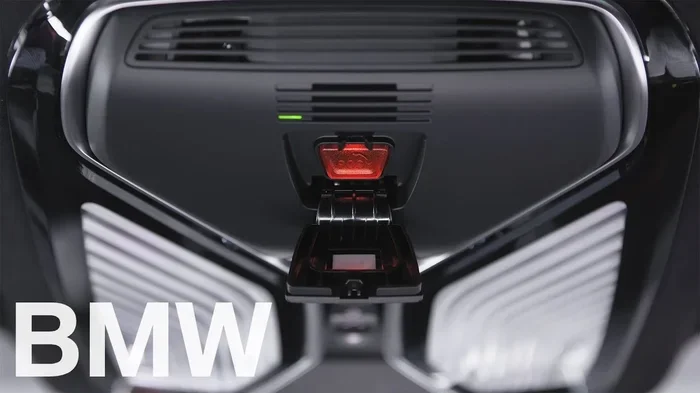
The BMW emergency call system is part of the BMW ConnectedDrive suite. It uses a built-in SIM card and GPS to communicate with emergency response centers. When the system detects a significant impact, it automatically dials emergency services and sends your exact location. You can also press the SOS button on the ceiling console to manually trigger a call. This feature has saved lives and is one of the reasons BMW vehicles are considered some of the safest on the road.
How the eCall System Works
Here is a quick look at how the BMW eCall system operates in normal conditions:
- Automatic Activation: The system deploys after a significant collision detected by sensors.
- Manual Activation: You can press the SOS button on the overhead console to start a call.
- Location Sharing: GPS data is sent to emergency services automatically.
- Two-Way Communication: You can speak with a response agent through the car’s audio system.
- Status Indicator: A green or white light on the dashboard shows the system is active and ready.
When the system is working properly, you rarely think about it. That is the point. It works silently in the background, ready to help if something goes wrong. But when a malfunction warning appears, it is time to take action.
Common Causes of Emergency Call Malfunction on BMW
Before you try to reset the system, it helps to understand what might have triggered the warning in the first place. Several issues can cause the BMW emergency call malfunction light to appear. Let us look at the most common ones.
1. Software Glitch or System Freeze
Like any computerized system in your car, the eCall module relies on software. Sometimes, a temporary software glitch can cause the system to report a malfunction even when nothing is actually broken. This is the most common reason BMW owners see the emergency call warning. A simple reset usually clears this type of issue right up.
2. Weak or Failing 12V Battery
The BMW eCall system depends on the car’s 12V battery for power. If your battery is old, weak, or has experienced a recent drain, the eCall module may not receive enough power to function correctly. This can trigger the malfunction warning. If you have noticed other electrical issues in your BMW, a weak battery could be the root cause.
3. Faulty SIM Card or Connectivity Issue
Your BMW’s emergency call system uses a built-in SIM card to connect to the cellular network. If the SIM card is damaged, expired, or loses its signal, the system cannot communicate with emergency services. In these cases, the malfunction warning will appear on your dashboard display.
4. Damaged or Disconnected Sensors
The eCall system relies on impact sensors located throughout the vehicle. If one of these sensors becomes damaged, loose, or disconnected, the system will detect an error and display the malfunction warning. This is more common after a minor accident or rough service work under the car.
5. Outdated BMW Software
BMW regularly releases software updates for its vehicles. These updates fix bugs and improve system performance. If your BMW has not had a recent software update, the eCall system might be running on outdated code that causes the malfunction error. Keeping your BMW software current is an easy way to prevent this issue.
6. Aftermarket Accessories Interference
Sometimes, aftermarket electronics or accessories can interfere with the BMW eCall system. If you have recently installed a new stereo, dash cam, or phone charger, it could be disrupting the eCall module’s connection. Removing the new accessory can sometimes solve the problem.
How to Reset Emergency Call Malfunction on Your BMW
Now that you know the common causes, let us get into the actual reset process. There are a few methods you can try at home. Start with the simplest method and work your way down the list if the first one does not work.
Method 1: The Simple Battery Disconnect Reset
This is the most popular and effective way to reset the BMW emergency call malfunction. It works by clearing the system’s temporary memory and forcing a fresh restart.
- Turn off your BMW and remove the key from the ignition.
- Open the hood and locate the 12V battery.
- Disconnect the negative (black) terminal first using a wrench.
- Wait at least 10 to 15 minutes.
- Reconnect the negative terminal and tighten it securely.
- Start your BMW and check if the emergency call warning is gone.
This method works for most software-related glitches. It is safe for your BMW and does not require any special tools. Just make sure you know your radio code before you disconnect the battery, as you may need to re-enter it when you restart the car.
Method 2: Reset Through the BMW iDrive System
Many BMW models allow you to reset the emergency call system directly through the iDrive infotainment screen. Here is how to do it:
- Press the Menu button on your iDrive controller.
- Navigate to Settings.
- Select Vehicle or ConnectedDrive, depending on your model year.
- Look for Emergency Call or eCall settings.
- Select the option to reset or reinitialize the system.
- Confirm the reset and wait for the system to reboot.
The exact menu path may vary slightly depending on your BMW model and year. If you cannot find the emergency call option, try searching for “eCall” in the iDrive search bar. This method is quick and does not require any physical work under the hood.
Method 3: Check and Replace the SIM Card
If the malfunction is caused by a connectivity issue, checking the SIM card is a smart next step. The SIM card in your BMW is usually located in the trunk or under the rear seat. Refer to your owner’s manual for the exact location on your specific model. If the SIM card looks damaged or dirty, you can try cleaning it gently with a dry cloth. If that does not work, contact your BMW dealer to request a replacement SIM card.
Method 4: Perform a BMW Software Update
Running a software update through your BMW dealer or using the BMW ConnectedDrive app can resolve the malfunction if it is caused by outdated software. Many BMW dealerships will perform this update for free during a routine service visit. You can also check for updates through the iDrive system if your BMW supports over-the-air updates.
When to Visit a BMW Dealer or Mechanic
Most of the time, a simple reset will fix the emergency call malfunction on your BMW. But there are situations where professional help is the right call. Here are the signs that you should take your BMW to a dealer or certified mechanic:
- The malfunction warning persists after trying all reset methods.
- You notice other warning lights on the dashboard at the same time.
- Your BMW has been in an accident, even a minor one.
- The emergency call system worked before but stopped working suddenly.
- You smell burning plastic or notice unusual sounds near the eCall module.
- Your BMW is still under warranty and you want to avoid any DIY risks.
A BMW technician can run a full diagnostic scan using specialized BMW tools. This scan will tell them exactly which component is causing the error. In some cases, the eCall module itself may need to be replaced. While this sounds expensive, it is often covered under BMW’s warranty or extended service plan.
It is also worth noting that ignoring the emergency call malfunction warning is not a good idea. Even if your BMW drives perfectly fine without a working eCall system, you lose a layer of safety protection. In the event of an accident, the system may not be able to alert emergency services on your behalf. That is a risk most BMW owners are not willing to take.
Preventing Future Emergency Call Malfunctions
Once you have successfully reset the emergency call system, you will want to keep it working properly. Here are some simple tips to prevent the malfunction from coming back:
- Keep Your Software Updated: Regular BMW software updates fix bugs and improve system stability. Check for updates at least once every few months.
- Maintain Your 12V Battery: Replace your BMW battery every 3 to 5 years, or sooner if you notice electrical issues.
- Avoid Aftermarket Interference: Be cautious when installing aftermarket electronics. Make sure they are properly grounded and do not tap into the eCall wiring.
- Check the SIM Card Periodically: If your BMW uses a prepaid SIM card, make sure it has not expired. Contact your dealer to renew or replace it.
- Drive Carefully: Avoid rough terrain or impacts that could damage the impact sensors connected to the eCall system.
- Schedule Regular Service: Routine BMW maintenance visits give technicians a chance to check the eCall system and catch small issues before they become big problems.
Taking these simple preventive steps can save you time, money, and the stress of dealing with a malfunctioning emergency call system again. A little maintenance goes a long way toward keeping your BMW’s safety features in top shape.
Is It Safe to Drive with an Emergency Call Malfunction?
This is one of the most common questions BMW owners ask when they see the emergency call warning. The short answer is yes, it is generally safe to continue driving your BMW. The malfunction only affects the eCall system, not the engine, brakes, or steering. Your car will still drive and stop normally. However, you are losing the automatic emergency call feature, which is an important safety net. If you drive frequently in remote areas or on highways, it is especially important to resolve the malfunction as soon as possible.
If you are unsure whether it is safe to drive your specific BMW model with this warning, check your owner’s manual or contact your BMW dealer. They can give you model-specific guidance based on your vehicle’s features and condition.
Key Takeaways
- Simple Reset Works Most of the Time: A battery disconnect or iDrive reset clears the emergency call malfunction in most BMW models.
- Know the Common Causes: Software glitches, weak batteries, and SIM card issues are the top reasons for eCall errors.
- Try DIY Methods First: Start with the battery disconnect reset and the iDrive menu reset before visiting a dealer.
- Do Not Ignore the Warning: The emergency call system is a critical safety feature that should always be functional.
- Professional Help Is Available: If the reset does not work, a BMW technician can run diagnostics and replace faulty components.
- Prevention Is Key: Regular software updates, battery maintenance, and careful driving help prevent future malfunctions.
Final Thoughts
Dealing with an emergency call malfunction on your BMW can feel stressful, but it is almost always fixable. Whether it is a quick battery disconnect reset or a simple iDrive menu reset, the solution is usually easier than you think. The BMW emergency call system is one of the most valuable safety features in your vehicle, so keeping it in good working order is well worth the effort.
Start with the basic reset methods we covered in this article. If those do not resolve the issue, do not hesitate to visit a BMW dealer or certified mechanic. They have the tools and expertise to diagnose and fix even the most stubborn eCall errors. And remember, taking care of small problems early can prevent bigger headaches down the road.
Your safety and the safety of your passengers should always come first. Now that you know how to handle the emergency call malfunction, you are better prepared to keep your BMW running safely and confidently. Drive safe, and enjoy the peace of mind that comes with a fully functioning emergency call system.
Frequently Asked Questions
Can I reset the BMW emergency call system myself?
Yes, in most cases you can reset the system yourself using a simple battery disconnect or through the iDrive menu. These DIY methods work for software glitches and temporary system freezes. If the problem persists, a BMW technician can help with a full diagnostic scan.
How much does it cost to fix a BMW emergency call malfunction?
If it is a simple software issue, the reset is completely free. If the eCall module or SIM card needs replacement, the cost can range from $100 to $500 depending on your BMW model. Many repairs are covered under BMW warranty, so check with your dealer first.
Why does my BMW keep showing the emergency call malfunction warning?
This usually happens when the underlying cause is not fully resolved. A weak 12V battery, outdated software, or a faulty SIM card can cause the warning to return after a reset. Running a full diagnostic scan at a BMW dealership can identify the root cause.
Is the BMW emergency call system the same as OnStar?
They serve a similar purpose, but they are different systems. BMW eCall is standard in many newer BMW models and is integrated with the BMW ConnectedDrive platform. OnStar is a GM (General Motors) system. Both automatically contact emergency services after a serious collision.
Can a dead battery cause the emergency call malfunction light to come on?
Yes, a weak or dead 12V battery is one of the most common causes of the emergency call malfunction warning. The eCall system needs consistent power to operate. If your BMW battery is more than three years old, it is worth having it tested at a service center.
How do I know if my BMW emergency call system is working properly?
A green or white status light on your dashboard indicates the system is active and ready. If the emergency call malfunction warning appears, the system may not function correctly in an emergency. You can also test the system by pressing the SOS button and confirming you hear a response tone.