Learn How to Change Time on a Subaru Crosstrek
Changing the time on your Subaru Crosstrek is a quick and easy process that anyone can do in just a few minutes. Whether you drive a 2018 model or a newer Crosstrek, our guide walks you through every step with clear instructions. You will learn how to adjust the clock, fix common issues, and keep your vehicle’s time accurate.
Have you ever looked at your Subaru Crosstrek dashboard and noticed the time is wrong? It happens to the best of us. Maybe you just bought a used vehicle. Perhaps the battery died over winter. Or you traveled across time zones and forgot to switch it back. Whatever the reason, learning how to change time on a Subaru Crosstrek is one of the simplest and most useful skills every owner should have.
The good news is that you do not need a mechanic or a dealership visit. This is a quick fix you can handle yourself right in your driveway. In this guide, we walk you through every step. We cover different model years. We explain common problems. And we share tips to keep your clock running perfectly. By the end, you will feel confident adjusting your Subaru Crosstrek clock like a pro.
Your vehicle clock does more than just tell time. It syncs with your trip computer, navigation system, and even your maintenance reminders. When the time is off, it can throw off your entire driving experience. That is why taking a few minutes to adjust the clock on your Subaru Crosstrek is worth it. Let us dive in.
Key Takeaways
- Easy Process: You can change the time on your Subaru Crosstrek in under five minutes using the steering wheel controls or the infotainment screen.
- Model Year Matters: The steps vary slightly depending on whether you own a 2017 model or a 2024 model, so we cover both.
- Common Fixes Included: We address the most frequent clock problems like resets after a battery change or time zone errors.
- No Tools Needed: This is a simple DIY task that requires no special equipment or dealership visits.
- Keep It Accurate: Regularly checking your clock ensures your trip computer, navigation, and daily schedule stay on track.
📑 Table of Contents
- Why the Clock on Your Subaru Crosstrek Matters
- How to Change the Time on a Subaru Crosstrek
- Understanding the Subaru Crosstrek Clock Settings
- Troubleshooting Common Clock Issues on the Subaru Crosstrek
- Keeping Your Subaru Crosstrek Clock Accurate Over Time
- Final Thoughts on Adjusting Your Subaru Crosstrek Clock
Why the Clock on Your Subaru Crosstrek Matters
You might think the clock is a small detail. But it plays a bigger role than you might expect. Your Subaru Crosstrek uses the time for several important functions. Understanding these helps you see why keeping it accurate matters.
Accurate Time for Daily Driving
Your clock shows up in more places than you realize. The instrument cluster, the infotainment screen, and even your trip computer all rely on accurate time. When you check your fuel economy for a trip, the system uses timestamps. When your navigation gives you arrival estimates, it depends on the correct time. Even your maintenance reminders use time-based alerts. A wrong clock means wrong data across the board.
Time Zone Changes and Travel
If you travel frequently, you know how annoying it is to deal with a clock that is off after crossing time zones. The Subaru Crosstrek does not always auto-update when you cross state lines. You need to manually change the time zone and adjust the clock. This is especially true for older model years that lack smart connectivity features. Knowing how to do this quickly saves you frustration on road trips.
Resale Value and Vehicle Details
When you sell or trade in your Subaru Crosstrek, small details matter. A working, accurate clock shows that the vehicle has been well cared for. Buyers notice these things. It is one of those small touches that builds trust and confidence in your vehicle’s overall condition.
How to Change the Time on a Subaru Crosstrek
Now let us get to the main event. The process to change the time on a Subaru Crosstrek depends on your model year. Newer models use the infotainment screen. Older models use steering wheel buttons. We cover both below so you can follow the steps that match your vehicle.
Step-by-Step Guide for 2018 and Newer Models
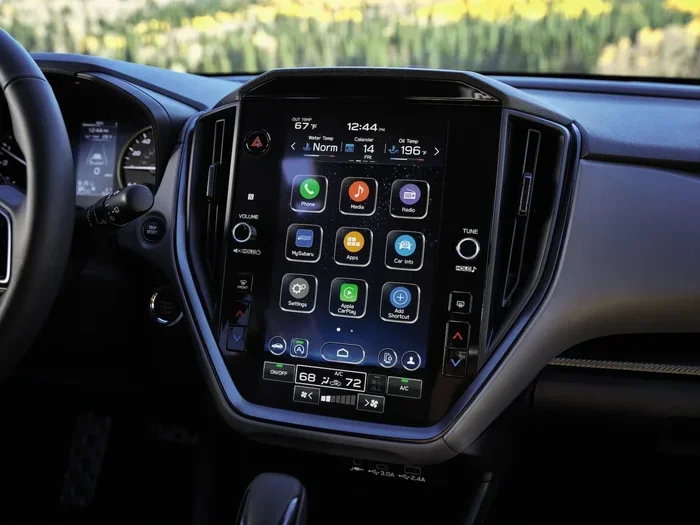
If you own a 2018 or later Subaru Crosstrek, you have a touchscreen infotainment system. This makes adjusting the clock straightforward. Follow these steps:
- Press the Home button on your infotainment screen to open the main menu.
- Navigate to Settings. Look for the gear icon on the bottom or side of the screen.
- Select Clock or Date & Time. This option is usually found under the Device or Vehicle Settings section.
- Tap the time display. This will allow you to enter the hour and minute values.
- Use the on-screen keyboard to input the correct time. Make sure you select AM or PM.
- Confirm your changes. Tap the checkmark or Save button to lock in the new time.
That is it. In less than two minutes, your clock is updated. Some 2018 and newer models also let you toggle between 12-hour and 24-hour format right in this same menu. If you prefer a military-style clock, simply switch it in the settings.
Step-by-Step Guide for Older Models (2013-2017)
If your Subaru Crosstrek does not have a touchscreen, do not worry. The process is still simple. You use the steering wheel controls and the instrument cluster. Here is how:
- Press the Menu or Info button on the left side of your steering wheel.
- Scroll through the options using the up and down arrow buttons until you see Clock or Settings.
- Press the OK button to select the Clock option.
- Use the arrow buttons to highlight the hour digits.
- Press and hold the up or down arrow to increase or decrease the hour.
- Move to the minute digits and repeat the process.
- Press the OK button again to save your changes.
Older Subaru Crosstrek models may also have a button near the steering column or on the center console labeled Clock. If you see one, a single press often cycles through the time settings. This is the fastest way to adjust the clock on an older Crosstrek.
Understanding the Subaru Crosstrek Clock Settings
Once you know how to change the time, it helps to understand the settings available. Most Subaru Crosstrek models offer a few options that let you customize how the clock works.
12-Hour vs 24-Hour Format
The 12-hour format is standard in the United States. You see AM and PM indicators. The 24-hour format, also called military time, runs from 00:00 to 23:59. Some drivers prefer the 24-hour format because it eliminates any confusion between morning and evening. To switch between formats, look in the Clock settings menu on your infotainment screen. On older models, this option may be buried a level deeper in the settings menu.
Time Zone and Auto-Update Options
Some newer Subaru Crosstrek models come with GPS-based time synchronization. This means the clock automatically updates based on your location. If you live in a region that observes daylight saving time, your vehicle may adjust automatically. To check if your model has this feature, look for an Auto-Time or GPS Time option in your Clock settings. If it is available, turn it on and your clock will always stay accurate without manual input.
For models without GPS sync, you will need to adjust the time manually twice a year when daylight saving time changes. Mark your calendar for the second Sunday in March and the first Sunday in November. A quick reminder on your phone can help you remember to update your Subaru Crosstrek clock each time.
Clock Display Brightness
While not directly related to changing the time, the brightness of your clock display can affect readability. If the time is too dim to read at night, you can adjust the display brightness in the same Clock or Display settings menu. This small tweak makes a big difference for nighttime driving.
Troubleshooting Common Clock Issues on the Subaru Crosstrek
Sometimes, even after you follow the steps correctly, the clock on your Subaru Crosstrek does not behave as expected. Here are the most common issues and how to fix them.
Clock Resets After Battery Disconnect or Death
This is the number one complaint among Subaru Crosstrek owners. When you disconnect the battery or the battery dies completely, the clock resets to a default time, usually 12:00 AM. This happens because the clock relies on a small backup battery or a memory setting that loses power. To fix this, simply follow the steps above to reset the clock to the correct time. There is no permanent damage, and it does not affect any other vehicle function.
If you find this happening frequently, it may be worth having your battery tested. A weak battery can cause repeated power losses that reset not just your clock but also your radio presets and other saved settings.
Clock Won Save Changes
If you set the time but it reverts when you turn the car off, try this fix. First, make sure you pressed the Save or Confirm button at the end of the process. On some models, you need to hold the button for two seconds. If that does not work, try turning the vehicle off and back on. Sometimes the system needs a full restart to register the new settings.
For touchscreen models, a frozen or unresponsive screen can also cause this issue. Try holding the power button on the infotainment unit for ten seconds to force a reboot. Once the screen restarts, check if your time change saved correctly.
Wrong Time After a Software Update
Subaru occasionally releases software updates for the infotainment system. After an update, some owners report their clock reverting to a default or incorrect time. This is normal and temporary. Simply re-enter the correct time following the steps above. You can also check the Subaru website or your dealer for any known issues with the latest update.
Keeping Your Subaru Crosstrek Clock Accurate Over Time
Now that you have set the correct time, you want to keep it that way. Here are some simple habits that help maintain clock accuracy on your Subaru Crosstrek.
Regular Quick Checks
Once a month, glance at your dashboard clock and compare it to your phone or watch. It takes just a few seconds. If you notice it drifting by even a minute or two, go ahead and adjust it. Small drifts tend to get worse over time if you ignore them.
Battery Health Matters
Your Subaru Crosstrek battery plays a bigger role in your clock than you might think. A healthy battery keeps all your settings intact, including the time. If your battery is more than three to five years old, consider having it tested at a service center. Replacing an aging battery before it fails can save you from dealing with reset clocks, lost radio presets, and other small inconveniences.
Also, if you store your Subaru Crosstrek for an extended period, the clock will likely reset when you start it again. This is normal. Just set the time when you return to driving.
Keep Your Software Updated
Subaru releases infotainment updates that can improve clock accuracy and add features like GPS time sync. Check with your dealer or visit the Subaru website periodically. Keeping your software current ensures your Subaru Crosstrek clock stays reliable and takes advantage of the latest improvements.
Final Thoughts on Adjusting Your Subaru Crosstrek Clock
Changing the time on your Subaru Crosstrek is one of those small maintenance tasks that makes a big difference. It takes just a few minutes, requires no special tools, and anyone can do it. Whether you use the touchscreen on a newer model or the steering wheel buttons on an older one, the process is simple and straightforward.
Remember to check your clock regularly. Adjust it after battery replacements or long periods of storage. And if you ever run into issues, the troubleshooting tips in this guide should help you resolve them quickly. Your Subaru Crosstrek is a versatile and reliable vehicle, and keeping the clock accurate is just one small way to get the most out of it.
So go ahead and take a moment right now to verify your clock is set correctly. Your future self will thank you when you are not scrambling to figure out what time it is during your morning commute. It is one of those quick wins that keeps your daily driving experience smooth and stress-free.
And if you are planning a road trip with your Crosstrek, make sure your clock is synced and accurate before you hit the road. Whether you are heading out for a weekend adventure or a long cross-country drive, an accurate clock helps you stay on schedule and enjoy the journey. Safe travels!
Frequently Asked Questions
How do I change the time on a 2020 Subaru Crosstrek?
Press the Home button on your touchscreen, go to Settings, select Clock or Date & Time, and tap the time display to enter the correct hour and minute. Confirm by tapping Save. The entire process takes less than two minutes.
Why does my Subaru Crosstrek clock reset every time I start the car?
This usually happens when the backup battery in your vehicle is weak or dead. The clock relies on this small battery to retain its settings when the engine is off. Replacing the backup battery or having your main battery tested should fix the issue.
Can I set my Subaru Crosstrek clock to 24-hour format?
Yes. Most Subaru Crosstrek models allow you to switch between 12-hour and 24-hour format. Look for this option in the Clock settings menu on your infotainment screen. On older models, this setting may be located a bit deeper in the menu structure.
Does the Subaru Crosstrek clock update automatically when I cross time zones?
Only newer models with GPS-based time sync will automatically update when you cross time zones. Older models require you to manually adjust the clock. Check your Clock settings for an Auto-Time or GPS Time option to see if your model supports this feature.
What should I do if the clock on my Subaru Crosstrek is stuck on 12:00?
This typically happens after a battery disconnect or a dead battery. Simply follow the clock adjustment steps in this guide to set the correct time. If the clock keeps resetting, have your vehicle battery tested at a service center.
Is it possible to sync my Subaru Crosstrek clock with my phone?
Some newer Subaru Crosstrek models with Apple CarPlay or Android Auto may sync time through your connected phone. Check your infotainment settings for a Phone Sync or Connected Time option. If your model does not support this, you will need to adjust the clock manually.