How to Add Navigation to Your Nissan Pathfinder Today
Adding navigation to your Nissan Pathfinder is easier than you think. Whether you own a older model or want an upgrade, this guide covers every option from aftermarket GPS units to built-in infotainment upgrades. You will learn about costs, installation methods, and the best systems for your Nissan Pathfinder navigation needs.
Adding navigation to your Nissan Pathfinder opens up a world of convenience. Whether you drive a older model or want a better system than what came with your vehicle, you have more options than ever before. Car navigation systems have become more affordable and easier to install. You do not need to be a tech expert to get this done.
In this guide, we walk you through every step of the process. You will learn about the different types of navigation systems available. We will cover costs, installation methods, and the pros and cons of each option. By the end, you will know exactly what works best for your Nissan Pathfinder and your budget.
Navigation is no longer a luxury. It is a daily necessity for millions of drivers. Whether you commute to work, take road trips, or just need to find the nearest gas station, a good GPS for Nissan Pathfinder setup makes life so much easier. Let us dive in.
Key Takeaways
- Multiple Options Exist: You can choose from aftermarket GPS units, OEM upgrades, or smartphone integration for your Nissan Pathfinder.
- Cost Varies Widely: Budget-friendly dash-mounted GPS units start around $100, while full infotainment upgrades can run $500 to $1,500.
- DIY Installation Is Possible: Many navigation systems are designed for easy self-installation with basic tools.
- Smartphone Apps Work Great: Apps like Google Maps and Waze offer free turn-by-turn navigation as a temporary or permanent solution.
- Check Your Model Year: The Did Nissan Make A 2021 Pathfinder guide can help you understand which models support which tech features.
- Avoid Overpaying: Knowing the How To Determine The Actual Cash Value Of A Car helps you decide if a navigation upgrade is worth the investment.
📑 Table of Contents
Why Add Navigation to Your Nissan Pathfinder
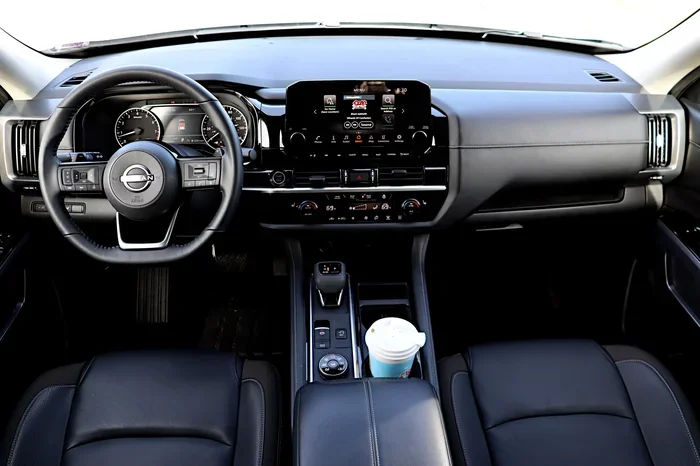
Many older Pathfinder models did not come with built-in navigation. Even some newer ones have basic infotainment systems that lack proper GPS features. This leaves drivers relying on their phones or paper maps. That can be frustrating and even dangerous while driving.
Safety First
Taking your eyes off the road to read a map or tap your phone is risky. A dedicated car navigation system keeps your eyes on the road and hands on the wheel. Most units offer clear voice guidance and large displays. This makes it much safer than using your phone while driving.
Better Road Trip Planning
With a proper navigation system, you can plan your entire route before you leave. You can find rest stops, restaurants, and gas stations along the way. Some systems even avoid tolls and highways based on your preferences. This level of planning makes road trips more enjoyable and less stressful.
Resale Value
Adding navigation can also boost your vehicle’s resale value. Buyers love cars that come with built-in GPS. If you are thinking about how to determine the actual cash value of a car, a navigation system can add to your asking price. It is one of those upgrades that pays for itself over time.
Types of Navigation Systems for the Nissan Pathfinder
Not all navigation systems are the same. Understanding your options helps you make the best choice. Here are the main types available for the Nissan Pathfinder.
Aftermarket Dash-Mounted GPS Units
These are standalone GPS devices that mount on your dashboard or windshield. Brands like Garmin and TomTom make popular models. They are affordable and easy to set up. You just plug them in, enter your destination, and start driving.
The main advantage is that they work independently of your car’s system. If you sell the car, you can simply take the unit with you. They also get regular map updates through their own software. This keeps your GPS mapping current without needing to touch your car’s electronics.
Head Unit Replacement Systems
These replace your entire factory infotainment screen with a new one that has built-in navigation. Companies like Pioneer, Kenwood, and Alpine make excellent units. They often come with touchscreen displays, Bluetooth, backup cameras, and Apple CarPlay or Android Auto.
A head unit replacement gives you a much more integrated look. The screen matches your dashboard better than a dash-mounted unit. It also works seamlessly with your car’s audio system. If you want a premium feel, this is the way to go.
Smartphone Integration
If you already have a smartphone, you can use apps like Google Maps, Waze, or Apple Maps. These apps provide full turn-by-turn navigation for free. You just mount your phone on the dashboard or windshield and follow the directions.
This is the most budget-friendly option. It also gives you access to real-time traffic data and live updates. The downside is that it drains your phone battery and can be less reliable than a dedicated unit. Still, for many drivers, this is all they need.
OEM Navigation Upgrade
If your Pathfinder has a basic infotainment system, you might be able to add the OEM navigation package. This depends on your model year and trim level. Some Nissan infotainment systems support navigation modules that plug into the existing setup. This gives you a factory-look navigation experience.
The benefit of an OEM upgrade is that it matches your car perfectly. It also tends to be more reliable than aftermarket options. However, it can be more expensive, and you may need a dealer or specialist to install it.
How Much Does It Cost to Add Navigation
Cost is one of the biggest factors when adding navigation. The price range is wide depending on the type of system you choose. Here is a breakdown of what you can expect.
| Navigation Type | Price Range | Installation Difficulty |
|---|---|---|
| Dash-Mounted GPS Unit | $100 – $400 | Easy (plug and play) |
| Head Unit Replacement | $300 – $1,500 | Moderate (requires wiring) |
| Smartphone App (Free) | $0 | Very Easy (just mount phone) |
| OEM Navigation Module | $500 – $2,000 | Hard (dealer recommended) |
As you can see, you have options at every price point. A simple dash-mounted GPS is the most affordable. It is also the easiest to install. You can have it running in minutes. A head unit replacement costs more but gives you a much better overall experience.
Keep in mind that installation costs can add up. If you pay a professional to install a head unit, you might spend an additional $100 to $300 on labor. Some people prefer to do it themselves to save money. With a little patience and the right tools, most DIYers can handle the job.
Step-by-Step Installation Guide
Installing a navigation system in your Nissan Pathfinder is a project you can tackle yourself. Here is a general overview of the process. Always refer to your specific unit’s manual for detailed instructions.
Step 1: Choose Your System
Before you buy anything, decide which type of navigation system fits your needs and budget. Consider whether you want a standalone unit, a head replacement, or a smartphone-based solution. Read reviews and compare features carefully.
Step 2: Gather Your Tools
You will need a few basic tools for most installations. A screwdriver set, wire strippers, and a trim removal tool are essential. Some head unit replacements also require a wiring harness adapter. These adapters make the installation much cleaner and easier.
Step 3: Remove the Factory Head Unit
If you are replacing your head unit, start by removing the factory unit. Use a trim removal tool to carefully take off the bezels and trim pieces around the dashboard. Unscrew the factory head unit and disconnect the wiring harness. Take photos before disconnecting anything so you can reference them later.
Step 4: Install the New Unit
Connect the wiring harness adapter to your factory wiring. Then connect the new head unit to the adapter. Slide the unit into the dash mount and secure it with screws. Make sure all connections are firm and secure before moving on.
Step 5: Mount the GPS Antenna
Most aftermarket units come with a GPS antenna. Mount it on the dash or windshield where it has a clear view of the sky. Use the included adhesive or suction cup to hold it in place. Run the cable neatly so it does not interfere with your driving.
Step 6: Test Everything
Before you put everything back together, test the new navigation system. Check that the GPS signal locks on quickly. Test the audio, Bluetooth, and any backup camera features. Make sure the touchscreen responds properly. Fix any issues before finalizing the installation.
Common Mistakes to Avoid
Adding navigation to your car can go wrong if you are not careful. Here are some common mistakes to watch out for.
- Skipping the Wiring Harness Adapter: This small piece makes installation much easier and safer. Without it, you risk damaging your car’s electrical system.
- Choosing the Wrong Screen Size: Measure your dash opening before buying a head unit. A unit that is too big or too small will not fit properly.
- Ignoring Map Updates: Navigation maps get outdated quickly. Choose a system that makes it easy to update maps regularly.
- Not Checking Compatibility: Make sure the navigation system is compatible with your Pathfinder model and year. Not all units fit all vehicles.
- Rushing the Installation: Take your time. Rushing can lead to loose connections, broken trim pieces, or incorrect wiring.
Expert Tips for the Best Navigation Experience
Getting the navigation system installed is only half the battle. Here are some expert tips to get the most out of your new setup.
Keep Your Maps Updated
Roads change constantly. New streets, closed routes, and updated speed limits all affect your navigation accuracy. Most systems let you download map updates for free or a small fee. Set a reminder to update your maps at least once a year.
Use Voice Commands
Many modern navigation systems support voice commands. This lets you enter destinations without taking your hands off the wheel. It is a small feature that makes a big difference in safety and convenience.
Add a Backup Camera
If your new head unit supports a backup camera, consider adding one. Backup cameras are incredibly useful for parking and maneuvering in tight spaces. They also add to your vehicle’s safety features. Many units come with a camera input ready to go.
Consider Apple CarPlay and Android Auto
These smartphone integration features are a game changer. They let you use your phone’s navigation apps directly on your car’s screen. You get the best of both worlds: a large display and access to the latest map data. Most modern head units support one or both of these platforms.
Is Adding Navigation Worth It
The answer depends on your situation and how much you drive. If you use your Pathfinder for daily commutes or regular road trips, navigation is a worthwhile investment. It saves time, reduces stress, and makes driving safer.
On the other hand, if you rarely drive or mostly travel familiar routes, a free smartphone app might be all you need. The beauty of the modern options is that you can start simple and upgrade later. There is no pressure to spend hundreds of dollars right away.
If you are concerned about the cost, remember that navigation upgrades can add value to your vehicle. When it comes time to sell, buyers appreciate cars with built-in GPS. It is one of those features that sets your vehicle apart from others on the market.
Also, be smart about where you buy your system. If you are purchasing from a dealer, be aware that some car salesman tricks involve pushing unnecessary extras. Know what you need before you walk in. Compare prices online and ask questions. A well-informed buyer always gets a better deal.
Final Thoughts
Adding navigation to your Nissan Pathfinder is a project that pays off every time you drive. Whether you choose a budget dash-mounted GPS or a premium head unit replacement, you will enjoy the benefits of turn-by-turn directions and peace of mind on the road. The process is straightforward, and the options are better than ever.
Start by assessing your needs and budget. Pick the system that fits your lifestyle. Follow the installation steps carefully, and do not be afraid to ask for help if you get stuck. Once your new Nissan Pathfinder navigation system is up and running, you will wonder how you ever drove without it.
Take the time to do it right, and you will have a reliable, feature-rich navigation setup that serves you for years to come. Safe travels and happy navigating.
Frequently Asked Questions
Can I add navigation to any Nissan Pathfinder model?
Yes, you can add navigation to virtually any Nissan Pathfinder model. Older models may benefit from aftermarket dash-mounted GPS units or head unit replacements. Newer models might support OEM navigation modules or smartphone integration. The key is to check compatibility with your specific model year before purchasing.
How long does it take to install a navigation system in a Pathfinder?
A dash-mounted GPS unit can be installed in about 15 minutes. A head unit replacement typically takes 1 to 2 hours for a DIYer with basic tools. If you pay a professional, expect to spend an additional hour or so for labor. The time varies based on your experience level and the complexity of the system.
Is it cheaper to use a phone app instead of a dedicated GPS?
Yes, using a phone app like Google Maps or Waze is completely free and very convenient. However, dedicated GPS units offer better reliability, larger displays, and do not drain your phone battery. For frequent drivers or road trippers, a dedicated unit is often worth the investment.
Do I need special tools to install a head unit?
You need basic tools like screwdrivers and wire strippers. A trim removal tool helps avoid damaging your dashboard. A wiring harness adapter is highly recommended as it makes the connection clean and safe. Most kits include all the necessary adapters and cables for a straightforward install.
Will adding navigation void my car warranty?
Adding navigation typically does not void your warranty. However, if the installation causes damage to your car’s electrical system, it could affect related warranty claims. To be safe, follow the manufacturer’s installation instructions carefully. If you are unsure, having a professional install the system is a smart choice.
How often do I need to update my navigation maps?
Most navigation systems require map updates once or twice a year. Roads change frequently, and updated maps ensure you get the most accurate directions. Many systems offer free updates for the first year, and then a small annual fee. Check your specific unit’s update policy before purchasing.