Does Toyota Have an App Everything You Need to Know
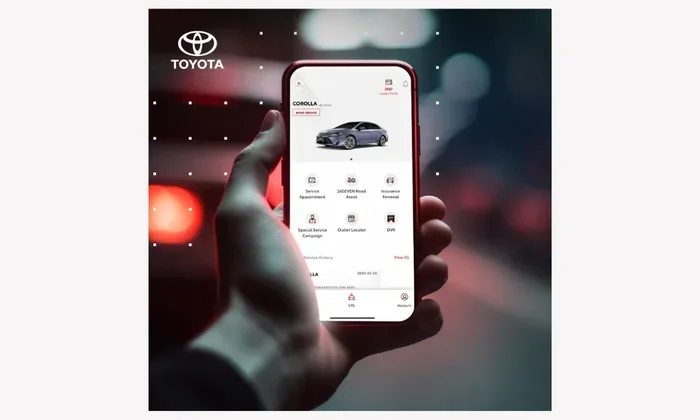
Yes, Toyota has a free mobile app called the Toyota App that lets you control key vehicle functions from your phone. The app works with both iPhone and Android devices, giving owners remote access to features like locking doors, checking tire pressure, and starting the engine. It’s a powerful tool that makes owning a Toyota easier and more convenient.
So, does Toyota have an app? The short answer is yes. Toyota offers a mobile app that connects your smartphone to your vehicle. It gives you remote access to many features that used to require a trip to the dealership or a quick call to the dealer.
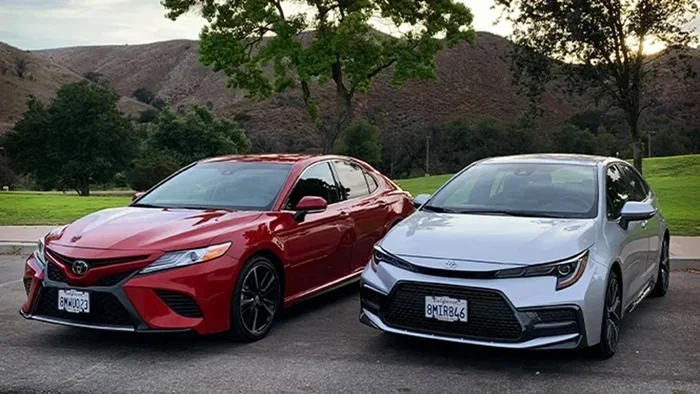
The Toyota App has grown a lot over the years. What started as a basic remote start tool has become a full-featured connected car platform. Whether you own a Toyota Camry, a Highlander, or a newer RAV4, there is a good chance the app works with your vehicle.
In this guide, we will cover everything you need to know about the Toyota App. We will look at what it does, how to set it up, which Toyotas are compatible, and common problems users face. By the end, you will know if the app is right for you.
Key Takeaways
- Toyota offers a free mobile app available for both iOS and Android devices
- The app provides remote access to many vehicle functions like locking, unlocking, and climate control
- You can check tire pressure, track your car, and manage service reminders through the app
- Two people can use the Toyota app for the same car with proper setup
- The app requires a compatible Toyota model and a connected service plan
- Setting up the app is straightforward and takes just a few minutes
📑 Table of Contents
What Is The Toyota App?
The Toyota App is a free mobile application that lets you connect with your Toyota vehicle using your smartphone. Think of it as a digital key that gives you access to your car from anywhere. You can lock the doors, check fuel levels, and even start the engine without being near the vehicle.
The app works through a built-in cellular connection in your Toyota. This means your car needs to have the right hardware and a connected services plan. Not every Toyota model has this capability, so it is important to check before you assume the app will work.
The Toyota App is available for both iPhone and Android users. You can download it from the Apple App Store or Google Play Store. Once installed, you create an account and link your vehicle using the VIN or a registration process.
What Does The Toyota App Cost?
The app itself is free to download and use. However, some features require a paid connected services subscription. Toyota offers different tiers of service. The basic plan gives you free access for a limited time, usually one to three years depending on your vehicle. After that, you may need to pay for a subscription to keep using premium features.
What Can You Do With The Toyota App?
The Toyota App offers a wide range of features. Here is a breakdown of what you can do with it:
Remote Vehicle Controls
You can lock and unlock your doors remotely. You can also honk the horn or flash the lights to find your car in a crowded parking lot. Some models let you start the engine from your phone, which is great for warming up the car on a cold morning.
You can also control the climate system. This means you can turn on the air conditioning or heater before you get in the car. It is a small feature, but it makes a big difference in comfort.
Vehicle Health And Maintenance
The app sends you alerts about your vehicle’s health. You can check oil life, tire pressure, and fuel level right from your phone. If something needs attention, the app will notify you. This helps you stay on top of maintenance and avoid surprises.
For example, you can check tire pressure on the Toyota App without ever getting out of your seat. This is one of the most popular features among Toyota owners.
Security And Tracking
The Toyota App includes security features that give you peace of mind. You can track a stolen Toyota using the app’s GPS location feature. If your car is ever stolen, you can share its location with law enforcement. The app also sends alerts if someone tries to break into your vehicle.
Service And Dealership Integration
You can schedule service appointments through the app. It sends reminders when your car is due for an oil change or other maintenance. You can also contact your local Toyota dealer directly from the app for help with any issues.
Multiple Users
Many Toyota owners wonder if more than one person can use the app. The answer is yes. Two people can use the Toyota App for the same car with proper setup. You can add a secondary user through the app settings, which is great for families or couples who share a vehicle.
How To Download And Set Up The Toyota App
Setting up the Toyota App is simple. Here is a step-by-step guide to get you started:
- Download the app from the Apple App Store or Google Play Store
- Create a Toyota account using your email address
- Enter your vehicle information, including the VIN
- Verify your vehicle through the app’s registration process
- Explore the features and customize your preferences
The entire process takes about five to ten minutes. Once your vehicle is linked, you can start using all the available features right away.
Make sure your phone has a stable internet connection during setup. The app needs to communicate with your vehicle’s onboard system, so a weak signal can cause problems.
Tips For A Smooth Setup
- Make sure your Toyota has the connected services package installed
- Keep your VIN handy before you start the setup process
- Use a strong password for your Toyota account
- Enable notifications so you do not miss important alerts
- Update the app regularly to get the latest features and fixes
Toyota App Compatibility And Requirements
Not every Toyota vehicle supports the app. Compatibility depends on the model year and trim level. Here is what you need to know:
Most Toyota models from 2018 and newer come with built-in connected services. This means the app will work with these vehicles out of the box. Older models may not have the necessary hardware to support the app’s features.
Here are some popular Toyota models that work with the app:
- Toyota Camry
- Toyota RAV4
- Toyota Highlander
- Toyota Corolla
- Toyota Tacoma
- Toyota Tundra
- Toyota Sienna
- Toyota 4Runner
You can check if your specific Toyota is compatible by visiting the Toyota website or asking your dealer. The app also works with Lexus vehicles in many cases, since Toyota and Lexus share platforms and technology.
What If Your Toyota Is Not Compatible?
If your Toyota model does not support the app natively, you still have options. Some third-party devices can add connectivity to older vehicles. However, these solutions may not offer the same level of integration as the official Toyota App.
Common Toyota App Problems And How To Fix Them
Like any app, the Toyota App can have issues from time to time. Here are some common problems and their solutions:
App Not Connecting To Your Vehicle
If the app will not connect to your car, try these steps. First, make sure your phone has a good internet connection. Then, restart the app and try again. If that does not work, log out and log back into your Toyota account. Sometimes a simple refresh fixes the problem.
Slow Response Times
Some users report slow response times when using remote features. This is usually caused by a weak cellular signal or server overload. Try moving to an area with better cell coverage. If the problem persists, it may be a temporary server issue on Toyota’s end.
App Crashes Or Freezes
If the app crashes frequently, make sure you have the latest version installed. Check the App Store or Google Play for updates. You can also try clearing the app cache on your phone. If none of these work, uninstall and reinstall the app.
Can Not Find Your Vehicle
If the app cannot locate your Toyota, check that your vehicle’s GPS and cellular modules are working. You can also verify that your vehicle has an active connected services plan. Without an active plan, some features may not work properly.
Is The Toyota App Worth It?
The Toyota App offers real value for Toyota owners. It gives you convenience, peace of mind, and better control over your vehicle. The remote start and climate control features alone can save you time and improve comfort.
The security and tracking features add an extra layer of protection. Knowing you can locate your car if it is stolen gives you peace of mind. The maintenance alerts help you stay on top of service needs, which can extend the life of your vehicle.
For most Toyota owners, the app is worth using. It is free to download, and the basic features work well. The paid subscription is optional, but it unlocks premium features that many users find valuable.
However, the app is not perfect. Some users have reported connectivity issues and slow response times. These problems are usually minor and can be fixed with basic troubleshooting. Overall, the Toyota App is a solid tool that enhances the ownership experience.
Final Thoughts On The Toyota App
The Toyota App is a powerful and convenient tool for Toyota owners. It gives you remote access to your vehicle, helps you stay on top of maintenance, and adds a layer of security. Whether you use it to check tire pressure, track your car, or just lock the doors from your couch, the app makes life easier.
If you own a Toyota, we highly recommend downloading the app and exploring its features. It is free, easy to set up, and works with most modern Toyota models. Give it a try and see how it can improve your daily driving experience.
Frequently Asked Questions
Is the Toyota App free to use?
Yes, the Toyota App is free to download and use for basic features. Some advanced features like remote start and GPS tracking require a paid connected services subscription. The cost varies depending on the plan you choose and your vehicle model.
Can I use the Toyota App on multiple devices?
Yes, you can log into the Toyota App on multiple devices. This is helpful if you share your phone with a family member or want to access the app from a tablet. Just make sure your Toyota account is secure with a strong password.
Does the Toyota App work with all Toyota models?
No, the app works with most Toyota models from 2018 and newer. Older models may not have the built-in hardware needed for the app. You can check your specific model’s compatibility on the Toyota website or by asking your dealer.
What should I do if the Toyota App is not working?
First, check your internet connection and make sure the app is updated. Try logging out and back in. If the problem continues, restart your phone and the app. You can also contact Toyota customer support for help with persistent issues.
Can I track my Toyota if it gets stolen?
Yes, the Toyota App includes a GPS tracking feature that can help you locate a stolen vehicle. You can share the location with law enforcement to help with recovery. This feature requires an active connected services plan and a working cellular connection in your vehicle.
How do I add another user to the Toyota App for my car?
You can add a second user through the app settings. This is useful for families or couples who share a Toyota vehicle. The secondary user will get their own login credentials and can access most of the app’s features for the shared vehicle.