Does Toyota Corolla Have Apple CarPlay Here Is Why
Yes, the Toyota Corolla does have Apple CarPlay, but availability depends on your model year and trim level. This guide breaks down which Corolla years support Apple CarPlay, how to set it up, and common issues you may face. Whether you drive a 2019 or a 2024 model, we have the answers you need.
Key Takeaways
- Apple CarPlay is available on most Toyota Corolla models from 2019 onward, depending on the trim and infotainment system.
- Wireless Apple CarPlay is supported on newer Corolla trims, while older models may require a USB cable connection.
- Not all trims include CarPlay, so always verify the tech package before purchasing a used or new Corolla.
- Setting up Apple CarPlay is straightforward and takes just a few minutes with an iPhone.
- Common issues like CarPlay not connecting can usually be fixed with a simple restart or cable swap.
- Apple CarPlay works alongside other Toyota infotainment features like Entune and Bluetooth connectivity.
- Toyota dealerships can help with CarPlay activation if your system supports it but it is not showing up.
📑 Table of Contents
- Does Toyota Corolla Have Apple CarPlay? Here Is Why It Matters
- Which Toyota Corolla Model Years Support Apple CarPlay?
- Toyota Corolla Trims That Include Apple CarPlay
- How to Set Up Apple CarPlay in Your Toyota Corolla
- Common Apple CarPlay Issues in the Toyota Corolla
- Wireless vs Wired Apple CarPlay: Which Is Better for the Corolla?
- Quick Tips to Get the Most Out of Apple CarPlay in Your Corolla
- Common Mistakes Toyota Corolla Owners Make With Apple CarPlay
- Expert Insight: How Toyota CarPlay Compares to Other Brands
- Is Apple CarPlay Worth It in a Toyota Corolla?
- Final Thoughts
Does Toyota Corolla Have Apple CarPlay? Here Is Why It Matters
If you are shopping for a Toyota Corolla or already own one, you have probably asked yourself a simple question: does Toyota Corolla have Apple CarPlay? The answer is yes, but with some important details you should know. Not every Corolla model year or trim level comes with this feature standard. And even when it does, the way you connect can vary.
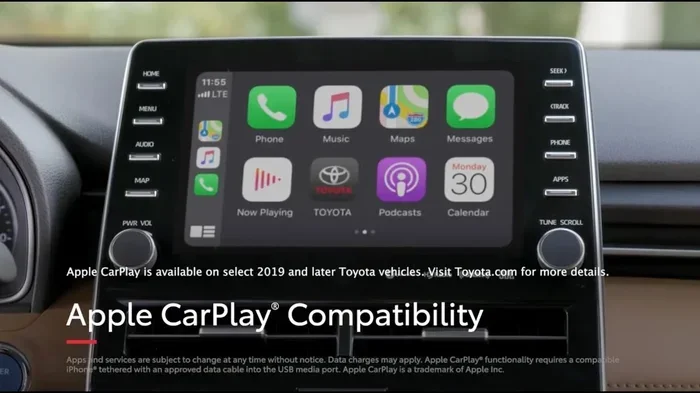
Apple CarPlay is one of the most popular smartphone integration features on the road today. It lets you access your iPhone maps, music, messages, and calls right from your car’s screen. For Toyota Corolla owners and buyers, knowing whether your specific model supports Apple CarPlay can make a big difference in your daily driving experience.
In this guide, we will walk through everything you need to know. We will cover which model years support it, which trims include it, how to set it up, and what to do if it is not working. We will also compare wireless and wired connections and share some practical tips to get the most out of CarPlay in your Toyota Corolla. Let us dive right in.
Which Toyota Corolla Model Years Support Apple CarPlay?
The Toyota Corolla has been around for decades, and Apple CarPlay support has evolved over time. Here is a clear breakdown of which years and what to expect.
2019 and Newer Toyota Corolla Models
Starting in 2019, Toyota made Apple CarPlay more widely available across the Corolla lineup. Most 2019 and newer Corolla models come with the Toyota Audio system that supports CarPlay. However, the base trims sometimes skip this feature. If you are looking at a used 2019 Corolla, make sure to check the trim level before assuming CarPlay is included.
2020 to 2024 Toyota Corolla Models
From 2020 onward, Toyota expanded Apple CarPlay support even further. The 2020 through 2024 Corolla models generally include CarPlay across most trims, especially in the LE, SE, and XSE variants. Toyota also introduced wireless Apple CarPlay on select higher trims during this period, which removes the need for a USB cable entirely.
It is worth noting that Toyota also offers Android Auto on many of these same models. If you are comparing smartphone integration options, having both Apple CarPlay and Android Auto gives you flexibility regardless of which phone you use. Some drivers even wonder about other Toyota models, like whether Can You Get A V8 In A Toyota Camry, since tech features often vary by model. The Corolla focuses more on efficiency and smart connectivity than raw power.
Older Corolla Models Before 2019
If you are driving a Corolla from 2018 or earlier, the news is not great. Most pre-2019 Corolla models do not support Apple CarPlay natively. Toyota’s older infotainment systems were not designed for smartphone integration in the way modern systems are. Some owners have found aftermarket solutions, but these are not as seamless as built-in support.
Toyota Corolla Trims That Include Apple CarPlay
Not every trim level of the Toyota Corolla comes with Apple CarPlay. Here is a closer look at what to expect based on the trim.
| Trim Level | Apple CarPlay | Wireless CarPlay | Notes |
|---|---|---|---|
| L | Sometimes (USB only) | No | Base model; may need optional tech package |
| LE | Yes | On select years | Standard on most 2020+ LE trims |
| SE | Yes | On select years | Included with Toyota Audio system |
| XSE | Yes | Yes (on newer models) | Top-tier tech features included |
| Hybrid (LE/SE/XSE) | Yes | On select years | Same as gas trims for CarPlay support |
The safest way to confirm is to check the specific model year and trim on Toyota’s website or ask the dealer directly. Toyota has also updated its infotainment systems over the years, so a 2021 LE might have slightly different CarPlay functionality than a 2024 LE.
How to Set Up Apple CarPlay in Your Toyota Corolla
Setting up Apple CarPlay in your Toyota Corolla is simple. Whether you have a wired or wireless setup, the process is designed to be quick and user-friendly.
For Wired Apple CarPlay
Follow these steps to connect using a USB cable:
- Plug your iPhone into the USB port in your Corolla.
- Wait for the CarPlay icon to appear on the infotainment screen.
- Tap the CarPlay icon to launch the connection.
- Follow any prompts on your phone to grant permissions.
- Once connected, you can access Maps, Music, Messages, and more.
Make sure you use a high-quality USB cable. A cheap or damaged cable is one of the most common reasons CarPlay will not connect. If you have ever wondered about other Toyota tech questions, like Can I Use 87 Octane Gas In My Toyota, the answer is usually yes, but always check your owner’s manual. The same applies to CarPlay — always verify your specific setup.
For Wireless Apple CarPlay
Wireless CarPlay is even easier:
- Make sure Bluetooth and Wi-Fi are turned on your iPhone.
- Go to your Corolla’s infotainment settings.
- Select Apple CarPlay and choose Wireless.
- Your phone should pair automatically.
- No cables needed — just get in and drive.
Wireless CarPlay is available on select 2022 and newer Corolla trims. It is a game-changer for daily commuters who do not want to deal with cables every time they get in the car.
Common Apple CarPlay Issues in the Toyota Corolla
Even though Apple CarPlay is generally reliable, you may run into issues from time to time. Here are the most common problems Corolla owners face and how to fix them.
CarPlay Will Not Connect at All
This is the most frustrating issue. If your Corolla shows no sign of CarPlay when you plug in your iPhone, try these steps:
- Unplug and replug the USB cable firmly.
- Try a different USB port in the car.
- Restart your iPhone.
- Restart the car’s infotainment system by holding the power button.
- Update your iPhone to the latest iOS version.
CarPlay Disconnects While Driving
If your connection drops frequently, the USB cable is often the culprit. A loose or worn cable will not maintain a stable connection. Replace it with an Apple-certified cable and see if the problem goes away. Also, make sure your phone is not in low power mode, as this can sometimes interfere with CarPlay connectivity.
CarPlay Works but Sound Cuts Out
Sometimes CarPlay connects but the audio is glitchy or cuts in and out. This usually happens when the car’s audio system and the phone are not synced properly. Try resetting the car’s audio system through the settings menu. You can also try disconnecting other Bluetooth devices that might be interfering.
For more Toyota-specific troubleshooting, you might also check whether your Toyota Camry can last 400 miles on a single service interval. While that is a different topic, it shows how Toyota owners often look for long-term reliability across all their tech features, including infotainment systems like CarPlay.
Wireless vs Wired Apple CarPlay: Which Is Better for the Corolla?
Both wired and wireless Apple CarPlay have their advantages. Here is a quick comparison to help you decide which setup works best for your Toyota Corolla.
Wired Apple CarPlay
- Pros: More stable connection, works on more model years, no battery drain on your phone.
- Cons: Requires a cable, can be messy, cable wear and tear over time.
Wireless Apple CarPlay
- Pros: No cables needed, cleaner setup, convenient for daily use.
- Cons: Limited to newer trims, can drain phone battery faster, occasional connection hiccups.
Most Corolla owners find that wired CarPlay is more reliable for consistent use. However, wireless CarPlay is a nice luxury if your trim level supports it. If you are buying a used Corolla and wireless CarPlay is important to you, make sure to confirm the specific model year and trim before purchasing.
Quick Tips to Get the Most Out of Apple CarPlay in Your Corolla
Here are some practical tips from experienced Toyota owners and tech enthusiasts to help you get the best experience with Apple CarPlay:
- Keep your iPhone updated. Apple regularly releases iOS updates that improve CarPlay performance and fix bugs.
- Use an Apple-certified USB cable. Third-party cables can cause connection issues and may not charge your phone properly while using CarPlay.
- Clean your USB port regularly. Dust and debris can build up in the car’s USB port and cause intermittent connection problems.
- Disable low power mode. Low power mode on your iPhone can sometimes prevent CarPlay from working correctly.
- Restart both devices regularly. A simple restart of your phone and the car’s infotainment system can resolve most minor glitches.
- Set CarPlay as your default. Go to your iPhone settings and make sure CarPlay is set to connect automatically when you get in the car.
Common Mistakes Toyota Corolla Owners Make With Apple CarPlay
Avoid these common mistakes that can cause frustration with your CarPlay setup:
- Assuming all trims include CarPlay. Always double-check the specific trim and model year. The base L trim on older models may not have it.
- Using a low-quality USB cable. This is the number one cause of CarPlay connection issues. Invest in a good cable.
- Ignoring software updates. Both your iPhone and your car’s infotainment system benefit from regular updates.
- Not restarting the system when issues arise. A quick restart solves most CarPlay problems, but many owners skip this step.
- Expecting wireless CarPlay on older models. Wireless CarPlay is a newer feature and is not available on pre-2022 Corolla models in most cases.
Expert Insight: How Toyota CarPlay Compares to Other Brands
Toyota’s implementation of Apple CarPlay is solid but not the most advanced on the market. Brands like Hyundai and Ford have pushed the boundaries with their infotainment systems. However, Toyota keeps things simple and reliable, which fits the Corolla’s identity as a practical, no-nonsense daily driver.
The Toyota Entune system that houses CarPlay is intuitive and easy to navigate. It may not have the flashiest interface, but it gets the job done. For most Corolla owners, the ability to use Maps, Spotify, Messages, and Phone calls through the car’s screen is more than enough. Toyota has also been gradually improving its infotainment systems across the lineup, so newer Corolla models benefit from faster processors and smoother performance.
If you are coming from a different car brand or considering switching, the good news is that Apple CarPlay works the same way regardless of the car. Once you learn the CarPlay interface on your Corolla, you will feel right at home in any other CarPlay-equipped vehicle.
Is Apple CarPlay Worth It in a Toyota Corolla?
The short answer is yes. Apple CarPlay adds real value to the Toyota Corolla experience. It makes navigation easier, keeps your phone connected safely, and lets you enjoy your favorite apps without touching your iPhone while driving.
For daily commuters, CarPlay is almost essential. The ability to use Siri for hands-free messaging and calls makes the Corolla safer and more convenient. Even if you primarily use Google Maps on your phone, CarPlay lets you cast that to your car’s screen with minimal effort.
If you are buying a used Corolla, prioritize models from 2019 or newer with the Toyota Audio system that includes CarPlay. It is a feature you will use every single day, and it genuinely improves the driving experience.
Final Thoughts
So, does Toyota Corolla have Apple CarPlay? The answer is a clear yes for most modern models. From 2019 onward, the Corolla offers Apple CarPlay support across many trim levels, with wireless options becoming available on newer models. Whether you prefer a wired or wireless connection, the Corolla delivers a reliable and user-friendly CarPlay experience.
Just remember to check your specific model year and trim before assuming CarPlay is included. And if you run into any connection issues, the fixes are usually simple and quick. With the right setup, Apple CarPlay in your Toyota Corolla can make every drive more connected, more convenient, and more enjoyable.
Take a few minutes to explore the CarPlay features on your phone and in your car. You will be surprised how much smoother your daily commute becomes when your favorite apps are right at your fingertips on the dashboard screen.
Frequently Asked Questions
Does every Toyota Corolla come with Apple CarPlay?
No, not every Toyota Corolla comes with Apple CarPlay standard. The feature is available on most 2019 and newer models, but the base trims on older or lower-end models may not include it. Always check the specific trim level and model year to confirm CarPlay availability before purchasing.
Can I get wireless Apple CarPlay in a Toyota Corolla?
Yes, wireless Apple CarPlay is available on select Toyota Corolla trims from 2022 and newer. It is typically found on higher trims like the SE and XSE. If wireless CarPlay is important to you, make sure to verify it is included in the specific trim you are considering.
Why is Apple CarPlay not working in my Toyota Corolla?
The most common reasons include a faulty USB cable, an outdated iOS version, or a need to restart the infotainment system. Try using a different Apple-certified cable, updating your iPhone, and restarting both your phone and the car’s audio system. These steps resolve the issue in most cases.
Can I use Apple CarPlay and Android Auto at the same time in a Toyota Corolla?
No, you cannot use both at the same time. However, you can switch between Apple CarPlay and Android Auto by disconnecting one and connecting the other. Many Toyota Corolla models support both features, giving you flexibility depending on which phone you are using.
Does Apple CarPlay work with CarPlay not showing on the screen?
If CarPlay is not showing on your screen, first make sure your iPhone is unlocked and on the home screen when you plug it in. Check that CarPlay is enabled in your iPhone settings under General. If the issue persists, try a different USB cable or port, and restart both devices.
Is Apple CarPlay safe to use while driving a Toyota Corolla?
Yes, Apple CarPlay is designed to be safe for use while driving. It provides a simplified interface with large buttons and voice control through Siri. You can make calls, send messages, and get directions without taking your hands off the wheel or your eyes off the road. Always follow local distracted driving laws.