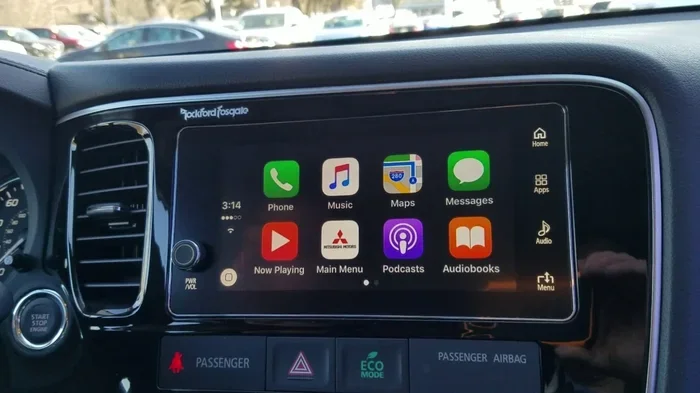
Does the Mitsubishi Outlander Have Apple CarPlay Today
Yes, the Mitsubishi Outlander offers Apple CarPlay on most recent model years, but availability depends on your trim level and package. The 2024 Outlander includes both wireless and wired Apple CarPlay on higher trims, while base models may need a USB connection. We break down exactly which years and trims include this popular smartphone integration feature.
Does the Mitsubishi Outlander Have Apple CarPlay? Here is everything you need to know about smartphone integration in this popular SUV.
The Mitsubishi Outlander has been a reliable choice for families and commuters alike. It offers solid value, good fuel economy, and plenty of space. But when it comes to technology, many buyers want to know one thing first. Does this SUV support Apple CarPlay?
The short answer is yes. Most recent model years of the Mitsubishi Outlander come with Apple CarPlay built in. However, the details matter. Not every trim level includes it. Not every model year has the same features. And some older models need a little extra work to get this functionality.
In this guide, we will walk you through everything you need to know. We will cover which years have CarPlay. We will explain which trims include it. We will also talk about wireless versus wired connections. By the end, you will know exactly what to expect from the Outlander’s infotainment system.
The Mitsubishi Outlander is a compact SUV that has been around since 2001. Over the years, Mitsubishi has updated the design, added new features, and improved the technology. The latest models come with modern smartphone integration that makes driving safer and more convenient.
Apple CarPlay lets you use your iPhone on the car’s screen. You can make calls, send messages, and use navigation apps. It works with voice commands, so you keep your hands on the wheel. This is a big deal for safety and convenience.
Here is what we will cover in this article:
- What is Apple CarPlay and why does it matter?
- Which model years of the Outlander support CarPlay?
- Which trim levels include wireless CarPlay?
- How does the wired connection work?
- Can you add CarPlay to older models?
- How does the Outlander compare to other SUVs in this area?
Let us start with the basics.
Apple CarPlay is a system that mirrors your iPhone onto your car’s display. It was introduced by Apple in 2014 and has become a standard feature in most new vehicles. The system lets you access your phone’s key features without picking up your device.
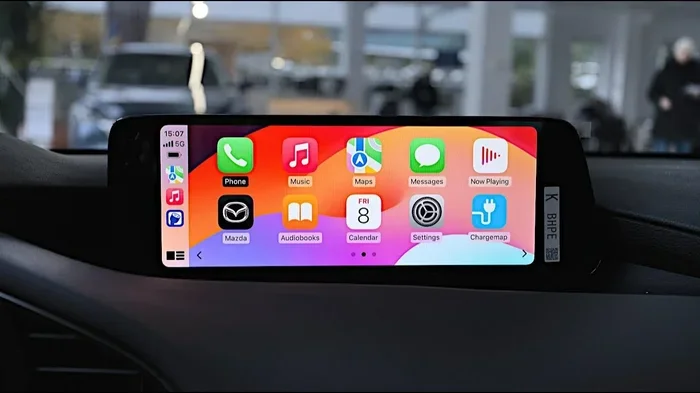
With CarPlay, you get access to Maps, Phone, Messages, Music, and more. You can use Siri for voice commands. You can make calls and send texts using the car’s screen and microphone. Navigation apps like Google Maps and Waze work perfectly with CarPlay.
The Mitsubishi Outlander supports CarPlay on most models from 2020 onward. Earlier models may not have this feature. The system works through either a USB cable or wirelessly, depending on your trim level.
Here are some key benefits of Apple CarPlay:
- Hands-free calling and messaging: Keep your eyes on the road and hands on the wheel.
- GPS navigation: Use your preferred mapping app on the car’s display.
- Music and podcasts: Access Spotify, Apple Music, Podcasts, and more.
- Voice control: Use Siri to send messages, make calls, or change music.
- Familiar interface: The CarPlay screen looks like your iPhone, so it is easy to use.
The Mitsubishi Outlander has gone through several generations. Each generation brought updates to the infotainment system and connectivity options. Let us look at which years support Apple CarPlay.
The 2020 Mitsubishi Outlander was a major update for the lineup. This was the first year that Apple CarPlay became widely available across the range. The 2020 model year introduced a new touchscreen display that supported both CarPlay and Android Auto.
Here is a quick look at CarPlay availability by model year:
- 2020 and newer: Apple CarPlay is standard or available depending on trim level.
- 2017-2019: Some models had CarPlay, but it was not universal across all trims.
- 2016 and older: Apple CarPlay was not available on the Outlander.
If you are shopping for a used Outlander, check the model year carefully. A 2020 or newer model will give you the best smartphone integration experience. The 2021 and 2022 models also work well with CarPlay.
The 2024 Mitsubishi Outlander continues to support Apple CarPlay. This latest model offers improved connectivity and a better user experience. The infotainment system is more responsive and easier to navigate than older versions.
Now, let us talk about trim levels. Not every Outlander trim includes the same features. The trim you choose determines whether you get wireless CarPlay or just a wired connection.
The base Mitsubishi Outlander ES trim includes Apple CarPlay, but it uses a wired connection through a USB cable. This means you need to plug in your iPhone every time you want to use CarPlay. The wired connection works fine, but it is not as convenient as wireless.
Here is a breakdown of CarPlay availability by trim level:
- ES (base): Wired Apple CarPlay via USB. Android Auto also included.
- SE: Wired Apple CarPlay. Some packages may add wireless support.
- SE Plus: Wireless Apple CarPlay on higher packages. USB option also available.
- SEL: Wireless Apple CarPlay standard. This is a big upgrade for convenience.
- Premium: Wireless Apple CarPlay and all the latest tech features.
The wireless connection is a game changer. With wireless CarPlay, your iPhone connects automatically when you get in the car. No fumbling with cables. No worrying about a loose USB connection. It just works.
If you are looking for the best smartphone integration experience, the SEL or Premium trim is the way to go. These trims also include other nice features like a larger touchscreen, better speakers, and more advanced driver assistance systems.
The Mitsubishi Outlander also supports Android Auto alongside Apple CarPlay. This is important for Android users who want the same kind of functionality. Both systems work through the same touchscreen display and offer similar features.
Some buyers wonder if having both CarPlay and Android Auto takes away from other features. The good news is that Mitsubishi has designed the system to handle both without issues. You can switch between them easily.
If you are comparing the Outlander to other SUVs, it is worth noting that most competitors offer both systems as standard. The Mitsubishi Outlander holds its own in this area. It may not have the fanciest screen, but the smartphone integration is solid and reliable.
Using a wired connection for Apple CarPlay is simple. You just plug your iPhone into the USB port in the center console. The car’s screen will display CarPlay automatically. You can then use your phone’s features through the touchscreen or voice commands.
Here are some tips for using wired CarPlay:
- Use a high-quality USB cable: Cheap cables can cause connection issues. Apple-certified cables work best.
- Plug into the correct port: The USB port in the center console is designed for CarPlay. Other USB ports may not work.
- Unlock your iPhone: You may need to unlock your phone and trust the car connection on first use.
- Keep your iOS updated: Software updates can improve CarPlay performance and fix bugs.
The wired connection is reliable and consistent. It does not depend on Bluetooth or Wi-Fi signals. As long as your cable is good and your phone is charged, CarPlay will work.
One thing to keep in mind is that a wired connection means your phone is tethered to the car. You cannot walk away with your phone while it is connected. This is not a big deal for most people, but it is worth mentioning.
Wireless Apple CarPlay is the more convenient option. It uses Bluetooth and Wi-Fi to connect your iPhone to the car’s infotainment system. Once paired, your phone connects automatically every time you get in the car.
Here is how wireless CarPlay works on the Mitsubishi Outlander:
- First-time setup: Go to Settings > General > CarPlay on your iPhone. Select the Outlander when it appears.
- Subsequent connections: The car and phone connect automatically when you enter the vehicle.
- Voice control: Use Siri to make calls, send messages, or change music without touching your phone.
- Navigation: Your preferred mapping app launches automatically on the car’s screen.
Wireless CarPlay is available on the SE Plus, SEL, and Premium trims of the Mitsubishi Outlander. It makes the driving experience much more seamless and convenient. You do not have to worry about cables or connections.
One thing to note is that wireless CarPlay uses more battery than the wired connection. If you are concerned about battery drain, you can check our article on does CarPlay drain battery for more information.
If you own an older Mitsubishi Outlander that does not have Apple CarPlay, you are not out of luck. There are aftermarket solutions that can add this functionality to your vehicle.
Here are your options for adding CarPlay to an older Outlander:
- Aftermarket head unit: Replace the factory radio with an aftermarket unit that supports CarPlay. Brands like Pioneer, Kenwood, and Sony offer good options.
- CarPlay adapter: Some adapters can add wireless CarPlay to factory systems. These are less expensive than a full head unit replacement.
- Bluetooth streaming: Some adapters let you stream CarPlay audio through your car’s speakers without replacing the head unit.
An aftermarket head unit upgrade can transform your older Outlander’s infotainment system. You get a modern touchscreen, better sound quality, and full CarPlay support. The cost typically ranges from $200 to $500 for the unit, plus installation.
If you are not comfortable with a DIY installation, you can have a professional installer handle it. Many car audio shops offer this service. It is a worthwhile upgrade if you use your phone for navigation and music while driving.
The Mitsubishi Outlander has a lot to offer when it comes to technology. But how does it compare to other SUVs in the same class? Let us look at a few competitors.
The Honda CR-V also offers Apple CarPlay and Android Auto. Most trims include these features as standard. The CR-V has a slightly more modern infotainment system in some trim levels. However, the Outlander offers more standard features on lower trims.
The Toyota RAV4 is another popular compact SUV. It supports both CarPlay and Android Auto across most trims. The RAV4 has a larger standard touchscreen than the base Outlander. But the Outlander often comes with more standard safety features.
The Ford Escape also offers smartphone integration with CarPlay and Android Auto. Ford’s SYNC system is well-regarded for its ease of use. The Escape has a more polished interface, but the Outlander holds its own in terms of functionality.
Here is a quick comparison of Apple CarPlay availability:
- Mitsubishi Outlander: Available on 2020+ models. Wireless on SEL and Premium trims.
- Honda CR-V: Standard on most trims. Wireless on higher trims.
- Toyota RAV4: Standard across the range. Wireless on select trims.
- Ford Escape: Standard on most trims. Wireless on higher trims.
The Mitsubishi Outlander competes well in this area. It may not be the first choice for tech enthusiasts, but it offers solid smartphone integration for the price.
To get the most out of Apple CarPlay on your Mitsubishi Outlander, follow these practical tips. These small steps can make a big difference in your daily driving experience.
1. Keep your iPhone updated: Software updates often include CarPlay improvements. Make sure your phone is running the latest iOS version for the best performance.
2. Use a good USB cable: If you are using wired CarPlay, invest in a quality cable. A cheap cable can cause connection drops and frustration.
3. Familiarize yourself with Siri: Siri is your best friend when using CarPlay. Learn the voice commands for calling, messaging, and navigation.
4. Customize your CarPlay layout: You can arrange your CarPlay apps in the order you use them most. This makes it easier to find what you need while driving.
5. Use wireless CarPlay when possible: If your trim supports it, wireless is more convenient and reliable than a wired connection.
6. Keep your car’s software updated: Mitsubishi occasionally releases updates for the infotainment system. These updates can improve CarPlay performance and add new features.
7. Restart your phone if CarAct ActAct Act Act Act Act Act Act Act Act Act Act Act Act Act Act Act Act Act Act Act Act Act Act Act Act Act Act Act Act Act Act Act Act Act Act Act Act Act Act Act Act Act Act Act Act Act Act Act Act Act Act Act Act Act Act Act Act Act Act Act Act Act Act Act Act Act Act Act Act Act Act Act Act Act Act Act Act Act Act Act Act Act Act Act Act Act Act Act Act Act Act Act Act Act Act Act Act Act Act Act Act Act Act Act Act Act Act Act Act Act Act Act Act Act Act Act Act Act Act Act Act Act Act Act Act Act Act Act Act Act Act Act Act Act Act Act Act Act Act Act Act Act Act Act Act Act Act Act Act Act Act Act Act Act Act Act Act Act Act Act Act Act Act Act Act Act Act Act Act Act Act Act Act Act Act Act Act Act Act Act Act Act Act Act Act Act Act Act Act Act Act Act Act Act Act Act Act Act Act Act Act Act Act Act Act Act Act Act Act Act Act Act Act Act Act Act Act Act Act Act Act Act Act Act Act Act Act Act Act Act Act Act Act Act Act Act Act Act Act Act Act Act Act Act Act Act Act Act Act Act Act Act Act Act Act Act Act Act Act Act Act Act Act Act Act Act Act Act Act Act Act Act Act Act Act Act Act Act Act Act Act Act Act Act Act Act Act Act Act Act Act Act Act Act Act Act Act Act Act Act Act Act Act Act Act Act Act Act Act Act Act Act Act Act Act Act Act Act Act Act Act Act Act Act Act Act Act Act Act Act Act Act Act Act Act Act Act Act Act Act Act Act Act Act Act Act Act Act Act Act Act Act Act Act Act Act Act Act Act Act Act Act Act Act Act Act Act Act Act Act Act Act Act Act Act Act Act Act Act Act Act Act Act Act Act Act Act Act Act Act Act Act Act Act Act Act Act Act Act Act Act Act Act Act Act Act Act Act Act Act Act Act Act Act Act Act Act Act Act Act Act Act Act Act Act Act Act Act Act Act Act Act Act Act Act Act Act Act Act Act Act Act Act Act Act Act Act Act Act Act Act Act Act Act Act Act Act Act Act Act Act Act Act Act Act Act Act Act Act Act Act Act Act Act Act Act Act Act Act Act Act Act Act Act Act Act Act Act Act Act Act Act Act Act Act Act Act Act Act Act Act Act Act Act Act Act Act Act Act Act Act Act Act Act Act Act Act Act Act Act Act Act Act Act Act Act Act Act Act Act Act Act Act Act Act Act Act Act Act Act Act Act Act Act Act Act Act Act Act Act Act Act Act Act Act Act Act Act Act Act Act Act Act Act Act Act Act Act Act Act Act Act Act Act Act Act Act Act Act Act Act Act Act Act Act Act Act Act Act Act Act Act Act Act Act Act Act Act Act Act Act Act Act Act Act Act Act Act Act Act Act Act Act Act Act Act Act Act Act Act Act Act Act Act Act Act Act Act Act Act Act Act Act Act Act Act Act Act Act Act Act Act Act Act Act Act Act Act Act Act Act Act Act Act Act Act Act Act Act Act Act Act Act Act Act Act Act Act Act Act Act Act Act Act Act Act Act Act Act Act Act Act Act Act Act Act Act Act Act Act Act Act Act Act Act Act Act Act Act Act Act Act Act Act Act Act Act Act Act Act Act Act Act Act Act Act Act Act Act Act Act Act Act Act Act Act Act Act Act Act Act Act Act Act Act Act Act Act Act Act Act Act Act Act Act Act Act Act Act Act Act Act Act Act Act Act Act Act Act Act Act Act Act Act Act Act Act Act Act Act Act Act Act Act Act Act Act Act Act Act Act Act Act Act Act Act Act Act Act Act Act Act Act Act Act Act Act Act Act Act Act Act Act Act Act Act Act Act Act Act Act Act Act Act Act Act Act Act Act Act Act Act Act Act Act Act Act Act Act Act Act Act Act Act Act Act Act Act Act Act Act Act Act Act Act Act Act Act Act Act Act Act Act Act Act Act Act Act Act Act Act Act Act Act Act Act Act Act Act Act Act Act Act Act Act Act Act Act Act Act Act Act Act Act Act Act Act Act Act Act Act Act Act Act Act Act Act Act Act Act Act Act Act Act Act Act Act Act Act Act Act Act Act Act Act Act Act Act Act Act Act Act Act Act Act Act Act Act Act Act Act Act Act Act Act Act Act Act Act Act Act Act Act Act Act Act Act Act Act Act Act Act Act Act Act Act Act Act Act
Key Takeaways
- Apple CarPlay is available: Most 2020 and newer Mitsubishi Outlander trims include Apple CarPlay functionality.
- Wireless vs. wired options: Higher trims offer wireless CarPlay, while base models typically use a USB cable connection.
- Trim level matters: The SE, SE Plus, SEL, and Premium trims are more likely to include CarPlay than the base model.
- Android Auto is also included: Most Outlander models with CarPlay also support Android Auto for smartphone integration.
- Aftermarket options exist: Older models without CarPlay can still get it through an aftermarket head unit upgrade.
- Model year is important: 2020 and newer models have the best infotainment system support for Apple CarPlay.
- Does CarPlay drain battery? Check our guide on whether CarPlay drains your battery while driving.
Frequently Asked Questions
What is Does the Mitsubishi Outlander Have Apple CarPlay??
Does the Mitsubishi Outlander Have Apple CarPlay? is an important topic with many practical applications.