Does Alfa Romeo Have Apple CarPlay In 2024 And Beyond
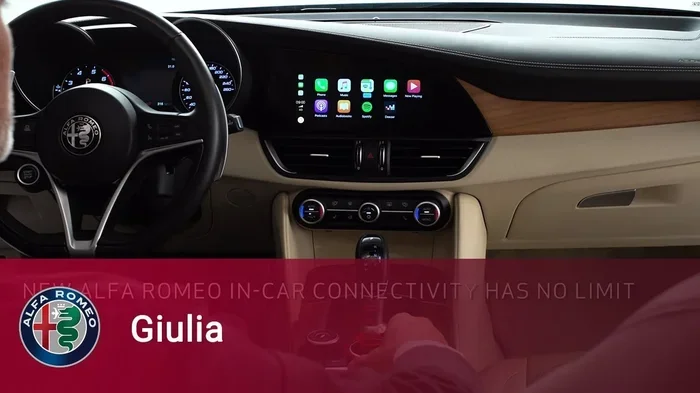
Yes, Alfa Romeo does offer Apple CarPlay in many of its 2024 and newer models. The Alfa Romeo infotainment system supports both wireless and wired smartphone integration depending on the trim and model year. Whether you drive a Giulia, Stelvio, or Tonale, you can connect your iPhone for navigation, music, and hands-free calling.
If you are an Alfa Romeo owner or thinking about becoming one, you have probably wondered about smartphone integration. After all, your phone is your lifeline. You use it for maps, music, messages, and calls. The last thing you want is a car that makes it hard to stay connected. So, does Alfa Romeo have Apple CarPlay? The short answer is yes. But the full story has some important details you should know.
In this guide, we will walk through everything you need to know about Apple CarPlay in Alfa Romeo vehicles. We will cover which models support it, how it works, how to set it up, and what to do when things go wrong. Whether you drive a Giulia, a Stelvio, or a brand-new Tonale, this article has you covered.
Let us dive in and make sure you get the most out of your Alfa Romeo’s infotainment system.
Key Takeaways
- Apple CarPlay is available on most Alfa Romeo models from 2022 onward, including the Giulia, Stelvio, and Tonale.
- Wireless CarPlay support comes standard on higher trims, while wired connections are found on base models.
- Setting up CarPlay is simple and only takes a few steps once your phone is paired.
- Software updates can add or improve CarPlay functionality on older Alfa Romeo vehicles.
- Android Auto is also available on many Alfa Romeo models as an alternative.
- Common issues like disconnections can usually be fixed with a simple restart or cable swap.
📑 Table of Contents
- What Is Apple CarPlay and Why Does It Matter?
- Which Alfa Romeo Models Support Apple CarPlay?
- How Apple CarPlay Works in Alfa Romeo Vehicles
- Wireless vs Wired Apple CarPlay in Alfa Romeo
- Setting Up Apple CarPlay in Your Alfa Romeo
- Common Issues and How to Fix Them
- Apple CarPlay and the Future of Alfa Romeo Connectivity
- Final Thoughts
What Is Apple CarPlay and Why Does It Matter?
Apple CarPlay is a technology that mirrors your iPhone on your car’s display. It lets you access your apps, make calls, send messages, and use navigation without taking your hands off the wheel. It is one of the most popular car connectivity features on the market today.
When you connect your iPhone to CarPlay, your car screen becomes a simplified version of your phone. You see your music apps, your maps, your contacts, and more. You can use Siri for voice commands, which makes hands-free calling and texting much safer.
Why CarPlay Matters for Daily Driving
Think about your daily commute. You might need to change routes on GPS, switch songs, or take a call. Without car connectivity, you would have to pick up your phone. That is dangerous and, in many places, illegal. CarPlay solves this problem by putting your most-used phone features right on the car’s display.
Here are some of the key benefits of using Apple CarPlay in your Alfa Romeo:
- Safer driving with hands-free calls and voice-controlled messaging.
- Real-time GPS navigation using Apple Maps or Google Maps.
- Easy music streaming from Spotify, Apple Music, and other apps.
- Seamless phone integration that works the same way every time.
- Minimal distraction thanks to a simplified, driver-friendly interface.
For Alfa Romeo drivers, CarPlay adds a layer of convenience that makes the driving experience feel modern and connected. It bridges the gap between your car’s multimedia system and your digital life.
Which Alfa Romeo Models Support Apple CarPlay?
Not every Alfa Romeo comes with Apple CarPlay automatically. The availability depends on the model, the model year, and the trim level. Let us break it down by vehicle.
Alfa Romeo Giulia
The Alfa Romeo Giulia is the brand’s flagship sedan. It has offered Apple CarPlay on most trims since the 2022 model year. On the base Giulia trim, you may get a wired connection. Higher trims like the Ti and Veloce typically include wireless CarPlay as standard. The top-tier Giulia Quadrifoglio also supports wireless smartphone integration.
Alfa Romeo Stelvio
The Stelvio is Alfa Romeo’s compact luxury SUV. It follows a similar CarPlay availability pattern as the Giulia. Most 2022 and newer Stelvio models come with Apple CarPlay. The wired version is common on lower trims, while wireless support is found on mid-range and higher trims.
Alfa Romeo Tonale
The Tonale is Alfa Romeo’s compact SUV and one of the newest additions to the lineup. It was introduced as a 2022 model and has Apple CarPlay available across most trims. The Tonale’s infotainment system is built around modern car technology, so CarPlay support is strong and reliable.
Older Alfa Romeo Models
If you own an older Alfa Romeo, do not lose hope. Many models from 2018 onward can be upgraded to support Apple CarPlay through a software update or an aftermarket infotainment upgrade. Check with your dealer or a trusted mechanic to see what options are available for your specific vehicle.
| Model | Model Years | CarPlay Support | Wireless Option |
|---|---|---|---|
| Giulia | 2022-2024 | Standard on most trims | Yes (higher trims) |
| Stelvio | 2022-2024 | Standard on most trims | Yes (higher trims) |
| Tonale | 2022-2024 | Standard on most trims | Yes (most trims) |
| Giulia (pre-2022) | 2017-2021 | Available on select trims | Rare |
| Stelvio (pre-2022) | 2017-2021 | Available on select trims | Rare |
Always confirm the exact CarPlay features for the specific vehicle you are considering. Trim levels and option packages can change what is included.
How Apple CarPlay Works in Alfa Romeo Vehicles
Understanding how Apple CarPlay works in your Alfa Romeo helps you get the most from it. The system is straightforward, but there are a few details worth knowing.
The Connection Process
When you plug your iPhone into the USB port or connect wirelessly, the Alfa Romeo infotainment system detects your phone. A CarPlay icon appears on the screen. Tap it, and your car display switches to the CarPlay interface. From there, you can access your apps just like you would on your iPhone.
What You Can Do with CarPlay
Apple CarPlay gives you access to a range of features while driving. Here is what you can expect:
- Navigation: Use Apple Maps, Google Maps, Waze, or any supported navigation app.
- Music and Podcasts: Stream from Apple Music, Spotify, Pandora, and other audio apps.
- Calls and Messages: Make and receive calls. Send and receive messages using Siri.
- Voice Control: Use Siri to search for places, play music, or send texts without touching your phone.
- Third-Party Apps: Many popular apps are CarPlay-compatible, including WhatsApp, Telegram, and Spotify.
The Role of the Uconnect System
Alfa Romeo uses the Uconnect system as its infotainment platform. Uconnect is the software that runs the car’s display and controls. When you activate Apple CarPlay, it layers on top of Uconnect. This means you still have access to your car’s settings, climate controls, and vehicle information. CarPlay simply adds a phone-friendly layer on top.
Wireless vs Wired Apple CarPlay in Alfa Romeo
One of the biggest questions Alfa Romeo owners ask is whether they get wireless CarPlay or if they need a cable. The answer depends on your model and trim.
Wired Apple CarPlay
Wired CarPlay connects your iPhone using a USB cable. It is found on base trims and older model years. The connection is stable and reliable. You do not have to worry about signal drops or interference. The downside is that you need to keep a cable in your car and plug in your phone every time.
Wired connections also charge your phone while you drive. This is a nice bonus, especially on long trips. However, cables can wear out over time. A frayed cable can cause connection problems or even stop working entirely.
Wireless Apple CarPlay
Wireless CarPlay connects your iPhone through Bluetooth and Wi-Fi. No cable is needed. You simply pair your phone, and it connects automatically when you get in the car. This is the more convenient option and is found on higher trims of the Giulia, Stelvio, and Tonale.
Here is a quick comparison of the two options:
- Wired CarPlay: More stable connection, charges your phone, but requires a cable.
- Wireless CarPlay: More convenient, no cable clutter, but relies on Bluetooth and Wi-Fi signals.
Most drivers prefer wireless CarPlay for its ease of use. If your Alfa Romeo does not come with wireless support, you can sometimes add it through a dealer-installed upgrade or an aftermarket adapter.
Which Is Better for Alfa Romeo Owners?
Both options work well. If you want simplicity and do not mind keeping a cable in your console, wired is fine. If you want a cleaner setup and automatic connections, wireless is the way to go. For the best car technology experience, wireless CarPlay is the clear winner.
Setting Up Apple CarPlay in Your Alfa Romeo
Setting up Apple CarPlay in your Alfa Romeo is quick and easy. Here is a step-by-step guide to get you started.
For Wired Connection
- Make sure your iPhone is updated to the latest iOS version.
- Plug your Lightning or USB-C cable into your iPhone.
- Connect the other end of the cable to the USB port in your Alfa Romeo.
- The infotainment system should detect your phone automatically.
- Tap the CarPlay icon on the screen to start using it.
For Wireless Connection
- Make sure Bluetooth and Wi-Fi are turned on in your iPhone settings.
- Go to your Alfa Romeo’s infotainment settings and select Apple CarPlay.
- Choose the wireless option when prompted.
- Your iPhone will pair with the car. Follow any on-screen instructions.
- Once paired, CarPlay will connect automatically every time you start the car.
Quick Tips for a Smooth Setup
- Unlock your iPhone before connecting. This helps the car detect it faster.
- Trust the device when prompted on your phone screen.
- Keep your phone close to the car’s antenna for wireless connections.
- Restart both devices if the connection does not work the first time.
Once you have CarPlay set up, it should work seamlessly every time you drive. The system remembers your paired devices and reconnects automatically.
Common Issues and How to Fix Them
Apple CarPlay is generally reliable, but sometimes issues pop up. Here are the most common problems Alfa Romeo owners face and how to solve them.
CarPlay Won’t Connect
If CarPlay does not activate when you plug in your phone or get in the car, try these steps:
- Restart your iPhone and the car’s infotainment system.
- Try a different USB cable or port.
- Make sure CarPlay is enabled in your iPhone settings under General.
- Check for any available car software update through your dealer.
CarPlay Disconnects While Driving
Wireless connections can sometimes drop, especially in areas with poor signal. To fix this:
- Turn Bluetooth off and back on in your iPhone settings.
- Delete the car from your iPhone’s Bluetooth list and re-pair it.
- Make sure your phone’s software is up to date.
- Avoid placing your phone in a metal phone mount that blocks signals.
Screen Freezes or Lagges
If the CarPlay interface freezes or runs slowly, it is usually a software issue. Try these fixes:
- Force restart the infotainment system by holding the power button for 10 seconds.
- Close background apps on your iPhone.
- Clear the CarPlay app cache by resetting your iPhone’s CarPlay settings.
Audio Cuts Out
If your music or navigation voice stops playing, check the audio source on your car’s display. Make sure CarPlay is set as the active audio source. Also, ensure your phone is not connected to a different Bluetooth device.
When to See a Professional
Most CarPlay issues can be fixed at home with a simple restart or cable swap. But if problems persist, it is worth visiting your Alfa Romeo dealer. They can run diagnostics, update your software, and check for hardware issues with the USB port or antenna.
Apple CarPlay and the Future of Alfa Romeo Connectivity
Car technology is evolving fast. Apple regularly updates CarPlay with new features, and Alfa Romeo keeps pace with these changes. Looking ahead, we can expect even deeper smartphone integration in Alfa Romeo vehicles.
Future updates may include improved wireless CarPlay stability, better voice control through Siri, and support for more third-party apps. Alfa Romeo is also investing in its own digital cockpit technology, which means the infotainment system will continue to get better.
For now, Apple CarPlay remains one of the best reasons to own an Alfa Romeo in 2024 and beyond. It adds real value to your daily driving experience and keeps you connected safely on the road.
Final Thoughts
So, does Alfa Romeo have Apple CarPlay? Absolutely. Whether you are looking at a Giulia, a Stelvio, or a Tonale, you will find Apple CarPlay support on most models from 2022 onward. The system is easy to use, reliable, and adds a modern touch to Alfa Romeo’s already impressive lineup.
Wireless CarPlay on higher trims makes the experience even better. You get a clean, cable-free setup that connects automatically every time you start the car. Even if your older model does not have CarPlay, there are still options to upgrade.
The key is to check the specific trim and model year before you buy. Not every Alfa Romeo comes with CarPlay standard, so do your homework. Ask the dealer, check the spec sheet, and make sure you are getting the connectivity features that matter to you.
Apple CarPlay is more than just a tech feature. It is a daily convenience that makes driving safer and more enjoyable. If you value staying connected on the road, Alfa Romeo delivers. Embrace the technology, set it up once, and enjoy a smarter, safer driving experience every time you hit the road.
Frequently Asked Questions
Do all Alfa Romeo models come with Apple CarPlay?
No, not all models come with CarPlay standard. Most 2022 and newer models offer it, but the base trims may only include wired CarPlay. Higher trims typically include wireless support. Always check the specific trim and model year before purchasing.
Can I add Apple CarPlay to an older Alfa Romeo?
Yes, in many cases. Some older models can be upgraded through a software update or an aftermarket infotainment system. Visit your Alfa Romeo dealer to explore your options for adding smartphone integration to your vehicle.
Is wireless CarPlay available on the Alfa Romeo Tonale?
Yes, the Alfa Romeo Tonale offers wireless Apple CarPlay on most trims. This makes it one of the most connected options in the Alfa Romeo lineup. Check the specific trim details to confirm.
Why does my CarPlay keep disconnecting in my Alfa Romeo?
Wireless CarPlay disconnections are usually caused by Bluetooth interference or outdated software. Try re-pairing your phone, updating your iPhone and car software, or restarting both devices. If the issue persists, visit a dealer for diagnostics.
Does Alfa Romeo support Android Auto as well?
Yes, many Alfa Romeo models support both Apple CarPlay and Android Auto. This gives you flexibility regardless of which smartphone you use. Check the specific model and trim for compatibility details.
What apps work best with Apple CarPlay in Alfa Romeo?
The most popular and useful apps include Apple Maps, Google Maps, Waze, Spotify, Apple Music, and WhatsApp. These apps are optimized for the CarPlay interface and work seamlessly with Alfa Romeo’s infotainment system.