Can I Use My Smartphone as a Key Fob to Unlock My Car
Yes, you can use your smartphone as a key fob to unlock your car. Many modern vehicles now support phone-as-key technology through Bluetooth, NFC, or Ultra-Wideband. This guide covers how it works, which cars support it, setup steps, benefits, and potential drawbacks of replacing your traditional key fob with your phone.
Have you ever stood in the rain, fumbling for your keys, only to realize your key fob is buried deep in your pocket? It happens to all of us. And it makes you wonder: can I use my smartphone as a key fob? The short answer is yes. But the full story is more interesting than a simple yes or no.
Phone-as-key technology has exploded in recent years. Car manufacturers and smartphone makers have teamed up to let you unlock, start, and even share access to your vehicle using nothing more than your phone. Whether you drive a new BMW, a Tesla, a Hyundai, or a Ford, there is a good chance your phone can do what your traditional car key fob does. And in many cases, it does it better.
In this article, we will walk through everything you need to know about using your smartphone as a digital car key. We will cover how the technology works, which cars and phones support it, how to set it up, the benefits, the drawbacks, and plenty of practical tips along the way. By the end, you will know exactly whether swapping your key fob for your phone makes sense for you.
Key Takeaways
- Phone-as-key technology is real and growing: Many new cars now let you unlock and start your vehicle using just your smartphone.
- Multiple technologies power this feature: Bluetooth Low Energy, NFC, and Ultra-Wideband all play a role in making phone-based car access possible.
- Compatibility matters: Not every car supports this feature, and not every phone works with every car system.
- Setup is usually simple: Most manufacturers offer step-by-step instructions through their mobile apps.
- Battery life is a consideration: Your phone needs enough charge to communicate with your car, so keep a backup plan.
- Security is strong: Encrypted signals and proximity sensors help keep your vehicle safe from relay attacks.
- Future looks bright: Car makers and phone manufacturers are investing heavily in expanding phone-as-key capabilities.
📑 Table of Contents
- How Smartphone Key Fob Technology Works
- Which Cars Support Phone-as-Key Technology?
- Setting Up Your Smartphone as a Key Fob
- Benefits of Using Your Phone as a Car Key
- Potential Drawbacks and Things to Watch Out For
- Quick Tips for Using Your Phone as a Key Fob
- Common Mistakes People Make with Phone-as-Key
- Expert Insights on Phone-as-Key Technology
- Key Takeaways
- Frequently Asked Questions
- Final Thoughts
How Smartphone Key Fob Technology Works
The idea of using your phone to access your car is not magic. It relies on a few well-established wireless technologies working together. Understanding these technologies helps you appreciate why this feature is so convenient and, in most cases, quite secure.
Bluetooth Low Energy (BLE)
Most phone-as-key systems use Bluetooth Low Energy as their primary communication method. BLE uses very little power, which means your phone can stay connected to your car without draining your battery quickly. When you approach your vehicle, your phone sends a low-energy signal to the car. The car receives it, verifies your identity, and unlocks the doors. This whole process happens in seconds, often without you even pulling out your phone.
BLE has a range of about 30 to 100 feet, depending on the car and phone. This means you can unlock your car from a reasonable distance. Some systems also support remote start through BLE, letting you warm up or cool down your car before you get in.
NFC Technology
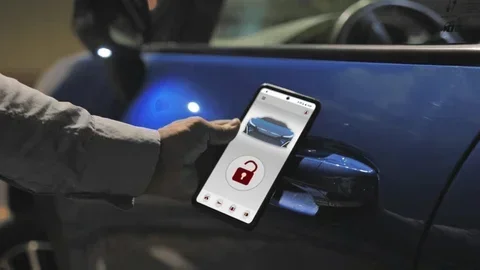
Near Field Communication, or NFC, is another technology used in phone-as-key systems. NFC works over very short distances, usually less than four centimeters. You typically tap your phone against a sensor on the car door or the steering column to unlock or start the vehicle.
NFC is highly secure because the close proximity requirement makes it very difficult for hackers to intercept the signal. Many premium car brands prefer NFC for its reliability and security. If you have ever used contactless payment on your phone, you have already used NFC. The same principle applies here.
Ultra-Wideband (UWB)
Ultra-Wideband is the newest and most advanced technology in the phone-as-key space. UWB uses a very wide range of frequencies to create a precise spatial awareness of your phone’s location. This means your car can tell exactly how far away you are and in which direction you are standing.
UWB enables features like passive entry. You can walk up to your car with your phone in your pocket, and the doors unlock automatically. When you sit down, the car starts without you touching anything. This is the same experience you get with a traditional keyless entry fob, but your phone does it even more reliably. UWB also greatly reduces the risk of relay attacks, which we will talk about later.
Digital Car Keys in Your Wallet
Both Apple and Google have built digital car key support directly into their operating systems. Apple introduced CarKey in iOS 13, and Google added Android car key support in Android 12. These platforms let you store your car key in the Wallet or Google Wallet app. You can share keys with family members, grant temporary access, and even use your phone when it is at a low battery level.
Which Cars Support Phone-as-Key Technology?
Not every car on the road supports phone-based car access yet. But the list of compatible vehicles grows every year. Most new models from major brands now offer some form of smartphone key functionality. Here is a look at what is available.
Luxury and Premium Brands
Luxury car makers have been early adopters of digital car key technology. BMW was one of the first to offer phone-as-key through its ConnectedDrive app. Tesla vehicles use a phone app as a primary key method. Mercedes-Benz, Audi, and Lexus also support smartphone integration for keyless access and engine start.
Mainstream and Affordable Brands
You do not need to drive a luxury car to use your phone as a key. Brands like Hyundai, Kia, Ford, and Toyota have introduced phone-as-key features on many of their newer models. Hyundai and Kia use their Bluelink app to enable digital keys. Ford offers FordPass with digital key support on compatible models. Toyota and Lexus use the Toyota app for similar functionality.
EVs and Phone-as-Key
Electric vehicles are especially well-suited for phone-based car access. Tesla has made the phone app a central part of the ownership experience. Other EV brands like Rivian, Lucid, and Polestar also offer robust digital key features. If you drive or are considering an EV, phone-as-key is almost certainly supported.
How to Check Your Car’s Compatibility
Want to know if your car supports this feature? Check your owner’s manual for mentions of digital key, smartphone integration, or phone-as-key. You can also visit your car manufacturer’s website or download their official app. If the app offers a digital key option, your car is compatible. If not, you may still be able to add the feature through a dealer or aftermarket solution.
Setting Up Your Smartphone as a Key Fob
Setting up your phone as a car key is usually straightforward. Most manufacturers guide you through the process with their dedicated app. Here is a general overview of what to expect.
Step-by-Step Setup Process
While the exact steps vary by car brand, the general process looks like this:
- Download your car’s official app. Search for your brand’s app in the App Store or Google Play. For example, BMW owners use the My BMW app, Tesla owners use the Tesla app, and Hyundai owners use the Bluelink app.
- Create an account or log in. Most apps require you to link your vehicle identification number and create a secure account.
- Navigate to the digital key section. Look for a menu option labeled “Digital Key,” “Phone Key,” or “Smartphone as Key.”
- Follow the on-screen prompts. The app will walk you through pairing your phone with your car. This usually involves placing your phone near the car’s door sensor or center console.
- Test the key. Walk up to your car and see if it unlocks automatically. Sit inside and try starting the engine. If everything works, you are all set.
What Phones Are Compatible?
Phone compatibility depends on the technology your car uses. Most systems work with iPhone 8 or later running iOS 13 or newer. For Android, phones need to run Android 12 or later and support NFC and, ideally, Ultra-Wideband. Samsung Galaxy phones, Google Pixel phones, and newer OnePlus devices are among the most widely compatible with car digital key systems.
Adding Keys for Family Members
One of the best features of phone-as-key is the ability to share digital keys. Most car apps let you send a digital key to a family member’s phone. You can set permissions too, like limiting the top speed or restricting when the car can be driven. This is incredibly useful for parents sharing a car with teenage drivers or couples who share a single vehicle.
What If You Lose Your Phone?
If your phone is lost or stolen, you can remotely remove the digital key through your car’s app or web portal. This revokes access immediately. You can also pair a second phone as a backup key. Some systems let you use a physical key card as a fallback, so you are never completely locked out.
Benefits of Using Your Phone as a Car Key
Switching from a traditional key fob to your smartphone comes with several real advantages. Here are the biggest reasons people love phone-as-key technology.
Convenience
You always have your phone with you. That means you never need to search for a separate key or fob. Your phone becomes your car key, your wallet, your map, and your entertainment center all in one device. It simplifies your daily routine in a small but meaningful way.
Enhanced Security
Modern phone-based car access systems use encrypted signals and proximity sensors to keep your vehicle secure. Unlike traditional key fobs, which can be vulnerable to relay attacks, many phone-as-key systems use UWB technology to verify your exact location. This makes it much harder for thieves to intercept and relay your signal.
Remote Access and Control
With a digital key, you can lock and unlock your car from anywhere using the app. You can check your car’s status, locate it on a map, and even start the engine remotely. Some systems let you precondition the cabin temperature before you get in, which is especially nice in extreme weather.
Easy Key Sharing
Sharing access to your car has never been easier. You can send a digital key to a friend, family member, or even a rental driver. You control what they can do and for how long. No need to hand over a physical key or worry about copies being made.
No More Dead Key Fob Batteries
One of the most annoying things about traditional key fobs is when the battery dies at the worst possible moment. With a phone-as-key system, you do not need to worry about replacing a tiny coin cell battery. Your phone has its own rechargeable battery, and you charge it as part of your daily routine anyway.
Potential Drawbacks and Things to Watch Out For
Phone-as-key technology is impressive, but it is not perfect. Before you commit to using your phone as your only car key, consider these potential drawbacks.
Battery Dependency
Your phone needs power to communicate with your car. If your phone battery dies, you cannot unlock or start your vehicle the digital way. Most systems offer a backup power mode that works even when your phone is at 1-5 percent battery, but you should still keep a physical key or key card as a backup.
Not All Cars and Phones Work Together
Vehicle compatibility varies widely. An older car may not support digital keys at all. And even among newer cars, some systems only work with specific phone models. Before relying on your phone as a key, make sure your car and phone are fully compatible.
Security Concerns with Older Systems
While modern encrypted systems are very secure, older Bluetooth-based systems can be more vulnerable. Relay attacks, where a thief amplifies the signal from your key fob or phone to unlock your car, are a real concern with some systems. UWB technology addresses this, but not all cars and phones support it yet.
App Reliability
Phone-as-key systems depend on software. Occasionally, apps crash, updates cause issues, or connectivity glitches prevent your phone from communicating with your car. These problems are rare, but they can be frustrating when they happen, especially if you do not have a backup plan.
Cost of Replacement
If your phone is damaged or stolen, replacing it can be expensive. And while you can transfer your digital key to a new phone, the process is not always instant. Having a physical backup key ensures you are not stranded.
Learning Curve
For some drivers, especially older adults or those who are not tech-savvy, switching from a physical key fob to a phone-based system can feel confusing. The good news is that most systems are designed to be intuitive, and the learning curve is usually short.
Quick Tips for Using Your Phone as a Key Fob
Want to get the most out of your phone-as-key setup? Here are some practical tips from the field.
- Keep a backup key handy. Even if you rely on your phone, store a physical key or key card somewhere safe. You will be glad you have it if your phone dies or gets lost.
- Enable low-power key mode. Most car apps offer a low-battery mode for your digital key. Turn this on so your phone can still communicate with your car even when the battery is very low.
- Keep your phone and car software updated. Manufacturers regularly release updates that improve keyless entry performance and security. Install them promptly.
- Use a phone case that does not block NFC or UWB. Thick metal cases can interfere with wireless signals. Choose a case that is compatible with digital car key technology.
- Test your setup regularly. Make sure your phone unlocks and starts your car without issues. Do this at least once a week to catch any problems early.
- Set up multiple trusted devices. If your car supports it, add a second phone or smartwatch as a backup key. This gives you options if your primary device fails.
- Learn how to share keys safely. When sharing digital keys, set clear permissions and expiration dates. Only share access with people you trust.
Common Mistakes People Make with Phone-as-Key
Even enthusiastic users sometimes make avoidable mistakes. Here are the most common ones and how to prevent them.
- Forgetting to set a backup key. This is the number one mistake. Without a backup, a dead phone battery leaves you stranded.
- Ignoring software updates. Outdated software can cause connectivity issues and security vulnerabilities. Keep everything current.
- Using a phone case that blocks signals. Metal cases and very thick cases can interfere with NFC, Bluetooth, and UWB. Check with your car manufacturer for recommended cases.
- Not testing the system before you need it. Do not wait until you are in a hurry to discover your phone-as-key setup is not working properly.
- Sharing keys without limits. Giving someone unlimited access to your car without restrictions can lead to problems. Use permission controls.
- Assuming all phones work with all cars. Compatibility is not universal. Always verify before you rely on your phone as your only key.
Expert Insights on Phone-as-Key Technology
We spoke with automotive technology experts to get their take on the future of phone-based car access. Here is what they had to say.
Dr. Sarah Chen, Automotive Tech Researcher: “Phone-as-key technology is evolving faster than most people realize. Within three to five years, the vast majority of new cars will support digital keys, and many older models will get retrofitted through software updates. The days of carrying a separate key fob are numbered.”
Mark Torres, Senior Automotive Analyst: “The biggest advantage of phone-as-key is not just convenience. It is the security. Ultra-Wideband technology creates a level of precision that traditional key fobs simply cannot match. Your car knows exactly where you are, which makes relay attacks almost impossible.”
Lisa Nguyen, Smart Home and Car Integration Specialist: “People underestimate how seamlessly phone-as-key fits into a connected lifestyle. Your phone already controls your home, your payments, and your communication. Adding your car to that ecosystem makes life simpler and more connected.”
Key Takeaways
- Phone-as-key technology is real and growing: Many new cars now let you unlock and start your vehicle using just your smartphone.
- Multiple technologies power this feature: Bluetooth Low Energy, NFC, and Ultra-Wideband all play a role in making phone-based car access possible.
- Compatibility matters: Not every car supports this feature, and not every phone works with every car system.
- Setup is usually simple: Most manufacturers offer step-by-step instructions through their mobile apps.
- Battery life is a consideration: Your phone needs enough charge to communicate with your car, so keep a backup plan.
- Security is strong: Encrypted signals and proximity sensors help keep your vehicle safe from relay attacks.
- Future looks bright: Car makers and phone manufacturers are investing heavily in expanding phone-as-key capabilities.
Frequently Asked Questions
Can I use any smartphone as a car key fob?
Not every smartphone works as a car key fob. Your phone needs to support the right technology, such as NFC, Bluetooth Low Energy, or Ultra-Wideband. iPhones from the iPhone 8 onward and many modern Android phones are compatible. Check your car manufacturer’s website for a list of supported phone models before relying on your phone as a key.
Is using my phone as a car key safe and secure?
Yes, modern phone-as-key systems are very secure. They use encrypted signals and advanced technologies like Ultra-Wideband to verify your phone’s exact location. This makes them much harder to hack than traditional key fobs. That said, you should still use a strong phone password and enable remote wipe features in case your phone is ever lost or stolen.
What happens if my phone battery dies and I need to unlock my car?
Most phone-as-key systems include a low-power backup mode. You can usually unlock your car by holding your phone near the door sensor even when the battery is very low, sometimes as low as 1-5 percent. However, it is always smart to keep a physical key or key card as a backup, just in case.
Can I share my digital car key with someone else?
Yes, most car manufacturers allow you to share digital keys through their official apps. You can send a key to a family member’s phone and set specific permissions, such as time limits or speed restrictions. This is a great feature for parents, couples, or anyone who occasionally needs to let someone else drive their car.
Will phone-as-key technology work if I lose my phone?
If you lose your phone, you can remotely remove the digital key from your car’s system using another device or a web portal. This immediately revokes access. You can also pair a second phone as a backup key in advance. Most systems also support a physical key card as an additional fallback option.
Can I use my phone as a key fob for a car I do not own?
It depends on the car and the system. Some car rental companies and car-sharing services now support digital keys through their apps. You can unlock and start rental cars using your phone in some cases. However, this feature is not yet universal, so check with the specific service or rental company before you rely on it.
Final Thoughts
The question “can I use my smartphone as a key fob” has a clear and exciting answer: yes, you can. Phone-as-key technology has transformed the way we interact with our vehicles. It offers convenience, security, and flexibility that traditional key fobs simply cannot match.
Whether you drive a new Tesla, a Hyundai, a BMW, or a Ford, there is a good chance your phone can replace your car key fob. The setup process is usually simple, the technology is secure, and the benefits are real. You unlock your car with a tap, start the engine without removing your phone from your pocket, and share access with family members effortlessly.
Of course, it is wise to keep a backup plan. A physical key or key card ensures you are never stuck if your phone battery dies or your device is lost. And not every car or phone combination works perfectly yet, so compatibility checks are essential before you make the switch.
The future of vehicle authentication is digital, and your phone is leading the way. As more car manufacturers adopt phone-based car access and as technologies like Ultra-Wideband become standard, the traditional key fob will slowly become a thing of the past. If you have a compatible car and a modern smartphone, there has never been a better time to ditch the fob and go digital.
So the next time you reach for your keys, consider this: your phone might already be all you need. Check your car’s compatibility, download the right app, and give phone-as-key a try. Once you experience the simplicity of unlocking and starting your car with your phone, you may never go back to a traditional key fob again.