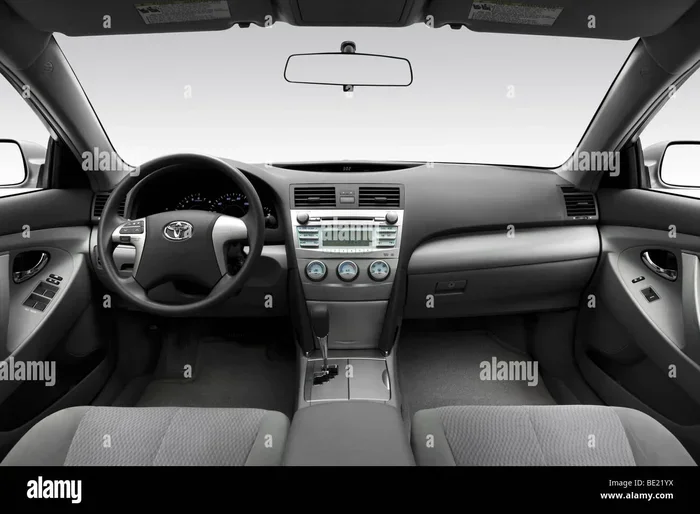
How to Reset the Maintenance Light on 2010 Toyota Camry
The maintenance required light on a 2010 Toyota Camry reminds you of upcoming service. Resetting the maintenance light on a 2010 Toyota Camry is a simple process you can do yourself with just the steering wheel controls. This guide walks you through the exact steps to clear the indicator after an oil change or other service. You will also learn what the wrench symbol means and whether it is safe to drive with the light on. Follow these instructions to turn off the light quickly and correctly.
The maintenance required light on a 2010 Toyota Camry can catch you off guard. You just finished an oil change, but the little wrench symbol still glows on your dashboard. Resetting the maintenance light on a 2010 Toyota Camry is a quick fix you can handle yourself. This guide gives you the exact steps to clear that reminder without visiting a dealer. You will learn what the light means, why it stays on, and how to turn it off in minutes.
Many Camry owners worry when they see the maintenance light. They wonder if the car is seriously damaged. In most cases, the light simply means your vehicle is due for routine service. The 2010 Camry uses an oil life system that tracks driving habits and reminds you to perform maintenance. Once the service is done, you need to reset the system. This article walks you through the entire process with clear instructions and helpful tips.
We also cover common mistakes and what to do if the light refuses to turn off. By the end, you will feel confident handling this simple maintenance task. Let us dive into the details of resetting the maintenance required light on your 2010 Toyota Camry.
Key Takeaways
- Reset the maintenance light on a 2010 Toyota Camry using the trip meter and steering wheel buttons in under two minutes.
- The wrench symbol means your vehicle is due for scheduled maintenance, not necessarily an oil change alone.
- You can safely drive short distances with the maintenance light on, but it is best to reset it after service.
- Do not confuse the maintenance required light with the check engine light; they indicate different issues.
- If the light stays on after resetting, a faulty sensor or pending code may need professional diagnosis.
- Following the recommended maintenance schedule keeps your Camry running smoothly and prevents future warnings.
📑 Table of Contents
- What the Maintenance Required Light Means on a 2010 Camry
- Why You Need to Reset the Maintenance Light
- How to Reset the Maintenance Light on a 2010 Toyota Camry
- Common Mistakes When Resetting the Maintenance Light
- Expert Insights: What Mechanics Say About the Maintenance Light
- Quick Tips to Keep Your 2010 Camry Running Smoothly
- Key Takeaways
- Final Thoughts on Resetting the Maintenance Light
What the Maintenance Required Light Means on a 2010 Camry
When you see a small wrench icon on your 2010 Toyota Camry dashboard, it is the maintenance required light. This symbol is part of Toyota’s service interval system. It does not mean your car is broken. Instead, it tells you that a scheduled service is coming up. The light often appears after a certain number of miles or based on your driving conditions.
The wrench symbol is sometimes called the wrench light. Many drivers confuse it with the check engine light. The check engine light looks like an engine outline and signals a serious problem. The wrench light is just a friendly reminder. The wrench light indicating an oil change is a common reason it appears, but it can also remind you of other routine services like tire rotation or fluid checks.
The Oil Life System Explained
Toyota’s oil life system does not just count miles. It monitors your driving habits, engine temperature, and load conditions. Based on this data, it calculates when the oil and other fluids need replacement. When the system determines that the maintenance interval is reached, it triggers the wrench light. This smart system ensures you service your Camry at the right time, not just based on a fixed mileage.
Understanding this system helps you appreciate why the light comes on. It is not a random alert. It is a calculated reminder based on real driving data. After you complete the service, resetting the light tells the system to start a fresh cycle.
Maintenance Light vs Check Engine Light
It is important to know the difference between the maintenance required light and the check engine light. The maintenance light is yellow or orange and shows a wrench. The check engine light is also yellow but shows an engine icon. If your check engine light is on, you should not just reset it. You need to diagnose the real problem first. If you are dealing with a check engine light instead, you can learn how to clear a check engine code using an OBD scanner.
Ignoring the check engine light can lead to expensive repairs. Ignoring the maintenance light just means you might miss a service. Both lights are important, but they mean very different things.
| Feature | Maintenance Required Light | Check Engine Light |
|---|---|---|
| Symbol | Wrench | Engine outline |
| Color | Yellow or Orange | Yellow or Red |
| Meaning | Scheduled service due | Engine or emissions issue |
| Urgency | Low to Medium | High |
| Reset After Service | Yes | Only after repair |
| Can You Drive? | Yes, safely | Check immediately |
This table shows the clear differences. The maintenance light is a service reminder, while the check engine light is a warning. Always check which light is on before taking action.
Why You Need to Reset the Maintenance Light
After an Oil Change or Service
When your mechanic finishes an oil change or other service, they should reset the maintenance light. Sometimes they forget, or you did the work yourself. The light stays on because the oil life system has not been recalibrated. Resetting it tells the car that the service is complete and the counter is back to zero.
Not resetting the light can be annoying. The constant reminder can distract you while driving. It also makes it hard to know when the next service is truly due. So, always reset the light after you have completed the maintenance.
Driving with the Light On
Some owners ask if they can keep driving with the maintenance required light on for a few more days. The short answer is yes, it is generally safe for a short period. The light does not affect your car’s performance or safety. However, it is best not to ignore it for too long. The maintenance schedule exists to protect your engine and keep your warranty valid.
If you plan to drive with the light on, make sure you schedule the service soon. Driving beyond the recommended interval can lead to wear and tear. The oil may degrade, and other fluids might need attention. Resetting the light after service keeps you on track.
How to Reset the Maintenance Light on a 2010 Toyota Camry
The 2010 Toyota Camry uses a simple trip meter method to reset the maintenance light. You do not need any special tools. Just your steering wheel controls and the instrument cluster. Follow these steps carefully.
Step-by-Step Reset Procedure
- Turn the ignition to the “ON” position. Do not start the engine. Press the “ODO” button on the instrument panel to display the odometer reading. This step ensures you are in the right mode to access the maintenance reset function.
- Turn the ignition off. Then, press and hold the “ODO” button on the steering wheel. Keep your finger on it.
- While holding the “ODO” button, turn the ignition back to the “ON” position. Do not start the engine. The odometer should show the trip meter or a blank screen.
- Continue holding the “ODO” button for about 10 seconds. The maintenance light should start to blink. This indicates the system is ready to reset.
- Release the “ODO” button. The light should turn off, and the trip meter will reset to zero. If it does not, repeat the process.
- Turn the ignition off and then back on. Check the dashboard to confirm the maintenance light is no longer visible.
If the light blinks and then turns off, you have successfully reset the maintenance light on your 2010 Toyota Camry. The oil life system is now back to 100%. You can drive confidently knowing the reminder is cleared.
Quick Tips for a Successful Reset
- Make sure the car is in “Park” and the parking brake is engaged.
- Use the steering wheel controls gently; pressing too hard can damage the buttons.
- If the light does not blink after 10 seconds, hold the button a few seconds longer.
- Some models may require you to toggle the trip meter display using the “MODE” or “TRIP” button before holding “ODO”.
- Perform the reset right after the service is completed for the best results.
What If the Light Won’t Turn Off?
Sometimes the maintenance light stays on even after you follow the steps. This can happen if there is a pending fault code or if the reset procedure was not done correctly. Do not panic. Here are a few things to check.
- Check the ignition position: Make sure you are in the “ON” mode, not “START”. The engine should not be running during the reset.
- Hold the button long enough: Some models require holding the “ODO” button for up to 15 seconds. Keep holding it until the light blinks.
- Try the trip meter reset: Use the steering wheel buttons to select the trip meter display and hold the reset button for a few seconds.
- Look for other warnings: If the check engine light is also on, you may need to clear a diagnostic code first.
If none of these work, the issue might be a faulty sensor. In that case, a visit to a Toyota dealer or a qualified mechanic is a good idea. They can scan the system and clear any hidden codes.
Common Mistakes When Resetting the Maintenance Light
Skipping the Reset After Service
The most common mistake is forgetting to reset the light after service. Many quick-lube shops reset it for you, but not all do. If you are unsure, always check the dashboard after leaving the shop. A simple reset takes seconds and saves you from a persistent reminder.
Another mistake is resetting the light before the service is actually done. If you reset it just to make the annoyance go away, you lose track of your maintenance schedule. The oil life system will not know that service is still needed. Always reset only after the work is complete.
Confusing the Maintenance Light with Other Warnings
Drivers sometimes mistake the maintenance light for a serious warning. They might think the car is overheating or that the oil pressure is low. The maintenance light is not an emergency indicator. It is a service reminder. If you see other warning lights like a red oil pressure light or a temperature gauge in the red, stop immediately and check your fluids.
Understanding your dashboard symbols helps you react appropriately. The maintenance light is yellow and shows a wrench. Red lights mean stop now. Yellow lights mean caution. Knowing this difference keeps you safe and calm.
Expert Insights: What Mechanics Say About the Maintenance Light
Professional mechanics often see drivers who are confused by the maintenance light. Here are a few insights from experienced Toyota technicians.
- Do not ignore the light for months: Even if the car feels fine, the oil degrades over time. The maintenance light is your best reminder to stay on schedule.
- Resetting is not a substitute for service: Some drivers reset the light and then postpone the actual service. This can lead to engine wear and voided warranties.
- Use genuine Toyota parts: When you service your Camry, ask for OEM parts. They are designed to meet Toyota’s exact specifications and help the oil life system function correctly.
- Keep a service log: Write down every oil change and reset date. This helps you track intervals and spot patterns if the light comes on too early.
These tips from the pros can save you time and money. A little prevention goes a long way with your 2010 Toyota Camry.
Quick Tips to Keep Your 2010 Camry Running Smoothly
Regular Maintenance Schedule
Toyota recommends a maintenance schedule based on mileage and time. For the 2010 Camry, the typical interval is every 5,000 miles or 6 months, whichever comes first. Following this schedule keeps your engine clean and your warranty intact.
- Oil changes: Use the recommended oil weight and change it on time.
- Tire rotations: Rotate tires every 5,000 to 7,500 miles for even wear.
- Fluid checks: Inspect coolant, brake fluid, and transmission fluid regularly.
- Air filter: Replace the engine air filter every 15,000 to 30,000 miles.
- Battery maintenance: Clean terminals and check voltage during service visits.
Sticking to this schedule means fewer surprise warnings. The maintenance light will only come on when it truly needs your attention.
When to See a Professional
While resetting the maintenance light is easy, some issues need a professional touch. If you notice the light coming back shortly after a reset, there might be an underlying problem. A technician can read the diagnostic trouble codes and find the root cause.
Also, if you are not comfortable doing the reset yourself, any Toyota service center can do it for free. They will also perform a multi-point inspection to ensure your Camry is in top shape. Regular professional checkups extend the life of your vehicle.
Key Takeaways
Resetting the maintenance light on a 2010 Toyota Camry is a straightforward process once you know the steps. The wrench symbol is a helpful reminder, not a cause for alarm. Always reset the light after your service is complete. If the light stays on, check your procedure or consult a professional. Keeping up with the maintenance schedule ensures your Camry stays reliable for years to come.
Final Thoughts on Resetting the Maintenance Light
Resetting the maintenance required light on a 2010 Toyota Camry is a simple task that anyone can do. You do not need expensive tools or a trip to the dealer. Just follow the trip meter method and be patient. The wrench symbol is a helpful reminder, not a cause for alarm.
Remember to reset the light only after your service is complete. Keep up with the recommended maintenance schedule to avoid future warnings. If the light stays on despite your efforts, a quick visit to a mechanic can solve the problem. Your 2010 Camry is a reliable machine, and a little attention goes a long way. Now you know exactly how to reset the maintenance light on a 2010 Toyota Camry and keep your dashboard clear.
Frequently Asked Questions
How do I know if my 2010 Camry needs an oil change?
The maintenance required light is your primary indicator. It illuminates based on the oil life system’s calculation of driving conditions and mileage. You can also check the oil level with the dipstick. If the oil is dark or below the minimum mark, it is time for a change.
Can I reset the maintenance light without starting the engine?
Yes, the reset procedure requires the ignition in the “ON” position, but the engine must not be running. You simply turn the key or press the start button without pressing the brake pedal to start the engine.
Will resetting the maintenance light clear any error codes?
No, the maintenance light reset only clears the service reminder. If you have a check engine light or stored diagnostic trouble codes, you need a scanner to clear those. The maintenance light and check engine light are separate systems.
How often should I reset the maintenance light on my 2010 Camry?
You should reset it every time you complete a scheduled service, such as an oil change, tire rotation, or fluid replacement. This keeps the oil life system accurate and ensures you stay on track with Toyota’s recommended maintenance schedule.
What if the maintenance light comes back after I reset it?
If the light returns shortly after resetting, it means the oil life system has detected that the service interval has been reached again. This could indicate that the service was not completed properly, or there is a sensor issue. Have a technician inspect the vehicle.
Is it safe to drive with the maintenance light on for a long time?
It is generally safe for a short period, but you should not delay service for too long. The light reminds you of routine maintenance that protects your engine. Prolonged driving without service can lead to reduced performance and potential warranty issues.