How to Reset a Subaru Radio and Fix Common Audio Issues
A Subaru radio reset is the fastest way to bring your audio system back to life when it freezes, glitches, or stops working altogether. Whether you need a simple soft reset or a full factory reset, this guide walks you through every method step by step. We also cover the most common Subaru audio issues and show you how to fix them without visiting a dealer.
There is nothing more frustrating than hopping into your Subaru and pressing the power button on your radio only to get nothing but a blank screen or a stubborn error message. Whether your car radio not working issue started after a battery change or appeared out of nowhere, a Subaru radio reset is often the simplest and most effective solution. This guide covers every method you need to know, from a quick soft reset to a full factory reset, so you can get back to enjoying your favorite tunes on the road.
Many drivers assume that a broken radio means an expensive trip to the dealership. In most cases, that is not true. A Subaru audio troubleshooting session at home can save you both time and money. We will walk you through each step in plain language, with practical tips and real-world examples. By the end of this article, you will feel confident tackling any car audio problems that come your way.
The methods we cover apply to a wide range of Subaru models, including the Outback, Forester, Crosstrek, and Legacy. Whether you are dealing with Subaru radio static, a frozen display, or Bluetooth connectivity issues, you will find the solution here. Let us dive in and get your Subaru sound system fix started right away.
Key Takeaways
- A soft reset is the quickest fix for most minor audio glitches and freezing issues on your Subaru radio.
- A hard reset erases all custom settings and should only be used when a soft reset does not solve the problem.
- Common causes of Subaru audio issues include weak batteries, loose connections, and software bugs.
- Regular maintenance like keeping your firmware updated can prevent most car audio problems before they start.
- Knowing when to seek help from a professional saves time and prevents accidental damage to your Subaru multimedia system.
- Preventive habits such as avoiding extreme temperatures and keeping firmware current extend the life of your car sound system.
📑 Table of Contents
Understanding Your Subaru Radio System
What Makes Subaru Audio Systems Unique
Subaru vehicles come equipped with thoughtfully designed Subaru multimedia systems that combine radio, Bluetooth, navigation, and audio controls into one head unit. These systems are built to be durable, but like any electronic device, they can experience software hiccups. Understanding how your system works helps you troubleshoot more effectively.
The head unit in most Subarus runs a proprietary operating system that manages everything from AM/FM reception to smartphone integration. When this system encounters a software conflict or a temporary glitch, a car audio system reset often resolves the issue. Think of it like restarting your phone when it starts acting slow. The process is simple, and it does not require any special tools.
Common Components of the Subaru Audio Setup
Before we get into the reset methods, it helps to know the key parts of your audio system. The head unit is the central control panel that houses the display and buttons. Behind it, wiring connects to your speakers, antenna, and power supply. A reset Subaru stereo targets the head unit’s software, not the physical hardware. Knowing this distinction is important because it tells you when a reset will help and when the problem might be something else entirely.
- Head Unit: The brain of your audio system that controls all functions.
- Speakers: Convert electrical signals into the sound you hear.
- Antenna: Receives radio signals for AM/FM stations.
- Wiring Harness: Connects all components and supplies power.
- Firmware: The software that runs your head unit and can be updated.
When You Need a Subaru Radio Reset
Signs Your Radio Needs a Reset
Not every audio issue requires a full reset. But there are clear signs that a Subaru radio reset will help. Watch for these common symptoms:
- The screen freezes or becomes unresponsive to button presses.
- The radio turns on but produces no sound at all.
- You hear Subaru radio static even after checking the antenna connection.
- Bluetooth pairing fails repeatedly despite correct settings.
- The display shows error messages that do not go away.
- The audio cuts in and out randomly while driving.
- Your car radio freezing happens right after starting the engine.
If you notice one or more of these issues, a reset is a great first step. It is quick, safe, and does not require any technical expertise. Most drivers can complete the process in under five minutes.
Soft Reset vs. Hard Reset: Which One Should You Choose?
Not all resets are the same. A soft reset is a quick restart that clears temporary glitches without affecting your saved settings. A hard reset, also called a factory reset, wipes everything and restores the system to its original state. Here is a quick comparison to help you decide which method fits your situation.
| Feature | Soft Reset | Hard Reset |
|---|---|---|
| What it does | Restarts the system temporarily | Wipes all settings and returns to factory defaults |
| Time required | 1 to 2 minutes | 5 to 10 minutes |
| Data loss | None | All saved stations, Bluetooth pairings, and settings are erased |
| Best for | Minor glitches, freezing, static | Persistent software bugs, major malfunctions |
| Difficulty level | Very easy | Moderate |
| Risk level | Very low | Low, but you must reconfigure settings afterward |
As a general rule, always try a soft reset first. Only move to a hard reset if the soft reset does not resolve your car audio problems. This approach minimizes disruption and keeps your saved preferences intact whenever possible.
How to Perform a Soft Reset on Your Subaru Radio
Step-by-Step Soft Reset Instructions
A soft reset is the fastest way to address most minor Subaru audio issues. Follow these simple steps and your radio should be back to normal in no time.
- Turn off your engine and remove the key from the ignition.
- Open the driver-side door and locate the fuse box under the dashboard.
- Find the radio fuse using your owner’s manual as a reference. It is usually labeled “Radio” or “Audio.”
- Remove the fuse carefully with the fuse puller or a pair of needle-nose pliers.
- Wait 30 to 60 seconds. This gives the system time to fully discharge any residual power.
- Reinsert the fuse firmly into its slot.
- Close the door, start your engine, and turn on the radio.
In most cases, the system will reboot and your audio will return to normal. This method works because it cuts power to the head unit completely, clearing any temporary software errors that caused the car radio not working problem.
- Always refer to your owner’s manual to locate the correct fuse. Fuse locations vary by model year.
- If you are unsure which fuse controls the radio, take a photo of the fuse box diagram before removing anything.
- Never pull a fuse while the engine is running. Always turn off the ignition first.
Alternative Soft Reset Method for Newer Models
If your Subaru has a newer Subaru infotainment reset system, you may not even need to touch the fuse box. Many recent models allow you to perform a soft reset directly from the screen. Simply hold down the power button for 10 to 15 seconds until the screen goes dark. Wait a few seconds, then press the power button again to turn it back on. This is the easiest how to restart car radio method for modern Subarus.
Some owners also report success with the navigation button combination method. Press and hold the volume knob and the tuner button simultaneously for about 10 seconds. The screen should flash and restart. This is especially useful when the display is frozen and you cannot access the power button.
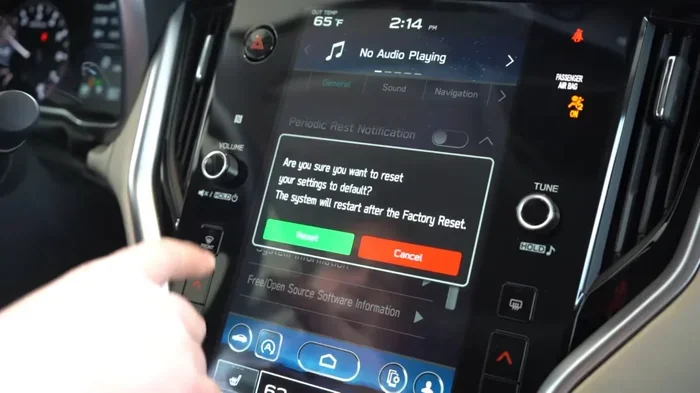
How to Perform a Hard Reset (Factory Reset)
When a Factory Reset Is Necessary
A factory reset car radio procedure is more involved than a soft reset, but it is sometimes the only way to fix deep-rooted software problems. You should consider a hard reset when:
- A soft reset does not solve the problem after two or three attempts.
- The radio displays persistent error codes that will not go away.
- You are selling or giving away your vehicle and want to clear all personal data.
- The Subaru head unit reset is needed after a failed software update.
- Bluetooth and audio settings are corrupted beyond simple troubleshooting.
Before you begin, make sure you have your radio code handy. Some Subaru models require a security code after a factory reset. This code is usually found on a card in your owner’s manual pouch or on a sticker inside the glove box. If you do not have it, contact your Subaru dealer before proceeding.
Step-by-Step Hard Reset Instructions
Follow these steps carefully to perform a factory reset car radio on your Subaru:
- Turn off the engine and remove the key from the ignition.
- Press and hold the power button on your head unit.
- While holding the power button, also press and hold the volume knob.
- Continue holding both buttons for 10 to 15 seconds until the screen goes blank.
- Release both buttons and wait for the system to restart on its own.
- When the setup screen appears, follow the on-screen prompts to reconfigure your language, time zone, and audio preferences.
- Enter your radio code if prompted. This restores your station presets and saved settings.
This process effectively gives your Subaru audio system reboot from scratch. All custom settings will be erased, so be prepared to set up your preferences again. It is a small price to pay for a fully functional audio system.
- Do not let go of the buttons too early. The system needs a full 10 to 15 seconds to initiate the reset process.
- Do not attempt a hard reset while driving. Always park safely and turn off the engine first.
- Do not skip the radio code step. Without the code, you may not be able to access your saved stations after the reset.
What to Do If the Hard Reset Does Not Work
Sometimes a hard reset alone is not enough to fix persistent car audio problems. If your radio still does not work after a factory reset, the issue may be hardware-related. Loose wiring, a blown speaker, or a damaged antenna can all cause symptoms that mimic software problems. In these cases, it is time to consult a professional. A certified Subaru technician can run diagnostic tests and identify issues that a simple reset cannot fix.
Also, if you find that your radio issues keep coming back even after multiple resets, consider checking your vehicle’s electrical system. A check your car battery if it is weak or failing, as inconsistent power supply can cause repeated audio glitches. A healthy battery is the foundation of a reliable Subaru multimedia system.
Common Subaru Audio Problems and How to Fix Them
Static and Interference Issues
Subaru radio static is one of the most common complaints among Subaru owners. Static can come from a variety of sources, and most of them are easy to fix. Start by checking your antenna connection. A loose or corroded antenna cable is the number one cause of persistent static. If the connection looks good, try switching between AM and FM to see if the static is on one band or both.
If static persists after checking the antenna, a Subaru radio reset can help clear any software-related interference. After performing a soft reset, scan for fresh stations and save your favorites. This often eliminates static caused by frequency conflicts in the system’s memory.
Bluetooth Connectivity Problems
Bluetooth issues are another frequent source of frustration. If your phone will not pair with your Subaru multimedia system, try deleting the existing pairing and starting fresh. A reset car audio process can also clear Bluetooth glitches that prevent new connections. Make sure your phone’s Bluetooth is turned on and that it is within range of the head unit.
For recurring Bluetooth problems, check for firmware updates. Subaru occasionally releases updates that improve Bluetooth compatibility. Updating your Subaru infotainment reset firmware is one of the best long-term Subaru sound system fix strategies you can use.
Display Screen Freezing
A frozen display is usually a sign of a temporary software glitch. A soft reset almost always resolves this issue. If the screen freezes frequently, it may indicate that your system’s firmware is outdated. Check with your Subaru dealer or visit the official Subaru website for the latest firmware updates for your model.
In rare cases, a consistently freezing screen points to a deeper hardware problem, such as a failing capacitor on the head unit board. A professional diagnostic test can confirm whether this is the case. If it is, replacing the head unit is usually the most cost-effective solution.
Preventing Future Audio Issues
Maintenance Tips for Your Subaru Sound System
Prevention is always better than cure. Here are simple habits that keep your Subaru audio system reboot ready and your sound quality high for years to come:
- Keep your firmware updated. Subaru releases updates that fix known bugs and improve performance. Check for updates at least twice a year.
- Avoid extreme temperatures. Excessive heat or cold can damage electronic components. Park in a garage or shaded area whenever possible.
- Turn off the radio before starting the engine. This reduces electrical surges that can stress the head unit over time.
- Use quality audio files. Low-quality audio files can cause distortion and put unnecessary strain on your speakers.
- Keep your wiring connections clean and tight. Periodically check that all connections behind the head unit are secure.
Just like you would clear your TPMS reset after a tire change to keep your safety systems running properly, regular small resets and maintenance checks keep your audio system in top shape. These simple habits go a long way toward preventing unexpected car stereo troubleshooting situations on the road.
When to Seek Professional Help
There is no shame in calling in the experts. If you have tried both a soft reset and a hard reset without success, it is time to see a professional. Persistent Subaru audio issues that do not respond to resets may indicate a hardware failure that requires specialized tools and expertise to repair.
A certified Subaru technician has access to diagnostic equipment that can pinpoint the exact cause of your car audio problems. They can also perform deeper system resets that are not available to the average owner. Investing in professional help when needed saves you from making the problem worse with DIY attempts that go too far.
Conclusion
A Subaru radio reset is one of the most effective and accessible tools you have for fixing audio problems at home. Whether a quick soft reset clears a minor freeze or a full factory reset brings your system back to life, knowing how and when to use each method puts you in control of your Subaru audio troubleshooting experience. Most car audio problems that seem alarming are actually simple software glitches that a reset can fix in minutes.
Remember to always try the least invasive method first, keep your firmware updated, and do not hesitate to seek professional help when the problem goes beyond what a reset can solve. With the right knowledge and a little patience, your Subaru sound system fix is almost always within reach. Keep this guide bookmarked for the next time your Subaru audio issues pop up, and you will be back to enjoying the road with crystal-clear sound in no time.
Frequently Asked Questions
How long does a Subaru radio reset take?
A soft reset takes about one to two minutes from start to finish. A hard reset or factory reset takes five to ten minutes, plus additional time to reconfigure your settings and enter your radio code. The entire process is quick and does not require any special tools or technical skills.
Will resetting my Subaru radio erase my saved stations and Bluetooth pairings?
A soft reset will not erase any of your saved data. A hard reset or factory reset, however, will wipe all saved stations, Bluetooth pairings, and custom settings. Always note down your important pairings and radio codes before performing a factory reset so you can restore them quickly afterward.
Why does my Subaru radio keep freezing even after a reset?
If your radio continues to freeze after multiple resets, the issue may be hardware-related rather than software-related. A failing capacitor, loose wiring, or a damaged head unit board can cause persistent freezing. In this case, it is best to have a certified Subaru technician run a full diagnostic to identify the root cause.
Can I reset my Subaru radio while driving?
No, you should always park safely and turn off the engine before attempting any reset. Working on your audio system while driving is dangerous and can lead to accidental shorts or loss of control. A quick pull-over to a safe spot takes only a moment and keeps you protected.
Do I need any special tools to reset my Subaru radio?
No special tools are needed for a soft reset. For a hard reset, you may need the radio security code, which is usually found in your owner’s manual or on a card in the glove box. A fuse puller can make removing the radio fuse easier, but needle-nose pliers work just as well in a pinch.
How often should I reset my Subaru radio to prevent issues?
You do not need to reset your radio regularly as a preventive measure. Only reset when you notice problems such as freezing, static, or connectivity issues. However, keeping your firmware updated and performing occasional soft resets after software updates can help maintain optimal performance of your Subaru multimedia system over time.