How to Change the Time on a 2013 Nissan Altima Quickly
Changing the time on a 2013 Nissan Altima is simple once you know the right steps. Whether your clock is off after a battery change or you just moved to a new time zone, this guide walks you through the entire process. You will learn multiple methods to adjust the clock on your Altima dashboard and get it showing the correct time in minutes.
Have you ever glanced at your dashboard and realized your car clock is completely wrong? Maybe you just moved to a new state, or perhaps your clock reset itself after a battery replacement. Whatever the reason, knowing how to fix it fast saves you from being late or confused about what time it actually is.
This guide covers everything you need to know about changing the time on a 2013 Nissan Altima. We keep things simple and straightforward. No confusing jargon. No long waits at the mechanic. Just clear, step-by-step instructions that work.
The 2013 Nissan Altima is a popular mid-size sedan with a clean dashboard layout. The clock sits in the center of the instrument cluster, and adjusting it is built right into the vehicle’s system. Whether you drive the base model or a higher trim, the process is similar. Let us walk you through each method so you can pick the one that works best for your setup.
Key Takeaways
- Multiple Methods Available: You can change the time using the steering wheel controls, the infotainment screen, or the manual knob method depending on your Altima trim.
- Quick Process: Most methods take less than five minutes to complete once you know where to look.
- Common Issues Explained: We cover why your clock resets after a battery change and how to fix it permanently.
- No Tools Needed: This is a simple DIY task that requires no special equipment or mechanic visits.
- 24-Hour and 12-Hour Formats: You can switch between clock formats if you prefer a different display style.
- Owner’s Manual Reference: Always keep your Nissan Altima owner’s manual handy for model-specific details.
- Battery Connection Matters: A weak car battery can cause repeated clock resets, so check your battery health regularly.
📑 Table of Contents
- Why Your Car Clock Might Show the Wrong Time
- Method 1: Using the Steering Wheel Controls
- Method 2: Using the Infotainment Display
- Method 3: The Manual Knob Method
- What to Do If the Clock Keeps Resetting
- Maintaining Your Altima Clock and Electrical System
- How Long Does This Whole Process Take?
- Common Mistakes People Make When Adjusting the Clock
- Expert Insights on Car Clock Maintenance
- Final Thoughts
Why Your Car Clock Might Show the Wrong Time
Before we dive into the steps, it helps to understand why clocks go wrong in the first place. A few common reasons can cause this issue on your 2013 Altima.
Battery Disconnection or Weak Battery
When you disconnect the car battery for any reason, the clock loses its stored memory. This is the most common reason the time becomes incorrect. Even a weak battery can cause small power drops that reset the clock overnight. If you have been dealing with a check engine light or replacing parts, the clock might have reset without you noticing.
Daylight Saving Time Changes
Every spring and fall, clocks shift for daylight saving time. Some Nissan Altima models auto-adjust, but the 2013 model requires a manual update. If you forgot to change it last November or March, your clock is probably off by one hour.
Aftermarket Accessories or Electrical Work
If you have added any aftermarket accessories or had electrical work done, a brief power loss can affect the clock settings. Even something as simple as installing a new stereo can temporarily disrupt the car clock settings.
Method 1: Using the Steering Wheel Controls
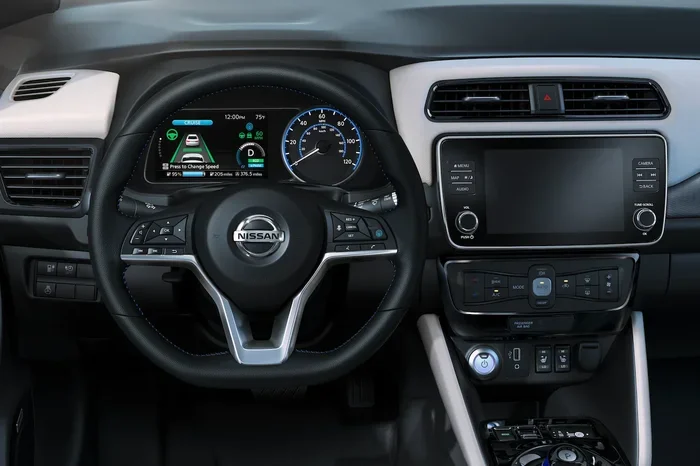
This is the fastest way to adjust the clock on your 2013 Altima. Most models come with steering wheel-mounted buttons that let you control the display settings without taking your hands off the wheel for long.
Follow these steps carefully:
- Turn the ignition to the ON position. You do not need to start the engine. Just turn the key to the accessory or ON setting.
- Locate the MENU button. It is usually on the left side of the steering wheel controls.
- Press the MENU button until the clock display appears. You may need to scroll through a few options.
- Use the up and down arrow buttons to highlight the time. The display will start blinking when it is ready for adjustment.
- Press the left or right arrow to change the hour. Hold the button to increase or decrease the number quickly.
- Press OK or the checkmark button to confirm the hour.
- Now adjust the minutes the same way. Use the arrows to set the correct minute value.
- Press OK again to save your changes. The clock will stop blinking and display the new time.
This method works on most 2013 Altima trims. If your steering wheel has a SET or RESET button, you may also be able to hold it for a few seconds to enter the clock adjustment mode directly.
Quick Tip: If the clock does not respond to the steering wheel buttons, try turning the ignition off and back on. Sometimes the system needs a fresh start to enter the settings menu.
Method 2: Using the Infotainment Display
The 2013 Nissan Altima comes with a basic infotainment system that also allows you to change the vehicle clock. This method works well if you prefer using the screen to navigate settings.
Step-by-Step Instructions
- Press the INFO or SETUP button on the audio head unit. This button is usually located on the left side of the climate controls or on the face of the stereo unit.
- Scroll through the menu options using the selector knob. Turn the knob to highlight “Settings” or “Setup.”
- Press the knob to select the clock or time setting.
- Choose between 12-hour and 24-hour format if needed. The 2013 Altima lets you pick your preferred display style. Some drivers prefer the 24-hour format for clarity.
- Adjust the hours and minutes using the knob or arrow buttons.
- Select “Save” or “Set” to confirm your changes.
The infotainment method gives you a bit more control. You can also set the time zone if your Altima has that feature. This is helpful if you travel frequently and want the clock to match your local time automatically.
Understanding the 12-Hour vs 24-Hour Display
The 12-hour format shows AM and PM. This is the default for most North American vehicles. The 24-hour format runs from 00:00 to 23:59, which some drivers find easier to read at a glance. To switch between them, simply find the “Time Format” option in the setup menu and toggle it.
Method 3: The Manual Knob Method
If your Altima does not have steering wheel controls or you prefer a more hands-on approach, the manual knob method works great too. This method uses the knobs and buttons on the dashboard itself.
- Locate the clock adjustment knob. On the 2013 Altima, this is usually near the radio controls or on the left side of the instrument panel.
- Press and hold the knob for about three seconds. The clock display should start blinking.
- Turn the knob to adjust the hour. Each click moves the number forward or backward depending on the direction you turn.
- Press the knob again to lock in the hour.
- Turn the knob to adjust the minutes.
- Press the knob one final time to save the settings.
This method is simple and does not require navigating through menus. It is also the most reliable if your infotainment system is acting up or freezing. Sometimes the simplest approach is the best one.
Quick Tip: If the knob does not respond, check that the ignition is in the ON position. The clock adjustment feature only works when the vehicle is powered on but does not need the engine running.
What to Do If the Clock Keeps Resetting
Dealing with a clock that keeps resetting can be frustrating. If your 2013 Altima clock loses the correct time every time you start the car, there are a few things you can check.
Check the Car Battery
A weak or dying battery often causes repeated clock resets. The clock needs a steady power supply to retain its settings. If your battery is more than three years old, consider having it tested at an auto parts store. Most stores offer free battery testing. This is also a good time to learn about how to determine the actual cash value of a car if you are thinking about replacing your vehicle altogether.
Check the Clock Fuse
Every car has a fuse box that protects the electrical components. The clock has its own fuse, and if it blows, the clock will not work at all. Check your owner’s manual for the fuse box diagram and locate the clock fuse. Replace it if it looks blown.
Inspect the Wiring Behind the Dashboard
In rare cases, a loose wire behind the dashboard can cause intermittent clock problems. If you are comfortable working under the dash, gently check the connections near the clock module. Always disconnect the battery before reaching into any electrical areas.
Visit a Nissan Dealer
If none of the above solutions work, it is worth visiting a Nissan dealer. They have diagnostic tools that can pinpoint electrical issues. Sometimes a simple software update from the dealer fixes persistent clock problems.
Maintaining Your Altima Clock and Electrical System
Once you have your clock set correctly, a few simple habits can keep it running smoothly. Regular maintenance of your electrical system goes a long way.
- Check your battery every six months. A healthy battery keeps all your electrical systems, including the clock, running properly.
- Avoid leaving accessories plugged in when the engine is off. This can drain the battery over time and cause clock resets.
- Keep your owner’s manual accessible. It contains model-specific information about your 2013 Nissan Altima that can help with troubleshooting.
- Note the time after any battery work. Always double-check the clock after disconnecting or replacing your battery. Make it a quick habit.
- Update your infotainment system if possible. Some dealers offer free software updates that improve overall system stability.
Taking care of these small details means fewer surprises and a car that feels reliable every time you get behind the wheel. A working clock might seem minor, but it adds to the overall comfort and usability of your vehicle.
How Long Does This Whole Process Take?
Here is the good news. Changing the time on a 2013 Nissan Altima takes just a few minutes. The steering wheel method is the fastest at about two minutes. The infotainment method might take three to four minutes if you are navigating menus for the first time. The manual knob method falls right in the middle.
Compare this to other car maintenance tasks. For example, learning how to clear a check engine code takes more steps and potentially more tools. Or think about how long it takes to build a car from start to finish at the factory, which is weeks of work. Adjusting your clock is one of the quickest and easiest DIY car tasks you can do.
Even if you are not a car person, this is a task you can handle confidently. No special tools. No expensive trips to the shop. Just a few button presses or knob turns.
Common Mistakes People Make When Adjusting the Clock
Avoid these common pitfalls to save yourself time and frustration:
- Forgetting to turn the ignition to ON. The clock settings are only accessible when the vehicle is powered on. Turning the key to ON without starting the engine is all you need.
- Not holding the knob long enough. If you are using the manual knob method, a quick tap will not work. Hold it for at least three seconds until the display starts blinking.
- Confusing the hour and minute buttons. Take your time and make sure you are adjusting the right value. The display will highlight each section when it is ready.
- Ignoring the time zone setting. If your Altima has a time zone option, setting it correctly helps the clock stay accurate throughout the year.
- Assuming the clock will auto-correct. The 2013 Altima does not have automatic daylight saving time adjustment. You must manually update the time each spring and fall.
Steering clear of these mistakes makes the process smoother the first time around. Once you have done it once, you will never forget the steps.
Expert Insights on Car Clock Maintenance
Experienced automotive technicians share a few extra tips that can help you keep your Altima clock in top shape. First, always keep a spare battery in your glove box. If your car battery dies unexpectedly, a spare allows you to get back on the road quickly and restore all your settings, including the clock. Second, consider investing in a battery maintainer or trickle charger if your Altima sits parked for long periods. This keeps the battery healthy and prevents the clock from resetting. Third, jot down the correct time in your phone or a small notebook in the glove box after adjusting it. This gives you a quick reference if you ever need to reset it again.
These small habits might seem like overkill, but they add up. They keep your vehicle running smoothly and your dashboard displaying the right time every single day. A well-maintained car is a reliable car, and that starts with the little things like clock accuracy.
Final Thoughts
Changing the time on your 2013 Nissan Altima is a quick and easy task that anyone can handle. Whether you use the steering wheel controls, the infotainment screen, or the manual knob, the process takes just a few minutes. No mechanic required. No expensive parts needed.
Remember to check your battery health if the clock keeps resetting. A strong battery supports all your electrical systems. And do not forget to manually update the clock for daylight saving time changes twice a year. These small routines keep your daily driving experience smooth and stress-free.
Now that you know exactly how to handle this, go ahead and set your clock to the correct time. Your future self will thank you when you are not rushing out the door wondering if you are late. Take a few minutes today, and enjoy the peace of mind that comes with a perfectly set car clock.
Frequently Asked Questions
How do I change the time on my 2013 Nissan Altima if the buttons are not working?
Try turning the ignition off and back on. If the buttons still do not work, check the fuse box for a blown clock fuse. You can also try the manual knob method if your model supports it. Sometimes a simple reset of the electrical system fixes unresponsive buttons.
Can I change the time format from 12-hour to 24-hour on the 2013 Altima?
Yes, you can. Use the infotainment system menu to find the time format setting. Toggle between 12-hour and 24-hour display. This option is available in the setup or preferences menu on the head unit.
Why does my clock reset every time I start my car?
This usually means your car battery is weak or has a low charge. The clock loses power when the battery cannot maintain a steady charge. Have your battery tested and replaced if needed. Also check the clock fuse for any issues.
How long does it take to change the clock on a 2013 Nissan Altima?
Most people complete the process in two to five minutes. The steering wheel method is the fastest. The infotainment method takes a bit longer if you are unfamiliar with the menu layout. The manual knob method is also quick once you know where the knob is located.
Do I need any special tools to change the time on my Altima?
No special tools are needed at all. You only need the steering wheel buttons, the infotainment knob, or the dashboard clock knob. All of these are built into the vehicle. Just make sure the ignition is in the ON position before you start.
Will changing the clock affect any other settings on my 2013 Altima?
No, changing the clock only affects the time display. It does not reset any other settings like radio presets, Bluetooth connections, or power window configurations. Your other vehicle settings remain exactly as they were before.