How to Remote Start a Nissan Kicks in 5 Easy Steps
Remote starting your Nissan Kicks is easy and incredibly convenient, especially on chilly mornings. With the right key fob and NissanConnect system, you can warm up or cool down your vehicle before you even step outside. This guide shows you exactly how to remote start a Nissan Kicks in five straightforward steps, plus expert tips to avoid common mistakes.
Key Takeaways
- You need a compatible key fob: Not all Nissan Kicks trims come with remote start. Check your owner’s manual to confirm your vehicle has this feature.
- The process is simple: Press the lock button, then hold the remote start button for about two seconds to start the engine.
- NissanConnect adds more control: The NissanConnect app lets you start your Kicks from your phone, giving you even more flexibility.
- Common issues are easy to fix: Most remote start problems come from a weak key fob battery or incorrect setup steps.
- Safety features are built in: Your Nissan Kicks stays secure while running remotely, with transmission locks and steering wheel locks engaged.
- Cold weather is where remote start shines: Warming up your engine and cabin before driving makes winter commutes much more comfortable.
📑 Table of Contents
- What You Need Before You Can Remote Start a Nissan Kicks
- Step-by-Step Guide to Remote Starting Your Nissan Kicks
- Understanding the NissanConnect Remote Start System
- Common Problems When Remote Starting a Nissan Kicks
- Tips to Get the Best Results from Remote Start
- Is Remote Start Safe for Your Nissan Kicks?
- Conclusion
What You Need Before You Can Remote Start a Nissan Kicks
Before you try to start your Nissan Kicks from across the parking lot, you need to make sure a few things are in place. Not every Kicks model comes with remote start as a standard feature, and not every key fob supports it. Taking a moment to check these basics will save you frustration later.
First, grab your Nissan Kicks owner’s manual. This small book has all the details about your specific model year and trim level. Look for the section on the key fob or remote engine start. If you have lost your manual, you can usually find a digital copy on Nissan’s website by entering your VIN.
Check Your Key Fob Compatibility
Your key fob is the remote control for your Nissan Kicks. It lets you lock the doors, open the trunk, and in some models, start the engine from a distance. But not all key fobs have the remote start button. The Nissan Kicks SV and SR trims are more likely to include this feature. Lower trims may not have it at all.
If your key fob has a button labeled Remote Start or a small engine icon, you are in luck. If you do not see this button, check whether your vehicle has the NissanConnect system. This is Nissan’s connected car technology that allows phone-based remote starting through a mobile app.
Verify Your Trim Level and Package
The trim level of your Nissan Kicks matters a lot here. The base S trim may not include remote start. The SV and SR trims are more likely to have it, especially if you chose the cold weather package or the technology package during purchase. These packages often bundle remote start with other comfort features like heated seats and heated steering wheels.
You can also check the door jamb sticker or the vehicle certification label on the driver’s door. This label lists your trim level and all factory-installed options. If you are still unsure, call your local Nissan dealer with your VIN and they can confirm whether your Kicks supports remote start.
Step-by-Step Guide to Remote Starting Your Nissan Kicks
Now that you know your vehicle supports remote start, let us walk through the process. These five steps work for most Nissan Kicks models with the factory remote start feature. The process is nearly identical every time, so once you learn it, it becomes second nature.
Step 1: Prepare Your Vehicle
This step is important and many people skip it. Make sure you are within range of your vehicle. Most key fobs work from about 300 to 500 feet away, though buildings and walls can reduce this distance. Stand outside the vehicle or be near a window if you are inside a building.
Also, make sure all doors are closed and locked. The remote start system will not engage if any door is open. Press the lock button on your key fob to confirm all doors are secured. Your lights should flash once to confirm the lock command was received.
Additionally, check that your transmission is in Park and the brake pedal was pressed when you last turned the vehicle off. These safety conditions must be met for the remote start system to activate. If you left the car in gear or did not press the brake, the system will not start the engine remotely.
Step 2: Press the Lock Button
Press the lock button on your key fob. You should hear the doors lock and see the lights flash. This tells the vehicle that you are initiating a remote command. You must lock the doors first before the remote start sequence begins.
Do this within a few seconds of approaching your vehicle or being ready to start. The system has a small window of time to accept the lock command before it resets. If you wait too long between the lock and the start command, you will need to repeat the process.
Step 3: Hold the Remote Start Button
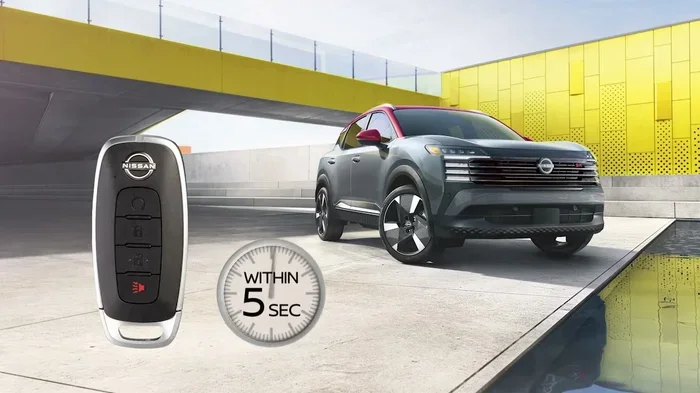
Now, press and hold the remote start button on your key fob for about two seconds. This button usually has a curved arrow icon or a small engine symbol. Hold it steadily and do not let go too early.
You should hear the engine start within a few seconds. The lights may flash again, and you might see the dashboard lights come on briefly. If the engine starts successfully, it will idle for about 10 to 15 minutes before shutting off automatically, unless you go out and drive the vehicle.
Step 4: Confirm the System is Active
After holding the button, wait a moment and listen. You should hear the engine running. If you are close enough, you may also feel the climate control system kick on. The air conditioning or heater will start based on your last settings, which is especially nice on hot or cold days.
Check your key fob for a confirmation light. Many Nissan key fobs have a small LED that changes color or flashes to confirm the remote start command was accepted. If nothing happens, the engine did not start, and you may need to repeat the process or check for issues.
Step 5: Enter the Vehicle and Drive
When you are ready to drive, walk up to your Nissan Kicks. The engine will already be running. Insert the key fob into the push-button start slot or have it near the ignition sensor, depending on your model year. Press the brake pedal and press the engine start button.
The engine will continue running normally, and the remote start timer resets. You can now drive away. Remember that the vehicle will shut off automatically after the preset time limit, usually around 10 to 15 minutes, if you do not drive it. This is a safety and fuel-saving feature built into the system.
Understanding the NissanConnect Remote Start System
NissanConnect is Nissan’s smart car technology platform that connects your vehicle to your smartphone. For Nissan Kicks models equipped with this system, you can remote start your engine from anywhere with a cellular or Wi-Fi connection. This is different from the key fob remote start because it works over much longer distances.
How NissanConnect Works with Remote Start
The NissanConnect system uses a built-in modem to communicate with Nissan’s servers. You send a command from your phone, the server relays it to your vehicle, and the engine starts. This means you can start your Nissan Kicks while you are at work, at the grocery store, or even on vacation.
To use NissanConnect remote start, you need to have the NissanConnect Services active on your vehicle. This usually requires a subscription plan, which may be free for the first few years after purchase. Check with your dealer or log into your Nissan account online to confirm your subscription status.
Using the NissanConnect Mobile App
Download the NissanConnect app from the App Store or Google Play. After logging in with your Nissan account, you will see a dashboard with options like lock, unlock, honk horn, flash lights, and remote start. The remote start option is usually represented by a small engine icon.
Tap the remote start button and confirm the command. The app will show a status message indicating whether the engine started successfully. You can also set climate control preferences through the app, so your Kicks is already warm or cool when you arrive.
One great advantage of using the app is that you can monitor your vehicle’s status in real time. You can see if the doors are locked, whether the engine is running, and even check your fuel level. This adds a layer of convenience and peace of mind that the key fob alone cannot provide.
Common Problems When Remote Starting a Nissan Kicks
Even with a fully compatible vehicle, remote start can sometimes give you trouble. Most issues are simple to fix and do not require a trip to the dealer. Here are the most common problems and how to solve them.
Key Fob Battery Issues
The most common reason for remote start failure is a weak key fob battery. When the battery gets low, the signal becomes too weak to reach the vehicle. If your remote start stopped working suddenly, replacing the key fob battery is the first thing to try.
Use a CR2032 battery for most Nissan key fobs. Open the back of the fob with a small flathead screwdriver, remove the old battery, and insert the new one with the positive side facing up. After replacing it, you may need to check your car battery voltage to make sure the vehicle’s main battery is also healthy, since a weak car battery can also prevent remote starting.
Range and Signal Problems
Remote start has a limited range, and obstacles like buildings, walls, and even large vehicles can block the signal. If you are trying to start your Nissan Kicks from inside a concrete building, the signal may not reach. Try stepping outside or moving closer to the vehicle.
Cold weather can also affect key fob performance. In freezing temperatures, the key fob battery drains faster and the signal weakens. If you live in a cold climate, keep your spare key fob warm by carrying it in an inside pocket close to your body. This keeps the battery voltage stable and the signal strong.
Engine Won’t Start Remotely
If the engine does not start when you press the remote start button, check a few things first. Make sure the doors are locked and the transmission is in Park. Verify that the brake pedal was pressed when you last turned the vehicle off. Also confirm that you are within range of the key fob signal.
If all of these conditions are met and the engine still will not start, there may be a fault code stored in the vehicle’s computer. Use an OBD-II scanner to check for error codes, or visit a Nissan dealership for a diagnostic check. Sometimes a simple software update from the dealer fixes remote start issues.
Tips to Get the Best Results from Remote Start
Remote start is not just about starting the engine. There are several ways to make the most of this feature and get the best experience every time you use it.
Climate Control Settings
Before you leave your Nissan Kicks for the day, set the climate control to your preferred temperature. When the remote start activates, the system will use those settings to warm or cool the cabin. This is incredibly useful during cold winter mornings or hot summer afternoons.
If your Kicks has heated seats, some models allow you to activate those through the remote start sequence as well. Check your owner’s manual for the exact button sequence to enable heated seats with remote start. Sitting in a warm seat makes the drive so much more comfortable.
Security Features to Keep in Mind
Your Nissan Kicks stays secure while running remotely. The steering wheel remains locked, the transmission is in Park, and the doors stay locked. You cannot drive the vehicle unless you are inside with the key fob present and the brake pedal pressed.
However, there are a few security tips to keep in mind. Never leave your vehicle unattended in a closed garage while remote starting it. The exhaust fumes can be dangerous, even with the garage door open. Also, always make sure the vehicle is parked in a well-ventilated area before using remote start.
Some owners worry about theft when using remote start. Modern Nissan vehicles have immobilizer systems that prevent the engine from being driven without the correct key fob present. So even if someone gets into your Kicks, they cannot drive it away without your key fob.
Is Remote Start Safe for Your Nissan Kicks?
Many people wonder whether remote starting their vehicle is safe and whether it causes any long-term damage to the engine. The short answer is yes, remote start is safe and designed by Nissan specifically for their vehicles. The system includes multiple safeguards that protect your engine and your Kicks.
Vehicle Security During Remote Start
When your Nissan Kicks is running remotely, it is not vulnerable to casual theft. The steering column lock is engaged, and the ignition cannot be turned without the proper key fob authentication. The doors remain locked, and the alarm system stays active.
The engine will also shut off automatically if any door is opened while the vehicle is in remote start mode. This is a security feature designed to prevent unauthorized use. If someone tries to open a door, the engine stops immediately, and the horn may sound as an alarm.
Legal Considerations
Remote start is legal in most places, but some jurisdictions have specific regulations about idling vehicles. In areas with strict anti-idling laws, you may be limited in how long you can let your engine run remotely. Check your local regulations to make sure you are compliant.
Also, be mindful of the environment. While a few minutes of idling to warm up the cabin is normal and expected, excessive idling wastes fuel and produces emissions. Use remote start wisely, and try to limit the idle time to what you actually need before driving.
Conclusion
Remote starting your Nissan Kicks is one of the most convenient features modern vehicles offer. Whether you use the key fob or the NissanConnect app, the process is straightforward and takes only a few seconds. By following the five steps outlined in this guide, you can warm up your engine, defog your windshield fast, and enjoy a comfortable cabin before you even walk out the door.
Remember to keep your key fob battery fresh, stay within range, and always follow the safety guidelines. Remote start works best when you understand how the system operates and what it needs from you. With proper use, your Nissan Kicks remote start system will serve you reliably for years to come.
Take a few minutes today to review your owner’s manual and practice the remote start sequence. Once you get comfortable with it, you will wonder how you ever lived without it. Enjoy the convenience and comfort that comes with knowing your Nissan Kicks is ready to go whenever you are.
Frequently Asked Questions
Can I remote start my Nissan Kicks with the NissanConnect app?
Yes, if your Nissan Kicks is equipped with the NissanConnect system, you can start the engine from the mobile app. Make sure your NissanConnect subscription is active and your phone has a data connection. The app works over Wi-Fi and cellular networks, so you can start your vehicle from almost anywhere.
How far away can I be from my Nissan Kicks when using remote start?
With the key fob, you can typically be about 300 to 500 feet away from your vehicle. With the NissanConnect app, the range is virtually unlimited as long as you have a cellular or Wi-Fi connection. Keep in mind that walls, buildings, and other obstacles can reduce the key fob range.
Why won’t my Nissan Kicks remote start work in cold weather?
Cold weather can weaken the key fob battery and reduce signal strength. If your remote start fails during winter, try replacing the key fob battery and keeping the fob close to your body for warmth. Also make sure all doors are fully closed and locked, as the system will not start if any door is open.
Does remote start waste gas or harm the engine?
No, remote start is designed to be safe for your engine. The system limits idle time, usually to about 10 to 15 minutes, and shuts off automatically. While there is a small amount of fuel used during idle, the convenience and comfort benefits generally outweigh the minimal fuel cost.
Can I set the temperature before using remote start?
Yes, you can set the climate control to your preferred temperature before turning off the engine. When remote start activates, it will use those settings to warm or cool the cabin. Some models also allow you to activate heated seats through the remote start sequence.
What should I do if the remote start engine keeps shutting off immediately?
If the engine starts but immediately shuts off, check that the brake pedal was pressed when you last turned off the vehicle. Also confirm the transmission is in Park and all doors are locked. If the problem persists, there may be a fault code in the vehicle’s computer system. A trip to the dealer for diagnostics usually resolves the issue quickly.