How to Connect Key Fob to Car Push to Start Step by Step
Connecting your key fob to a push to start car is simpler than you think. This guide walks you through the entire process step by step, from preparation to final pairing. You will learn how to program your smart key, fix common issues, and keep your fob working perfectly.
Have you ever stood by your car, key fob in hand, wondering how to connect key fob to car push to start? It feels like something only a dealer should handle. But here is the truth. You can do this yourself. It takes just a few minutes, and you do not need any special tools. This guide breaks down every single step so you can pair your smart key with confidence.
Push to start systems have become standard in most modern vehicles. They are convenient, sleek, and secure. But when your key fob loses its connection or you get a new one, the process can feel confusing. Whether you lost your original fob, bought a replacement, or just want to add a spare, this article has you covered. Let us walk through it together.
Key Takeaways
- Know your system: Understanding how push to start and smart keys work makes the process much easier.
- Preparation matters: Having the right tools and information before you start saves time and frustration.
- Follow the steps carefully: Each car brand has a specific pairing sequence you need to follow exactly.
- Fix common issues fast: Dead batteries, signal interference, and sync errors are easy to resolve at home.
- Maintain your fob: Regular battery swaps and proper storage keep your key fob running smoothly for years.
- Know when to call a pro: Some issues need a dealer or locksmith, and that is perfectly okay.
📑 Table of Contents
- Understanding How Your Key Fob Works with Push to Start
- Preparing to Connect Your Key Fob to Car Push to Start System
- Step by Step Key Fob Connection Process
- Brand-Specific Key Fob Pairing Tips
- Troubleshooting Common Connection Issues
- Tips to Keep Your Key Fob Working Perfectly
- When to Seek Professional Help
- Frequently Asked Questions
- Conclusion
Understanding How Your Key Fob Works with Push to Start
Before you dive into the steps, it helps to understand what is happening under the hood. A push to start system uses a smart key or proximity sensor to recognize your fob. When you press the start button, the car checks if the correct fob is nearby. If it finds a match, the ignition turns on and the engine starts.
What Is a Smart Key?
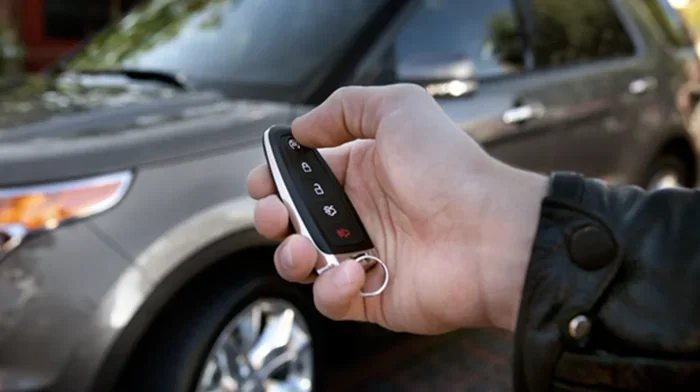
A smart key is a wireless fob that communicates with your car using a low-frequency signal. You do not need to insert it into a slot. Just keep it in your pocket or purse, and the car detects it. This is called passive entry. When you press the push start button, the system verifies the fob is authentic and allows the engine to fire up.
How Does Key Fob Pairing Work?
Pairing means teaching your car to recognize a new fob. Each fob has a unique code inside its chip. This is often called a transponder key system. When you follow the pairing steps, the car and the fob exchange these codes. After that, the car trusts that fob and allows it to start the engine.
The pairing process is different for every car brand. Some use a simple button sequence. Others require you to use the steering column controls. We will cover the general process below, and then look at specific brands in more detail.
Preparing to Connect Your Key Fob to Car Push to Start System
Preparation is the most overlooked step. People rush into the pairing process and get stuck. Do not let that be you. A few minutes of prep makes everything smoother.
What You Will Need
- Your new or replacement key fob
- A working fob (if you have one)
- Your car owner’s manual
- A fresh battery for the new fob (usually CR2025 or CR2032)
- A quiet environment with no signal interference
Check Your Car Battery
Before you start, make sure your car battery is healthy. A weak battery can interrupt the pairing process. If your dashboard lights are dim or flickering, charge or jump-start your car first. A strong electrical system ensures a clean signal between the fob and the car.
Read Your Owner’s Manual
Your owner’s manual contains the exact pairing instructions for your specific model. Some brands hide the steps in a section called “Remote Key Entry” or “Smart Key System.” Find that section and read it before you begin. It will save you from guesswork.
Choose the Right Location
Pair your fob inside the car with all doors closed. Turn off any nearby electronics that might cause signal interference. This includes other key fobs, phones on wireless chargers, or even microwave ovens nearby. A clean signal environment leads to a faster and more reliable pairing.
Step by Step Key Fob Connection Process
Now we get to the heart of the matter. Below is the general process for connecting a key fob to a push to start vehicle. Remember, your specific model may vary slightly. Always cross-check with your owner’s manual.
Step 1: Insert the Key or Use the Physical Start Method
Some cars require you to insert the mechanical key into the ignition slot. Others let you place the fob in a specific spot on the console or steering column. Check your manual for the designated fob placement zone. This is often marked with a small icon or label.
If your car has a hidden mechanical key inside the fob, pull it out now. You may need it to access a physical slot. This backup method is essential if the fob battery dies completely.
Step 2: Turn the Ignition to the On Position
Without pressing the brake pedal, turn the ignition to the “On” or “Accessory” position. In some vehicles, you just press the push start button once without the fob. The dashboard lights should come on. This tells the car you are in programming mode.
Watch for a flashing light on the dashboard. That light usually means the car is ready to accept a new fob. If nothing happens, double-check that you are in the right position and the car battery is strong.
Step 3: Press the Lock or Unlock Button on the Fob
Now, press the lock button or unlock button on the new fob. Hold it for about two seconds. You should see the dashboard light change or hear a beep. This confirms the car has detected the fob.
Some models require you to press the button three times quickly. Others ask you to hold it for five seconds. Pay close attention to any sounds or visual cues from the car. These are your clues that the process is working.
Step 4: Turn the Ignition Off and Repeat
Turn the ignition back to the “Off” position. Wait about five seconds. Then turn it back to “On” again. Repeat the button press on the fob if needed. This second cycle confirms the pairing.
If you are adding multiple fobs, repeat this step for each one. The car usually accepts up to three or four fobs at a time. Make sure you pair all of them in the same session.
Step 5: Test the Connection
Turn the ignition off. Step out of the car and close all doors. Now walk back to the vehicle with your new fob. Press the push start button with the brake pedal pressed. The engine should start without any error messages.
If the car starts, congratulations. You have successfully completed the key fob connection. If not, do not worry. Move on to the troubleshooting section below.
Brand-Specific Key Fob Pairing Tips
Different car brands use slightly different methods. Here are quick tips for some of the most popular brands.
Toyota and Lexus
For most Toyota and Lexus models, you need to press and hold the lock and unlock buttons on the fob for one to two seconds while the ignition is in the “On” position. Then turn the ignition off and on again within five seconds. Repeat this for each additional fob.
Honda
Honda vehicles often require you to place the fob on a specific spot on the steering column. Press the engine start/stop button with the fob in that spot. The car will recognize it and you can then add more fobs through the same process.
Ford
Ford uses a simple sequence. Turn the ignition from “Off” to “On” three times within ten seconds. Then press any button on the fob. The doors will lock or unlock to confirm the pairing. Repeat for additional fobs.
Chevrolet and GMC
GM vehicles typically require you to have a working fob already programmed. Place the working fob in the “On” position, then insert the new fob into the fob programming slot (often found on the center console). Press the push start button and follow the on-screen prompts.
Troubleshooting Common Connection Issues
Even when you follow every step perfectly, things can go wrong. Here are the most common problems and how to fix them fast.
The Car Does Not Detect the Fob
This is the most common issue. Start by replacing the fob battery. A weak battery sends a weak signal, and the car cannot pick it up. Use a fresh CR2025 or CR2032 battery depending on your fob model. Also, make sure the fob is not sitting next to your phone or other wireless devices during pairing.
Error Message on the Dashboard
If you see a message like “Key Not Found” or “Smart Key Not Detected,” do not panic. This usually means the car is not in programming mode. Go back to Step 2 and make sure you turned the ignition to “On” correctly. Some cars require you to press the brake pedal before pressing the start button during programming.
The Fob Works but the Car Will Not Start
This happens when the fob is paired for locking and unlocking but not for engine start. This means the transponder chip inside the fob did not fully sync. Repeat the pairing process from the beginning. Make sure you complete all steps without skipping any.
Interference from Other Fobs
If you have multiple fobs in the car during pairing, they can interfere with each other. Remove all other fobs from the vehicle and your pockets. Pair one fob at a time in a clean signal environment. This alone fixes the problem more often than you would think.
Tips to Keep Your Key Fob Working Perfectly
Once your key fob is connected, you want it to stay reliable. A few simple habits go a long way.
Replace the Battery Every Two Years
Key fob batteries typically last between one and two years. Set a reminder on your phone to swap the battery before it dies completely. A dying battery often causes intermittent connection problems that can feel like a serious issue when it is really just a weak battery.
Store the Fob Properly
Do not leave your fob near strong magnets, microwaves, or large metal objects. These can interfere with the key fob signal. Also, avoid dropping the fob. Internal damage to the chip can cause pairing failures even when the battery is fresh.
Keep a Spare Fob
Always have at least one spare key fob programmed and ready. If your primary fob gets lost, stolen, or damaged, you will not be stranded. Many people learn this lesson the hard way. Be proactive and pair a backup fob as soon as possible.
Clean the Fob Regularly
Dirt and moisture can get inside the fob and cause connection issues. Wipe it down with a soft, slightly damp cloth every few weeks. Check the battery contacts for any corrosion. A clean fob is a reliable fob.
When to Seek Professional Help
Most key fob connection issues can be solved at home. But there are times when you need expert help. Here are clear signs it is time to call a professional.
- You have tried the full pairing process three times and it still fails
- Your car displays a security warning light that will not go away
- You need to program a fob for a luxury or high-security vehicle
- The transponder chip inside the fob appears damaged
- You have lost all working fobs and need a new one programmed from scratch
A car locksmith or dealership can handle complex situations quickly. They have specialized tools and software that home methods cannot replicate. There is no shame in asking for help. It saves you time and prevents costly mistakes.
Frequently Asked Questions
Can I connect a key fob to car push to start without the owner’s manual?
Yes, you can. Most follow a general pattern of turning the ignition on and pressing fob buttons. However, your owner’s manual has the exact steps for your model. It is the fastest and most reliable way to get it right the first time.
How long does it take to pair a new key fob?
It usually takes between five and fifteen minutes. Simple vehicles with one fob take less time. Cars that support multiple fobs or have complex security systems may take a bit longer. Be patient and follow each step carefully.
What should I do if my push to start car says no key detected?
First, check the fob battery and replace it if needed. Then make sure the fob is close to the proximity sensor, usually located on the center console or steering column. If the problem persists, try the full re-pairing process from the beginning.
Do I need special equipment to program a key fob?
No. For most vehicles, you only need the new fob, a fresh battery, and access to the car’s interior. Some luxury brands require dealer-level tools, but the majority of cars allow you to pair fobs yourself at home.
Can I pair a used key fob to my car?
Yes, but you must first erase the old vehicle’s memory from the fob. This is usually done through the car’s settings menu or by a professional. Once cleared, you can pair it as a new fob to your vehicle.
Why does my key fob work for unlocking but not for starting the car?
This means the fob is paired for basic functions but the engine start signal did not fully sync. Repeat the pairing process and make sure you complete every step without interruption. Check that the fob battery is strong enough to transmit the start signal.
Conclusion
Connecting your key fob to car push to start system does not have to be stressful. With the right preparation and a little patience, you can handle it all on your own. Start by understanding how your smart key works. Gather your tools. Follow each step carefully. And if something goes wrong, the troubleshooting tips above will help you get back on track.
Keep your fob battery fresh, store it properly, and always have a spare ready. These small habits prevent most problems before they start. And remember, when the situation calls for it, a professional locksmith or dealer is just a phone call away.
Now that you know exactly how to connect key fob to car push to start, you have the power to handle this task yourself. Save the money, gain the confidence, and enjoy the convenience of a properly paired smart key. Your car is ready. All you need to do is press that button and go.