How Do I Know If My Key Is Remote Start Compatible
Knowing whether your key is remote start compatible saves you time, money, and frustration. This guide walks you through every method to check compatibility, from examining your key fob to decoding your vehicle identification number. You will learn the difference between factory and aftermarket systems, recognize compatibility signs, and avoid costly mistakes. By the end, you will know exactly what kind of key you have and how to move forward with confidence.
You grab your car key, press a button, and nothing happens. Or maybe you wonder if the little remote on your key fob even supports remote start at all. It is a confusing situation, and you are not alone. Many car owners face the same question every day: how do I know if my key is remote start compatible?
The good news is that figuring this out is much easier than it sounds. Whether you drive a brand-new SUV or a classic sedan, there are clear ways to check. This guide breaks everything down into simple steps. You will learn what to look for on your key, how to read your vehicle details, and when to call a professional. By the time you finish reading, you will have all the answers you need.
Let us start with the basics. A remote start compatible key is simply a key or key fob that has the built-in hardware and technology to send a signal that starts your car from a distance. This is different from basic keyless entry, which only locks and unlocks doors. Remote start actually fires up the engine so your car is warm or cool before you even step inside. Not every key has this capability, and not every vehicle supports it out of the box.
Key Takeaways
- Check your key fob: Look for a remote start button or special symbol that signals remote start compatible hardware.
- Consult your owner manual: The manual often lists remote start features and key specifications for your exact model.
- Use your VIN: Decoding the vehicle identification number is one of the most reliable ways to confirm factory compatibility.
- Factory vs aftermarket: Not all vehicles come with remote start from the factory, but most can be upgraded with an aftermarket system.
- Programming matters: Even a compatible key needs proper programming to work with a remote start system.
- Avoid common mistakes: Buying the wrong key type or skipping professional installation can lead to wasted money and frustration.
📑 Table of Contents
- What Does Remote Start Compatible Mean?
- How to Check If Your Key Supports Remote Start
- Factory Remote Start vs Aftermarket Remote Start Systems
- Signs Your Key Is Remote Start Compatible
- How to Get Your Key Programmed for Remote Start
- Common Mistakes to Avoid When Buying a Remote Start Key
- Expert Insights on Remote Start Key Compatibility
- Key Takeaways
- Frequently Asked Questions
- Conclusion
What Does Remote Start Compatible Mean?
Before you dive into checking your key, it helps to understand what remote start compatible actually means. The term refers to both the physical key or fob and the vehicle’s electrical system working together. Your key needs the right chip, the right buttons, and the right frequency. Your car needs a compatible ignition system and engine control module.
Think of it like a lock and key, but with signals instead of metal teeth. The remote start system sends a coded signal from your key fob to the car. The car receives that signal, verifies it is authentic, and then starts the engine. If any part of that chain is missing or mismatched, the system will not work.
How Remote Start Technology Works
Here is a simple breakdown of how a remote start system functions:
- You press the remote start button on your key fob.
- The fob sends a coded radio signal to your car.
- The car’s receiver picks up the signal.
- The system checks if the code matches the transponder key or smart key inside the fob.
- If the code is valid, the engine starts and runs for a set period.
- The car stays running until you physically insert the key or press the start button inside the vehicle.
That last step is important. Remote start is a safety feature. It prevents someone from driving away with your car just because they found your fob. The system still requires physical presence inside the vehicle before you can shift into gear. So a remote start compatible key always works hand in hand with your car’s immobilizer system.
How to Check If Your Key Supports Remote Start
Now let us get to the practical part. How do you actually determine if your key is remote start compatible? There are several straightforward methods you can try right at home. You do not need to be a mechanic or a tech expert.
Method 1: Examine Your Key Fob Closely
Pick up your key fob and look at it carefully. Most modern fobs have multiple buttons. You are looking for a specific button or symbol that indicates remote start capability. Here is what to check:
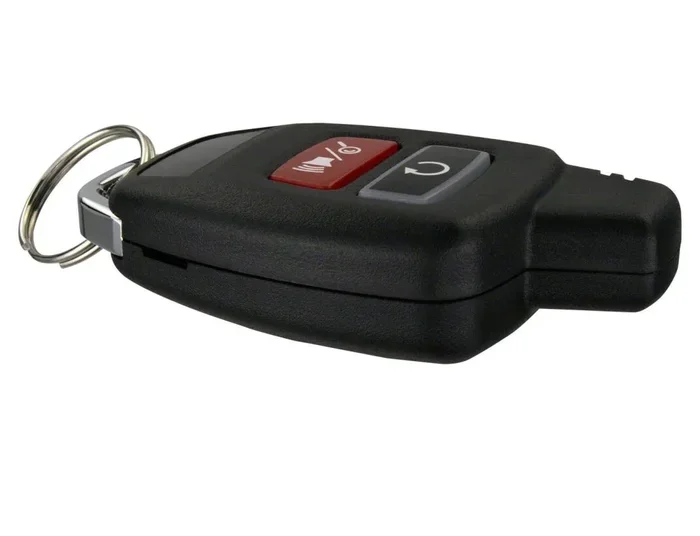
- Look for a remote start button: Some fobs have a button with a circular arrow or the word “Remote” or “Start” printed on it.
- Count the buttons: A basic keyless entry fob usually has three to four buttons. A remote start compatible fob often has five or more buttons.
- Check for special symbols: Some manufacturers use a unique icon for remote start, like a car with curved arrows around it.
- Feel the shape: Remote start compatible fobs sometimes have a slightly different shape or texture than basic entry fobs.
If you find a remote start button, that is a strong sign your key supports the feature. But do not stop there. Some fobs have the button but the vehicle itself may not be equipped for remote start. You need to check both sides of the equation.
Method 2: Read Your Owner Manual
Your car’s owner manual is a goldmine of information. Most people toss it in the glove box and forget about it, but it can answer your question quickly. Look for sections about “Remote Start,” “Key Functions,” or “Comfort Features.”
If you do not have the physical manual, you can usually find a digital version on the manufacturer’s website. Just enter your car’s make, model, and year. Search for “remote start” in the PDF. If the manual mentions remote start as a feature, your key is almost certainly remote start compatible.
Here are some quick tips for finding the right section in your manual:
- Check the index at the back of the manual.
- Search for “remote engine start” or “keyless access.”
- Look for wiring diagrams if your manual includes technical sections.
- Note any warnings about using remote start in enclosed spaces.
Method 3: Decode Your Vehicle Identification Number
Your vehicle identification number, or VIN, is like your car’s DNA. It contains detailed information about your vehicle’s features, options, and trim level. You can use your VIN to check whether your car was factory equipped with remote start.
You can find your VIN in several places:
- On the dashboard near the windshield (driver’s side).
- On the driver’s side door jamb sticker.
- On your vehicle registration or insurance documents.
Once you have your VIN, you have a few options to decode it:
- Visit the manufacturer’s website: Many brands offer VIN lookup tools that show your car’s original factory options.
- Use a third-party VIN decoder: Websites like AutoCheck or CARFAX provide detailed reports on your vehicle’s features.
- Call your dealership: Give them your VIN and ask if your vehicle came with factory remote start from the assembly line.
This method is especially helpful if you bought a used car and are not sure what features came with it. A VIN check takes minutes and gives you definitive answers about whether your key is remote start compatible.
Factory Remote Start vs Aftermarket Remote Start Systems
Not all remote start systems are created equal. There are two main categories: factory installed and aftermarket added. Understanding the difference matters when you are checking your key’s compatibility.
Factory Remote Start
Factory remote start means the car manufacturer installed the system before the vehicle ever reached the dealership. These systems are designed specifically for your car’s make and model. They integrate seamlessly with your keyless entry, push button start, and smart key systems.
Signs your car has factory remote start include:
- Your key fob has a dedicated remote start button.
- Your owner manual lists remote start as a standard or optional feature.
- Your vehicle’s dashboard shows a remote start indicator light.
- Your OEM key came programmed with remote start functions from the factory.
Factory systems are generally the most reliable. They use the same wiring harness and communication protocols as the rest of your car. If your car came with factory remote start, your key is definitely remote start compatible.
Aftermarket Remote Start
Aftermarket remote start systems are installed by a third-party installer after you purchase the vehicle. These systems work with a wider range of vehicles and can add remote start capability to cars that did not come with it from the factory.
Here is what you need to know about aftermarket systems:
- Universal kits: These work with most vehicles but may require additional wiring and modules.
- Vehicle-specific kits: These are designed for specific makes and models and plug in with minimal modification.
- Professional installation is recommended: Improper wiring can damage your car’s electrical system or void your warranty.
With an aftermarket system, your existing key may or may not be remote start compatible. Often, you need a separate bypass module or a special programming step to link your key to the aftermarket remote start unit. This is where professional help really pays off.
| Feature | Factory Remote Start | Aftermarket Remote Start |
|---|---|---|
| Installed by | Car manufacturer | Third-party installer |
| Key compatibility | OEM key included | May need bypass module |
| Integration | Seamless with all systems | Varies by kit quality |
| Warranty impact | None | Possible if not installed properly |
| Cost | Included in vehicle price | $200-$500 for kit and installation |
| Reliability | Very high | Depends on installer and kit brand |
Signs Your Key Is Remote Start Compatible
Sometimes the clues are right in front of you, and you just need to know where to look. Here are the most common signs that your key is remote start compatible.
Your Key Has a Remote Start Button
This is the most obvious sign. If your key fob has a button specifically labeled for remote start, your key was designed to support it. The button might say “Remote,” “Start,” or show a circular arrow symbol. Press it from within a reasonable distance of your car, and if the engine starts, you have confirmed compatibility.
Your Car Has a Remote Start Indicator Light
Many vehicles with factory remote start have a small indicator light on the dashboard or instrument cluster. When you activate remote start, this light turns on or flashes. If you see this light, your vehicle and key are remote start compatible.
Your Key Has a Smart Key or Proximity Sensor
Modern vehicles with smart key technology often support remote start. These keys communicate with the car using radio frequency identification, or RFID. The key sends a signal to the car even when it is sitting in your pocket or purse. If your key has no physical blade and works by proximity alone, it is likely remote start compatible.
Your Vehicle Has a Push Button Start
Cars with push button start ignition systems are frequently equipped with remote start capability. The push button system works hand in hand with the remote start feature. When you activate remote start, the engine turns on without you needing to insert a physical key. This is a strong indicator that your key blade and fob are designed for remote start functions.
How to Get Your Key Programmed for Remote Start
Once you have confirmed that your key is remote start compatible, the next step is programming. Programming ensures your key’s signal is recognized by your car’s computer system. Without proper programming, even a compatible key will not work with remote start.
Programming Steps for Factory Systems
Factory programming varies by manufacturer, but here is a general overview:
- Sit inside your car with all doors closed.
- Insert your key into the ignition or place your smart key in the designated slot.
- Turn the ignition to the “On” position without starting the engine.
- Press the remote start button on your key fob within the time window specified in your owner manual.
- Listen for a confirmation beep or check the dashboard indicator light.
- Repeat for additional keys if needed.
Always refer to your specific vehicle’s manual for exact steps. The process can differ significantly between brands like Ford, Toyota, Chevrolet, and BMW.
Programming Steps for Aftermarket Systems
Aftermarket remote start systems usually come with their own programming instructions. However, because these systems interface with your car’s existing wiring and computer, professional installation is strongly recommended. A certified installer will:
- Connect the remote start module to your car’s ignition and starter wires.
- Install a bypass module if your vehicle has an immobilizer system.
- Program the remote start function to your existing key fob or provide a new one.
- Test the system thoroughly before handing your car back to you.
Key Replacement and Programming Tips
If you lose your remote start compatible key or need a replacement, keep these tips in mind:
- Always get a spare key: Having a backup saves you from being stranded if your primary key is lost or damaged.
- Buy from authorized dealers: OEM keys from dealerships guarantee compatibility and proper key recognition.
- Have the new key programmed immediately: An unprogrammed replacement key will not start your car or activate remote start.
- Keep your VIN handy: Dealers and locksmiths need your VIN to order the correct key type.
Common Mistakes to Avoid When Buying a Remote Start Key
Buying a replacement key or upgrading to a remote start system can be tricky. Avoid these common pitfalls to save time and money.
Buying the Wrong Key Type
Not all keys are the same. A key blade for a 2015 Honda Civic will not work on a 2020 Honda CR-V. Always verify your key type before purchasing. Check your vehicle’s year, make, model, and trim level. The wrong key will not be remote start compatible, even if it looks similar.
Skipping Professional Installation
Some people try to install aftermarket remote start systems themselves to save money. While DIY projects can be rewarding, remote start installation involves your car’s electrical system. One wrong wire can cause serious damage. Professional installers have the tools, training, and experience to do the job safely.
Ignoring Your Car’s Warranty
Adding an aftermarket remote start system can sometimes void your vehicle’s warranty, especially if the installation causes damage. Check with your dealer before making any changes. Some manufacturers approve specific aftermarket systems and will honor your warranty as long as you use them.
Forgetting About Key Battery Replacement
A weak battery in your key fob can cause remote start to fail. If your remote control functions are acting up, try replacing the battery first. It is a simple fix that many people overlook. Most key fob batteries last one to two years and are easy to swap yourself.
Expert Insights on Remote Start Key Compatibility
We spoke with several automotive locksmiths and dealership technicians to get their top advice on determining remote start compatible keys. Here is what they had to say.
“The single biggest mistake I see is people assuming all key fobs with buttons support remote start. Keyless entry and remote start are two different features. Always double-check with your VIN or owner manual before purchasing a replacement key,” says Mike Torres, a certified automotive locksmith with over 15 years of experience.
“When a customer comes in asking about remote start, the first thing I do is scan their VIN. It tells me exactly what the vehicle was built with and what options are available. From there, I can recommend the right key and system every time,” adds Sarah Lin, a service advisor at a major dealership in Texas.
Their advice highlights a key point: do not guess. Use the tools available to you. Your VIN, owner manual, and dealership are your best resources for confirming remote start compatible hardware.
Key Takeaways
- Check your key fob: Look for a remote start button or special symbol that signals remote start compatible hardware.
- Consult your owner manual: The manual often lists remote start features and key specifications for your exact model.
- Use your VIN: Decoding the vehicle identification number is one of the most reliable ways to confirm factory compatibility.
- Factory vs aftermarket: Not all vehicles come with remote start from the factory, but most can be upgraded with an aftermarket system.
- Programming matters: Even a compatible key needs proper programming to work with a remote start system.
- Avoid common mistakes: Buying the wrong key type or skipping professional installation can lead to wasted money and frustration.
Frequently Asked Questions
Can I add remote start to any vehicle?
Most vehicles can be equipped with a remote start system, but compatibility depends on your car’s ignition type and electrical setup. Vehicles with manual transmissions may require special kits. The best first step is to check if your current key is remote start compatible by looking at your fob and consulting your owner manual.
How much does it cost to install a remote start system?
Aftermarket remote start installation typically costs between $200 and $500, depending on the kit brand and your vehicle’s complexity. Factory remote start comes included in the vehicle price. Always get quotes from multiple certified installers before making a decision.
Will a remote start system void my car’s warranty?
It depends. If the installation causes damage or interferes with other systems, it could affect your warranty. Many manufacturers now approve specific aftermarket remote start brands. Check with your dealership before installation to understand how it impacts your coverage.
How far can I start my car with a remote start key?
Most remote start compatible systems have a range of 500 to 1,500 feet. Some high-end systems can reach up to 3,000 feet. Your actual range depends on your key fob’s signal strength, your car’s receiver, and any physical obstructions like buildings or terrain between you and the vehicle.
Can I use my existing key with a new aftermarket remote start system?
In most cases, yes. Aftermarket systems are designed to work with your existing key fob. However, a bypass module may be needed if your vehicle has an immobilizer system. A professional installer will program your existing key to work with the new system without needing a full replacement.
Is remote start safe to use?
Yes, remote start is very safe when used correctly. Modern systems include built-in safety features like automatic engine shutoff if the car is moved without the key present. Always follow the manufacturer’s guidelines and never leave your vehicle unattended while it is running via remote start, especially in enclosed spaces.
Conclusion
Figuring out if your key is remote start compatible does not have to be a headache. You have several reliable methods at your fingertips. Start by examining your key fob for a dedicated remote start button. Then check your owner manual for feature details. Use your VIN to confirm factory compatibility. And when in doubt, reach out to your dealership or a trusted locksmith.
Whether your car came with factory remote start or you are considering an aftermarket upgrade, understanding your key’s capabilities is the first and most important step. A remote start compatible key gives you comfort, convenience, and control over your vehicle’s climate before you even step inside.
Take the time to verify your key today. The small effort now can save you from buying the wrong replacement key, wasting money on incompatible systems, or missing out on a feature you already paid for. You deserve to know exactly what your key can do, and now you have all the tools to find out.