How Do I Turn On the Backup Camera for Safer Driving
Knowing how to turn on the backup camera is one of the simplest yet most impactful safety upgrades you can make. Whether your vehicle activates the rearview display automatically when you shift into reverse or you need to manually enable it through the settings menu, this guide covers every scenario. We will walk you through activation steps, common issues, and expert tips to ensure your backup camera works flawlessly every time you park or maneuver in tight spaces.
Have you ever stepped out of your car, only to realize you have no idea what is behind you? That moment of uncertainty happens to almost every driver at some point. The good news is that your vehicle likely has a backup camera ready to help. Learning how to turn on the backup camera takes just a few minutes, and it can make your daily driving safer and far more convenient.
Backup cameras have become standard equipment in most new vehicles sold today. They give you a clear view of the area behind your car when you are reversing, parking, or navigating tight spaces. Despite their widespread availability, many drivers never bother to check whether their rear camera is actually activated. Some assume it works automatically, while others are unsure where to find the settings. This guide removes all the guesswork.
We will cover everything from basic activation steps to advanced troubleshooting. Whether you drive a new SUV with a high-tech infotainment system or an older sedan with a simple dashboard display, you will find the answers you need right here. Let us get started.
Key Takeaways
- Easy Activation: Most modern vehicles turn on the backup camera automatically when you shift into reverse gear or open the tailgate.
- Manual Steps Exist: Older or base-model vehicles may require you to navigate through the infotainment settings to enable the rear camera display.
- Troubleshooting Matters: Common issues like a dirty lens, blown fuse, or loose wiring can prevent your backup camera from working properly.
- Safety First: A functioning backup camera significantly reduces reversing accidents and helps you spot obstacles, children, and pets behind your vehicle.
- Aftermarket Options: You can install an aftermarket backup camera system if your vehicle does not come with one built in.
- Maintenance Is Key: Regular cleaning and periodic checks keep your rearview camera performing at its best year-round.
📑 Table of Contents
- Why Your Backup Camera Matters for Safe Driving
- How to Turn On the Backup Camera in Different Vehicles
- Common Reasons Your Backup Camera Might Not Turn On
- How to Choose the Right Backup Camera for Your Vehicle
- Maintenance Tips to Keep Your Backup Camera Working
- Expert Insights on Backup Camera Usage
- Key Takeaways
- Conclusion
Why Your Backup Camera Matters for Safe Driving
Before we dive into the steps, it is worth understanding why the backup camera is such an important safety feature. According to the National Highway Traffic Safety Administration, back-up collisions account for thousands of injuries each year. Many of these incidents involve young children or pets that are difficult to see from the driver’s seat.
A rearview camera eliminates much of the blind spot behind your vehicle. It gives you a real-time view of the ground, obstacles, and people directly behind you. This is especially helpful when you are backing out of a parking space, pulling into a driveway, or navigating a crowded garage.
How the Backup Camera Works
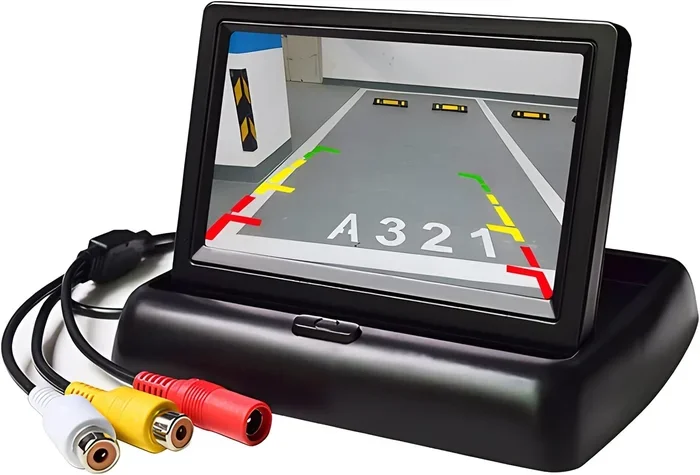
Most backup camera systems are surprisingly simple in design. A small camera lens is mounted on the rear of the vehicle, usually near the license plate or trunk handle. When the camera activates, it sends a live video feed to a display screen inside the car. This display is often built into the dashboard infotainment system or mounted on the rearview mirror itself.
The camera typically turns on only when you engage reverse gear. This is a safety feature designed to prevent distraction while driving forward. Some vehicles also display dynamic guide lines on the screen, which help you judge distance and steering angle as you back up.
How to Turn On the Backup Camera in Different Vehicles
The process to turn on the backup camera varies depending on your vehicle make, model, and year. Below we cover the most common methods so you can find the one that matches your car.
Method 1: Automatic Activation When Shifting into Reverse
The most common way to activate a backup camera is simply by shifting your vehicle into reverse gear. In most modern cars, trucks, and SUVs, the rearview camera turns on automatically the moment you engage the reverse gear. The display screen will light up with a live feed from the rear lens.
Here is what to expect:
- Press the brake pedal firmly.
- Move the gear shift lever into reverse.
- The backup camera display activates automatically on the infotainment screen.
- The camera feed turns off when you shift back into drive or park.
If this does not happen in your vehicle, do not worry. There are other methods to try. Some cars require a manual toggle, especially older models or base trim levels.
Method 2: Using the Infotainment Settings Menu
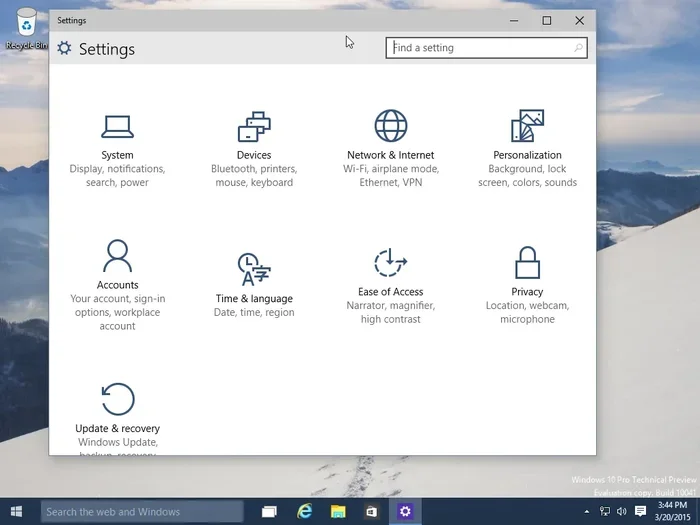
Many vehicles allow you to enable or disable the backup camera through the infotainment system settings. This is common in cars where the manufacturer gives the driver more control over display features.
Follow these general steps:
- Start the engine and press the brake pedal.
- Press the infotainment or settings button on the dashboard.
- Navigate to the Camera or Display section.
- Look for an option labeled Backup Camera, Rear Camera, or Reverse Camera.
- Toggle the setting to On.
Every vehicle menu is slightly different, but the general path is similar across most brands. If you cannot find the option, check your owner’s manual for specific guidance. The manual will also tell you whether your vehicle supports automatic or manual camera activation.
Method 3: Using a Dedicated Button or Switch
Some vehicles come with a dedicated button or switch to turn on the backup camera. This is often found on the console near the gear shift, on the steering column, or near the rearview mirror.
Look for a small icon that resembles a rearview camera or a vehicle with lines behind it. Pressing this button toggles the camera display on and off. This feature is especially common in trucks and larger SUVs where drivers frequently need the camera view when towing or hauling.
Method 4: Enabling Through the Rearview Mirror Display
Vehicles equipped with a rearview mirror that has a built-in screen offer a slightly different activation process. These mirrors display the backup camera feed directly in the mirror surface, giving you a seamless view without looking away from the road behind you.
To activate the camera on a mirror display:
- Shift into reverse gear as you normally would.
- The mirror should automatically switch to the camera feed.
- If it does not, check the mirror’s menu settings for a camera toggle option.
These mirror displays are popular aftermarket upgrades as well. If you have installed one yourself, make sure all wiring connections are secure and the camera power source is properly connected.
Common Reasons Your Backup Camera Might Not Turn On
If you have tried the steps above and your backup camera still does not activate, there could be a simple explanation. Let us explore the most common reasons and how to fix them.
Dirty or Obstructed Camera Lens
This is the number one cause of backup camera issues. The lens on the rear of your vehicle is exposed to the elements. Dirt, mud, snow, rain, and even bugs can cover the lens and block the video feed. A quick wipe with a soft cloth usually solves this problem instantly.
Make it a habit to clean your backup camera lens whenever you wash your car. During winter months, ice and frost can also obscure the lens. A few seconds of cleaning before you start driving can save you a lot of frustration.
Blown Fuse or Electrical Issue
Every backup camera is connected to your vehicle’s electrical system through a fuse. If the fuse blows, the camera loses power and will not turn on. Check your owner’s manual for the location of the fuse box and the specific fuse that controls the backup camera circuit.
Replacing a blown fuse is inexpensive and straightforward. However, if the fuse blows repeatedly, it may indicate a deeper electrical problem that requires professional diagnosis.
Loose or Damaged Wiring
Over time, the wiring connecting the backup camera to the vehicle’s display can become loose or damaged. This is especially common in older vehicles or cars that have been through rough conditions. Vibrations from driving can gradually work connections loose.
If you suspect a wiring issue, it is best to have a qualified mechanic inspect the system. They can trace the wiring, identify the problem, and make the necessary repairs safely.
Software or Display Malfunction
Modern vehicles rely on software to manage the backup camera display. Occasionally, a software glitch can prevent the camera from activating. In these cases, restarting the infotainment system often resolves the issue.
To reset the system, simply turn off the engine, remove the key from the ignition, wait for a minute, and restart the vehicle. This refreshes the electronic systems and clears minor glitches that may be interfering with the camera display.
Aftermarket Camera Installation Problems
If you added a backup camera to your vehicle as an aftermarket upgrade, installation errors are a common cause of non-functioning cameras. Incorrect wiring, incompatible components, or a poorly connected power source can all prevent the camera from working.
Double-check that all connections match the manufacturer’s instructions. If you are unsure about the installation, consult a professional installer who specializes in vehicle electronics. A properly installed aftermarket backup camera should work just as reliably as a factory-installed one.
How to Choose the Right Backup Camera for Your Vehicle
If your vehicle does not have a backup camera, or if you want to upgrade to a better system, choosing the right one makes a big difference. The market offers many options, from basic models to advanced systems with multiple lenses and smart features.
Factors to Consider When Buying
Keep these key factors in mind when shopping for a backup camera:
- Resolution: Higher resolution cameras provide a clearer, more detailed image. Look for at least 720p for a good viewing experience.
- Night Vision: If you frequently park or reverse in low-light conditions, a camera with infrared night vision is a valuable feature.
- Weather Resistance: Make sure the camera is rated for outdoor use and can withstand rain, snow, and extreme temperatures.
- Dynamic Guide Lines: These on-screen lines adjust based on your steering angle and help you judge turning radius while reversing.
- Display Compatibility: Ensure the camera is compatible with your vehicle’s existing display or choose a system that includes its own monitor.
- Wide Angle View: A wider field of view captures more area behind your vehicle, reducing blind spots significantly.
Top Backup Camera Brands to Consider
Several brands have built strong reputations for quality backup camera systems. Brands like Garmin, Rear View Safety, and Auto-Vox offer reliable options at various price points. Before purchasing, read customer reviews and compare features to find the best fit for your needs and budget.
Maintenance Tips to Keep Your Backup Camera Working
Once you know how to turn on the backup camera and have it working properly, a little maintenance goes a long way. Regular care ensures your camera stays reliable and delivers a clear image every time you need it.
Clean the Lens Regularly
As mentioned earlier, a dirty lens is the most common cause of poor image quality. Wipe the camera lens with a microfiber cloth at least once a week, or more often if you drive in dusty or wet conditions. This simple habit keeps the image crisp and clear.
Check for Physical Damage
The backup camera lens is mounted on the exterior of your vehicle, making it vulnerable to damage from road debris, parking bumps, and weather exposure. Periodically inspect the lens for cracks, scratches, or discoloration. A damaged lens should be replaced promptly to maintain a clear video feed.
Test the Camera Before Every Trip
It takes only a few seconds to verify that your backup camera is working. Before you start driving, shift into reverse and confirm that the display shows a clear, well-lit image of the area behind your vehicle. This quick habit catches problems early before they become safety issues.
Update Firmware When Available
Some advanced backup camera systems receive firmware updates that improve performance, add features, or fix bugs. Check the manufacturer’s website or consult your dealer to see if updates are available for your specific model. Keeping the firmware current ensures the best possible performance from your camera system.
Expert Insights on Backup Camera Usage
We spoke with several automotive safety experts about backup camera usage, and they shared some valuable insights that every driver should know.
Always use your mirrors in addition to the camera. The backup camera gives you a great view directly behind the vehicle, but it does not replace side mirrors or blind spot monitoring. The safest reversing technique combines the camera feed with mirror checks and shoulder checks.
Adjust your driving speed when reversing. Even with a clear camera view, you should always back up slowly. This gives you more time to react to unexpected obstacles, and it reduces the risk of collisions.
Teach young drivers about camera activation. New drivers, especially teenagers, benefit greatly from understanding how to turn on and use the backup camera. Make it a part of their driving routine from the very start.
Do not rely solely on guide lines. Dynamic guide lines are helpful tools, but they are not perfectly accurate. Always use them as a reference, not as a precise measurement of distance.
Key Takeaways
- Automatic Activation: Most vehicles turn on the backup camera automatically when you shift into reverse gear. This is the default setting in the majority of modern cars.
- Manual Activation Options: Some vehicles require you to enable the camera through the infotainment settings menu or a dedicated dashboard button.
- Troubleshooting Is Straightforward: Dirty lenses, blown fuses, loose wiring, and software glitches are the most common reasons a backup camera fails to activate.
- Regular Maintenance Matters: Cleaning the lens, checking for damage, and testing the camera before each trip keeps the system reliable.
- Upgrade When Needed: If your vehicle lacks a backup camera, aftermarket options are widely available and relatively easy to install.
- Combine Tools for Maximum Safety: Use the backup camera alongside side mirrors, blind spot monitors, and shoulder checks for the safest reversing experience.
Conclusion
Knowing how to turn on the backup camera is a fundamental skill that every driver should master. It takes only a moment to activate, yet it provides tremendous peace of mind every time you reverse, park, or navigate tight spaces. Whether your camera turns on automatically when you shift into reverse or you need to enable it through the settings menu, the process is straightforward and well worth the effort.
Take a few minutes today to verify that your backup camera is working correctly. Clean the lens, check the display, and test the activation process. If your vehicle does not have a backup camera, consider installing one. It is one of the most practical and affordable safety upgrades you can make for yourself and your family.
Safe driving starts with awareness, and a functioning backup camera is one of the best tools you have to stay aware of what is behind you. Use it every time you reverse, and make it a natural part of your driving routine. Your safety and the safety of others around you is worth it.
Frequently Asked Questions
How do I know if my backup camera is turned on?
When the backup camera is active, you will see a live video feed from the rear of your vehicle on your dashboard display or rearview mirror screen. The image typically appears when you shift into reverse gear. If you do not see the feed, check that the camera is enabled in your vehicle settings or that the lens is clean and unobstructed.
Can I turn on the backup camera without putting the car in reverse?
In most vehicles, the backup camera only activates when you shift into reverse gear. This is a built-in safety feature designed to prevent unnecessary distractions while driving forward. However, some vehicles with advanced infotainment systems allow you to manually toggle the camera on through the settings menu or a dedicated button, even while driving forward.
Why does my backup camera show a black screen?
A black screen usually indicates that the camera is not receiving power or that the lens is completely obstructed. Start by cleaning the camera lens thoroughly. If the screen remains black, check the fuse associated with the backup camera circuit. If the fuse is intact, the issue may be with the wiring or the camera unit itself, which may need professional inspection.
Is it safe to drive with a backup camera that is not working?
While you can still drive safely by using your side mirrors and turning your head to check blind spots, a non-functioning backup camera removes a valuable safety layer. It is especially risky when reversing in crowded areas, parking lots, or driveways where pedestrians, children, and pets may be present. We recommend fixing the issue promptly.
Can I install a backup camera myself?
Yes, many aftermarket backup camera kits are designed for DIY installation and come with detailed instructions. However, if you are not comfortable working with your vehicle’s electrical system, it is best to have a professional handle the installation. Proper wiring and placement are essential for reliable camera performance.
How often should I clean my backup camera lens?
You should clean your backup camera lens at least once a week as part of your regular car wash routine. If you frequently drive in dusty, muddy, or snowy conditions, clean it more often. A clean lens ensures the clearest possible image and helps you stay safe every time you reverse.